
1. Introducció
This manual provides instructions for the eKids FR-115F2 Frozen Sing Along Boombox. This device features a real working microphone, built-in music, and flashing lights. It also includes an AUX-in port for connecting external audio devices. The unit is designed to be portable and lightweight.

Figura 1: Frontal view of the eKids FR-115F2 Frozen Sing Along Boombox with microphone.
2. Configuració
2.1 Instal·lació de la bateria
The boombox requires batteries for operation. Locate the battery compartment on the back of the unit. Open the compartment cover and insert the required batteries, ensuring correct polarity (+/-). Close the compartment cover securely.
2.2 Connexió del micròfon
Connect the included microphone to the designated microphone input port on the boombox. Ensure the connection is firm.
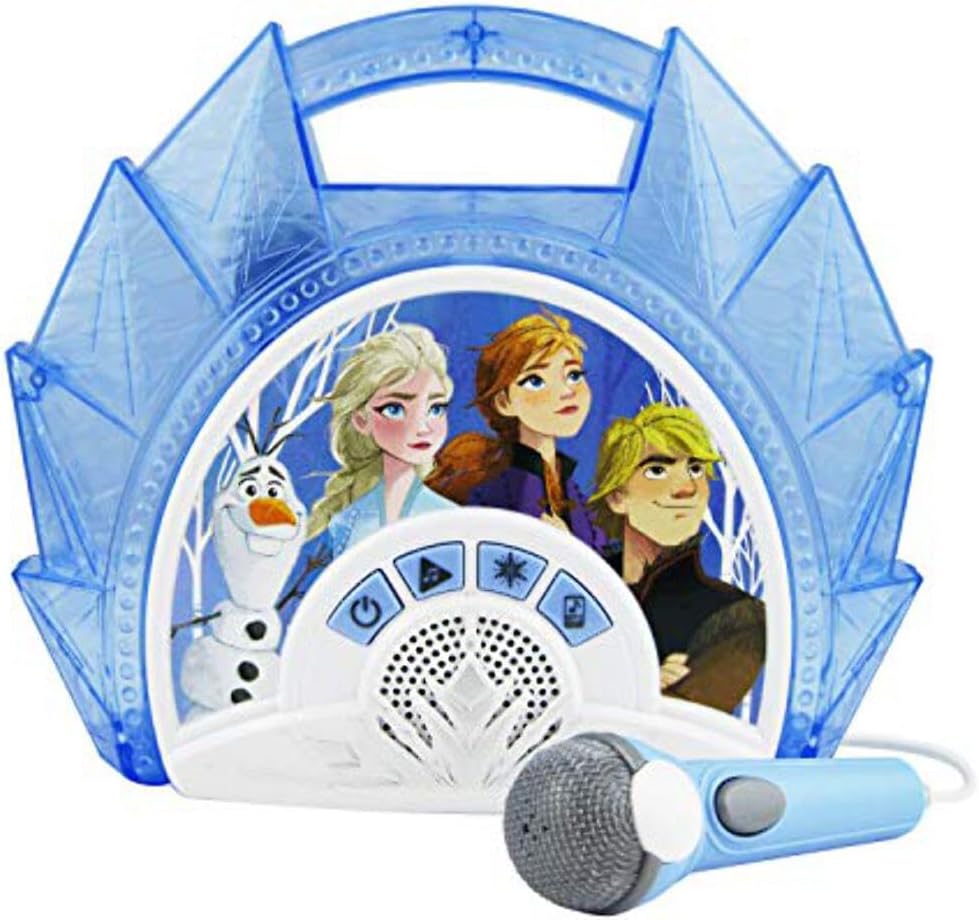
Figura 2: Esquena view highlighting battery compartment, AUX-in, and control buttons.
3. Funcionament
3.1 Encès/Apagat
Premeu el botó Botó d'encesa/apagada (typically marked with a power symbol) to turn the boombox on or off.
3.2 Built-in Music Playback
To play built-in music, press the Botó de selecció de cançons to cycle through available tracks. Press the Botó Reprodueix/Repetir to start or repeat a song.
3.3 Connecting External Devices (AUX-in)
To connect an external audio device (e.g., MP3 player, smartphone), use a 3.5mm audio cable (not included) to connect your device to the Entrada de línia AUX port on the boombox. Press the MP3 (Aux) Mode Button to switch to AUX input mode. Audio from your connected device will now play through the boombox speakers.
3.4 Ús del micròfon
After connecting the microphone, ensure the microphone's Interruptor d'encesa/apagada is in the 'On' position. You can sing along to built-in music or music from a connected external device. Adjust your singing volume as needed.

Figure 3: Detail of the microphone with its On/Off switch.
3.5 Espectacle de llum
Premeu el botó Botó de llum (often marked with a star icon) to activate or deactivate the flashing light show feature.

Figure 4: The boombox in operation, demonstrating the light show feature.
4. Manteniment
4.1 Neteja
To clean the boombox, use a soft, dry cloth. Do not use abrasive cleaners, solvents, or chemical sprays. Keep the unit dry and away from excessive moisture.
4.2 Cura de la bateria
Remove batteries if the unit will not be used for an extended period to prevent leakage. Do not mix old and new batteries, or different types of batteries. Dispose of used batteries responsibly according to local regulations.
5. Solució De Problemes
5.1 Sense poder
- Check if the batteries are correctly installed and not depleted.
- Substituïu les piles si cal.
- Assegureu-vos que el botó d'engegada estigui completament premut.
5.2 Sense so
- If using built-in music, ensure the volume is turned up and the unit is not in AUX mode.
- If using an external device, check the connection cable, the device's volume, and ensure the boombox is in AUX mode.
- Ensure the microphone's On/Off switch is in the 'On' position if microphone sound is missing.
5.3 El micròfon no funciona
- Assegureu-vos que el micròfon estigui ben connectat al seu port.
- Check the On/Off switch on the microphone itself.
- Ensure the boombox volume is adequate.
6. Especificacions
| Marca | eKids |
| Model | FR-115F2 |
| Font d'alimentació | Funciona amb bateria |
| Tecnologia de connectivitat | AUX (3.5 mm jack) |
| Components inclosos | Micròfon |
| Nombre de ponents | 1 |
| Tipus de suport | MP3 |
| Dimensions de l'article (D x W x H) | 5.9 x 25.5 x 25.6 cm |
| Usos recomanats | Smartphones (for AUX connection) |
| Característica especial | Portable, Flashing Lights |
7. Informació de la garantia
Aquest producte ve amb un Garantia del fabricant de 2 anys. Please retain your proof of purchase for warranty claims. For specific terms and conditions, refer to the warranty documentation included with your product or contact eKids customer support.
8. Suport
If you encounter any issues not covered in this manual or require further assistance, please visit the official eKids website or contact their customer support. Keep your model number (FR-115F2) handy when seeking support.