
AOPUTTRIVER AP-570C
AOPUTTRIVER AP-570C Cl digitalamp Manual d'usuari multímetre multímetre
Model: AP-570C
1. Introducció
The AOPUTTRIVER AP-570C is a 4000-count auto-ranging digital clamp meter designed for precise electrical measurements. It offers a wide range of functions including AC/DC current, AC/DC voltage, resistance, capacitance, frequency, duty cycle, temperature, diode test, and continuity. This manual provides essential information for safe and effective operation of your device.
2. Informació de seguretat
Always adhere to safety precautions when using electrical testing equipment. Failure to do so may result in electric shock, injury, or damage to the meter or equipment under test.
- Ensure the meter is in good working condition before use.
- No aplicar voltage or current exceeding the maximum rated values.
- Utilitzeu l'equip de protecció individual (EPI) adequat, com ara guants aïllants i ulleres de seguretat.
- Verify the function switch is in the correct position for the measurement being performed.
- Eviteu tocar els conductors o components del circuit exposats durant les mesures.
- Do not operate the meter in wet environments or in the presence of explosive gases or dust.
- Canvieu les piles immediatament quan aparegui l'indicador de bateria baixa per garantir lectures precises.
- The AP-570C Clamp Meter meets IEC1010 Double Insulation, Pollution Degree 2, and Overvoltage Category III standards.
3. Components del producte
The AOPUTTRIVER AP-570C package includes the following items:
- AOPUTTRIVER AP-570C Clamp Mesurador
- Cordons de prova (2)
- Sonda de temperatura
- 9V (6F22) Battery
- Manual d'usuari
- Bossa d'emmagatzematge
- Petit tornavís

Image: AOPUTTRIVER AP-570C Digital Clamp Meter with test leads, temperature probe, battery, and storage bag.
4. Product Diagram and Key Functions
Familiarize yourself with the main parts and controls of the AP-570C clamp metre:

Image: Labeled diagram of the AP-570C showing the clamp, rotary switch, LCD display, D.HOLD/Back Light key, SELECT key, MAX/MIN key, REL key, Hz/DUTY key, COM Input Jack, and T+VΩHz Input Jack.
- Clamp: S'utilitza per a la mesura de corrent AC/DC sense contacte.
- Interruptor rotatiu: Selecciona la funció de mesura desitjada.
- Pantalla LCD: Mostra lectures de mesurament i indicadors.
- D.HOLD/Back Light Key: Freezes the current reading on the display and activates/deactivates the backlight.
- Tecla SELECT: Toggles between different measurement modes within a single rotary switch position (e.g., AC/DC voltage, díode/continuïtat).
- MAX/MIN Key: Registra els valors màxims i mínims durant una sessió de mesurament.
- REL Key: Activates relative measurement mode.
- Hz/DUTY Key: Selecciona la mesura de freqüència o cicle de treball.
- Input Jacks (COM, T+VΩHz): Connect test leads for voltage, resistance, capacitance, diode, continuity, and temperature measurements.
5. Configuració
5.1. Instal·lació de la bateria
The AP-570C requires one 9V (6F22) battery. To install or replace the battery:
- Assegureu-vos que el comptador estigui apagat.
- Use the provided small screwdriver to open the battery compartment cover on the back of the meter.
- Introduïu la pila de 9 V, respectant la polaritat correcta (+/-).
- Substituïu la tapa del compartiment de la bateria i fixeu-la amb el cargol.
5.2. Connexió dels cables de prova
Per a la majoria de mesures (voltage, resistance, capacitance, diode, continuity, temperature), connect the test leads:
- Inseriu el cable de prova negre a la presa d'entrada "COM" (comú).
- Insert the red test lead into the "T+VΩHz" input jack.
- For temperature measurements, connect the temperature probe to the same input jacks, ensuring correct polarity if applicable.
6. Instruccions de funcionament
6.1. Mesura de corrent AC/DC (Clamp)
El clamp function allows for non-contact current measurement. This is ideal for safely measuring current in live circuits.
- Turn the rotary switch to the desired current range (e.g., 400A or 1000A).
- Press the SELECT button to toggle between AC and DC current measurement if necessary.
- Obriu el clamp mandíbules prement el gallet.
- Enclose a single conductor (not a bundle of wires) within the clamp mandíbules. Assegureu-vos que les mandíbules estiguin completament tancades.
- Llegiu el valor actual a la pantalla LCD.

Image: The AP-570C clamp meter measuring current on an electrical cable.
Video: Demonstration on how to measure DC current using a clamp metre.
6.2. AC/DC Voltage Mesura
Per mesurar voltage, use the test leads connected to the appropriate input jacks.
- Gireu l'interruptor rotatiu a la posició "V~" (Volum ACtage) o "V-" (Volumen de CCtage) position. The meter may auto-range.
- Connecteu els cables de prova en paral·lel al circuit o component que voleu mesurar.
- Llegeix el voltage valor a la pantalla LCD.

Image: The AP-570C clamp meter with test leads connected to an electrical outlet for voltage mesura.
6.3. Resistance, Capacitance, Diode, and Continuity Measurement
These functions are accessed via the rotary switch and SELECT button.
- Turn the rotary switch to the "Ω" (Resistance), "CAP" (Capacitance), or "Diode/Continuity" position.
- Use the SELECT button to switch between Diode Test and Continuity Test if on the combined setting.
- Connecteu els cables de prova al component que s'ha de mesurar.
- Read the value on the LCD display. For continuity, a buzzer will sound if continuity is detected.
Video: Demonstration on how to measure capacitance using a clamp metre.
6.4. Mesura de la temperatura
The AP-570C can measure temperature using the included temperature probe.
- Turn the rotary switch to the "°C" (Temperature) position.
- Connect the temperature probe to the "COM" and "T+VΩHz" input jacks.
- Place the tip of the temperature probe on or in the object whose temperature you wish to measure.
- Read the temperature value on the LCD display. The range is -20°C to 1000°C.
6.5. Backlight and Data Hold
- Il·luminació de fons: Press the "D.HOLD/Back Light" button briefly to turn the LCD backlight on or off, improving visibility in low-light conditions.
- Conservació de dades: Press and hold the "D.HOLD/Back Light" button to freeze the current reading on the display. Press again to release.

Imatge: Primer pla view of the AP-570C's bright LCD display and protective case.
6.6. Vol sense contactetage (NCV) Detecció
La funció NCV permet la detecció ràpida del volum de CAtagi sense contacte directe.
- Gireu l'interruptor rotatiu a la posició "NCV".
- Move the top part of the meter (near the clamp jaws) close to the conductor or outlet.
- El mesurador indicarà la presència de voltatge de CAtage mitjançant un bip audible i/o un indicador visual.
7. Especificacions
Key technical specifications for the AOPUTTRIVER AP-570C:
- Visualització: 4000 recomptes
- Corrent DC: 200A ~ 1000A
- Corrent CA: 400A~1000A (0.1A resolution for 0.1~400A)
- DC Voltage: 400mV~1000V
- Vol. ACtage: 4 V ~ 750 V
- Resistència: 400Ω, 4KΩ, 40KΩ, 400KΩ, 4MΩ, 40MΩ
- Capacitat: 5.12nF~100µF
- Freqüència: Sí
- Cicle de treball: Sí
- Prova de díode: Sí
- Brunzidor de continuïtat: Sí
- Interval de temperatura: -20 °C a 1000 °C
- Jaw Caliber: 45 mm (1.77 polzades)
- Classificació de seguretat: IEC1010 Double Insulation, Pollution Degree 2, Overvoltage Categoria III
- Font d'alimentació: 1 bateria de 9 V (inclosa)
- Dimensions del producte: 22.35 x 9.65 x 3.81 cm
- Pes de l'article: 444.52 g (0.98 lliures)
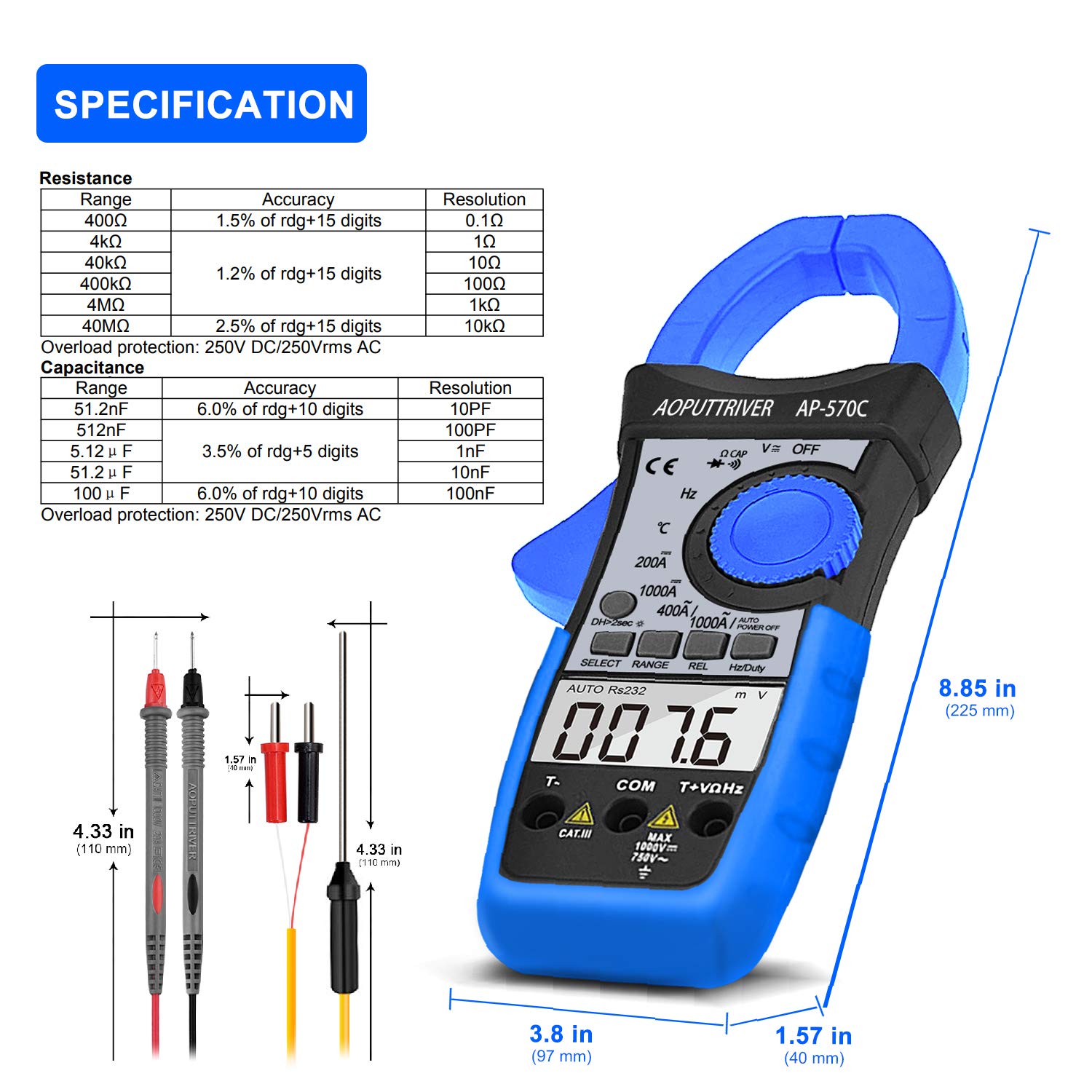
Image: Detailed specifications table for Resistance and Capacitance, along with physical dimensions of the meter and test leads.
8. Manteniment
8.1. Neteja
To maintain the accuracy and longevity of your meter:
- Netegeu el cas amb l'anunciamp drap i detergent suau. No utilitzeu abrasius ni dissolvents.
- Keep the input terminals and clamp jaws clean and free of debris.
8.2. Substitució de la bateria
When the low battery indicator appears on the LCD, replace the 9V battery as described in the "Setup" section. Prompt replacement ensures continued accuracy.
8.3. Emmagatzematge
When not in use, store the meter in its protective storage bag in a dry, cool place, away from direct sunlight and extreme temperatures.
9. Solució De Problemes
If you encounter issues with your AP-570C, consider the following common solutions:
- Sense pantalla/Pantalla tènue: Comproveu la càrrega de la bateria i assegureu-vos que estigui instal·lada correctament. Substituïu-la si cal.
- "OL" on Display: Indicates an over-range condition. The measured value exceeds the selected range. Switch to a higher range or verify the circuit.
- Lectures inexactes:
- Ensure test leads are fully inserted and making good contact.
- Verify the rotary switch is set to the correct function and range.
- For current measurements, ensure only one conductor is within the clamp mandíbules.
- Check for external electromagnetic interference.
- El brunzidor de continuïtat no funciona: Ensure the meter is in continuity mode and test leads are making proper contact. If the issue persists, the meter may require service.
10. Garantia i Suport
The AOPUTTRIVER AP-570C comes with a 2 any de garantia and lifetime technical support. For any questions or assistance with your product, please contact AOPUTTRIVER customer support.
You can visit the official AOPUTTRIVER store for more information: AOPUTTRIVER Store
Ask a question about this manual
Ask about setup, troubleshooting, compatibility, parts, safety, or missing instructions. Manuals+ will review the question and use this page’s manual context to help answer it.