
SKROSS 1.400130
SKROSS Reload 10 Power Bank User Manual
Model: 1.400130
1. Introducció
The SKROSS Reload 10 is a compact and powerful 10,000 mAh power bank designed for convenient charging of your mobile devices on the go. Its sleek design and practical size make it an ideal travel companion, ensuring your devices stay charged even when no power outlet is available.
This manual provides essential information on how to safely and effectively use your SKROSS Reload 10 Power Bank.
2. Informació de seguretat
Llegiu atentament totes les instruccions de seguretat abans d'utilitzar el producte. Si no seguiu aquestes instruccions, podeu patir descàrregues elèctriques, incendis o lesions greus.
- Do not expose the power bank to water, rain, or high humidity.
- Avoid exposing the power bank to extreme temperatures (above 45°C or below 0°C) or direct sunlight.
- Do not disassemble, open, or attempt to repair the power bank yourself. Refer all servicing to qualified service personnel.
- Keep the power bank away from heat sources, such as radiators, heat registers, stoves, or other apparatus (including amplificadors) que produeixen calor.
- No deixeu caure, perforeu ni apliqueu impactes forts al banc d'energia.
- Feu servir només els cables de càrrega proporcionats o compatibles certificats.
- Dispose of the product responsibly according to local regulations for electronic waste. Do not dispose of in household waste.
3. Contingut del paquet
Verifiqueu que tots els elements siguin presents al paquet:
- SKROSS Reload 10 Power Bank
- Cable de càrrega micro USB

Image: SKROSS Reload 10 Power Bank in its retail packaging, showing the product and included cable.
4. Producte acabatview
Familiarize yourself with the different parts of your SKROSS Reload 10 Power Bank:
- Botó d'encesa: Activa el banc d'energia i comprova l'estat de la bateria.
- Indicadors LED: Four LED lights indicating the remaining battery capacity.
- Port d'entrada micro USB: Used to charge the power bank itself.
- USB Output Ports (USB1 & USB2): Used to charge your mobile devices.

Imatge: Frontal view of the SKROSS Reload 10 Power Bank, highlighting its compact design and the 'Reload 10' branding.

Imatge: Superior view of the SKROSS Reload 10 Power Bank, clearly showing the two USB output ports and the Micro USB input port.
5. Configuració
Before using your SKROSS Reload 10 Power Bank for the first time, it is recommended to fully charge it.
- Connect the small end of the supplied Micro USB charging cable to the Micro USB Input Port on the power bank.
- Connect the standard USB-A end of the cable to a USB power adapter (not included) or a USB port on a computer.
- The LED indicators on the power bank will light up and blink to show the charging progress. When all four LEDs are solid, the power bank is fully charged.
- Desconnecteu el cable un cop finalitzada la càrrega.
6. Funcionament
6.1. Charging Your Mobile Device
- Connect your mobile device's charging cable (e.g., USB-C, Lightning, or Micro USB) to one of the USB Output Ports (USB1 or USB2) on the SKROSS Reload 10 Power Bank.
- Connecteu l’altre extrem del cable al dispositiu mòbil.
- The power bank will automatically begin charging your device. If charging does not start, briefly press the Power Button once.
- Els indicadors LED mostraran el nivell de bateria restant del banc d'energia durant la càrrega.
- Desconnecta el dispositiu un cop estigui completament carregat o quan ja no el necessitis carregar.

Image: A user charging a smartphone using the SKROSS Reload 10 Power Bank, demonstrating its portability.
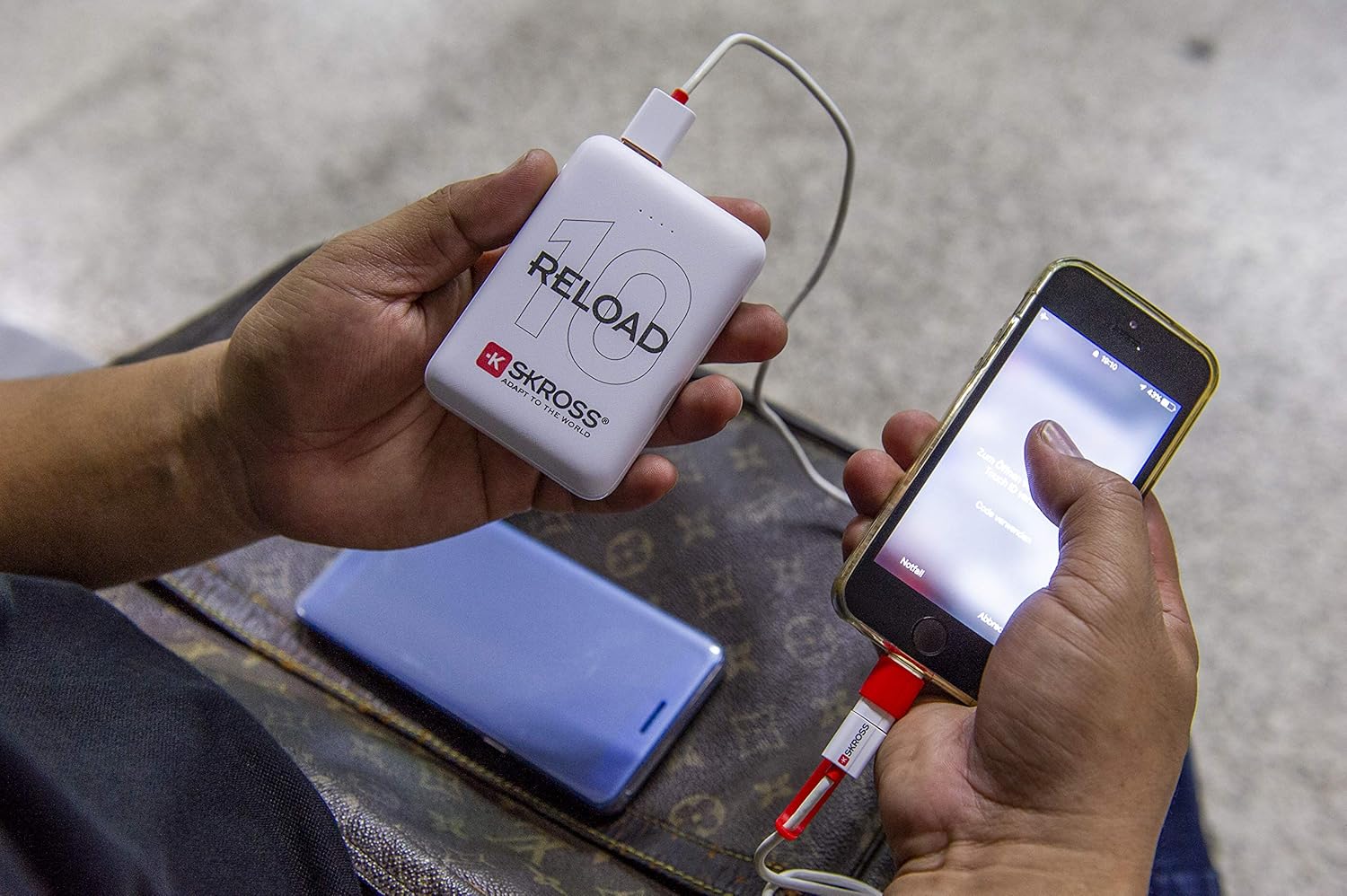
Image: Another perspective of a user charging a smartphone with the SKROSS Reload 10 Power Bank, highlighting its ease of use.
6.2. Comprovació del nivell de la bateria
To check the remaining battery capacity of the power bank, briefly press the Power Button. The LED indicators will light up:
- 4 LEDs fixos: 75% - 100% carregat
- 3 LEDs fixos: 50% - 75% carregat
- 2 LEDs fixos: 25% - 50% carregat
- 1 LED fix: 0% - 25% de càrrega (recarregar aviat)
7. Manteniment
Un manteniment adequat garanteix la longevitat i el rendiment òptim del teu banc d'energia.
- Neteja: Use a soft, dry cloth to clean the surface of the power bank. Do not use liquid cleaners, aerosols, or abrasive materials.
- Emmagatzematge: Guardeu el banc d'energia en un lloc fresc i sec, allunyat de la llum solar directa i de temperatures extremes.
- Cura de la bateria: If the power bank is not used for an extended period, it is recommended to fully charge it at least once every three months to maintain battery health.
8. Solució De Problemes
If you encounter issues with your SKROSS Reload 10 Power Bank, refer to the following common problems and solutions:
| Problema | Possible causa/solució |
|---|---|
| Power bank is not charging my device. |
|
| Power bank is not charging. |
|
| Els indicadors LED no s'encenen. |
|
9. Especificacions
Detailed technical specifications for the SKROSS Reload 10 Power Bank:
| Característica | Especificació |
|---|---|
| Nom del model | 1.400130 |
| Capacitat de la bateria | 10,000 mAh / 37.0 Wh |
| Tipus de bateria | 3.7V Lithium Class A |
| Entrada (Micro USB) | 5V / 2A màx. |
| Sortida 1 (USB) | 5V / 2A màx. |
| Sortida 2 (USB) | 5V / 2A màx. |
| Màx. Sortida | 5V / 2.4A màx. |
| Nombre de cicles de càrrega | min. 500 |
| Temps de càrrega | Aproximadament 5 hores (des de buit) |
| Taxa d’autodescàrrega | < 1% per month (in standby) |
| Classe de protecció | IP20 |
| Indicador d'estat d'alimentació | LED |
| Color | Blanc |
10. Garantia i Suport
SKROSS products are manufactured with high-quality standards and are designed for reliability. For detailed warranty information, terms, and conditions, please refer to the warranty card included with your product or visit the official SKROSS weblloc.
For technical support, troubleshooting assistance, or any inquiries regarding your SKROSS Reload 10 Power Bank, please contact SKROSS customer service or your local distributor. Keep your proof of purchase for any warranty claims.
Official SKROSS Weblloc: www.skross.com
Documents relacionats1.400130


Ask a question about this manual
Ask about setup, troubleshooting, compatibility, parts, safety, or missing instructions. Manuals+ will review the question and use this page’s manual context to help answer it.