
1. Introducció
Thank you for choosing the Joyroom JR-T06 TWS Bluetooth Earbuds. This manual provides detailed instructions on how to set up, operate, and maintain your earbuds to ensure optimal performance and longevity. Please read this manual carefully before use and keep it for future reference.
2. Contingut del paquet
Si us plau, comproveu el paquet per veure si hi ha els elements següents:
- Joyroom JR-T06 TWS Bluetooth Earbuds (Left and Right)
- Estoig de càrrega
- Cable de càrrega USB
- Manual d'usuari
3. Producte acabatview
The Joyroom JR-T06 TWS earbuds feature a compact design with touch controls and come with a portable charging case. Below is an illustration of the product components.
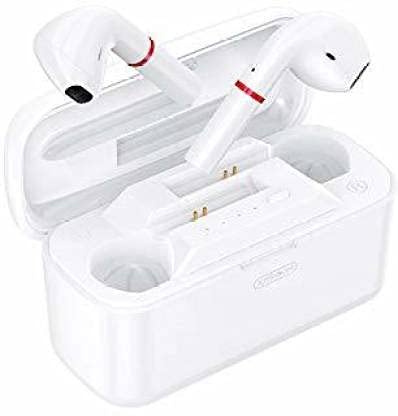
Imatge 1: Joyroom JR-T06 TWS Bluetooth Earbuds (white) shown inside their matching white charging case. The earbuds are positioned upright within the case, indicating their charging status. The case is open, revealing the earbuds and internal charging contacts.
Components:
- Auriculars: Left and Right earbuds with touch-sensitive surfaces.
- Estoig de càrrega: Stores and charges the earbuds, also acts as a power bank.
- Port de càrrega: Located on the charging case for external power input.
- Indicadors LED: On both earbuds and charging case to show battery status and pairing mode.
4. Configuració
4.1 Càrrega inicial
- Abans del primer ús, col·loca els dos auriculars a l'estoig de càrrega.
- Connecteu el cable de càrrega USB al port de càrrega de la carcassa i a una font d'alimentació.
- Allow the earbuds and case to fully charge. The LED indicators will show charging status and turn off or change color when fully charged.
4.2 Vinculació amb un dispositiu
- Assegureu-vos que els auriculars estiguin carregats.
- Open the charging case. The earbuds will automatically enter pairing mode, and their LED indicators will flash (refer to specific LED behavior in the product guide if available).
- Al dispositiu (telèfon intel·ligent, tauleta, etc.), activeu el Bluetooth.
- Cerca available Bluetooth devices and select "JR-T06 TWS" from the list.
- Once connected, the earbud LED indicators will stop flashing or change to a steady light. You will hear a confirmation tone.
- Els auriculars es tornaran a connectar automàticament a l'últim dispositiu emparellat quan es treguin de l'estoig, si el Bluetooth està activat al dispositiu.
5. Instruccions de funcionament
The Joyroom JR-T06 TWS earbuds feature sensitive touch controls for various functions.
5.1 Encès/Apagat
- Encès: Obre l'estoig de càrrega o mantén premut la zona tàctil dels dos auriculars durant uns segons.
- Apagar: Place the earbuds back into the charging case and close the lid, or long-press the touch area on both earbuds for a few seconds until the indicator light turns off.
5.2 Reproducció de música
- Reproduir/pausa: Un sol toc a qualsevol dels auriculars.
- Pista següent: Toqueu dues vegades l'auricular dret.
- Pista anterior: Toqueu dues vegades l'auricular esquerre.
- Pujar el volum: Toqueu tres vegades l'auricular dret.
- Baixar el volum: Toqueu tres vegades l'auricular esquerre.
5.3 Gestió de trucades
- Respondre/Finalitzar la trucada: Un sol toc a qualsevol dels auriculars.
- Rebutja la trucada: Long-press the touch area on either earbud for 2 seconds.
5.4 Assistent de veu
- Activa l'Assistent de veu: Long-press the touch area on either earbud for 3 seconds (e.g., Siri, Google Assistant).
6. Càrrega
6.1 Càrrega dels auriculars
Place the earbuds into the charging case. They will automatically begin charging. The LED indicators on the earbuds will show their charging status.
6.2 Càrrega de la funda
Connect the USB charging cable to the charging port on the case and to a 5V power adapter or a computer's USB port. The LED indicators on the case will show the charging progress. The charging case has a capacity of 2500 mAh.
6.3 Durada de la bateria
- Temps de funcionament: Approximately 4.5 to 5.5 hours on a single charge.
- Temps d'espera: Fins a 200 hores.
- The charging case provides multiple full charges for the earbuds.
7. Manteniment
- Netegeu els auriculars i l'estoig de càrrega regularment amb un drap suau i sec.
- Eviteu utilitzar productes químics o materials abrasius.
- Mantingueu nets els contactes de càrrega tant dels auriculars com de la funda per garantir una càrrega correcta.
- Guardeu els auriculars a la funda de càrrega quan no els feu servir per protegir-los i mantenir-los carregats.
- Eviteu exposar el dispositiu a temperatures extremes, humitat o líquids.
8. Solució De Problemes
| Problema | Solució |
|---|---|
| Els auriculars no s'emparellan amb el dispositiu. |
|
| Només funciona un auricular. |
|
| Els auriculars no es carreguen. |
|
| Volum baix o mala qualitat de so. |
|
9. Especificacions
| Característica | Detall |
|---|---|
| Marca | Joyroom |
| Nom del model | JR-T06 TWS |
| Número de model | T06 |
| Color | Blanc |
| Versió Bluetooth | 5.0 |
| Distància d'operació | Fins a 10 metres (33 peus) |
| Mètode de control | Touch Control (Sensitive response) |
| Sistema de so | estèreo |
| Control de soroll | Aïllament acústic |
| Capacitat de la caixa de càrrega | 2500 mAh |
| Temps de funcionament dels auriculars | Approx. 4.5 - 5.5 hours |
| Temps d'espera | Fins a 200 hores |
| Factor de forma | In-orella |
| Tecnologia de connectivitat | Sense fil |
| Dispositius compatibles | Tots els dispositius amb Bluetooth |
| Característica del cable | Cable-free |
10. Informació de seguretat
- No desmunteu ni modifiqueu el producte.
- Do not expose the product to fire, water, or extreme temperatures.
- Eviteu escoltar a nivells de volum elevats durant períodes prolongats per evitar danys auditius.
- Mantenir fora de l'abast dels nens i mascotes.
- Eliminar el producte de manera responsable segons la normativa local.
11. Garantia i Suport
Joyroom products come with a standard warranty. For detailed warranty information, technical support, or customer service, please refer to the warranty card included in your package or visit the official Joyroom website. You can also contact the retailer where you purchased the product.
Per obtenir més ajuda, visiteu el Botiga Joyroom a Amazon.