
1. Introducció
This manual provides detailed instructions for the setup, operation, maintenance, and troubleshooting of your LENRUE SoundBoom A25 USB Computer Speaker. Please read this manual thoroughly before using the product to ensure proper function and longevity.
2. Producte acabatview
The LENRUE SoundBoom A25 is a compact, wired stereo speaker designed for use with computers, laptops, desktops, and smartphones. It features a simple plug-and-play connection and is powered via a USB port.

Figura 2.1: Davant view of the LENRUE SoundBoom A25 speaker, showcasing its sleek design and integrated blue LED lighting on both ends.
Característiques principals:
- Connexió senzilla: Connects via a 3.5mm audio jack for sound and a USB port for power.
- USB Bus Powered: Eliminates the need for an external power adapter.
- Disseny compacte: Measures approximately 39.6 cm (L) x 5.8 cm (D) x 6.6 cm (H), ideal for desktop use.
- So estèreo: Delivers 2.0 channel stereo audio.
- Il·luminació LED: Integrated blue LED lights for visual enhancement.
3. Instruccions de configuració
Follow these steps to connect your LENRUE SoundBoom A25 speaker to your device.
- Connecteu el cable d'alimentació USB: Insert the USB-A connector of the speaker cable into an available USB port on your computer, laptop, or a compatible USB power adapter. This provides power to the speaker.
- Connect the 3.5mm Audio Cable: Insert the 3.5mm audio jack into the headphone or audio output port of your computer, laptop, desktop PC, or smartphone. This transmits the audio signal to the speaker.
- Encès: The speaker will automatically power on when the USB cable is connected to a powered USB port. The integrated LED lights will illuminate.
- Ajustar el volum: Use the volume controls on your connected device (computer, laptop, smartphone) to adjust the audio output level. The speaker itself may also have touch controls (refer to Figure 4.1).

Figura 3.1: Connection diagram illustrating how to connect the 3.5mm audio jack and USB power cable to your devices.

Figura 3.2: Example of connecting the speaker to a laptop, demonstrating the simple plug-and-play setup.
4. Funcionament
4.1 Encès/Apagat
The speaker is designed to power on automatically when connected to a live USB port. To turn off the speaker, simply disconnect the USB power cable from its source.
4.2 Control de volum
Volume is primarily controlled through the connected device (computer, laptop, smartphone). The speaker features touch controls on its top surface for additional volume adjustments. These controls are typically marked with '+' and '-' symbols.

Figura 4.1: A dalt view of the speaker highlighting the touch control panel for volume adjustment and other functions.
4.3 llums LED
The speaker includes integrated blue LED lights on its ends. These lights illuminate when the speaker is powered on. There is no specific control mentioned for turning off these lights independently.
5. Manteniment
To ensure the longevity and optimal performance of your speaker, follow these simple maintenance guidelines:
- Neteja: Use a soft, dry cloth to wipe the exterior of the speaker. Avoid using abrasive cleaners, solvents, or harsh chemicals, as these can damage the finish.
- Emmagatzematge: Quan no l'utilitzeu durant períodes prolongats, guardeu l'altaveu en un lloc fresc i sec, allunyat de la llum solar directa i de temperatures extremes.
- Manipulació: Avoid dropping the speaker or subjecting it to strong impacts. Do not attempt to disassemble the speaker, as this will void the warranty and may cause damage.
6. Solució De Problemes
If you encounter issues with your LENRUE SoundBoom A25 speaker, refer to the following common problems and solutions:
| Problema | Causa possible | Solució |
|---|---|---|
| Sense sortida de so. |
|
|
| So distorsionat o de mala qualitat. |
|
|
| LED lights are not on. |
|
|
| Speaker is not a "true" USB speaker (requires 3.5mm audio). |
|
|
7. Especificacions
Technical specifications for the LENRUE SoundBoom A25 USB Computer Speaker:
| Característica | Detall |
|---|---|
| Marca | LENRUE |
| Número de model | A25 |
| Tecnologia de connectivitat | Auxiliary, USB (for power) |
| Mode de sortida d'àudio | estèreo |
| Tipus d'altaveu | Altaveu informàtic |
| Tipus de muntatge | Muntatge de taula |
| Dimensions del producte | 39.6 cm (amplada) x 5.8 cm (profunditat) x 6.6 cm (alçada) |
| Pes de l'article | 612 g |
| Font d'alimentació | Alimentat per bus USB |
| Dispositius compatibles | Ordinador de sobretaula, portàtil, ordinador personal, telèfon intel·ligent |
| Característica especial | USB Port (for power), LED Light |
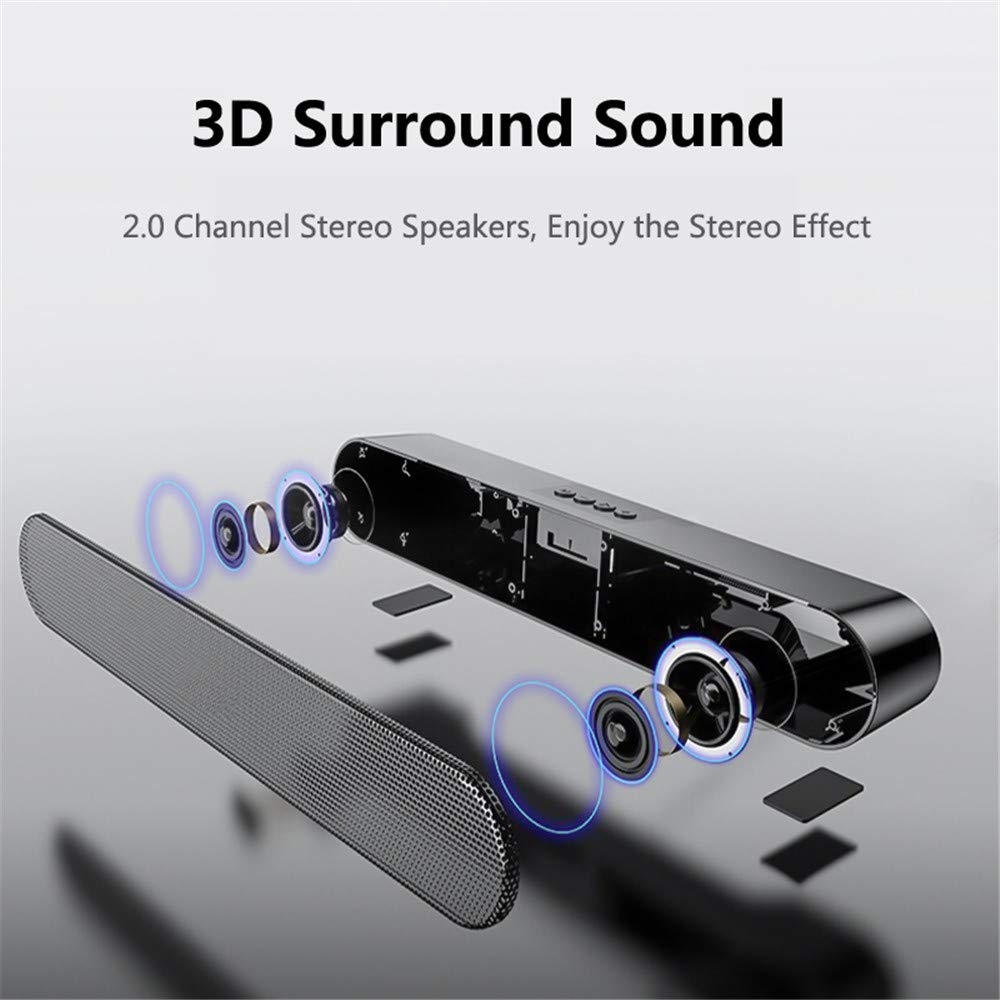
Figura 7.1: Internal component layout, illustrating the 2.0 channel stereo speaker configuration.

Figura 7.2: The speaker's ultra-compact design, fitting seamlessly into a desktop environment.
8. Garantia i Suport
For information regarding warranty coverage and customer support, please refer to the warranty card included with your product or contact LENRUE customer service directly. Details are typically available on the manufacturer's official weblloc.
Per a més ajuda, podeu visitar el LENRUE Store on Amazon.
