
1. Introducció
Thank you for choosing the Calvas RM-L812 Universal TV Remote Control. This remote is designed to provide convenient control over various television brands. Please read this manual carefully to understand the features, setup, and operation of your new remote control. Proper use and maintenance will ensure long-lasting performance.
2. Producte acabatview
The Calvas RM-L812 is an infrared (IR) universal remote control. It features a comprehensive layout of buttons for power, channel, volume, navigation, and various TV functions. Its ergonomic design ensures comfortable handling.
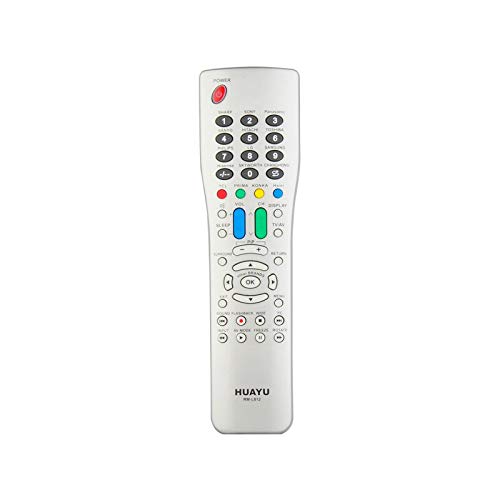
Figura 1: Calvas RM-L812 Universal TV Remote Control. This image shows a silver-colored remote control with a wide array of buttons, including numerical keys, channel and volume controls, navigation buttons, and colored function keys. The remote has a slightly curved, ergonomic shape.
Característiques principals:
- Compatibilitat universal: Designed to control a wide range of television brands.
- Infrared (IR) Communication: Utilizes standard IR signals for reliable control.
- Botons de funció dedicats: Includes buttons for power, volume, channel, mute, input, menu, and more.
- Disseny ergonòmic: Còmode de subjectar i fàcil d'operar.
3. Configuració
3.1 Instal·lació de la bateria
- Localitzeu la tapa del compartiment de la bateria a la part posterior del comandament a distància.
- Feu lliscar o aixequeu la tapa per obrir el compartiment.
- Introduïu dues piles AAA (no incloses), assegurant-vos de la polaritat correcta (+ i -) tal com s'indica a l'interior del compartiment.
- Torneu a col·locar la tapa del compartiment de la bateria, assegurant-vos que encaixi correctament al seu lloc amb un clic.
3.2 Programació del comandament a distància
The Calvas RM-L812 is a universal remote and requires programming to control your specific TV. There are typically two main methods for programming universal remotes:
Method 1: Code Entry (Recommended)
- Engegueu el televisor que voleu controlar.
- Locate the programming code list for your TV brand (usually provided in a separate leaflet or online by the manufacturer of the remote).
- Manteniu premut el botó SET button (or a similar programming button) on the remote until the indicator light stays on.
- Enter the 3 or 4-digit code for your TV brand using the number buttons.
- If the code is correct, the indicator light will turn off. Test the remote by pressing the PODER button. If the TV turns off, the remote is programmed.
- If the TV does not respond, try the next code for your brand from the list.
Mètode 2: Cerca automàtica
- Engegueu el televisor que voleu controlar.
- Manteniu premut el botó SET button (or a similar programming button) on the remote until the indicator light stays on.
- Point the remote at the TV and repeatedly press the PODER botó (o CH+ button) slowly. Each press sends a different code.
- Stop pressing the button immediately when the TV turns off.
- Premeu el botó SET button again to save the code. The indicator light will turn off.
- Prova les funcions del comandament a distància. Si algunes funcions no funcionen, és possible que hagis de repetir el procés de cerca automàtica per trobar un codi més compatible.
Nota: Specific programming instructions may vary slightly. Refer to the packaging or a dedicated code list for the most accurate programming steps for your specific TV model and remote version.
4. Instruccions de funcionament
Once programmed, your Calvas RM-L812 remote control functions similarly to your original TV remote. Below are common button functions:
- POTÈNCIA: Encén o apaga el televisor.
- CH+/CH-: Canvia de canal amunt o avall.
- VOL + / VOL-: Augmenta o disminueix el volum.
- MUT: Silencia o activa el so del televisor.
- Botons numèrics (0-9): Introduïu directament els números de canal.
- ENTRADA/FONT: Selects different input sources (HDMI, AV, etc.).
- MENÚ: Accedeix al menú principal del televisor.
- Navigation Buttons (Up, Down, Left, Right, OK/Enter): Navigate through TV menus and selections.
- SORTIDA: Surt del menú o funció actual.
- INFORMACIÓ: Mostra informació del programa.
Nota: Some advanced functions or smart TV features may not be fully supported by a universal remote. Functionality depends on the TV model and the specific code used for programming.
5. Manteniment
5.1 Substitució de la bateria
When the remote control's performance degrades or the indicator light does not illuminate, it's time to replace the batteries. Follow the battery installation steps in Section 3.1. Always replace both batteries at the same time with new ones of the same type (AAA).
5.2 Neteja
Per netejar el comandament a distància, utilitzeu un drap suau i sec. Per a la brutícia resistent, netegeu lleugerament.ampNetegeu el drap amb aigua o un netejador suau i no abrasiu. No utilitzeu productes químics agressius ni submergiu el comandament a distància a l'aigua.
5.3 Emmagatzematge
Store the remote control in a cool, dry place away from direct sunlight and extreme temperatures. If the remote will not be used for an extended period, it is recommended to remove the batteries to prevent leakage.
6. Solució De Problemes
| Problema | Causa possible | Solució |
|---|---|---|
| El comandament a distància no funciona gens. |
|
|
| TV not responding to commands. |
|
|
| Only some buttons work. |
|
|
7. Especificacions
| Característica | Detall |
|---|---|
| Model: | RM-L812 |
| Marca: | Calbes |
| Ús: | TV |
| Comunicació sense fils: | Infrarojos (IR) |
| Canal: | 1 |
| Freqüència: | 433 MHz |
| Suport a l'aplicació: | No |
| Dispositius compatibles: | Televisió |
| Característica especial: | Universal |
| Font d'alimentació: | 2 piles AAA (no incloses) |
8. Garantia i Suport
For warranty information and customer support, please refer to the product packaging or contact your retailer. Keep your purchase receipt as proof of purchase for any warranty claims.
For further assistance or technical inquiries, please visit the official Calvas website or contact their customer service department. Contact details are typically available on the product packaging or the brand's official online presence.