
Introducció
The ENGL Cabloader is a versatile cabinet simulator and impulse response (IR) loader pedal designed for guitarists. This device allows users to integrate various virtual cabinet and speaker combinations, microphone options, and power amp simulations directly into their signal chain. It is ideal for connecting to a PA system, audio interface, or for silent practice with headphones, providing a wide range of tonal possibilities without the need for traditional speaker cabinets.
Informació de seguretat
- Always use the specified power supply (9V DC, 300mA, center negative) to prevent damage to the unit.
- No exposeu la unitat a l'aigua, la humitat ni a temperatures extremes.
- Eviteu deixar caure la unitat ni sotmetre-la a impactes forts.
- No intenteu obrir ni modificar la unitat. Encarregueu tot el manteniment a personal qualificat.
- Assegureu-vos que hi hagi una ventilació adequada quan feu servir el dispositiu.
Contingut del paquet
Si us plau, comproveu que tots els elements siguin presents al paquet:
- ENGL Cabloader Cabinet Simulator Pedal
- Power supply (9V DC 300mA)
- cable USB
- Manual d'usuari
Producte acabatview
The ENGL Cabloader features a robust metal enclosure with clearly labeled controls and connections. Understanding the layout is crucial for effective operation.
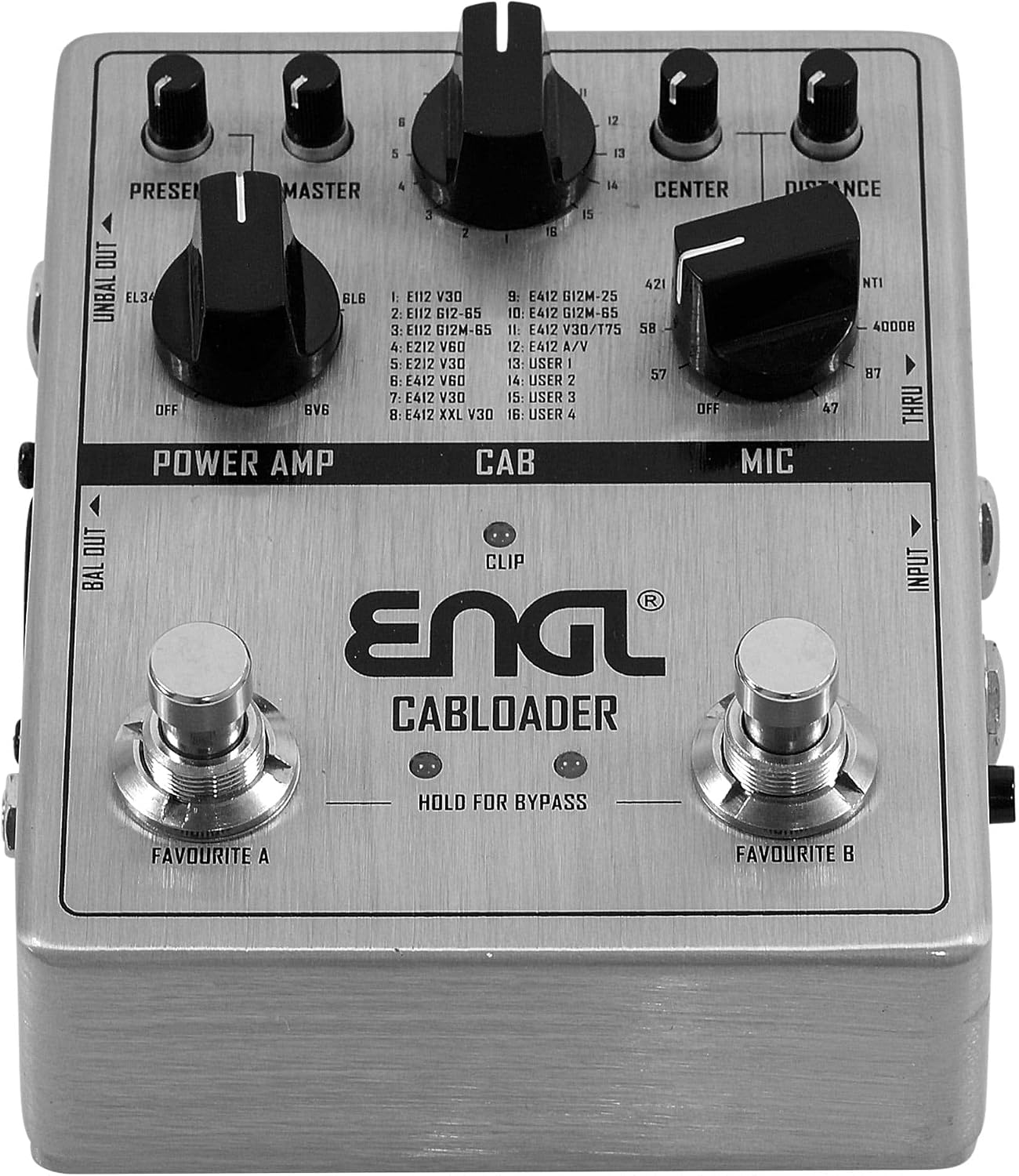
Figura 1: A dalt view of the ENGL Cabloader pedal, showing the Power Amp, Cab, and Mic sections, along with the Favourite A and B footswitches. The Power Amp section includes PRESENT and MASTER knobs. The Cab section features a selector knob for various cabinet IRs. The Mic section has CENTER and DISTANCE knobs. Input, Unbalanced Out, and Balanced Out connections are visible on the sides.

Figura 2: posterior view of the ENGL Cabloader pedal, highlighting the USB port for computer connection and the 9V DC power input. This view also shows the overall compact design of the unit.
Controls i connexions:
- ENTRADA: 1/4" mono input for your guitar or amplifier's speaker output.
- UNBAL OUT: 1/4" unbalanced output for connecting to an amplifier's FX return, another pedal, or an audio interface.
- BAL OUT: XLR balanced output for direct connection to a PA system or recording console.
- FINS: 1/4" output for passing the dry signal to another device.
- AURICULARS: 1/8" stereo headphone output for silent practice.
- USB: Micro USB port for connecting to a computer for IR loading and software updates.
- ENTRADA 9V DC: Power input for the included 9V DC power supply.
- PRESENT Knob: Adjusts the presence in the power amp simulació.
- Pom MÀSTER: Controls the overall output level of the power amp simulació.
- CAB Selector Knob: Selects from 16 different cabinet impulse responses (12 preloaded, 4 user-loadable).
- CENTER Knob: Adjusts the virtual microphone's position relative to the speaker cone.
- DISTANCE Knob: Adjusts the virtual microphone's distance from the speaker.
- FAVOURITE A/B Footswitches: Engage or bypass the effect, or switch between saved presets. Hold for bypass.
Configuració
- Connexió d'alimentació: Connect the included 9V DC 300mA power supply to the 9V DC IN jack on the Cabloader. Plug the power supply into a suitable electrical outlet.
- Instrument/AmpConnexió del lifier:
- For guitar directly into the Cabloader: Connect your guitar to the INPUT jack.
- Per amplifier's speaker output into the Cabloader: Connect the speaker output of your amplifier (ensure your amplifier is connected to a load box if it requires one) to the INPUT jack.
- Connexió de sortida:
- To a PA system or audio interface: Connect the BAL OUT (XLR) to your mixer or interface.
- A un amplifier's FX return: Connect the UNBAL OUT (1/4") to the FX return of your ampmés viu.
- For silent practice: Connect headphones to the 1/8" HEADPHONE OUT.
- Connexió USB (opcional): Connect the Micro USB port to your computer using the supplied USB cable to load custom IRs or update firmware.
Instruccions de funcionament
Poder Amp Simulació:
The Cabloader features a power amp simulation section that allows you to emulate different power tube types, such as EL34s and 6L6s, influencing the overall feel and response of your tone.
- PRESENT Knob: Adjusts the high-frequency content and brightness, simulating the presence control found on many tube ampaixecadors.
- Pom MÀSTER: Controls the overall output volume of the power amp simulació.
Cab Simulation (IR Loader):
The CAB section allows you to select from a variety of preloaded cabinet impulse responses or load your own.
- CAB Selector Knob: Rotate this knob to choose from 16 different cabinet simulations. The first 12 are preloaded ENGL cabinet and speaker combinations. Positions 13-16 are reserved for user-loaded third-party IRs.
Mic Simulation:
Fine-tune your cabinet tone with virtual microphone options and placement controls.
- CENTER Knob: Adjusts the virtual microphone's position across the speaker cone, from the edge to the center, affecting the tonal character.
- DISTANCE Knob: Controls the virtual microphone's distance from the speaker, influencing the amount of room sound and proximity effect.
Funcions del pedal:
- FAVOURITE A / FAVOURITE B: These footswitches can be used to recall saved presets.
- Bypass: To bypass the effect, hold down either the FAVOURITE A or FAVOURITE B footswitch.
Manteniment
- Neteja: Feu servir un drap suau i sec per netejar l'exterior de la unitat. No utilitzeu productes de neteja abrasius ni dissolvents.
- Emmagatzematge: Store the Cabloader in a dry, cool place away from direct sunlight and extreme temperatures when not in use.
- Cura del cable: Reviseu regularment tots els cables per si hi ha danys. Substituïu immediatament qualsevol cable desfilat o danyat.
Resolució de problemes
- Sense energia: Ensure the power supply is correctly connected to the unit and a working power outlet. Verify the power supply specifications (9V DC, 300mA, center negative).
- Sense so: Check all audio cable connections (input, output, headphones). Ensure the volume controls on the Cabloader and connected devices are turned up. Verify that the unit is not in bypass mode.
- Qualitat de so baixa: Check for proper impedance matching with connected devices. Ensure cables are not damaged. Experiment with different cabinet and microphone settings.
- Unable to Load IRs via USB: Ensure the USB cable is securely connected to both the Cabloader and your computer. Check that the necessary software/drivers are installed on your computer. Refer to the ENGL website for specific software requirements and troubleshooting guides.
Especificacions
| Marca | ENGL |
| Nom del model | ENGL CABLOADER |
| Fabricant | ENGL Ampaixecadors |
| Pes de l'article | 1.09 lliures |
| Dimensions de l'article (L x A x A) | 5.3 x 4.75 x 2.7 polzades |
| Font d'alimentació | Elèctric amb cable |
| Voltage | 9 Volts DC |
| Ampedat | 50 milionsamps |
| Interfície del maquinari | USB (Micro USB) |
| Format del senyal | Analògic |
| Tipus de controls | Push Button, Knob |
| Efectes de sortida d'àudio | Distortion (Note: This device primarily offers cabinet simulation and IR loading, not traditional distortion effects.) |
Garantia i Suport
For warranty information and technical support, please refer to the official ENGL Ampaixecadors website or contact your authorized ENGL dealer. Keep your purchase receipt as proof of purchase for any warranty claims.
ENGL Amplifiers Official Weblloc: www.angl-amps.com


