
Sanyo XT-32A170H
Sanyo Kaizen Series HD Ready Smart Certified Android IPS LED TV
Model: XT-32A170H
Introducció
This manual provides comprehensive instructions for the setup, operation, maintenance, and troubleshooting of your Sanyo Kaizen Series HD Ready Smart Certified Android IPS LED TV, Model XT-32A170H. Please read this manual thoroughly before using your television to ensure proper and safe operation. Keep this manual for future reference.

Imatge: Frontal view of the Sanyo Kaizen Series HD Ready Smart Certified Android IPS LED TV, showcasing its sleek design and the "Sanyo Kaizen Android Smart TV" logo on the screen.
Configuració
1. Desembalatge i contingut
Traieu amb cura tots els components de l'embalatge. Assegureu-vos que hi hagi tots els elements que s'enumeren a continuació:
- 1 TV LED
- 1 Suport de taula
- 1 Suport de paret
- 1 Manual d'usuari (aquest document)
- 1 Targeta de garantia
- 1 Remote Control (with 2 AAA batteries included)
2. Fixació del suport o del muntatge a la paret
You have the option to place the TV on a flat surface using the included table-top stand or mount it on a wall using the provided wall mount bracket.
Table Top Stand Installation:
- Col·loqueu la pantalla del televisor amb la pantalla cap avall sobre una superfície suau i neta per evitar ratllades.
- Align the stand bases with the corresponding screw holes on the bottom of the TV.
- Secure the stand bases using the screws provided.
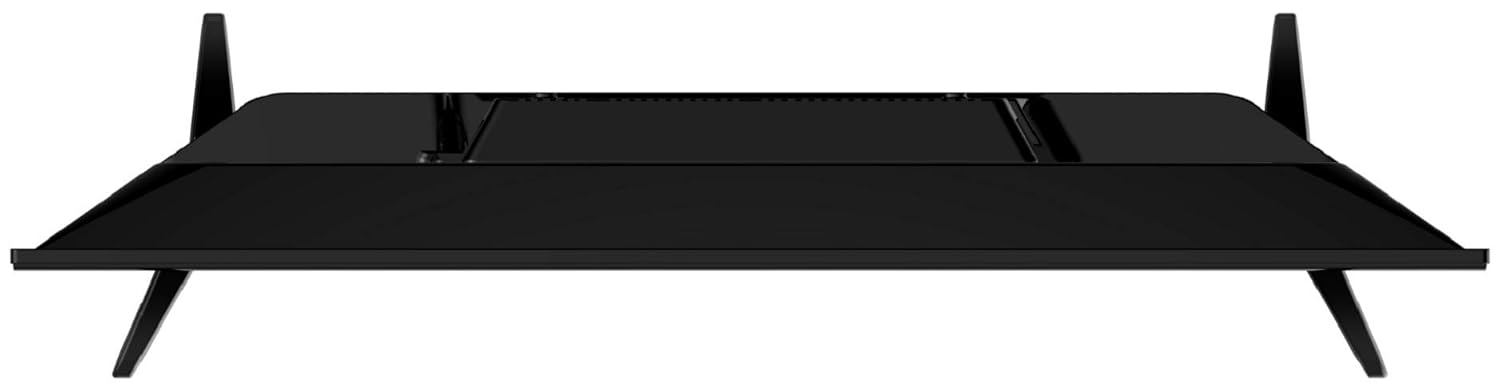
Imatge: De dalt a baix view of the Sanyo TV, illustrating how the table-top stands are attached to the bottom of the television unit.
Instal·lació de muntatge a la paret:
For wall mounting, refer to the separate instructions provided with the wall mount bracket. Ensure the wall can support the weight of the TV (approximately 3.8 kg). It is recommended to seek professional assistance for wall mounting.

Imatge: Part posterior view of the Sanyo TV, highlighting the VESA mounting holes for wall bracket installation.
3. Connexió de dispositius externs
Your Sanyo TV offers various connectivity options:
- Ports HDMI (2): Connect set-top boxes, gaming consoles, streaming devices, or Blu-ray players.
- Ports USB (2): Connecteu discs durs, unitats flaix USB o altres dispositius USB per a la reproducció de contingut multimèdia.
- Bluetooth Ver 5.0: Connect compatible wireless audio devices like soundbars or headphones.
- Wi-Fi (802.11a/b/g/n 2.4G 2T2R): Connect to your home network for smart TV features.

Imatge: Side profile of the Sanyo TV, displaying the accessible HDMI and USB ports for connecting external devices.
After connecting all desired devices, plug the TV's power cord into a wall outlet.
4. Configuració inicial
En encendre'l per primera vegada, el televisor us guiarà pel procés de configuració inicial:
- Seleccioneu el vostre idioma preferit.
- Connecteu-vos a la vostra xarxa Wi-Fi seleccionant la vostra xarxa i introduint la contrasenya.
- Sign in with your Google account to access Android TV features, Google Play Store, and personalized recommendations.
- Follow on-screen prompts to complete the setup, including channel scanning (if connecting an antenna) and privacy settings.
En funcionament
1. Funcions de control remot
The included Bluetooth remote control provides easy navigation and access to smart features. Insert the two AAA batteries into the remote before use.
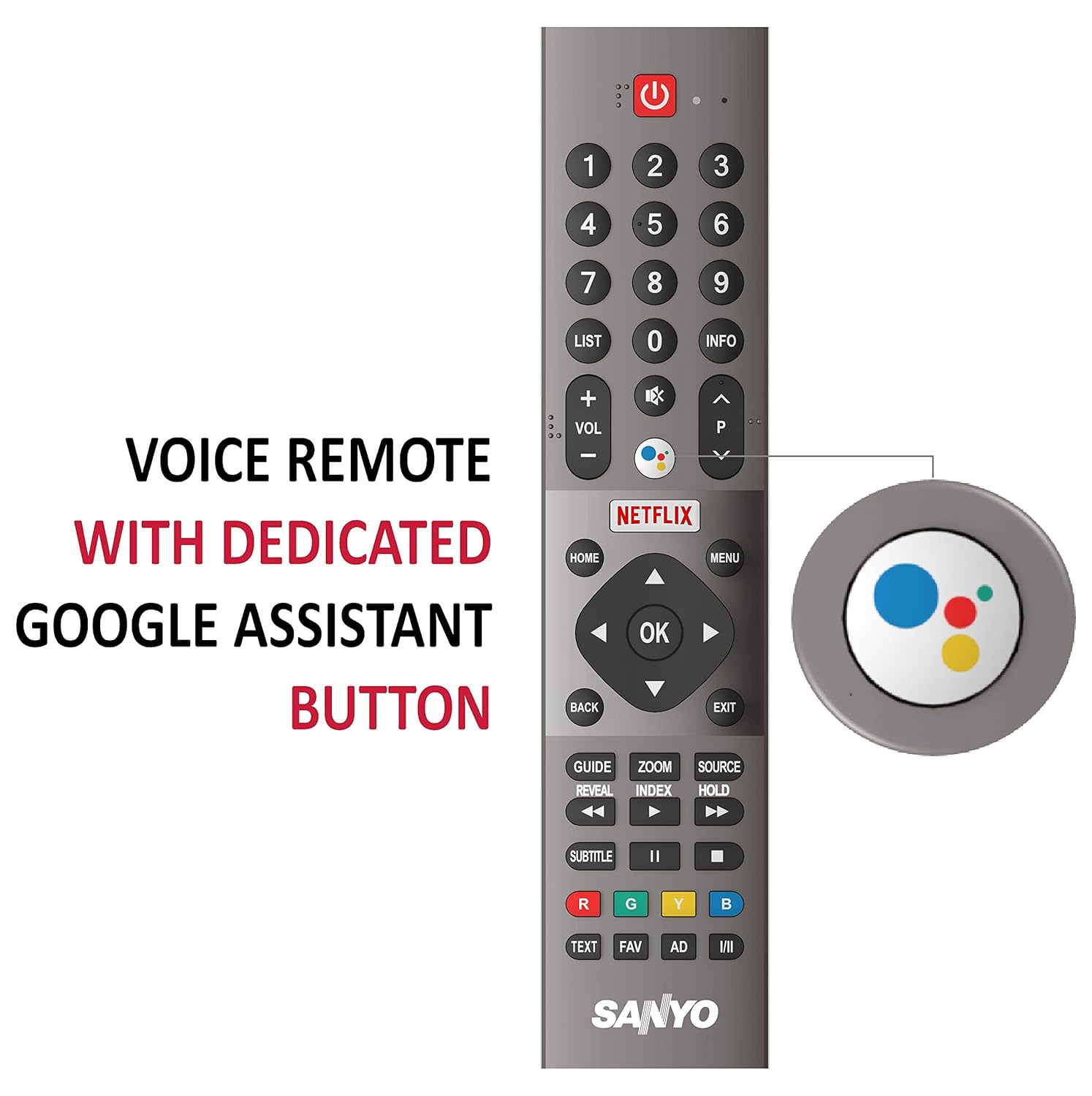
Image: The Sanyo TV remote control, featuring a dedicated Google Assistant button for voice search and other smart functions.
- Botó d'encesa: Encén o apaga el televisor.
- Botons numèrics: Selecció directa de canals.
- Pujar/baixar el volum: Ajusta el nivell de volum.
- Canal amunt/avall: Canvia els canals de televisió.
- Teclat de navegació (Amunt/Avall/Esquerra/Dreta/D'acord): Navega pels menús i confirma les seleccions.
- Enrere: Torna a la pantalla anterior.
- Inici: Accedeix a la pantalla d'inici d'Android TV.
- Botó de l'Assistent de Google: Activates voice search and commands.
- Netflix/Prime Video Buttons: Accés directe a aquestes aplicacions de streaming.
2. Navegació per Android TV
The Sanyo Kaizen TV runs on Google Certified Android Pie 9.0, offering a user-friendly interface for accessing content and applications.

Image: The Sanyo TV screen showing the Android TV home interface, populated with popular streaming applications like Netflix, Prime Video, and YouTube.
- Pantalla d'inici: Displays recommended content, installed apps, and input sources.
- Aplicacions: Access all your installed applications from the Google Play Store.
- Entrades: Switch between HDMI, USB, and other connected devices.
- Configuració: Configure network, display, sound, system, and other TV settings.
3. Using Google Assistant and Chromecast
- Assistent de Google: Press the dedicated Google Assistant button on your remote and speak your command. You can search for content, get information, control smart home devices, and more.
- Chromecast integrat: Cast content (videos, photos, music) directly from your compatible smartphone, tablet, or computer to your TV using the Chromecast feature. Ensure your device and TV are on the same Wi-Fi network.
No hi ha vídeos oficials de productes disponibles del venedor per integrar-los en aquest manual.
Manteniment
1. Neteja del televisor
- Pantalla: Netegeu suaument la pantalla amb un drap suau i sense borrissol. Per a marques difícils, netegeu lleugerament.ampNetegeu el drap amb aigua o un netejador de pantalles especialitzat. No ruixeu líquid directament sobre la pantalla.
- Cos: Netegeu el marc i el suport del televisor amb un drap suau i sec. Eviteu utilitzar productes de neteja abrasius o dissolvents.
- Desendolleu sempre el televisor de la presa de corrent abans de netejar-lo.
2. Actualitzacions de programari
Your Android TV may receive periodic software updates to improve performance and add new features. Ensure your TV is connected to the internet to receive these updates. You can check for updates manually in the TV's settings menu.
3. Atenció general
- Eviteu col·locar el televisor sota la llum solar directa o a prop de fonts de calor.
- Assegureu-vos que hi hagi una ventilació adequada al voltant del televisor.
- Protegiu el televisor de la humitat i la pols.
- No col·loqueu objectes pesats a sobre del televisor.
Resolució de problemes
Si teniu problemes amb el televisor, consulteu els problemes i solucions més comuns següents abans de contactar amb el servei d'assistència.
| Problema | Possible causa/solució |
|---|---|
| Sense poder | Check if the power cord is securely plugged into the TV and the wall outlet. Ensure the outlet has power. Try a different outlet. |
| Sense imatge / Pantalla negra | Assegureu-vos que heu seleccionat la font d'entrada correcta. Comproveu les connexions dels cables als dispositius externs. Intenteu reiniciar el televisor. |
| Sense so | Check the volume level and ensure mute is not activated. Verify audio cable connections. If using external speakers, check their power and connections. |
| Problemes de connexió Wi-Fi | Ensure your router is on and working. Re-enter the Wi-Fi password. Try restarting both the TV and your router. Move the TV closer to the router if possible. |
| El control remot no respon | Check and replace the batteries. Ensure there are no obstructions between the remote and the TV. Re-pair the Bluetooth remote if necessary (refer to TV settings). |
Especificacions
Key technical specifications for the Sanyo Kaizen Series HD Ready Smart Certified Android IPS LED TV (Model XT-32A170H):
| Característica | Detall |
|---|---|
| Mida de la pantalla | 32 polzades (80 cm) |
| Resolució | HD Ready (1366x768 pixels) |
| Freqüència d'actualització | 60 Hz |
| Tipus de visualització | IPS LED Panel |
| Viewangle ing | 178 graus |
| Relació de contrast de la imatge | 1200:1 |
| Sortida de so | 20 Watts (Dolby Digital, Digital Sound Processing) |
| Sistema operatiu | Google Certified Android Pie 9.0 |
| Memòria RAM | 1 GB |
| Connectivitat | 2 HDMI, 2 USB, Bluetooth 5.0, Wi-Fi (802.11a/b/g/n 2.4G 2T2R) |
| Característiques especials | Chromecast Built-in, Google Assistant, Google Play App Store, Netflix, Prime Video, Hotstar |
| Dimensions del producte (LxWxH) | 72 x 8.9 x 42.1 cm |
| Pes de l'article | 3.8 kg |
| Consum d'energia en mode activat | 60 watts |

Image: A visual summary table highlighting key features of the Sanyo TV, including screen size, connectivity, display, sound, smart TV capabilities, and warranty information.
Garantia i Suport
1. Informació de la garantia
Your Sanyo Kaizen Series TV comes with a Garantia de marca d'1 any provided by Sanyo from the date of purchase. Please retain your purchase invoice for warranty claims.
2. Installation and Demo Support
For requesting installation, wall mounting, or a product demonstration after delivery, please directly contact Sanyo support. Provide the product's model name (XT-32A170H) and the seller's details mentioned on your invoice.
3. Atenció al client
For any queries, technical assistance, or service requests, please contact Sanyo support at:
Número gratuït: 18004195088
This product is eligible for replacement within 10 days of delivery in case of any product defects, damage, or features not matching the description provided.