
1. Introducció
Thank you for choosing the ThreeH AC09A Digital Alarm Clock. This device combines a digital alarm clock with a thermometer, hygrometer, and weather forecast display, offering a comprehensive overview of your indoor environment. It features a vibrant color screen and a convenient voice-controlled backlight. Please read this manual carefully to ensure proper use and optimal performance of your new device.
2. Producte acabatview i Característiques
The ThreeH AC09A is designed for ease of use and functionality. Key features include:
- Pantalla en color: Shows time (12/24 hour format), date, day of the week, indoor temperature (Celsius/Fahrenheit), indoor humidity, and a weather forecast icon.
- Comfort Icon: Indicates indoor comfort levels based on temperature and humidity.
- Funció d'alarma i repetició d'alarma: Customizable alarm with a snooze option.
- Voice-Controlled Backlight: Activate the backlight by pressing a button, making a sound within 1 meter, or tapping the table. The backlight stays on for 5 seconds.
- Monitorització de la temperatura i la humitat: Provides accurate indoor readings.
- Funció d'hora mundial: Displays world time and allows adjustment for 16 major cities.

Figura 2.1: Frontal view of the ThreeH AC09A Digital Alarm Clock, displaying its multi-function color screen.
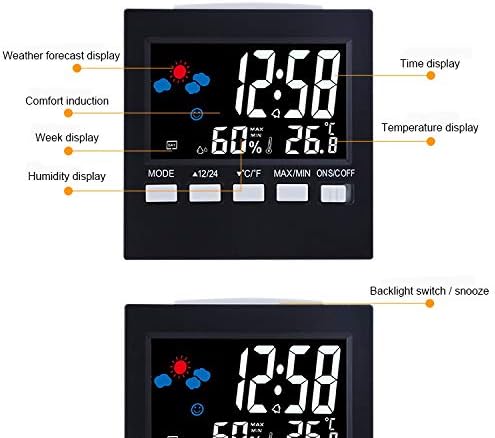
Figura 2.2: Detallada view of the display, highlighting various indicators such as weather forecast, comfort, week, humidity, time, and temperature.
3. Configuració
3.1 Instal·lació de la bateria
- Localitza el compartiment de la bateria a la part posterior del despertador.
- Obriu la tapa del compartiment de la bateria.
- Introduïu 2 piles AAA, assegurant-vos de la polaritat correcta (+ i -).
- Tanqueu bé la tapa del compartiment de la bateria.
3.2 Engegada inicial
Upon battery installation, the clock will power on automatically. The display will show default settings. You may also connect the optional USB line for continuous power, though batteries are required for backup.
4. Instruccions de funcionament
The clock features several buttons on the front for easy operation:

Figure 4.1: Control buttons and their functions on the ThreeH AC09A.
4.1 Configuració de l'hora i la data
- Press the 'MODE' button repeatedly to cycle through settings: Year, Date, Alarm, Time.
- When the desired setting (e.g., Time) is flashing, use the '▲ 12/24' button (Up) or '▼ °C/°F' button (Down) to adjust the value.
- Press 'MODE' again to confirm and move to the next setting parameter (e.g., minutes after hours).
- To switch between 12-hour and 24-hour format, press the '▲ 12/24' button when the time is displayed.
4.2 Configuració de l'alarma
- Press the 'MODE' button until the alarm time is displayed and flashing.
- Use the '▲ 12/24' or '▼ °C/°F' buttons to set the desired alarm hour and minute.
- Press 'MODE' to confirm.
- To activate/deactivate the alarm, use the 'ONS/OFF' switch on the right side of the clock.
- When the alarm sounds, press any button (except 'ONS/OFF') to activate the snooze function. The alarm will sound again after a few minutes.
4.3 Selecció de la unitat de temperatura
Press the '▼ °C/°F' button to switch the temperature display between Celsius (°C) and Fahrenheit (°F).
4.4 Voice-Controlled Backlight
The backlight can be activated in three ways:
- Press the 'LIGHT' button (often integrated with 'ONS/OFF' or a dedicated button, refer to Figure 4.1).
- Make a sound within 1 meter of the device.
- Tap the surface the clock is resting on.
The backlight will automatically turn off after approximately 5 seconds to conserve battery power.
4.5 Max/Min Temperature and Humidity
Press the 'MAX/MIN' button to view the maximum and minimum recorded temperature and humidity values for the day. Press again to return to current readings.
4.6 Previsió meteorològica
The clock predicts the weather based on changes in temperature and humidity. The weather icon on the display will change to indicate sunny, cloudy, rainy, etc. This is an indoor prediction and may not always perfectly match outdoor conditions.
5. Manteniment
To ensure the longevity and accuracy of your ThreeH AC09A Digital Alarm Clock, follow these simple maintenance guidelines:
- Neteja: Netegeu el dispositiu amb un drap suau i sec. No utilitzeu productes de neteja abrasius ni dissolvents, ja que poden danyar la pantalla o laasing.
- Substitució de la bateria: Replace batteries when the display dims or functions become erratic. Always replace both AAA batteries at the same time.
- Col·locació: Avoid placing the clock in direct sunlight, near heat sources, or in areas with extreme temperature fluctuations, as this can affect temperature and humidity readings.
- Exposició a l'aigua: This device is not waterproof. Avoid exposure to water or high humidity environments.
6. Solució De Problemes
If you encounter any issues with your ThreeH AC09A, please refer to the following common problems and solutions:
- La pantalla està en blanc o té poca llum:
- Comproveu si les bateries estan instal·lades correctament.
- Substituïu les piles velles per unes de noves.
- Ensure the optional USB power cable is securely connected if using.
- L'hora o la data són incorrectes:
- Seguiu les instruccions de la secció 4.1 per restablir la data i l'hora.
- L'alarma no sona:
- Ensure the alarm is activated using the 'ONS/OFF' switch.
- Verify the alarm time is set correctly (Section 4.2).
- La retroiluminació no funciona:
- Comproveu els nivells de bateria.
- Ensure you are pressing the correct button or making sufficient noise/vibration for voice control.
- Lectures de temperatura/humitat inexactes:
- Relocate the clock away from direct sunlight, drafts, or heat sources.
- Allow the device to stabilize for 15-30 minutes after moving to a new environment.
7. Especificacions

Figure 7.1: Dimensions of the ThreeH AC09A Digital Alarm Clock.
| Característica | Especificació |
|---|---|
| Número de model | AC09A (H-AC09A) |
| Interval de temperatura | De 0 °C a 50 °C (32 °F a 122 °F) |
| Precisió de la temperatura | +/- 1 °C |
| Gamma d’humitat | 10% a 99% HR |
| Precisió de la humitat | +/- 5% HR |
| Dimensions | 9.2 cm x 3.9 cm x 9.2 cm |
| Font d'alimentació | 2 x AAA Batteries (optional USB power) |
| Material | Plàstic |
| Tipus de visualització | Digital Color Screen |
8. Garantia i Suport
For warranty information and customer support, please refer to the documentation provided at the time of purchase or contact your retailer. Keep your purchase receipt as proof of purchase. For technical assistance or further inquiries, please visit the official ThreeH weblloc o poseu-vos en contacte amb el seu departament d'atenció al client.