
ThreeH H-AC11Brown_Blue
ThreeH Desk Wooden Alarm Clock Digital User Manual
Model: H-AC11Brown_Blue
Introducció
Gràcies per la compraasing the ThreeH Desk Wooden Alarm Clock Digital. This manual provides detailed instructions for setting up, operating, and maintaining your new alarm clock. Please read this manual thoroughly before use to ensure proper function and longevity of the product.
This digital alarm clock features a wooden design, digital time and temperature display, multiple alarm settings, and voice control functionality. It is suitable for use in homes, kitchens, and offices.
Producte acabatview
The ThreeH Desk Wooden Alarm Clock is designed with a minimalist aesthetic and practical features. It displays time and temperature clearly with adjustable brightness. The clock supports both USB power and battery backup.

Imatge: Frontal view of the ThreeH Wooden Digital Alarm Clock, displaying time (12:02) and temperature (23°C) in blue LED digits on a brown wooden surface.
Característiques principals:
- Digital Time and Temperature Display
- 3 Configuració d'alarma
- Voice Control Functionality
- Adjustable Brightness (3 levels)
- Power Off Memory (CR2032 battery backup)
- Dual Power Supply Options (USB or AAA batteries)
- Modern Wooden Design
Configuració
Powering the Clock:
The clock can be powered by either a USB power cord or AAA batteries. For continuous display and optimal performance, USB power is recommended.
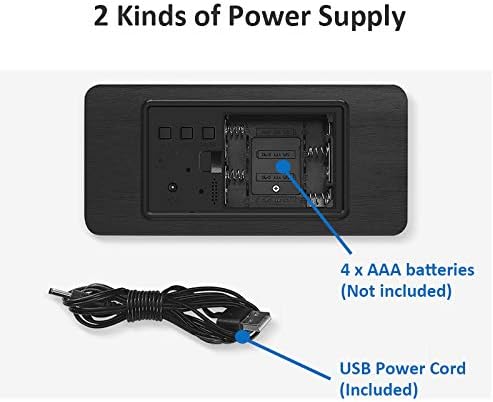
Imatge: Part posterior view of the alarm clock, illustrating the battery compartment for 4x AAA batteries (not included) and the USB power cord input (included).
- Potència USB: Connect the provided USB power cord to the DC5V port on the back of the clock and plug the other end into a USB power adapter (not included) or a powered USB port.
- Energia de la bateria (reserva): Open the battery compartment on the back of the clock. Insert 4 x AAA batteries (not included), ensuring correct polarity (+/-). Note: Batteries are primarily for backup and may not provide continuous display.
- Bateria de memòria: The clock also uses a CR2032 button cell battery (usually pre-installed) for "power off memory," which retains time settings even when the main power is disconnected.

Imatge: Detallada view of the clock's rear panel, highlighting the 'SET', 'UP', 'DOWN', and 'RESET' buttons, the USB port, and the CR2032 battery compartment for memory retention.
Instruccions de funcionament
Configuració de l'hora i la data:
- Premeu el botó SET per entrar al mode de configuració de l'hora. Els dígits de l'hora parpellejaran.
- Utilitza el UP i ABAIX botons per ajustar l'hora.
- Premeu SET again to move to minute setting. Adjust minutes with UP i ABAIX.
- Continueu prement SET per anar ciclant pels paràmetres d'any, mes i dia, ajustant cadascun amb UP i ABAIX.
- Premeu SET una última vegada per sortir del mode de configuració.
Configuració d'alarmes:
The clock supports up to 3 alarm settings (AL1, AL2, AL3).
- Premeu el botó SET button repeatedly until "AL1" appears on the display.
- Premeu SET to enter AL1 setting. The hour digits will flash.
- Ús UP i ABAIX per configurar l'hora de l'alarma.
- Premeu SET to move to minute setting. Adjust minutes with UP i ABAIX.
- Premeu SET again to enable/disable the alarm (ON/--).
- Repetiu-ho per a AL2 i AL3 si ho desitgeu.
Funció de control de veu:
In power-saving mode, the display will turn off. To activate the display, make a sound (e.g., clap hands, tap the clock) or touch the clock. The display will light up for approximately 15 seconds before turning off again.
To toggle voice control mode (ON/OFF), refer to the specific instructions in your clock's packaging, as this feature can sometimes be enabled or disabled via a long press of a specific button (e.g., DOWN button) or a combination of buttons.
Ajust de brillantor:
The clock features 3 levels of brightness. While in normal time display mode, press the UP botó per canviar pels nivells de brillantor.

Image: A ThreeH Wooden Digital Alarm Clock with a dark wood finish, showing the time and temperature in bright blue LED digits. This image demonstrates the clear display.
Manteniment
- Neteja: Wipe the clock surface with a soft, dry cloth. Do not use abrasive cleaners or solvents, as they may damage the wooden finish or electronic components.
- Substitució de la bateria: If using AAA batteries for backup, replace them when the display becomes dim or inconsistent, or if the clock fails to retain time during power outages. Ensure correct polarity.
- Bateria CR2032: The CR2032 battery for memory retention typically lasts for several years. If the clock loses time settings after a power disconnection, the CR2032 battery may need replacement.
- Medi ambient: Keep the clock away from direct sunlight, extreme temperatures, high humidity, and strong magnetic fields to prevent damage.
Resolució de problemes
| Problema | Causa possible | Solució |
|---|---|---|
| La pantalla està apagada o té poca llum. |
|
|
| El rellotge perd la configuració de l'hora després de desconnectar l'alimentació. | La pila de memòria CR2032 està morta o no hi és. | Replace the CR2032 button cell battery on the back of the clock. |
| L'alarma no sona. |
|
|
| El control per veu no funciona. | Voice control feature is disabled. | Refer to your clock's specific instructions to enable voice control mode. |
Especificacions
| Característica | Detall |
|---|---|
| Marca | Tres H |
| Número de model | H-AC11Brown_Blue |
| Dimensions del producte | 4 x 3.81 x 7 cm |
| Pes de l'article | 245 g |
| Material | Fusta |
| Tipus de visualització | Digital |
| Característiques especials | Alarm, Voice Control, Temperature Display, Adjustable Brightness |
| Font d'alimentació | Corded Electric (USB), 4x AAA Batteries (backup), 1x CR2032 (memory) |
Garantia i Suport
For warranty information and customer support, please refer to the documentation included with your purchase or contact ThreeH customer service directly through their official weblloc web o el venedor on es va comprar el producte.
Si us plau, conserveu el comprovant de compra per a qualsevol reclamació de garantia.
Ask a question about this manual
Ask about setup, troubleshooting, compatibility, parts, safety, or missing instructions. Manuals+ will review the question and use this page’s manual context to help answer it.