
FLEXISPOT EN2
FLEXISPOT EN2 Electric Standing Desk Instruction Manual
Model: EN2 (48x30" Maple Top + White Frame)
Introducció
This manual provides detailed instructions for the assembly, operation, and maintenance of your FLEXISPOT EN2 Electric Standing Desk. Please read this manual thoroughly before assembly and use to ensure safe and efficient operation. This model features a 48x30 inch maple top and a white frame, designed to enhance your workspace with adjustable height functionality and integrated power solutions.
Informació de seguretat
- Exceeding the maximum weight limit of 176 pounds may cause damage or injury. Always adhere to the specified weight limit for safety.
- Proper assembly is required for stability. Ensure all components are securely fastened according to the assembly instructions.
- Place the desk on a stable, level surface to prevent tipping.
- The desk is equipped with overload and overheat protection to prevent undue overuse. Do not attempt to bypass these safety features.
- Mantingueu els nens i les mascotes allunyats de l'escriptori durant el funcionament per evitar accidents.
- Ensure there are no obstructions in the desk's path when adjusting height. The anti-collision system is designed to detect obstacles, but caution is always advised.
Contingut del paquet
Your FLEXISPOT EN2 desk will arrive in two separate packages. Please verify all components are present before beginning assembly.

Image: The desk components are shipped in two separate packages for the desktop and the frame.
- 48x30" Maple Desktop (Whole-piece)
- White Electric Desk Frame
- 6-Button Digital Controller
- Integrated Desk Clamp Power Strip (with 3 AC outlets and 2 USB charging ports)
- Sistema de gestió de cables
- Assembly Hardware and Tools (some tools may not be included, an electric drill is recommended for faster assembly)
Instruccions de muntatge
Assembly typically requires two people for ease and safety, especially when handling the desktop and frame. An electric drill (not included) is recommended for quicker assembly of certain components.
- Desempaquetar components: Carefully remove all parts from both packages and lay them out on a clean, soft surface to prevent scratches. Verify all items listed in the 'Package Contents' section are present.
- Muntar el marc de l'escriptori: Follow the detailed instructions provided in the separate assembly guide for connecting the desk legs, crossbars, and feet. Ensure all screws are tightened securely.
- Adjunta l'escriptori: Carefully place the desktop upside down on a soft surface. Position the assembled desk frame onto the desktop, aligning the pre-drilled holes. Secure the desktop to the frame using the provided screws.
- Install Controller and Power Strip: Mount the 6-button digital controller and the clamp power strip to the underside or edge of the desktop as desired. The power strip can be clipped to the back or side.
- Connecteu el cablejat: Connect all motor and controller cables according to the wiring diagram in the assembly guide. Ensure connections are firm.
- Gestionar cables: Utilize the included cable management system to organize and secure all wires, preventing tangles and ensuring a tidy workspace.
- Gira l'escriptori: Amb ajuda, gireu amb cura l'escriptori muntat cap amunt i col·loqueu-lo a la ubicació desitjada.

Image: Effective cable management transforms a cluttered workspace into an organized one.
Instruccions de funcionament
Your FLEXISPOT EN2 desk features an intuitive digital controller for easy height adjustments and memory presets.
Digital Controller Functions

Image: The digital controller allows for precise height adjustments and saving preferred positions.
- Botons amunt/avall (▲ / ▼): Press and hold these buttons to smoothly adjust the desk height. The desk adjusts from 28.1 inches to 45.7 inches. Release the button at your desired height. The motor operates quietly, typically below 50 dB.
- Preajustos de memòria (1, 2, 3, 4): To save a preferred height, adjust the desk to the desired position, then press the 'M' button (if present, or a similar 'Set' button) followed by one of the numbered preset buttons (1-4). To recall a saved height, simply press the corresponding numbered button.
- Sistema anticol·lisió: The desk is equipped with a smart anti-collision system. If the desk encounters an obstruction during height adjustment, it will automatically stop and reverse slightly to prevent damage or injury.
Regleta d'alimentació integrada
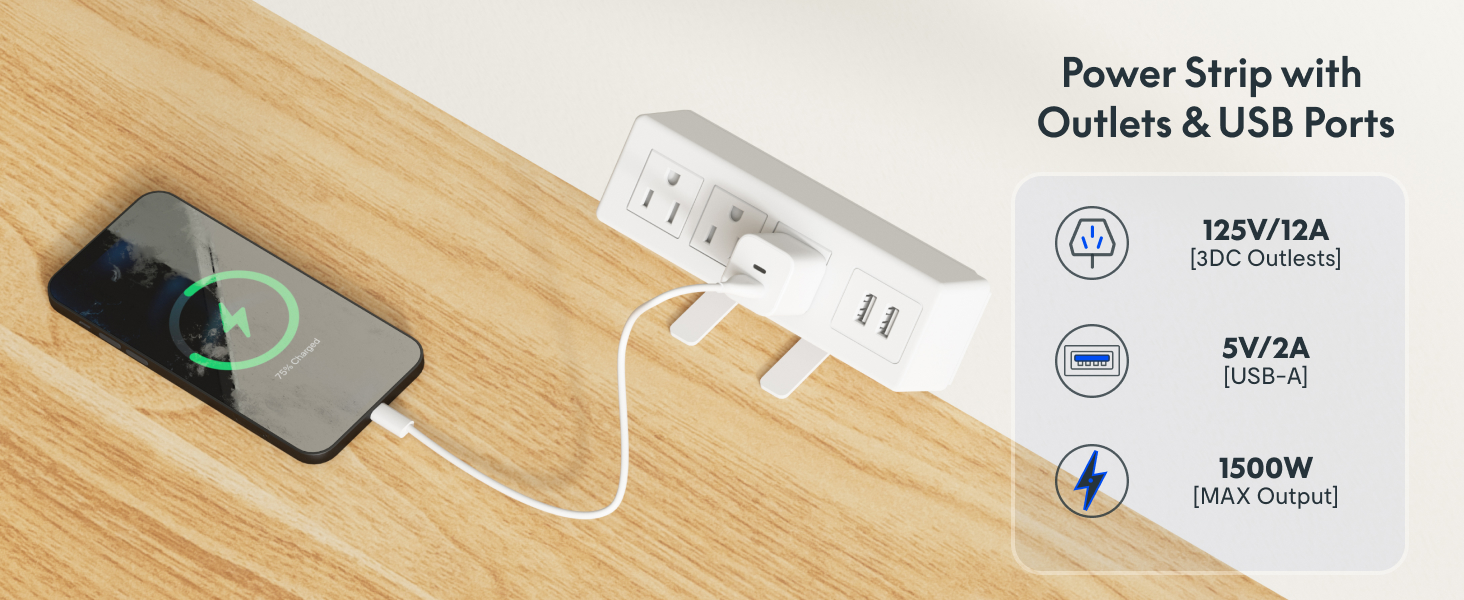
Imatge: El clamp power strip provides convenient access to power and USB charging.
The removable desktop power outlet provides convenient access to power for your devices.
- It includes 3 AC outlets (125V/12A) and 2 USB charging ports (5V/2A).
- The power strip can be clipped to the back or side of your desk.
- Ensure the power strip is securely clamped and connected to a wall outlet before use.
Manteniment
- Neteja: Netegeu l'escriptori i el marc amb un drap suauamp drap. Eviteu netejadors abrasius o productes químics agressius que puguin danyar l'acabat.
- Comprovacions periòdiques: Reviseu periòdicament tots els cargols i connexions per assegurar-vos que romanen ajustats. Torneu a apretar-los si cal.
- Gestió de cables: Ensure cables remain neatly organized and are not pinched or tangled, which could affect desk operation or damage wires.
- Cura del motor: The motor is designed for durability. Avoid overloading the desk or operating it continuously for extended periods without rest to prevent overheating.
Resolució de problemes
If you encounter issues with your FLEXISPOT EN2 desk, refer to the following common solutions:
- L'escriptori no es mou:
- Check if the power cord is securely plugged into both the desk and a working wall outlet.
- Ensure all cables connecting the motor, controller, and power supply are firmly attached.
- Try plugging the desk into a different power outlet to rule out an issue with the original outlet.
- If an error code is displayed on the controller, consult the full product manual or contact customer support for specific instructions.
- Moviment o soroll irregular:
- Comproveu que l'escriptori estigui col·locat sobre una superfície plana.
- Comproveu si hi ha obstruccions sota o al voltant de les potes de l'escriptori.
- Assegureu-vos que tots els cargols de muntatge estiguin ben apretats.
- Freqüència d'activació del sistema anticol·lisió:
- Ensure there are no objects near the desk that could be mistaken for an obstruction during movement.
- The sensitivity of the anti-collision system may be adjustable in advanced settings (refer to the full manual if available).
If these steps do not resolve the issue, please contact FLEXISPOT customer support for further assistance.
Especificacions

Image: Key dimensions and features of the FLEXISPOT EN2 desk.
| Marca | FLEXISPOT |
| Model | EN2 |
| Desktop Dimensions (D x W) | 30 cm x 48 cm |
| Material d'escriptori | Maple Wood (Whole-piece) |
| Color del marc | Blanc |
| Interval d'ajust d'altura | 28.1" - 45.7" |
| Capacitat màxima de pes | 176 lliures (79.8 kg) |
| Nivell de soroll del motor | Menys de 50 dB |
| Power Strip Outlets | 3 CA (125 V/12 A), 2 USB (5 V/2 A) |
| Muntatge obligatori | Sí (es recomana 2 persones) |
| Característiques especials | 4 Memory Presets, Anti-Collision System, Cable Management |
Garantia i Suport
FLEXISPOT provides comprehensive warranty coverage for your EN2 Electric Standing Desk:
- 5 any de garantia: Covers frames, motors, and other mechanical devices.
- 2 any de garantia: Covers controllers, switches, and electronics.
For warranty claims, technical support, or any questions not covered in this manual, please contact FLEXISPOT customer service through their official website or the retailer where the product was purchased. Please have your model number (EN2) and proof of purchase ready.
Ask a question about this manual
Ask about setup, troubleshooting, compatibility, parts, safety, or missing instructions. Manuals+ will review the question and use this page’s manual context to help answer it.