
1. Introducció
This user manual provides detailed instructions for the safe and efficient operation of the QJE PS3010N Adjustable Digital DC Power Supply. This device is designed to provide a stable and adjustable DC voltage and current output, suitable for various electronic testing, research, and development applications. Please read this manual thoroughly before operating the unit and retain it for future reference.
2. Instruccions de seguretat
WARNING: Failure to follow these safety instructions may result in electric shock, fire, or damage to the power supply or connected equipment.
- Assegureu-vos que l'entrada voltage matches the power supply's rating (220V AC).
- No feu funcionar la font d'alimentació en llocs humits o secs.amp condicions.
- No obriu la c.asing de la font d'alimentació. No hi ha peces a l'interior que l'usuari pugui reparar. Demaneu totes les tasques de manteniment a personal qualificat.
- Ensure proper ventilation. Do not block the cooling fan or vents.
- Connect the ground terminal of the power supply to a proper earth ground.
- Before connecting or disconnecting any load, ensure the power supply is turned off or the output is set to zero.
- Avoid short-circuiting the output terminals for extended periods, even though the unit has short-circuit protection.
3. Producte acabatview
The QJE PS3010N is a compact and efficient digital DC power supply. Familiarize yourself with its components:
3.1 Tauler frontal
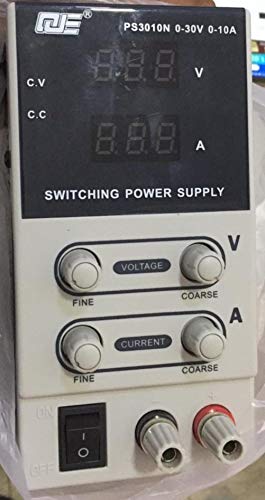
Figure 1: Front Panel Layout of QJE PS3010N
This image displays the front panel of the QJE PS3010N power supply, showing the digital voltage and current displays, voltage and current adjustment knobs (fine and coarse), power switch, and output terminals.
- Digital Voltage Display (V): Mostra el volum de sortidatage en Volts.
- Digital Current Display (A): Mostra el corrent de sortida a Amperes.
- Voltage Adjustment Knobs (Fine/Coarse): S'utilitza per ajustar el volum de sortida desitjattage. The coarse knob makes large adjustments, while the fine knob allows for precise tuning.
- Current Adjustment Knobs (Fine/Coarse): Used to set the desired current limit. The coarse knob makes large adjustments, while the fine knob allows for precise tuning.
- Interruptor d'alimentació (ON/OFF): Toggles the main power to the unit.
- Output Terminals (+/-): Connect your load here. Red for positive (+), Black for negative (-).
- CV/CC Indicators: LEDs indicating Constant Voltage (CV) or Constant Current (CC) operating mode.
3.2 Panell posterior
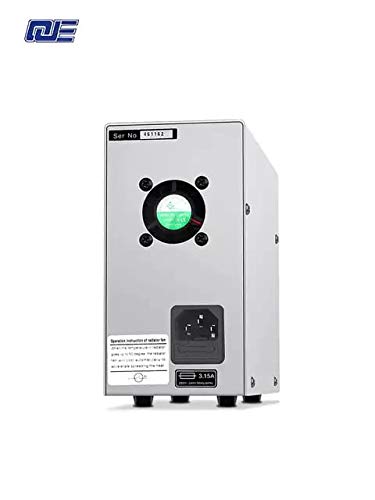
Figura 2: Disseny del panell posterior
This image shows the rear panel of the power supply, featuring the AC power input socket, cooling fan, and fuse holder.
- Entrada d'alimentació de CA: Connect the provided AC power cord here.
- Ventilador de refrigeració: Automatically adjusts speed based on internal temperature to ensure optimal cooling.
- Portafusibles: Contains the main protective fuse for the unit.
4. Configuració
- Desembalatge: Carefully remove the power supply from its packaging. Inspect for any signs of damage during transit.
- Col·locació: Place the unit on a stable, level surface with adequate ventilation. Ensure there is sufficient space around the cooling fan at the rear.
- Connexió d'alimentació:
- Ensure the power switch on the front panel is in the "OFF" position.
- Connect the provided AC power cord to the AC power input socket on the rear panel.
- Plug the other end of the AC power cord into a grounded 220V AC wall outlet.
- Comprovació inicial: Before connecting any load, turn on the power supply. The digital displays should illuminate, showing default voltage i lectures actuals.
5. Instruccions de funcionament
5.1 Engegada/apagada
- Per encendre: Flip the power switch on the front panel to the "ON" position. The displays will light up.
- Per apagar: Flip the power switch to the "OFF" position. The displays will turn off.
5.2 Ajust del volumtage
- Ensure no load is connected or the load can safely handle the maximum voltage.
- Utilitza el Coarse Voltage botó per ajustar el volumtage close to your desired value.
- Utilitza el Fins Voltage knob to precisely adjust the voltage to the exact required value.
- El voltage display will show the current output voltage.
5.3 Adjusting Current Limit
The current adjustment knobs set the maximum current the power supply will deliver. This is crucial for protecting sensitive circuits.
- Method 1 (Without Load):
- Establiu el volum de sortida desitjattage (p. ex., 5 V).
- Short-circuit the output terminals (connect positive to negative with a short, thick wire for a brief moment). The CC indicator will light up, and the current display will show the maximum current.
- Utilitza el Coarse Current i Fine Current knobs to set the desired current limit.
- Remove the short circuit. The power supply will return to constant voltagmode e.
- Method 2 (With Load):
- Connect your load.
- Estableix el voltage to your desired value.
- Adjust the current limit knobs. If the load draws less than the set limit, the unit operates in CV mode. If the load attempts to draw more than the set limit, the unit switches to CC mode, and the output voltage will drop to maintain the set current.
5.4 Constant Voltage (CV) and Constant Current (CC) Modes
- Vol. Constanttage (CV) Mode: When the load current is below the preset current limit, the power supply maintains a constant output voltage as set by the voltage knobs. The CV indicator will be lit.
- Constant Current (CC) Mode: When the load current reaches the preset current limit, the power supply automatically switches to constant current mode. The output voltage will decrease to prevent the current from exceeding the set limit. The CC indicator will be lit.
5.5 Funcions de protecció
The power supply incorporates several protection mechanisms:
- Més de voltage Protecció (OVP): Protects the load from excessive voltage.
- Short Circuit Protection (OCP): Limits current in case of a short circuit at the output.
- Over-Temperature Protection (OTP): Apaga la unitat si la temperatura interna supera els límits de seguretat.
6. Manteniment
- Neteja: Desconnecteu l'alimentació de la presa de corrent abans de netejar-lo. Feu servir un drap suau i sec per netejar l'exterior. No utilitzeu productes de neteja abrasius ni dissolvents.
- Ventilació: Regularly check that the cooling fan and vents are free from dust and obstructions to ensure proper airflow.
- Substitució de fusibles: If the unit does not power on, check the fuse located on the rear panel. Replace it only with a fuse of the same type and rating (e.g., 3.15A).
- Emmagatzematge: Quan no la feu servir durant períodes prolongats, guardeu la font d'alimentació en un lloc fresc i sec, allunyat de la llum solar directa i de temperatures extremes.
7. Solució De Problemes
| Problema | Causa possible | Solució |
|---|---|---|
| La unitat no s'encén. | No AC power; Blown fuse; Faulty power cord. | Check AC outlet and power cord connection. Replace fuse if necessary. |
| Sense sortida voltage / actual. | Output terminals not connected; Voltage/current knobs set to zero; Unit in CC mode with low current limit. | Ensure proper connections. Adjust voltage/current knobs. Check CC indicator and current limit setting. |
| Volum de sortidatage drops unexpectedly. | Load current exceeds set current limit (CC mode activated). | Increase the current limit using the current adjustment knobs or reduce the load. |
| La unitat s'sobreescalfa i s'apaga. | Blocked ventilation; Excessive load; High ambient temperature. | Ensure clear airflow around the fan. Reduce load. Operate in a cooler environment. |
8. Especificacions
- Entrada Voltage: 220 V AC
- Vol. De sortidatage: 0-30V DC
- Corrent de sortida: 0-10 A DC
- Potència de sortida: 300 W (màx.)
- Resolució de visualització: 100mV / 10mA
- Efecte de potència: CV ≤ 1% + 10mV
- Load Effect: CV ≤ 1% + 5mV
- Ripple Noise: CV ≤ 200mVp-p
- Precisió de la indicació: LCD/V: 1% ± 1d; LCD/A: 1% ± 2d
- Mètode de refrigeració: Intelligent temperature control fan, forced air cooling
- Entorn de treball: -10°C to 40°C, Relative humidity <80%
- Entorn d'emmagatzematge: -20°C to 40°C, Relative humidity <80%
- Dimensions: 205 mm x 85 mm x 160 mm (aprox.)
- Pes de l'article: 1.5 kg (aprox.)
9. Garantia i Suport
This QJE PS3010N power supply comes with a 1 mesos de garantia from the date of purchase. This warranty covers manufacturing defects under normal use. It does not cover damage caused by misuse, accident, unauthorized modification, or improper operation.
For technical support or warranty claims, please contact your retailer or the manufacturer, QJE, with your purchase details and model number.
Fabricant: QJE