
1. Introducció
Thank you for choosing the Ahuja DPA-570 Mixer Amplifier. This manual provides essential information for the safe and efficient operation of your device. Please read it thoroughly before use and retain it for future reference. The DPA-570 is designed for public address applications, offering versatile audio mixing and ampcapacitats de lificació.
2. Instruccions de seguretat
- Font d'alimentació: Connecteu el amplifier only to the specified AC voltage or a compatible 12V DC car battery. Ensure the power outlet is properly grounded.
- Ventilació: No bloquegeu les obertures de ventilació. Assegureu-vos que hi hagi un flux d'aire adequat al voltant de la unitat per evitar el sobreescalfament.
- Humitat: Mantenir el amplifier away from water, rain, and excessive humidity. Do not operate with wet hands.
- Col·locació: Place the unit on a stable, flat surface. Avoid direct sunlight, heat sources, or areas with high vibration.
- Manteniment: No intenteu atendre aquest producte vosaltres mateixos. Consulteu tots els serveis a personal de servei qualificat.
- Neteja: Desconnecteu l'alimentació abans de netejar. Feu servir un drap suau i sec. No utilitzeu netejadors líquids ni aerosols.
3. Contingut del paquet
Si us plau, comproveu que el vostre paquet contingui els elements següents:
- Ahuja DPA-570 Mixer AmpUnitat lificadora
- Cable d'alimentació CA
- Remote Control for MP3 Player
- Manual d'usuari (aquest document)
Si falta algun article o està malmès, poseu-vos en contacte amb el vostre distribuïdor immediatament.
4. Producte acabatview
The Ahuja DPA-570 is a robust mixer amplifier designed for various public address needs. It features multiple inputs and controls for flexible audio management.
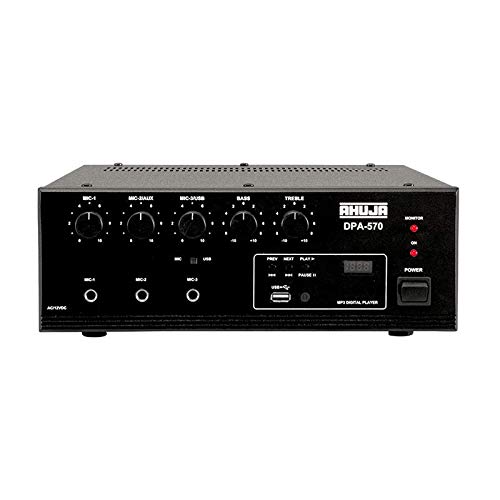
Figura 1: Frontal view of the Ahuja DPA-570 Mixer Amplifier, showing input jacks, control knobs, and the MP3 player interface.
Característiques principals:
- 3 Microphone Inputs & 1 Auxiliary Input: Allows connection of multiple audio sources.
- Reproductor MP3 integrat: Features a USB reader for playing audio files directly, controlled via the front panel or remote.
- Sortida de línia: Provides an output for connecting to an external booster amplifier for expanded sound coverage.
- Active Bass & Treble Controls: Independent controls for adjusting the low and high frequencies of the audio output.
- AC/DC Operation: Automatically switches to DC power (car battery) if AC power fails, ensuring uninterrupted operation.
5. Configuració
Follow these steps to set up your Ahuja DPA-570 Mixer Ampmés viu:
- Col·locació: Col·loca el amplifier on a stable, flat surface in a well-ventilated area, away from direct heat or moisture.
- Connexió de l'altaveu: Connect your speakers to the appropriate speaker output terminals on the rear panel. Ensure correct polarity (+ to + and - to -) and impedance matching. Refer to the amplifier's specifications for compatible speaker impedance.
- Connexió del micròfon: Plug your microphones into the MIC 1, MIC 2, or MIC 3 input jacks on the front panel.
- Auxiliary Device Connection: Connect external audio sources (e.g., CD player, smartphone) to the AUX input jack using an appropriate cable.
- Connexió d'alimentació:
- Alimentació CA: Connecteu el cable d'alimentació de CA subministrat a amplifier's AC inlet and then to a suitable wall outlet.
- Alimentació de CC (opcional): For battery operation, connect a 12V DC car battery to the DC input terminals on the rear panel, observing correct polarity. The unit will automatically switch to DC power if AC power is interrupted.
- Encesa inicial: Ensure all volume controls are set to minimum before turning on the ampmés viu.
6. Instruccions de funcionament
6.1 Funcionament bàsic
- Encès: Premeu l'interruptor d'encesa per encendre el amplificador. L'indicador lluminós d'engegada s'il·luminarà.
- Ajust de volum: Gradually increase the MASTER volume control to the desired listening level. Adjust individual MIC and AUX volume controls as needed.
- Control de tons: Use the BASS and TREBLE knobs to adjust the low and high frequencies of the audio output to your preference.
6.2 Using the MP3 Player
- Inseriu una unitat USB: Inseriu una unitat flash USB que contingui àudio MP3 files al port USB del panell frontal.
- Seleccioneu el mode: El amplifier should automatically switch to USB mode. If not, press the 'MODE' button on the front panel or remote control until USB mode is selected.
- Controls de reproducció: Use the play/pause, next, and previous track buttons on the front panel or remote control to manage playback.
- Volum: Adjust the MP3 player's volume using its dedicated control or the main volume control.
7. Manteniment
- Neteja: Netegeu regularment l'exterior de la amplifier with a soft, dry cloth. Do not use abrasive cleaners or solvents.
- Ventilació: Ensure that the ventilation grilles are free from dust and debris to maintain proper cooling.
- Emmagatzematge: Quan no s'utilitzi durant períodes prolongats, guardeu-lo amplifier in a cool, dry place, protected from dust and extreme temperatures.
- Inspecció del cable: Reviseu periòdicament tots els cables per detectar signes de desgast o danys. Substituïu immediatament qualsevol cable danyat.
8. Solució De Problemes
| Problema | Causa possible | Solució |
|---|---|---|
| Sense poder | Power cord not connected; Power outlet faulty; Amplifier power switch off. | Comproveu la connexió del cable d'alimentació; proveu una presa de corrent diferent; assegureu-vos que l'interruptor d'alimentació estigui encès. |
| Sense sortida de so | Speaker cables disconnected; Volume controls too low; Input source not selected or faulty. | Check speaker connections; Increase MASTER and input volume; Verify input source is active and correctly connected. |
| So distorsionat | Volume too high; Incorrect impedance speakers; Faulty cables. | Reduce volume; Ensure speaker impedance matches amplifier; Replace faulty cables. |
| El reproductor de MP3 no funciona | USB drive not inserted correctly; USB drive corrupted; Incorrect file format. | Reinsert USB drive; Try a different USB drive; Ensure fileestan en format MP3. |
9. Especificacions
| Característica | Especificació |
|---|---|
| Marca | Ahuja |
| Número de model | DPA-570 |
| Nombre de canals | 4 |
| Dimensions del producte (P x A x A) | 34P x 36A x 32H centímetres |
| Pes de l'article | 6900 grams |
| Tecnologia de connectivitat | Auxiliar, USB |
| Tipus de font d'alimentació | AC (Mains), Battery Powered (12V DC) |
| Tipus de connector de sortida | 1/4" TRS (balanced) |
| Entrada d'àudio | USB |
| País d'origen | Xina |
10. Garantia i Suport
Ahuja products are manufactured to high-quality standards. For warranty information, please refer to the warranty card included with your product or visit the official Ahuja weblloc web. Conserveu el rebut de compra com a comprovant de compra per a reclamacions de garantia.
For technical support, service, or inquiries, please contact Ahuja customer service through their official channels. Contact details can typically be found on the product packaging or the manufacturer's weblloc.