
Benss BRBD05
Benss Portable Digital Radio
Manual d'usuari
1. Producte acabatview
The Benss Portable Digital Radio (Model BRBD05) is a compact and versatile multi-band receiver designed for clear reception and ease of use. It supports AM, FM, and SW bands, features a digital LCD display with backlight, an alarm clock, and a sleep timer. Its portable design makes it ideal for both indoor and outdoor use.

Figura 1.1: Frontal view of the Benss Portable Digital Radio.
This radio is equipped with a built-in loudspeaker for clear audio and a 3.5mm earphone jack for private listening. The telescopic antenna ensures optimal signal reception, and the device is powered by two AA batteries, making it highly portable.
2. Informació de seguretat
- Do not expose the radio to extreme temperatures, direct sunlight, or high humidity.
- Eviteu deixar caure la ràdio ni sotmetre-la a impactes forts.
- Do not attempt to disassemble or modify the radio. This will void the warranty and may cause damage.
- Feu servir només el tipus de pila especificat (2 piles AA). Assegureu-vos de la polaritat correcta en inserir les piles.
- Traieu les piles si no heu d'utilitzar la ràdio durant un període prolongat per evitar fuites.
- Keep the radio away from water and other liquids.
- Netegeu la ràdio amb un drap suau i sec. No utilitzeu productes de neteja abrasius ni dissolvents.
3. Contingut del paquet
Si us plau, comproveu el paquet per veure si hi ha els elements següents:
- 1 x Benss Pocket Radio
- 1 x Manual d'usuari
- Nota: Les piles no estan incloses i s'han de comprar per separat.
4. Configuració
4.1 Instal·lació de la bateria
- Localitzeu la tapa del compartiment de la bateria a la part posterior de la ràdio.
- Feu lliscar la tapa cap avall per obrir el compartiment.
- Insert two AA size batteries, ensuring the correct positive (+) and negative (-) polarity as indicated inside the compartment.
- Tanqueu la tapa del compartiment de la bateria lliscant-la cap amunt fins que encaixi al seu lloc.

Figure 4.1: Battery installation process for the Benss radio.
4.2 Ajust de l'antena
For optimal reception, especially for FM and SW bands, extend the telescopic antenna fully. The antenna can be rotated 360 degrees to find the best signal direction.

Figure 4.2: The radio's telescopic antenna can be rotated for optimal signal.
5. Instruccions de funcionament
5.1 Encès/Apagat
Premeu el botó ON/OFF button located on the front panel to turn the radio on or off. The LCD display will illuminate when the radio is powered on.
5.2 Setting Time and Alarm
- Hora de configuració: Premeu el botó TIME.SET botó. Utilitza el P- i P+ buttons to adjust the hour and minute. Press TIME.SET again to confirm. You can switch between 12-hour and 24-hour display formats.
- Configuració d'alarma: Premeu el botó AL.SET botó. Utilitza el P- i P+ buttons to set the desired alarm time. Press AL.SET again to confirm. The alarm sound will gradually increase in volume.

Figure 5.1: The radio supports both 12-hour and 24-hour time display.
5.3 Tuning Radio Stations (AM/FM/SW)
- Selecció de la banda: Use the slide switch on the front panel to select between FM, AM, or SW (Shortwave) bands.
- Escaneig automàtic: Premeu el botó ESCANEAR botó per cercar i emmagatzemar automàticament les emissores disponibles.
- Sintonització manual: Utilitza el P- i P+ botons per sintonitzar manualment una freqüència específica.
- Shortwave (SW) Reception: The radio supports multiple shortwave bands (SW1-SW7), allowing reception of international broadcasts.
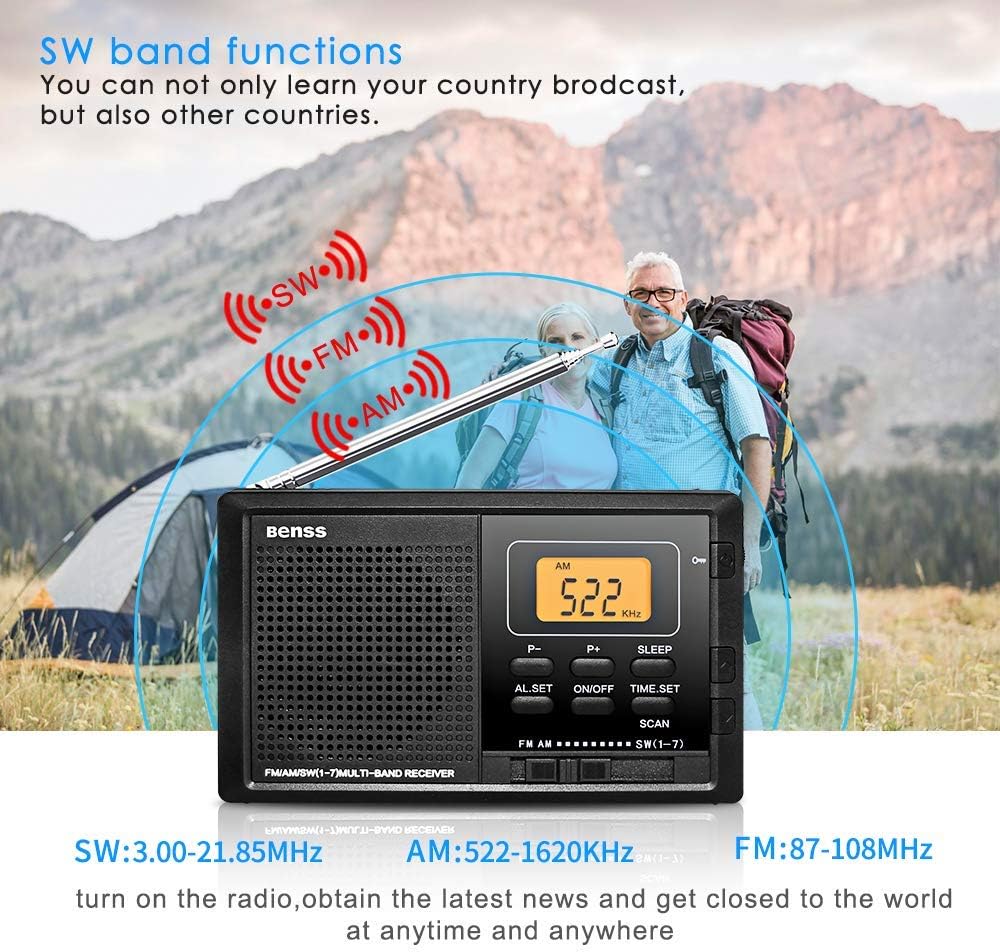
Figure 5.2: The radio supports AM, FM, and SW bands for diverse listening options.
5.4 Control de volum
Adjust the volume using the rotary knob located on the right side of the radio. Rotate upwards to increase volume and downwards to decrease.
5.5 Funció de temporitzador de son
Premeu el botó DORMIR button to activate the sleep timer. You can set the radio to automatically turn off after a specified duration (e.g., 10-90 minutes), allowing you to fall asleep to your favorite station without wasting battery power.

Figure 5.3: The sleep timer allows the radio to turn off automatically.
5.6 Botó de bloqueig
The lock button prevents accidental button presses. Slide the BLOC switch (usually on the side or top) to the locked position to disable all buttons. Slide it back to unlock.
5.7 Presa d'auriculars
Connect standard 3.5mm earphones to the earphone jack on the side of the radio for private listening. The built-in speaker will automatically mute when earphones are connected.
6. Manteniment
- Neteja: Wipe the radio's surface with a soft, dry cloth. Do not use liquid cleaners or aerosols.
- Substitució de la bateria: Replace batteries when the display dims or audio quality deteriorates. Always replace both batteries at the same time.
- Emmagatzematge: If storing the radio for an extended period, remove the batteries to prevent corrosion. Store in a cool, dry place.
7. Solució De Problemes
| Problema | Causa possible | Solució |
|---|---|---|
| La ràdio no s'encén. | Les piles estan gastades o incorrectament inserides. | Substituïu les piles per unes de noves, assegurant la polaritat correcta. |
| Mala recepció/estàtica. | Antena no estesa o posicionada correctament; zona de senyal feble. | Fully extend and rotate the telescopic antenna. Try moving to a different location. |
| L'alarma no sona. | L'alarma no està configurada o el volum és massa baix. | Ensure alarm time is set correctly. Increase the volume. |
| Els botons no responen. | La funció de bloqueig està activada. | Slide the LOCK switch to the unlocked position. |
8. Especificacions
| Característica | Detall |
|---|---|
| Número de model | BRBD05 |
| Rang de freqüència FM | 87-108 MHz |
| Rang de freqüència AM | 522-1620 KHz |
| Frequency Range SW | 3.00-21.85 MHz |
| Font d'alimentació | DC 3V (2 x AA Batteries) |
| Dimensions (L x A x A) | 122 x 69 x 22 mm (4.7 x 2.7 x 0.8 polzades) |
| Pes (sense bateria) | 142 g |
| Tecnologia de connectivitat | Wi-Fi (Note: This seems to be an error in the source data, as typical portable radios do not have Wi-Fi. The radio functions via radio waves.) |
| Característica especial | Portàtil |
| Components inclosos | Manual del propietari |
9. Garantia i Suport
This Benss product is manufactured with high-quality standards. For any issues or support inquiries, please refer to the contact information provided at the point of purchase or visit the official Benss weblloc.
Si us plau, conserveu el comprovant de compra per a reclamacions de garantia. Els termes i condicions específics de la garantia poden variar segons la regió i el distribuïdor.
Ask a question about this manual
Ask about setup, troubleshooting, compatibility, parts, safety, or missing instructions. Manuals+ will review the question and use this page’s manual context to help answer it.