
1. Introducció
Gràcies per la compraasing the Eonon 11.6-inch Flip-Down Car Monitor. This manual provides detailed instructions for the installation, operation, and maintenance of your new device. Please read this manual thoroughly before use to ensure proper functionality and to maximize your viewexperiència.

Figure 1.1: Eonon 11.6-inch Flip-Down Car Monitor L0154
This image shows the Eonon 11.6-inch Flip-Down Car Monitor in its deployed state, displaying a car image on its screen. The monitor is designed for overhead installation in vehicles.
2. Característiques
The Eonon L0154 monitor is equipped with advanced features for an enhanced in-car entertainment experience:
- 11.6-inch IPS Wide Viewing Angle Screen: Provides clear and vibrant images from various angles.
- Resolució Full HD 1080p: Supports high-definition video playback (1920x1080 via HDMI).
- Disseny ultraprim: With a thickness of only 16mm when folded, it offers a sleek and discreet profile.
- HDMI (1.4) Input: Connect external devices like smartphones, tablets, or gaming consoles.
- Connexió USB: Supports MP3 music playback and 1080P high-definition video files.
- IR Headphone Compatible: Allows for wireless audio listening with compatible IR headphones.
- Multi-color LED Lights: Choose from seven ambient LED colors to match your vehicle's interior or mood.
- Dome Light Door Control Wiring: Integrates with your vehicle's dome light system for automatic illumination.
- Adjustable Image Settings: Brightness, contrast, hue, and saturation can be customized.
- Multi-language Menu: Supports English, Japanese, German, French, Spanish, Portuguese, Dutch, Italian, and Russian.
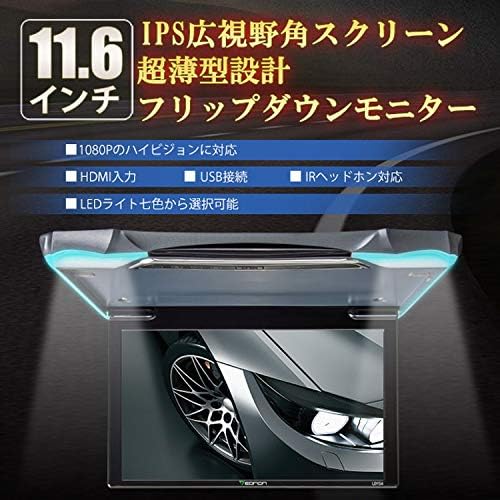
Figure 2.1: Key Features of the Eonon L0154 Monitor
This image highlights the main features of the Eonon L0154, including its 11.6-inch IPS wide viewing angle screen, ultra-thin design, 1080P high-definition support, HDMI and USB inputs, IR headphone compatibility, and selectable LED light colors.

Figure 2.2: 11.6-inch IPS Wide Viewing Angle Screen
This image illustrates the 11.6-inch IPS wide viewing angle screen of the monitor, emphasizing its ability to provide clear and vibrant visuals for an immersive viewexperiència.
3. Contingut del paquet
Si us plau, comproveu el contingut del paquet en desembalar-lo per assegurar-vos que hi hagi tots els elements:
- Eonon 11.6-inch Flip-Down Car Monitor (L0154)
- Japanese Instruction Manual (1 pc)
- Comandament a distància (1 unitat)
- AV Power Cable (1 pc)
- Dome Light Door Control Wiring (1 pc)
- Cargols (10 unitats)
- Screw Hole Covers (4 pcs)

Figura 3.1: Accessoris inclosos
This image displays all the accessories included with the Eonon L0154 monitor: the AV power cable, dome light door control wiring, remote control, screw hole covers, screws, and the instruction manual.
4. Configuració i instal·lació
Professional installation is recommended for this product. Ensure the vehicle's power is disconnected before beginning installation. Refer to the wiring diagram for correct connections.
4.1 Connexions de cablejat
Identify the following connections for proper installation:
- 1. Ground Wire: Connect to vehicle chassis.
- 2. ACC Power Connection: Connect to accessory power (switched 12V).
- 3. Sortida de vídeo: For connecting to other displays.
- 4. AUX Audio Output (Left): Sortida d'àudio del canal esquerre.
- 5. AUX Audio Output (Right): Sortida d'àudio del canal dret.
- 6. Entrada de vídeo: For connecting external video sources.
- 7. Audio Input (Left): Left channel audio input.
- 8. Audio Input (Right): Right channel audio input.
- 9. Door+ (Yellow): Positive trigger for dome light control.
- 10. Door- (Green): Negative trigger for dome light control.
- 11. 12V Battery Power Cord: Connecteu-lo a una alimentació constant de 12 V.
- 12. Ground Wire: Connexió a terra addicional.
- 13. HDMI: Port d'entrada HDMI.
- 14. USB: USB input port.

Figure 4.1: Wiring Diagram and Connections
Aquesta imatge ofereix un detall view of the wiring harness and connection points for the Eonon L0154 monitor, with numbered labels corresponding to the description above for easy identification during installation.
4.2 Muntatge del monitor
Securely mount the monitor to the vehicle's ceiling using the provided screws and screw hole covers. Ensure the mounting location is stable and does not obstruct airbags or other safety features.
5. Instruccions de funcionament
5.1 Engegada/apagada
The monitor will power on automatically when the vehicle's ACC power is supplied. To turn off, turn off the vehicle's ignition. The monitor has a power state memory function.
5.2 Selecció d'entrada
Use the remote control or the buttons on the monitor to switch between different input sources (HDMI, USB, AUX).
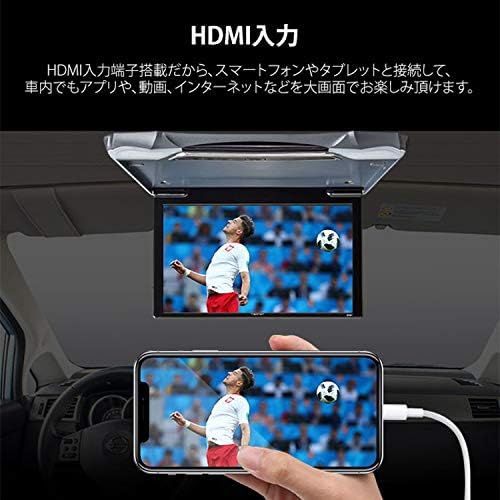
Figure 5.1: HDMI Input Connection
This image demonstrates the HDMI input capability, showing a smartphone connected to the monitor to display content, allowing for large-screen viewing of apps, videos, and internet content within the vehicle.

Figure 5.2: USB Connection for Media Playback
This image illustrates the USB connection feature, enabling playback of music (MP3) and 1080P high-definition videos directly from an external USB device on the car monitor.
5.3 Ajustar la configuració
Navigate the on-screen menu using the remote control to adjust image brightness, contrast, hue, and saturation. You can also change the menu language.
5.4 LED Ambient Lighting
Select your preferred LED light color from the seven available options (Red, Green, Blue, Yellow, Cyan, White, Purple) via the menu or remote control to enhance the interior ambiance.

Figure 5.3: Built-in LED Lights
This image highlights the built-in LED lights feature, allowing users to select from seven different colors to customize the ambient lighting around the monitor.
6. Manteniment
To ensure the longevity and optimal performance of your Eonon L0154 monitor, follow these maintenance guidelines:
- Neteja: Feu servir un drap suau i sec per netejar la pantalla i l'exterior. Per a taques difícils, netegeu lleugerament.ampRenta el drap amb aigua o un netejador de pantalles. Evita netejadors o dissolvents abrasius.
- Eviteu líquids: Do not spray liquids directly onto the monitor.
- Temperatura: Eviteu exposar el monitor a temperatures extremes o a la llum solar directa durant períodes prolongats.
- Manipulació: When folding or unfolding the monitor, do so gently to prevent damage to the hinge mechanism.
7. Solució De Problemes
Si teniu problemes amb el monitor, consulteu els problemes i solucions més comuns següents:
| Problema | Causa possible | Solució |
|---|---|---|
| Sense poder | Connexió d'alimentació fluixa; fusible fundit; cablejat incorrecte. | Check all power cables and connections. Verify vehicle fuse. Ensure correct wiring as per Section 4.1. |
| No Image/Signal | Incorrect input source selected; Loose video cable; Incompatible resolution. | Select the correct input source (HDMI/USB/AUX). Check video cable connections. Ensure output resolution from source is compatible (max 1920x1080 for HDMI). |
| Sense àudio | Volume too low; Muted; Loose audio cables; Incorrect audio format. | Increase volume. Check if muted. Verify audio cable connections. Ensure audio format is supported (WMA, MP3, M4A). |
| El control remot no funciona | Piles esgotades; Obstrucció; Sensor del comandament a distància bloquejat. | Replace remote control batteries. Remove any obstructions between remote and monitor. Ensure remote sensor on monitor is clear. |
| Les llums LED no canvien de color | Setting error; Malfunction. | Check LED light settings in the menu. If issue persists, contact support. |
If the problem persists after trying these solutions, please contact Eonon customer support.
8. Especificacions
| Característica | Especificació |
|---|---|
| Mida de la pantalla | 11.6 polzades |
| Tipus de panell | IPS Wide Viewangle ing |
| Resolució HDMI | 1920 x 1080 Full HD |
| RCA Resolution | 720 x 480 VGA |
| Vol. Operatiutage | DC 12V |
| Corrent màxim de funcionament | 740 mA |
| Mides plegades (L x A x A) | 31 cm x 24 cm x 1.6 cm |
| Fully Open Dimensions (L x W x H) | 31 cm x 24 cm x 18.5 cm |
| Pes de la unitat | 1.1 KG |
| Gross Weight (with packaging) | 1.9 KG |
| Display Open Angle | 140° |
| Relació d'aspecte | 16:9 / 4:3 |
| Formats d'àudio compatibles (USB) | WMA, MP3, M4A |
| Supported Image Formats (USB) | AAC, JPEG, PNG, BMP |
| Supported Video Formats (USB) | MPEG RM, AVI, MP4, RMVB, MOV, MJPEG, Divx |
| Max Video Resolution (USB) | 1920 x 1080 |
| Connectivitat | HDMI (1.4), USB, RCA (Video In/Out, Audio In/Out), IR |
| Idiomes del menú | English, Japanese, German, French, Spanish, Portuguese, Dutch, Italian, Russian |
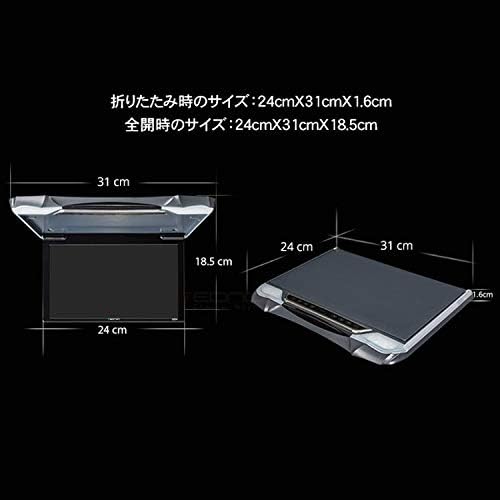
Figura 8.1: Dimensions del monitor
This image provides a diagram showing the folded and fully open dimensions of the Eonon L0154 monitor, including length, width, and height measurements in centimeters.
9. Garantia i Suport
9.1 Garantia del fabricant
This product comes with a 1-year manufacturer's warranty. For detailed warranty terms and conditions, please refer to the official Eonon website or the link provided at the time of purchase.
9.2 Atenció al client
If you have any questions regarding the operation, installation, or troubleshooting of your Eonon L0154 monitor, please contact Eonon customer service. When contacting support, please have your order number, name, and the product's serial number ready.
Eonon Customer Service Contact: 03-4405-5960
In case of product malfunction, warranty service can be obtained directly from Eonon customer service or the store where the product was purchased.