
Bluedio H-T-19
Manual d'usuari dels auriculars supraaurals Bluedio Bluetooth 5.0
Model: H-T-19 | Brand: Bluedio
Introducció
This manual provides detailed instructions for the Bluedio Bluetooth 5.0 Over-Ear Headphones. It covers product features, setup, operation, maintenance, and troubleshooting to ensure optimal performance and user experience.
Què hi ha a la caixa
- Bluedio HT wireless headphones
- Cable de càrrega micro USB
- Cable d'àudio de 3.5 mm
- Manual d'usuari
Producte acabatview
Familiarize yourself with the various components and controls of your Bluedio headphones.

Figura 1: Auriculars connectatsview amb components etiquetats.
- Botó per pujar el volum: Augmenta el volum d'àudio.
- Botó per baixar el volum: Disminueix el volum d'àudio.
- Indicador LED: Displays device status (e.g., pairing, connected, charging).
- Power/MF Button (Multi-Function Button): Powers on/off, controls playback, answers/ends calls.
- Interruptor de roda: Used for previous/next track selection.
- Presa de càrrega USB: Per carregar els auriculars.
- Micròfon: Built-in for calls and voice commands.
- Presa d'àudio (3.5 mm): Per a connexió d'àudio amb cable.
Configuració
Carregant els auriculars
Before first use, fully charge your headphones. Use the provided Micro USB charging cable to connect the headphones to a power source.

Figure 2: Long Working Time and Battery.
- Capacitat de la bateria: 650 mAh
- Temps de càrrega: Aproximadament 1 hora per a una càrrega completa.
- Temps de reproducció de música: Fins a 40 hores amb una càrrega completa.
- Temps de conversa: Fins a 45 hores amb una càrrega completa.
- Temps d'espera: Fins a 30 dies.
Pairing with Your Mobile Phone
Follow these steps to pair your Bluedio headphones with your device via Bluetooth:

Figure 3: Bluetooth Pairing Guide.
- Mantingueu la distància entre l’auricular i el telèfon mòbil a menys d’un metre. Com més a prop, millor.
- When the headset is off (if not, turn off the headphones first), press and hold the Power/MF Button for 5 seconds or so, only when you see the blue light stays on (instead of blinking), can you release the button. The headset is in pairing mode.
- Activeu el Bluetooth del vostre telèfon mòbil, afegiu / cerqueu dispositius.
- When "H" or "Bluedio" appears, select it. If asked for a pass code: Enter "0000".
Atenció:
If pairing is not successful within 60 seconds, the LED goes out and the headset is out of pairing mode. Repeat the pairing procedure.
Instruccions de funcionament
Reproducció de música
The headphones feature a Hurricane turbine housing design for powerful bass resonance and CD lossless sound with SNR up to 98dB for crystal-clear audio.

Figure 4: High-Fidelity Audio Experience.
- Reproduir/pausa: Premeu el botó Power/MF Button una vegada.
- Pista següent: Utilitza el Interruptor de rodes endavant.
- Pista anterior: Utilitza el Interruptor de rodes cap enrere.
- Control de volum: Feu servir els botons de pujar/baixar el volum.
- Compartir música: Connect another headphone (e.g., Bluedio Shooting Brake) via the 3.5mm audio cable to share music instantly. (Recommended to use earphones with impedance of at least 32Ω).
Gestió de trucades
The built-in microphone and echo suppression ensure clear communication during calls.
- Respondre/Finalitzar la trucada: Premeu el botó Power/MF Button una vegada.
- Rebutja la trucada: Manteniu premut el botó Power/MF Button durant 2 segons.
- Torna a marcar l'últim número: Premeu dues vegades el botó Power/MF Button.
Voice Prompts and Smart Features
The headphones offer voice prompts in multiple languages and integrate with cloud services for enhanced functionality.

Figure 5: Voice Prompt and Bluetooth 5.0 Features.
- Voice Prompt Languages: English, Chinese, Spanish, French. Switch by pressing the Power/MF Button i Botó cap avall de volum simultàniament.
- Cloud Service Integration: Supports Baidu Cloud Engine and Amazon Cloud. Download the Bluedio APP to access your AWS account for music, weather, news, and agenda.
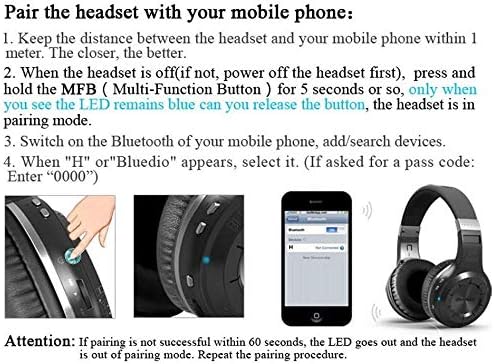
Figure 6: Smart Features with Cloud Service.
Especificacions
| Característica | Detall |
|---|---|
| Versió Bluetooth | 5.0 |
| Suport Profiles | A2DP, AVRCP, HTSP, HTFP |
| Distància de comunicació | 10 metres |
| Interval dinàmic | 118 dB |
| Unitat d'accionament | 57 mm |
| Impedància de la trompa | 16 Ω |
| Distorsió harmònica total (THD) | <0.5% |
| Capacitat de la bateria | 650 mAh |
| Temps de reproducció de música | 40 hores |
| Temps de conversa | 45 hores |
| Temps d'espera | 30 dies |
| Temps de càrrega | 1 hores |
| Dimensions | 7.09 x 6.69 x 1.97 polzades |
| Pes de l'article | 15.5 unces |
| Control de soroll | Cancel·lació activa del soroll |
| Conector d'auriculars | 3.5 mm Jack |
| Tipus de control | Control multimèdia, Veu |
Manteniment
Un manteniment adequat garanteix la longevitat i el rendiment dels teus auriculars.
- Neteja: Gently wipe the earcups and headband with a soft, dry cloth. Do not use harsh chemicals or abrasive materials.
- Emmagatzematge: Store the headphones in a cool, dry place away from direct sunlight and extreme temperatures. When not in use, it is recommended to store them in a protective case to prevent damage.
- Cura de la bateria: Avoid fully discharging the battery frequently. For long-term storage, charge the battery to about 50% every few months.
- Gestió de cables: Handle the charging and audio cables carefully to prevent kinks or damage.
Resolució de problemes
Si teniu problemes amb els auriculars, consulteu les solucions habituals següents:
- No es pot emparellar:
- Assegureu-vos que els auriculars estiguin completament carregats.
- Make sure the headphones are in pairing mode (blue LED stays on).
- Desactiva i activa el Bluetooth del dispositiu.
- Esborra les connexions Bluetooth anteriors del dispositiu.
- Prova d'emparellar-lo amb un altre dispositiu per descartar problemes específics del dispositiu.
- Sense so:
- Comproveu el nivell de volum tant dels auriculars com del dispositiu connectat.
- Assegureu-vos que els auriculars estiguin correctament emparellats i connectats.
- If using a wired connection, ensure the 3.5mm audio cable is fully inserted into both the headphones and the audio source.
- Prova de reiniciar tant els auriculars com el dispositiu font d'àudio.
- Qualitat de so baixa:
- Move closer to your connected device to avoid interference or being out of range.
- Assegureu-vos que no hi hagi obstacles físics entre els auriculars i el dispositiu.
- Comproveu si la qualitat de la font d'àudio és alta.
- Els auriculars no s'encenen:
- Assegureu-vos que els auriculars estiguin completament carregats.
- Press and hold the Power/MF button for a longer duration (e.g., 5-7 seconds).
Garantia i Suport
Bluedio offers a comprehensive warranty and support for your product.
- Política de devolució: 30 days with no reason to return for your Bluedio Bluetooth headphone.
- Garantia: 12 Months worry-free warranty.
- For further assistance or warranty claims, please refer to the contact information provided in your product packaging or visit the official Bluedio support weblloc.
Ask a question about this manual
Ask about setup, troubleshooting, compatibility, parts, safety, or missing instructions. Manuals+ will review the question and use this page’s manual context to help answer it.