
1. Introducció
This manual provides detailed instructions for the installation, operation, and maintenance of your ENERMAX LIQMAX V4 120mm AIO CPU Liquid Cooler. Please read this manual thoroughly before installation to ensure proper setup and optimal performance. This liquid cooler is designed to provide efficient cooling for your CPU, featuring a digital display for real-time monitoring and a high-performance pump and fan system.
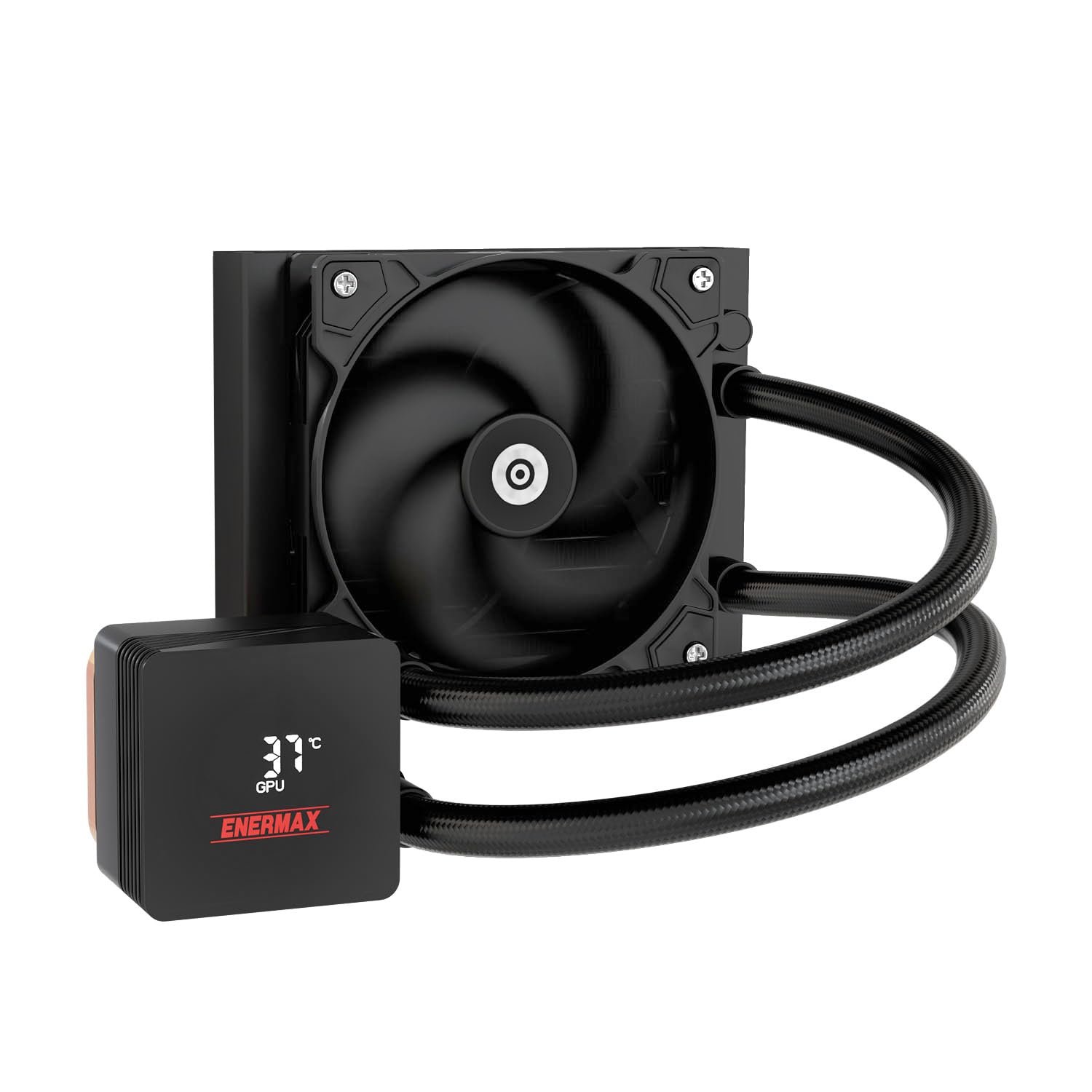
Figure 1: ENERMAX LIQMAX V4 120mm AIO CPU Liquid Cooler
2. Contingut del paquet
Verifiqueu que tots els components siguin presents al paquet:
- 1x Radiator with pre-installed fan
- 1x CPU Water Block with integrated pump and digital display
- Mounting hardware for Intel sockets (LGA 1851/1700/1200/115X)
- Mounting hardware for AMD sockets (AM5/AM4)
- Pasta tèrmica
- Manual d'usuari
3. Característiques del producte
3.1. Magnetic Rotatable Real-time Status Display
The integrated digital display provides real-time monitoring of CPU/GPU temperatures and fan speeds. The display is magnetic and rotatable, allowing for easy adjustment of its orientation without tools for optimal visibility in any system configuration.
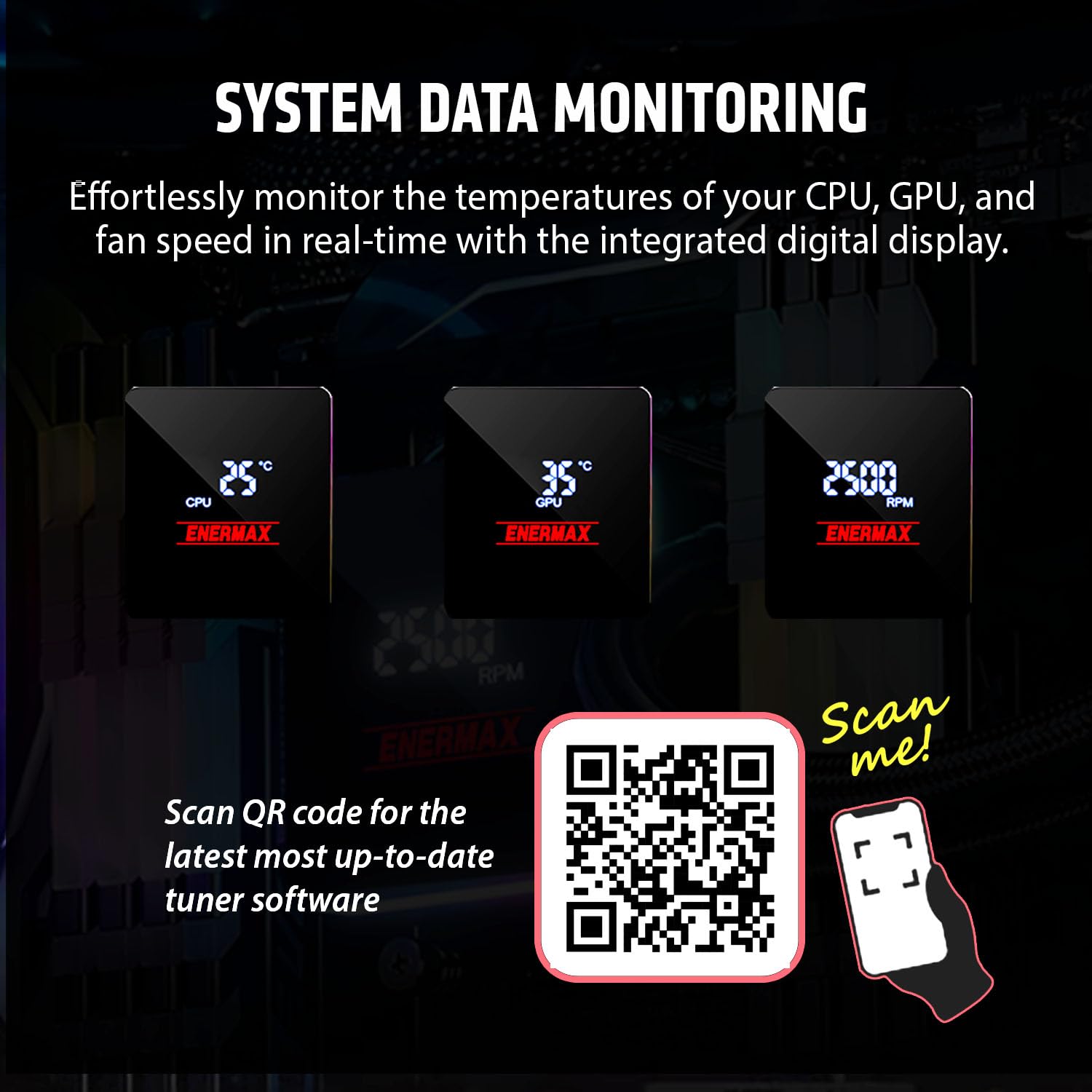
Figure 2: System Data Monitoring on the digital display

Figure 3: Magnetic detachable display for easy orientation adjustment
3.2. Gen.2 Xtreme Pump Design
The cooler features a Gen.2 Xtreme Pump with an enlarged cooling base and improved pump lift. This design enhances heat dissipation and boosts the flow rate for superior cooling performance, capable of handling up to 320W TDP.

Figura 4: Intern view of the Gen.2 Xtreme Pump
3.3. Silent Flow PWM Fan
The included 120mm Silent Flow fan features 3mm thicker blades and optimized angles for advanced cooling efficiency while minimizing noise. The PWM-controlled design allows the fan and pump to automatically adjust speeds (500-1800 RPM for fan, 1500-3100 RPM for pump) based on system load, optimizing both noise levels and cooling performance.

Figure 5: Quiet, Adaptive Cooling Performance of the Silent Flow Fan
3.4. High-Density Radiator
The radiator is designed for maximum cooling performance, featuring a high-efficiency structure, widened tubing, and enhanced heat transfer capabilities for effective thermal management.

Figure 6: High-Density Radiator for enhanced cooling
4. Guia d'instal·lació
Aquesta secció ofereix una descripció generalview of the installation process. Refer to the detailed diagrams included with your product for specific steps.
4.1. Compatibilitat
The ENERMAX LIQMAX V4 120mm AIO CPU Liquid Cooler supports the following CPU sockets:
- Intel: LGA 1851, LGA 1700, LGA 1200, LGA 115X (1150, 1151, 1155, 1156)
- AMD: AM5, AM4
4.2. Passos generals d'instal·lació
- Prepara la placa base: Install the appropriate backplate and standoffs for your CPU socket (Intel or AMD).
- Aplicar pasta tèrmica: Apply a thin, even layer of thermal paste to the center of your CPU's integrated heat spreader (IHS).
- Mount Water Block: Carefully place the CPU water block onto the CPU, aligning it with the standoffs. Secure it with the provided thumb screws or mounting brackets.
- Muntar el radiador: Install the radiator and pre-installed fan(s) into an available fan mount location in your PC case. Ensure adequate airflow.
- Connectar els cables:
- Connecteu el cable d'alimentació de la bomba al capçalera CPU_FAN o AIO_PUMP de la placa base.
- Connect the fan power cable(s) to available fan headers on your motherboard.
- Connect the USB cable from the water block to an available internal USB 2.0 header on your motherboard for digital display functionality and software control.
- Gestió de cables: Route cables neatly to avoid interference with other components and improve airflow.
5. Funcionament
5.1. Pantalla Digital
Upon system startup, the digital display on the CPU water block will activate, showing real-time CPU/GPU temperatures and fan speeds. The display can be rotated manually to suit your preferred orientation.
5.2. Control de programari
For advanced monitoring, customization, and alarm settings, install the ENERMAX Tuner software. This software allows you to:
- Monitor CPU/GPU temperatures and fan speeds.
- Set temperature and fan speed alert thresholds.
- Customize display options.
To download the latest ENERMAX Tuner software, scan the QR code below or visit the provided link:

Figure 7: ENERMAX Tuner Software Interface
Figure 8: Scan for ENERMAX Tuner Software
Enllaç de descàrrega de programari: https://uqr.to/enermaxmarketing/1xosr
6. Manteniment
Un manteniment regular ajuda a garantir la longevitat i el rendiment òptim del vostre refrigerador de líquid.
- Eliminació de pols: Periodically clean dust from the radiator fins and fan blades using compressed air. Ensure the system is powered off before cleaning.
- Inspeccionar tubs: Check the tubing for any signs of kinks, leaks, or damage.
- Monitoritzar el rendiment: Regularly check CPU/GPU temperatures and fan speeds via the digital display or ENERMAX Tuner software to detect any anomalies.
7. Solució De Problemes
If you encounter issues with your liquid cooler, refer to the following common problems and solutions:
| Problema | Causa possible | Solució |
|---|---|---|
| High CPU/GPU Temperatures | Improper thermal paste application, loose water block, insufficient airflow, dust buildup on radiator. | Reapply thermal paste, ensure water block is securely mounted, clean radiator and fans, improve case airflow. |
| Fan(s) Not Spinning | Fan cable disconnected, faulty fan header, fan failure. | Check fan cable connections, try a different fan header, contact support if fan is faulty. |
| Pump Not Operating / Unusual Noise | Pump cable disconnected, air bubbles in loop, pump failure. | Check pump cable connection, gently tilt the PC case to dislodge air bubbles, contact support if pump is faulty. |
| La pantalla digital no funciona | USB cable disconnected, software not installed or running, display fault. | Ensure USB cable is connected to motherboard, install/run ENERMAX Tuner software, contact support if display is faulty. |
If the issue persists after attempting these solutions, please contact ENERMAX customer support.
8. Especificacions
| Característica | Detall |
|---|---|
| Número de model | ELC-LMIV120-SF |
| Mètode de refrigeració | Ventilador, Aigua |
| Suport TDP | 320 watts |
| Mida del ventilador | 120 mm |
| Maximum Fan Rotational Speed | 1800 RPM |
| Nivell de soroll | 23.46 decibels |
| Tipus de connector d'alimentació | 4-pins |
| Dispositius compatibles | CPU |
| Material | Plastic (components) |
| Pes de l'article | 3.27 lliures |
| Dimensions del paquet | 9.88 x 8.66 x 5.47 polzades |
| UPC | 819315029268 |
9. Garantia i Suport
ENERMAX products are manufactured to the highest quality standards. For warranty information and technical support, please refer to the warranty card included with your product or visit the official ENERMAX weblloc web. Conserveu el comprovant de compra per a reclamacions de garantia.
ENERMAX USA Support: For assistance, please visit the Enermax weblloc o poseu-vos en contacte amb el seu departament d'atenció al client.