
Introducció
The NEDIS Universal Programmable Remote Control (model TVRC1140BK) is designed to manage up to 4 different devices. This remote can be programmed via a personal computer (PC) to replace original remote controls for various electronic devices, including televisions (TV), video cassette recorders (VCR), digital versatile disc players (DVD), and digital video broadcasting terrestrial receivers (DVB-T). It is engineered to replicate most functions of your original remotes, providing a consolidated control solution.
Informació de seguretat
- No exposeu el comandament a distància a la llum solar directa, a la calor o a la humitat.
- Eviteu deixar caure el comandament a distància ni sotmetre'l a impactes forts.
- No intenteu desmuntar ni modificar el comandament a distància. Això anul·larà la garantia.
- Mantingueu les piles fora de l'abast dels nens. En cas d'ingestió, busqueu atenció mèdica immediata.
- Elimineu les piles usades d'acord amb la normativa local. No llenceu les piles al foc.
- Use only the specified battery type (2x AAA Alkaline).
Contingut del paquet
Si us plau, comproveu el paquet per veure si hi ha els elements següents:
- NEDIS Universal Programmable Remote Control (TVRC1140BK)
- Cable de programació USB
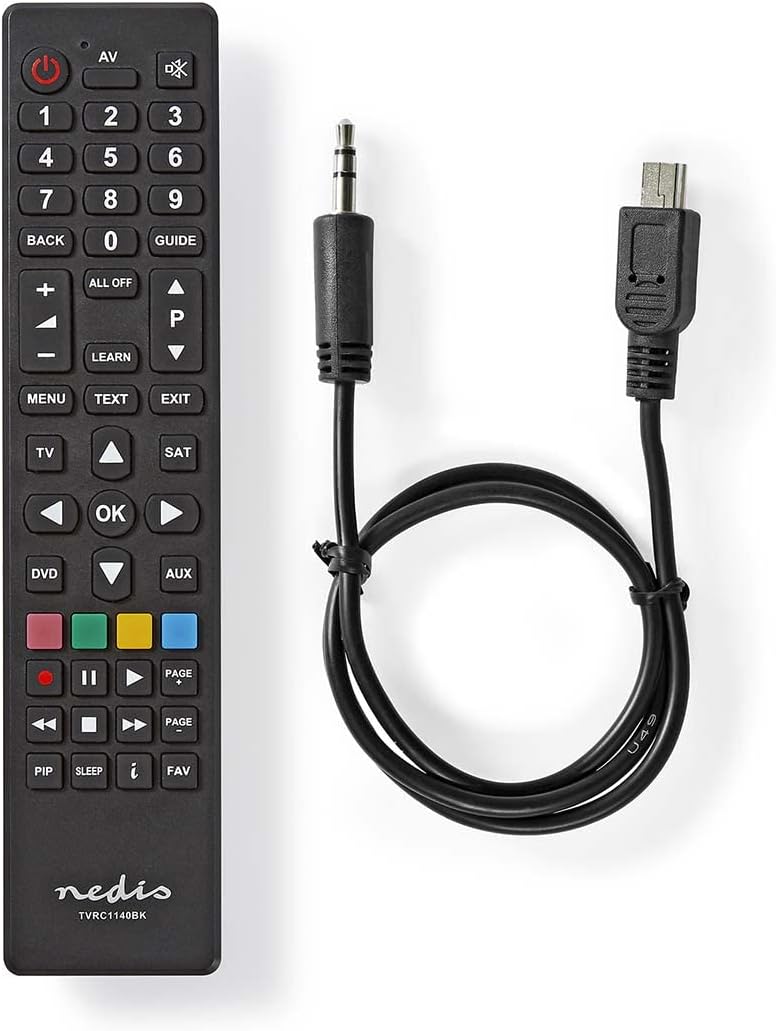
Image: The NEDIS Universal Remote Control TVRC1140BK shown alongside its USB programming cable.
Producte acabatview
The remote control features a clear button layout for intuitive operation. Familiarize yourself with the various buttons and their functions before use.

Imatge: Frontal view of the NEDIS Universal Remote Control TVRC1140BK, displaying all control buttons.
Key Buttons and Functions:
- Botó d'encendre (): Turns devices on or off.
- Device Selection Buttons (TV, DVD, SAT, AUX): Selecciona el dispositiu que vols controlar.
- Teclat numèric (0-9): For channel selection and data input.
- Pujar/baixar el volum (+/-): Ajusta el volum.
- Channel Up/Down (P/P): Canvi de canals.
- Botons de navegació (amunt, avall, esquerra, dreta, D'acord): Per a la navegació i selecció de menús.
- Menú/Sortida: Accesses or exits device menus.
- Botó d'aprenentatge: Used for programming functions from an original remote.
- Botons de colors (vermell, verd, groc, blau): Often used for specific functions in menus or teletext.
Configuració
1. Instal·lació de la bateria
- Obriu la tapa del compartiment de la bateria a la part posterior del comandament a distància.
- Insert two (2) AAA Alkaline batteries, ensuring the correct polarity (+ and -) as indicated inside the compartment.
- Tanqueu bé la tapa del compartiment de la bateria.
2. Programació per a PC
The NEDIS TVRC1140BK remote control is programmed using dedicated software on a PC. This method allows for comprehensive device code loading and customization.
- Descàrrega de programari: Visit the official NEDIS support website to download the latest programming software for the TVRC1140BK model.
- Instal·lació de programari:
- If you have previously installed an older version of the software, uninstall it completely before proceeding.
- For new users, install the downloaded software directly by following the on-screen instructions.
- Connecteu el comandament a distància: Use the provided USB programming cable to connect the remote control to an available USB port on your PC.
- Programming Process: Follow the instructions within the software to select your device types (TV, DVD, VCR, DVB-T, etc.) and load the appropriate control codes onto the remote. The software typically guides you through the process of assigning functions to buttons.
Nota: For optimal performance and access to the latest device codes, always use the most current version of the programming software available from the manufacturer.
Funcionament del comandament a distància
Once programmed, the remote control functions similarly to your original device remotes.
- Seleccioneu el dispositiu: Premeu el botó del dispositiu corresponent (per exemple, TV, DVD, Ds, AUX) to select the device you wish to control. The indicator light on the remote may illuminate to confirm selection.
- Point and Operate: Point the remote control directly at the device's infrared receiver.
- Use Functions: Press the desired function buttons (e.g., Power, Volume, Channel, Menu, Play, Pause) to control your selected device.
Manteniment
- Neteja: Netegeu el comandament a distància amb un drap suau i sec. No utilitzeu productes de neteja abrasius ni dissolvents.
- Substitució de la bateria: Replace batteries when the remote's performance degrades or if the indicator light does not illuminate. Always replace both batteries at the same time with new AAA Alkaline batteries.
- Emmagatzematge: Si no feu servir el comandament a distància durant un període prolongat, traieu-ne les piles per evitar fuites.
Resolució de problemes
- El comandament a distància no respon:
- Comproveu si les piles estan correctament inserides i tenen prou càrrega. Substituïu-les si cal.
- Ensure there is a clear line of sight between the remote control and the device's infrared receiver.
- Verify that the correct device mode (TV, DVD, etc.) is selected on the remote.
- Device functions not working correctly after programming:
- The device code may be incorrect or incomplete. Re-program the remote using the PC software, ensuring you select the correct manufacturer and model for your device.
- Some specific functions might not be available if the original remote had unique features not supported by the universal remote's code database.
- Consult the NEDIS support website for updated software or additional programming tips.
- PC programming software issues:
- Ensure you have uninstalled any previous versions of the software before installing the latest one.
- Check your PC's operating system compatibility with the software.
- Prova d'utilitzar un port USB diferent o reinicia l'ordinador.
Especificacions
| Marca | NEDIS |
| Número de model | TVRC1140BK |
| Tecnologia de connectivitat | infrarojos |
| Dispositius màxims compatibles | 4 |
| Dispositius compatibles | TV, DVD/Blu-ray Player, Set-top Box, VCR |
| Tipus de controlador | Control de botons |
| Interval màxim | 10 metres |
| Piles necessàries | 2x AAA alcalí (no inclòs) |
| Color | Negre |
Garantia i Suport
For warranty information, please refer to the terms and conditions provided by your retailer at the time of purchase or contact NEDIS customer support directly. For technical assistance, software updates, and additional resources, please visit the official NEDIS weblloc.