
TCL 40a323
TCL 40a323 Smart TV Full HD 40-inch User Manual
Model: 40a323
1. Introducció
Gràcies per la compraasing the TCL 40a323 Smart TV. This manual provides essential information for the safe and efficient operation of your television. Please read it thoroughly before using the product and retain it for future reference.
Instruccions importants de seguretat
- No bloquegeu cap obertura de ventilació. Instal·leu-ho d'acord amb les instruccions del fabricant.
- No instal·leu a prop de cap font de calor com ara radiadors, registres de calor, estufes o altres aparells (inclosos amplificadors) que produeixen calor.
- Eviteu que el cable d'alimentació sigui trepitjat o pessigat, especialment als endolls, els endolls i el punt on surten de l'aparell.
- Utilitzeu només accessoris/accessoris especificats pel fabricant.
- Desendolleu aquest aparell durant les tempestes amb llamps o quan no l'utilitzeu durant llargs períodes de temps.
- Demaneu tot el servei a personal de servei qualificat. Cal fer servei quan l'aparell s'hagi fet malbé d'alguna manera.
2. Contingut del paquet
Please check to ensure all items are present and in good condition:
- TCL 40a323 Smart TV (40-inch Full HD LED Television)
- Control remot
- Cable d'alimentació
- Moble per a TV (2 peces)
- Cargols per a la instal·lació del suport
- Manual d'usuari (aquest document)
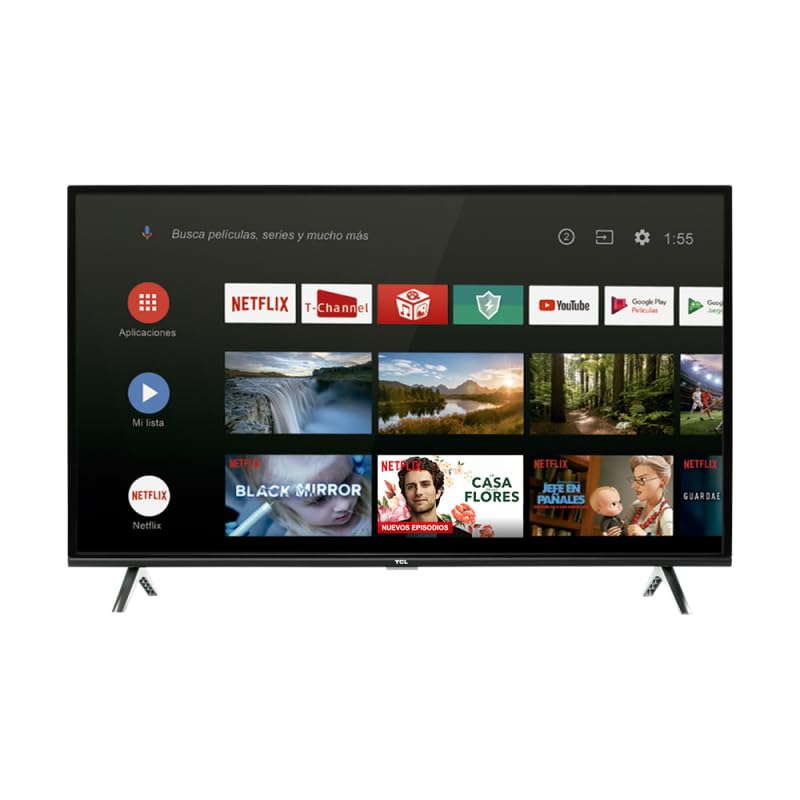
Image: The TCL 40a323 Smart TV, showing its display and smart interface.
3. Configuració
3.1 Instal·lació del suport per a TV
- Col·loqueu amb cura la pantalla del televisor amb la pantalla cap avall sobre una superfície suau i plana (per exemple, una manta o escuma) per evitar que es faci malbé.
- Alineeu cada peça del suport amb les ranures corresponents de la part inferior del televisor.
- Secure each stand piece with the provided screws, ensuring they are tightened firmly.
- Aixequeu amb cura el televisor fins a la seva posició vertical sobre una superfície estable i anivellada.
Imatge: Lateral view of the TCL 40a323 Smart TV, illustrating the attached stand.
3.2 Connexió de dispositius
Your TCL Smart TV offers various connection options:
- HDMI: Connect external devices like Blu-ray players, game consoles, or cable boxes to the HDMI port.
- LAN (Ethernet): Per a una connexió a Internet per cable estable, connecteu un cable Ethernet al port LAN.
- Composite/AV Input: For older devices, use the Composite/AV input.

Imatge: Lateral view of the TCL 40a323 Smart TV, highlighting the available input ports.
3.3 Connexió d'alimentació
Plug the power cable into the TV's power input, then plug the other end into a suitable wall outlet.
3.4 Engegada i configuració inicials
- Premeu el botó d'engegada del comandament a distància o del televisor mateix.
- Follow the on-screen instructions to select your language, country, and connect to your Wi-Fi network (if not using a wired connection).
- Sign in with your Google account to access Android TV features, including Google Play Store and voice assistant.
- Complete the channel scan if you are connecting an antenna or cable.
4. Funcionament del televisor
4.1 Control remotview
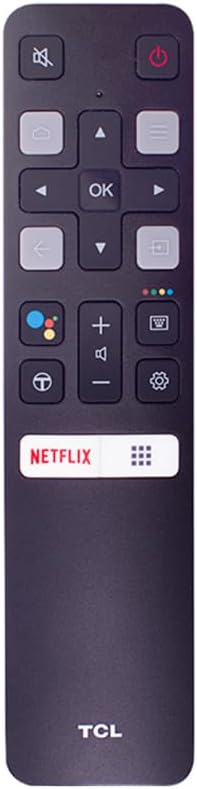
The remote control allows you to navigate your TV's features. Familiarize yourself with the buttons:

Image: The TCL Smart TV remote control, showing its layout and buttons.
- Botó d'encesa: Encén o apaga el televisor.
- Directional Pad (Up/Down/Left/Right) & OK: Navegar pels menús i confirmar les seleccions.
- Botó enrere: Torna a la pantalla anterior.
- Botó d'inici: Accedeix a la pantalla d'inici d'Android TV.
- Pujar/baixar el volum: Ajusta el nivell de volum.
- Botó de silenci: Silencia o activa el so.
- Botó d'entrada: Selecciona la font d'entrada (HDMI, AV, etc.).
- Botó de Netflix: Accés directe a l'aplicació Netflix.
- Botó de l'Assistent de Google: Activa les ordres de veu.
4.2 Funcions de Smart TV (Android TV)
Your TCL 40a323 runs on Android TV, providing access to a wide range of entertainment and applications:
- Google Play Store: Download and install apps, games, and streaming services.
- Chromecast integrat: Emet contingut des del teu telèfon intel·ligent o tauleta directament al televisor.
- Assistent de Google: Feu servir ordres de veu per cercar contingut, controlar dispositius domèstics intel·ligents i obtenir informació.
- Aplicacions preinstal·lades: Access popular services like Netflix and YouTube directly from the home screen.
4.3 Connectivitat de xarxa
- Wi-Fi: Connect to your home wireless network via the Settings menu.
- Bluetooth: Pair Bluetooth devices such as headphones, game controllers, or soundbars.
5. Manteniment
5.1 Neteja de la pantalla
- Desendolla sempre el televisor abans de netejar-lo.
- Use a soft, lint-free cloth (e.g., microfiber) to gently wipe the screen.
- Per a marques difícils, esbandiu lleugeramentampNetegeu el drap amb aigua o amb un netejador de pantalles especialitzat. No ruixeu mai líquid directament sobre la pantalla.
- Avoid using harsh chemicals, abrasive cleaners, or alcohol-based solutions.
5.2 Neteja de la carcassa del televisor
- Netegeu el marc i el panell posterior del televisor amb un drap suau i sec.
- Do not allow water or other liquids to enter the TV's casing.
6. Solució De Problemes
Si teniu problemes amb el televisor, consulteu els problemes i solucions més comuns següents:
| Problema | Possible solució |
|---|---|
| Sense poder |
|
| No hi ha imatge, però hi ha so |
|
| No hi ha so, però hi ha imatge |
|
| El comandament a distància no funciona |
|
| No es pot connectar a la Wi-Fi |
|
7. Especificacions
| Nom del model | 40A323 |
| Marca | TCL |
| Mida de la pantalla | 40 polzades |
| Tecnologia de visualització | LED |
| Resolució | Full HD (1920 x 1080) |
| Freqüència d'actualització | 60 Hz |
| Sistema operatiu | Android TV |
| Tecnologia de connectivitat | Bluetooth 4.0, Wi-Fi 2.4G 802.11 b/g/n 2T2 |
| Serveis d'Internet compatibles | Android, Google Play, Netflix, YouTube, etc. |
| Ports | 1 x HDMI, 1 x LAN (Ethernet), 1 x Composite/AV Input |
| Sortida d'àudio | Dolby Audio 2 x 8W |
| Mètode de control | Control remot |
| Color | Negre |
| Pes | 10000 grams (aprox. 22 lliures) |
| UPC | 846042011051 |
8. Garantia i Suport
8.1 Garantia limitada
This product comes with a limited warranty. Please refer to the warranty card included in your product packaging or visit the official TCL website for detailed terms, conditions, and duration of the warranty applicable to your region. Keep your purchase receipt as proof of purchase for any warranty claims.
8.2 Atenció al client
For technical assistance, troubleshooting beyond this manual, or service inquiries, please contact TCL customer support. You can usually find contact information (phone numbers, email, or support portals) on the official TCL weblloc per al vostre país.
Before contacting support, please have your TV's model number (40a323) and serial number ready.
Ask a question about this manual
Ask about setup, troubleshooting, compatibility, parts, safety, or missing instructions. Manuals+ will review the question and use this page’s manual context to help answer it.