
Tilta WLC-T03-K5
Tilta Nucleus-M: Wireless Lens Control System User Manual
Model: WLC-T03-K5
1. Introducció
The Tilta Nucleus-M is a 3-channel wireless lens control system designed for precise control of focus, iris, and zoom functions on camera lenses. This system offers flexibility through its FIZ hand unit and two wireless hand grips, allowing for various control configurations. It is engineered for reliable performance in professional filmmaking environments, featuring a robust build and extended wireless range.
2. Components del sistema
The Nucleus-M system includes several key components that work together to provide comprehensive lens control:
- FIZ Hand Unit: The primary control unit for focus, iris, and zoom.
- Wireless Hand Grips (Left & Right): Ergonomic grips with finger wheels and zoom toggles for additional control.
- Brushless Wireless Motors: Motors with integrated motor drives for direct communication with control units.
- Rod Bushings: Adapters for mounting motors on 15mm rods.
- Cables d'alimentació: D-tap power cable and 7-pin to 7-pin daisy chain cables.
- Carregador: For recharging 18650 batteries (batteries not included).
- Accessoris de muntatge: Rosette mounts and gimbal adapters.

Imatge: Més deview of the Tilta Nucleus-M Wireless Lens Control System, showing the FIZ hand unit, two wireless hand grips, and two brushless motors.
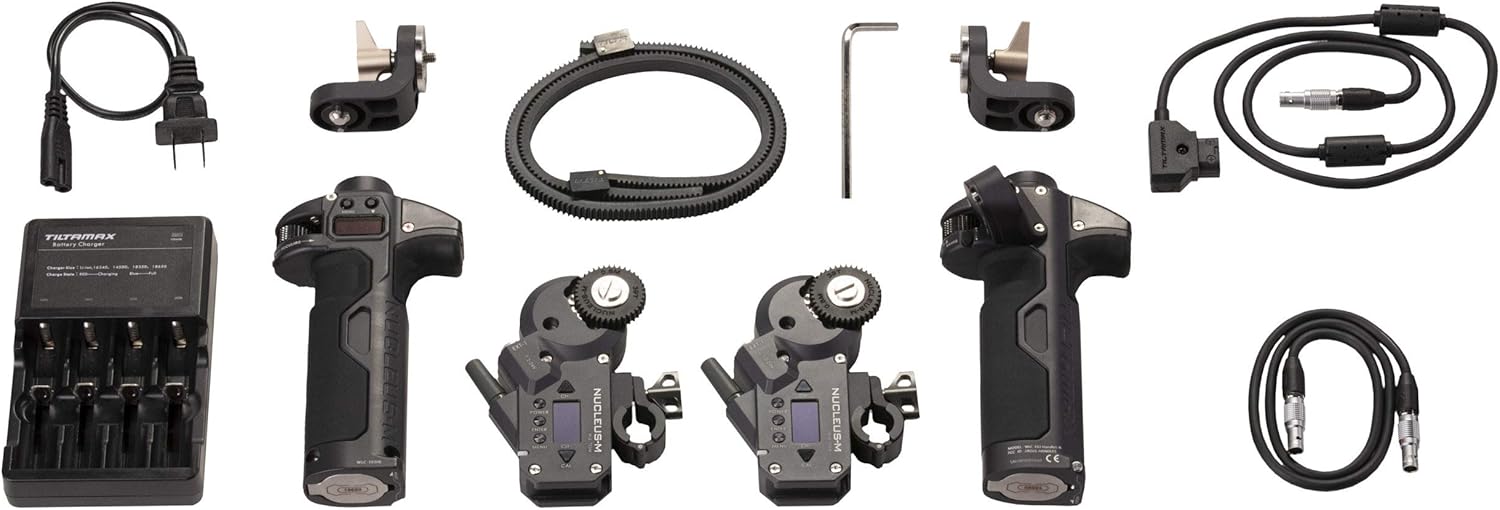
Image: The complete Tilta Nucleus-M kit, including the FIZ hand unit, two hand grips, two motors, various cables, rod bushings, a charger, and mounting accessories.
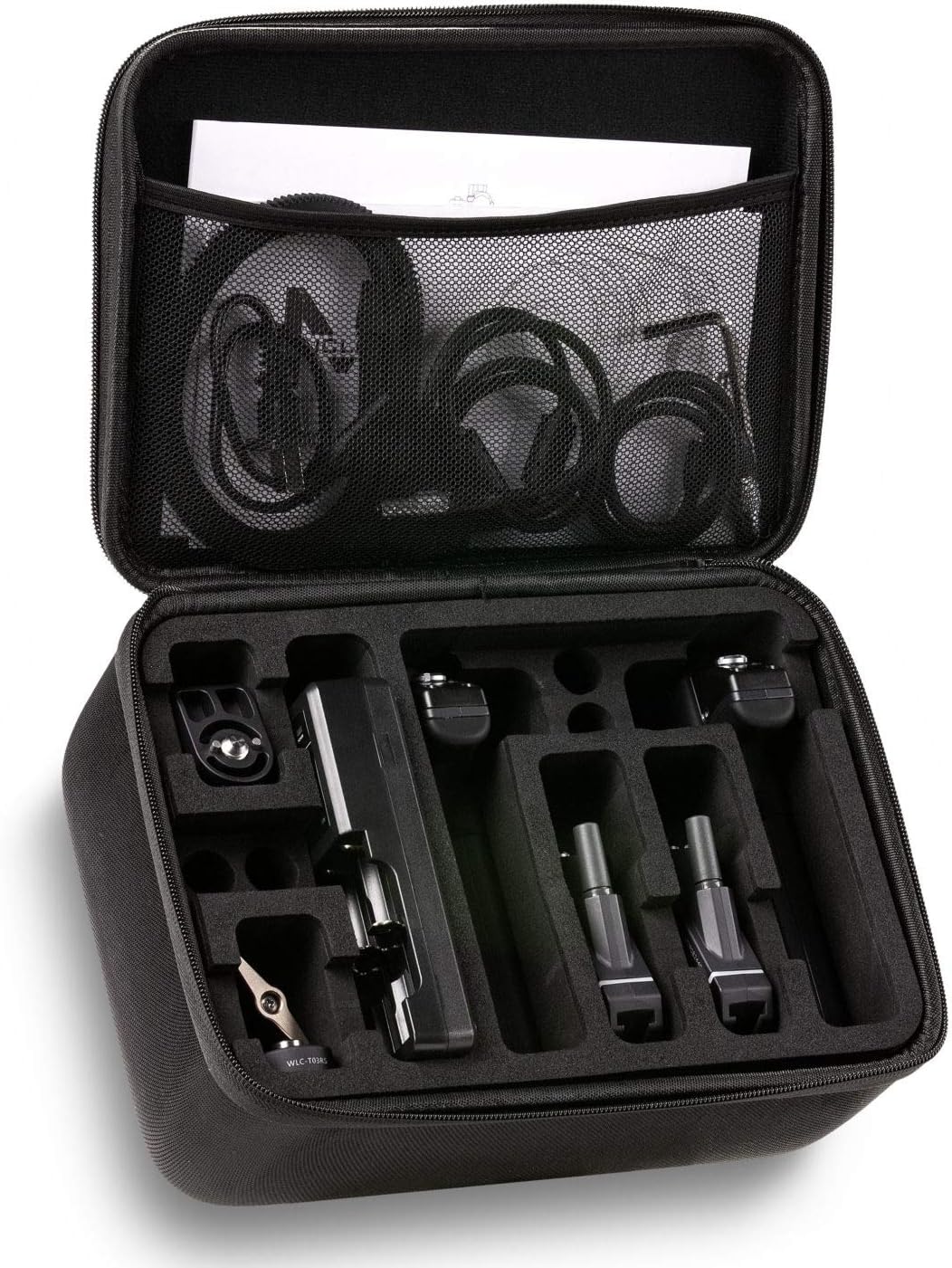
Image: The custom-fitted carrying case for the Tilta Nucleus-M system, showing organized compartments for all components.
3. Instruccions de configuració
Follow these steps to set up your Tilta Nucleus-M system:
- Powering the Control Units: The FIZ hand unit and wireless hand grips require two 18650 rechargeable batteries each (batteries are not included with the kit). Insert the batteries into their respective compartments. Use the provided charger to ensure batteries are fully charged before use.
- Mounting the Motors:
- Attach the brushless motors to your camera rig's 19mm rods. If using 15mm rods, utilize the included rod bushings. The clamp-on design allows for easy attachment and detachment without disassembling other rig components.
- Ensure the motor's 0.8 mod, 35 tooth, 32 pitch gear aligns correctly with your lens's focus, iris, or zoom gear.

Image: A Tilta Nucleus-M motor securely mounted onto a camera rod, demonstrating its clamp-on design.
- Powering the Motors:
- Connect the P-tap power cable from your camera rig's power source to one of the motors.
- Use the short 7-pin to 7-pin cables to daisy chain power to additional motors. Only one power port on your camera rig is required to power multiple motors.

Image: Multiple Tilta Nucleus-M motors connected in a daisy-chain configuration to share power from a single source.
- Pairing and Channel Setting: Set the motors, FIZ hand unit, and hand grips to the same wireless channel to establish communication. Refer to the on-screen menu of the FIZ hand unit for channel selection.
- Lens Calibration:
- The motors support automatic calibration for lenses with hard end stops.
- For lenses without hard end stops, manual calibration is required. Follow the instructions on the FIZ hand unit to set the focus, iris, and zoom limits.
- Remote Start/Stop (Optional): If remote start/stop functionality is desired, connect a compatible Nucleus-M R/S cable into the open 7-pin port of a motor. This enables R/S capabilities through the hand unit and/or hand grips.

Image: A remote start/stop cable connected to a Tilta Nucleus-M motor, enabling camera control from the FIZ hand unit or hand grips.
4. Funcionament del sistema
The Nucleus-M offers versatile control options:
- FIZ Hand Unit: Provides full control over focus, iris, and zoom via its main wheel and dedicated controls. The unit may provide vibrating feedback to indicate set stop points.
- Wireless Hand Grips: The left and right hand grips feature a finger wheel and zoom toggle, respectively, allowing for intuitive control. These can be used independently or in conjunction with the FIZ hand unit.
- Splitting Control: Control channels can be split between the FIZ hand unit and the wireless hand grips as needed, offering operational flexibility.
- Interval sense fil: The system operates on a 2.4 GHz frequency, providing a reliable wireless range of up to 1,640 feet (500 meters) in unobstructed environments.

Imatge: Un primer pla view of the Tilta Nucleus-M FIZ hand unit, highlighting its control wheel and display, alongside a motor.

Image: The Tilta Nucleus-M wireless hand grips, showing the finger wheel and zoom toggle for precise lens control.
5. Manteniment
Proper maintenance ensures the longevity and optimal performance of your Nucleus-M system:
- Neteja: Use a soft, dry cloth to clean the surfaces of the FIZ hand unit, hand grips, and motors. Avoid using harsh chemicals or abrasive materials.
- Cura de la bateria: Regularly charge the 18650 batteries. If the system will not be used for an extended period, remove the batteries from the control units to prevent discharge or damage.
- Emmagatzematge: Store the system in its dedicated carrying case in a cool, dry place, away from direct sunlight and extreme temperatures.
- Inspecció d'engranatges: Periodically check the motor gears for any debris or wear. Clean as necessary to ensure smooth operation.
6. Solució De Problemes
Consulteu els següents problemes comuns i les seves solucions:
| Problema | Causa possible | Solució |
|---|---|---|
| Motor unresponsive or erratic movement | Incorrect channel setting, low battery, temporary communication error. | Verify all units are on the same channel. Check battery levels. Restart the system (motors and control units). Re-calibrate the lens. |
| Hand controllers lose settings | Power cycle, temporary software glitch. | Ensure batteries are fully charged. If settings are lost after powering down, re-enter and save them. If persistent, perform a factory reset and re-pair. |
| Lens calibration fails | Lens without hard stops, motor not properly engaged with lens gear, obstruction. | For lenses without hard stops, use manual calibration. Ensure motor gear is firmly and correctly engaged with the lens gear. Check for any physical obstructions. |
| FIZ unit strap detaches unexpectedly | Strap attachment mechanism issue. | Exercise caution when relying on the strap. Regularly inspect the strap and its attachment points for wear or damage. Consider alternative securing methods if concern persists. |
| Short battery life for control units | Old or low-quality 18650 batteries, improper charging. | Ensure you are using high-quality, fully charged 18650 batteries. Replace old batteries if performance degrades. |
7. Especificacions
| Característica | Detall |
|---|---|
| Número de model | WLC-T03-K5 |
| Dimensions del producte | 11.5 x 8.3 x 5 polzades |
| Pes de l'article | 4.3 lliures |
| Marca | Tilta |
| Fabricant | Tilta |
| Dispositius compatibles | Càmera |
| UPC | 631384550258 |
| Motor Gear Mod | 0.8 |
| Motor Gear Teeth | 35 |
| Pas de l'engranatge del motor | 32 |
| Freqüència sense fil | 2.4 GHz |
| abast sense fils | Up to 1640' (500m) unobstructed |
| Materials de construcció | Aluminum alloy, stainless steel, ABS plastic |
8. Garantia i Suport
For warranty information, technical support, or service inquiries, please contact Tilta customer service directly. You can find more information and contact details on the official Tilta weblloc o a través de distribuïdors autoritzats.
Visita el Tilta Store on Amazon per a productes i informació addicionals.
Documents relacionatsWLC-T03-K5


Ask a question about this manual
Ask about setup, troubleshooting, compatibility, parts, safety, or missing instructions. Manuals+ will review the question and use this page’s manual context to help answer it.