
1. Introducció
This manual provides essential information for the installation, operation, maintenance, and troubleshooting of your Chieftec Polaris 650W 80Plus Certified Power Supply Unit (PSU). Please read this manual thoroughly before installing and using the product to ensure proper function and safety. The Chieftec Polaris 650W PSU is designed to provide stable and efficient power to your personal computer system.
2. Informació de seguretat
Observeu sempre les següents precaucions de seguretat per evitar lesions o danys al vostre equip:
- No ho facis Obriu la font d'alimentació casing. Alt volumtages inside can cause electric shock. There are no user-serviceable parts inside.
- No ho facis insert any objects into the PSU's ventilation openings.
- No ho facis exposeu la font d'alimentació a l'aigua, la humitat o una humitat elevada.
- Ensure the PSU is installed in a well-ventilated area, free from obstructions to airflow.
- Always disconnect the AC power cord from the wall outlet before installing, removing, or cleaning the PSU.
- Use only the modular cables provided with your Chieftec Polaris 650W PSU. Using incompatible cables may damage the PSU or connected components.
- Ensure all cable connections are secure before powering on the system.
3. Contingut del paquet
Verifiqueu que tots els elements siguin presents al vostre paquet:
- Chieftec Polaris 650W Power Supply Unit
- Modular Cable Set (e.g., 24-pin ATX, 8-pin EPS/CPU, PCIe, SATA, Molex)
- Cable d'alimentació CA
- Cargols de muntatge
- Manual d'usuari (aquest document)
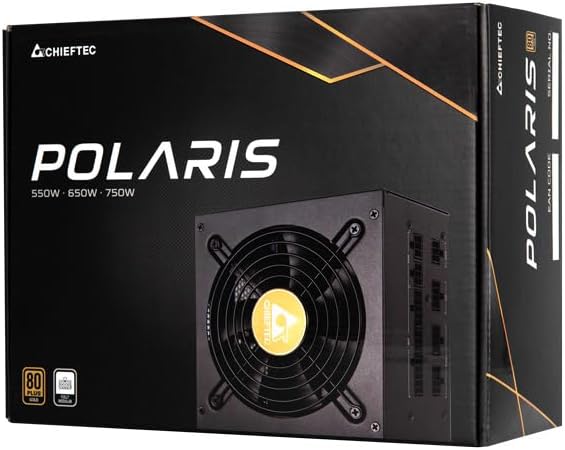
Image: The Chieftec Polaris 650W Power Supply Unit and its retail packaging.
4. Configuració i instal·lació
Follow these steps to install your Chieftec Polaris 650W PSU into your personal computer system:
- Prepareu el vostre sistema: Ensure your computer is completely powered off and unplugged from the wall outlet. Open your computer case to access the PSU mounting area.
- Traieu la font d'alimentació antiga (si escau): If replacing an existing PSU, disconnect all cables from the components and motherboard, then unscrew and remove the old PSU.
- Muntar la nova font d'alimentació: Carefully slide the Chieftec Polaris 650W PSU into the designated PSU bay in your computer case. Ensure the fan faces the correct direction (typically downwards for bottom-mounted PSUs, or as per case design for optimal airflow). Secure the PSU with the provided mounting screws.
- Connecteu els cables modulars: Identify the necessary modular cables for your system components (motherboard, CPU, graphics card, storage drives). Connect these cables to the corresponding ports on the back of the PSU. Refer to the image below for connector identification.
- Connecta't als components: Connect the other end of the modular cables to your motherboard (24-pin ATX and 8-pin EPS/CPU), graphics card(s) (PCIe), and storage devices (SATA/Molex). Ensure all connections are firm and fully seated.
- Gestió de cables: Col·loca els cables amb cura per millorar el flux d'aire i l'estètica dins de la carcassa.
- Comprovacions finals: Double-check all connections. Ensure no loose cables are obstructing fans. Close your computer case.
- Connecteu l'alimentació de CA: Plug the AC power cord into the PSU's power inlet and then into a wall outlet.

Imatge: Part posterior view of the Chieftec Polaris 650W PSU showing modular cable connection ports for M/B, SATA, PCIe, and CPU.

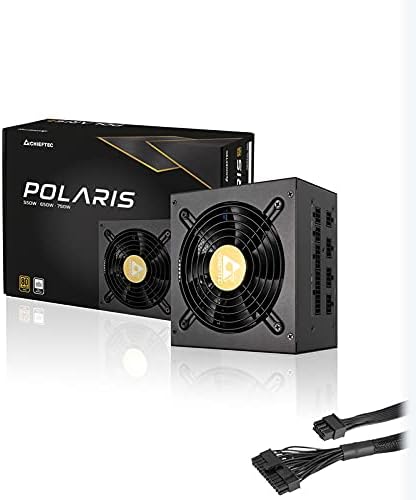
Image: The Chieftec Polaris 650W Power Supply Unit with its modular cables connected, ready for installation.
5. Instruccions de funcionament
Once the Chieftec Polaris 650W PSU is correctly installed and all connections are secure:
- Encès: Locate the power switch on the back of the PSU (next to the AC power inlet). Ensure it is in the 'I' (On) position.
- Engegada del sistema: Press the power button on your computer case. The system should power on, and the PSU fan will begin to spin, indicating normal operation.
- Funcionament del ventilador: The PSU features an air cooling method. The fan will operate to dissipate heat generated by the power supply components. Its speed may vary depending on the load and temperature to maintain optimal cooling and noise levels.
- Apagar: To shut down your system, use the operating system's shutdown procedure. For a complete power cut, switch the PSU's power switch to the 'O' (Off) position and unplug the AC power cord.
Imatge: De dalt a baix view of the Chieftec Polaris 650W Power Supply, highlighting the cooling fan and protective grille.
6. Manteniment
Un manteniment adequat garanteix la longevitat i el rendiment òptim de la font d'alimentació:
- Neteja de pols: Periodically (e.g., every 3-6 months), power off your computer, unplug the AC cord, and open the case. Use compressed air to gently blow dust out of the PSU's fan and ventilation grilles. No ho facis use a vacuum cleaner directly on the PSU as it can generate static electricity.
- Condicions ambientals: Ensure the computer operates in a clean, dry, and well-ventilated environment. Avoid extreme temperatures and direct sunlight.
- Integritat del cable: Occasionally check that all modular cables are securely connected and not frayed or damaged.
7. Solució De Problemes
If you encounter issues with your Chieftec Polaris 650W PSU, consider the following troubleshooting steps:
- Sense energia:
- Assegureu-vos que el cable d'alimentació de CA estigui ben connectat tant a la font d'alimentació com a la presa de corrent.
- Check that the PSU's power switch on the back is in the 'I' (On) position.
- Verifiqueu que la presa de corrent de la paret funciona connectant-hi un altre dispositiu.
- Confirm all internal power cables (24-pin ATX, 8-pin EPS/CPU) are firmly connected to the motherboard.
- Inestabilitat del sistema/aturades aleatòries:
- Ensure the PSU is adequately ventilated and not overheating.
- Check all power connections to components (graphics card, storage) for looseness.
- If possible, test the PSU with a different set of components or in another system to rule out other hardware issues.
- Sorolls inusuals:
- A rattling or grinding noise may indicate a fan issue. Power off the system and inspect the PSU fan for obstructions (e.g., loose cables).
- If the noise persists and is not due to an obstruction, contact support.
Si aquests passos no resolen el problema, consulteu la secció Garantia i assistència.
8. Especificacions
| Característica | Especificació |
|---|---|
| Marca | Chieftec |
| Nom del model | Polaris |
| Número de model de l'article | IN-ACT-ZDLCHFOBU0087 |
| Potència de sortidatage | 650 watts |
| Factor de forma | ATX |
| Mètode de refrigeració | Aire |
| Tipus de connector | ATX |
| Dispositius compatibles | Ordinador personal |
| Dimensions del producte (L x A x A) | 8.66 x 3.15 x 1.18 polzades (22 x 8 x 3 cm) |
| Pes de l'article | 4.4 lliures (2 quilograms) |
| Certificació | Certificat 80Plus |
9. Garantia i Suport
Chieftec products are manufactured to high-quality standards. For specific warranty terms and conditions, please refer to the warranty card included with your product or visit the official Chieftec website. Warranty periods and coverage may vary by region and product.
For technical support, product inquiries, or warranty claims, please contact Chieftec customer service through their official website or the contact information provided in your product documentation. When contacting support, please have your product model number (IN-ACT-ZDLCHFOBU0087) and proof of purchase readily available.


