
1. Introducció
Thank you for choosing the Ksix Retro Wireless Headphones. These headphones combine a classic design with modern Bluetooth 5.0 technology, offering a comfortable and high-quality audio experience. This manual provides essential information for the proper setup, operation, and maintenance of your device.
2. Informació de seguretat
- No exposeu els auriculars a temperatures extremes, humitat ni substàncies corrosives.
- Eviteu deixar caure els auriculars ni sotmetre'ls a impactes forts.
- No intenteu desmuntar ni modificar els auriculars. Això anul·larà la garantia.
- Mantingueu els auriculars fora de l'abast dels nens i les mascotes.
- Clean the headphones with a soft, dry cloth. Do not use harsh chemicals.
- Aquests auriculars ho són no impermeable. Avoid contact with water or moisture.
- Escolteu a un volum moderat per evitar danys auditius.
3. Contingut del paquet
Si us plau, comproveu que tots els elements siguin presents al paquet:
- 1 x Ksix Retro Wireless Headphones (Model BXAUHBT01)
- 1 x cable de càrrega (micro USB)
- 1 x Audio Cable (3.5mm Jack)
- 1 x Manual d'usuari
4. Producte acabatview
Familiarize yourself with the components and controls of your Ksix Retro Wireless Headphones.

Imatge 4.1: Davant view of the Ksix Retro Wireless Headphones, showcasinel disseny supraaural i la diadema ajustable.

Imatge 4.2: Primer pla view of the control buttons located on the earcup, including volume and track navigation controls.
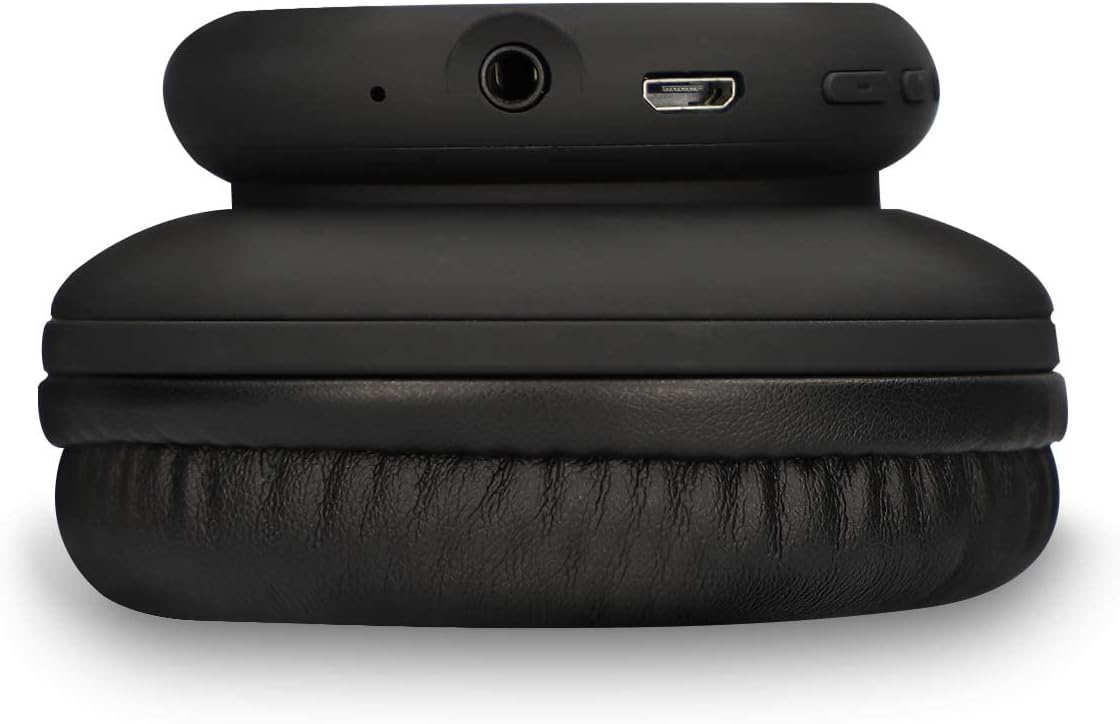
Imatge 4.3: View of the headphone's connectivity ports, including the 3.5mm audio jack and the Micro USB charging port.
Característiques principals:
- Bluetooth 5.0: Per a una connectivitat sense fil estable.
- Micròfon integrat: Per trucades mans lliures.
- Botons de control: For volume adjustment and track navigation.
- Pressure-Relief Cushions: Dissenyat per a un ús còmode.
- Conector d'àudio de 3.5 mm: For wired connection when battery is low or for non-Bluetooth devices.
5. Configuració
5.1 Càrrega dels auriculars
- Connect the Micro USB end of the charging cable to the charging port on the headphones.
- Connecteu l'extrem USB-A del cable de càrrega a una font d'alimentació USB compatible (per exemple, un adaptador de paret, un port USB de l'ordinador).
- The LED indicator will illuminate to show charging status.
- Una càrrega completa triga aproximadament 1.5 hores. The LED indicator will change or turn off once charging is complete.
5.2 Vinculació Bluetooth
- Assegureu-vos que els auriculars estiguin completament carregats.
- Premeu i manteniu premut el botó d'engegada dels auriculars fins que l'indicador LED parpellegi en blau i vermell, cosa que indica el mode d'emparellament.
- Al dispositiu (telèfon intel·ligent, tauleta, ordinador), activeu el Bluetooth i cerqueu els dispositius disponibles.
- Select "Ksix Retro Headphones" (or similar name) from the list of found devices.
- Once paired, the LED indicator on the headphones will typically show a solid blue light or flash blue slowly.
- The headphones have a Bluetooth range of up to 30 metres in an open environment.
6. Instruccions de funcionament
6.1 Encès/Apagat
- Encès: Premeu i manteniu premut el botó d'engegada durant aproximadament 3 segons fins que l'indicador LED s'encengui.
- Apagar: Premeu i manteniu premut el botó d'engegada durant aproximadament 3-5 segons fins que l'indicador LED s'apagui.
6.2 Reproducció de música
- Reproduir/pausa: Premeu el botó multifunció (sovint el botó d'engegada) una vegada.
- Pista següent: Press the "+" button (Volume Up) for 2 seconds.
- Pista anterior: Press the "-" button (Volume Down) for 2 seconds.
- Pujar el volum: Premeu breument el botó "+".
- Baixar el volum: Premeu breument el botó "-".
6.3 Gestió de trucades
- Respondre/Finalitzar la trucada: Premeu el botó multifunció una vegada.
- Rebutja la trucada: Manteniu premut el botó multifunció durant 2 segons.
- Torna a marcar l'últim número: Premeu dues vegades el botó multifunció.
6.4 Wired Mode (3.5mm Jack)
You can use the headphones with the included 3.5mm audio cable. This is useful when the battery is depleted or for devices without Bluetooth connectivity.
- Connecteu un extrem del cable d'àudio de 3.5 mm a la presa d'àudio dels auriculars.
- Connecteu l'altre extrem al port de 3.5 mm de la font d'àudio.
- In wired mode, the headphone's battery is not used, and some controls on the headphones may be inactive.

Imatge 6.1: A person wearing the Ksix Retro Wireless Headphones, demonstrating their use in a daily setting.
7. Manteniment i cura
- Neteja: Use a soft, dry, lint-free cloth to clean the headphones. Do not use abrasive cleaners, solvents, or sprays.
- Emmagatzematge: Quan no els utilitzeu, guardeu els auriculars en un lloc fresc i sec, allunyats de la llum solar directa i de temperatures extremes.
- Bateria: To prolong battery life, charge the headphones regularly, even if not used frequently. Avoid fully discharging the battery for extended periods.
- Exposició a l'aigua: As these headphones are not waterproof, protect them from rain, splashes, and sweat.
8. Solució De Problemes
| Problema | Causa possible | Solució |
|---|---|---|
| Els auriculars no s'encenen | Bateria baixa | Carregueu els auriculars durant 1.5 hores. |
| No es pot emparellar per Bluetooth | Auriculars no en mode d'emparellament; Bluetooth desactivat al dispositiu; massa lluny del dispositiu | Ensure headphones are in pairing mode (flashing blue/red LED). Turn on Bluetooth on your device. Move headphones closer to your device (within 30m). |
| Sense so | Volum massa baix; font d'àudio incorrecta; auriculars no connectats | Increase volume on headphones and connected device. Ensure headphones are properly paired or connected via 3.5mm cable. Check audio output settings on your device. |
| Mala qualitat del so | Weak Bluetooth signal; interference; low battery | Move closer to the connected device. Avoid sources of strong electromagnetic interference. Charge the headphones. |
| El micròfon no funciona | Microphone muted; incorrect input device selected | Check call settings on your device to ensure the headphone microphone is selected and not muted. |
9. Especificacions
| Marca | KSIX |
| Número de model | BXAUHBT01 |
| Tecnologia de connectivitat | Sense fil (Bluetooth), amb cable (connector de 3.5 mm) |
| Versió Bluetooth | 5.0 |
| Interval Bluetooth | Fins a 30 metres |
| Durada de la bateria | Fins a 6 hores (mitjana) |
| Temps de càrrega | Aproximadament 1.5 hores |
| Interval de freqüència | 20 Hz - 20,000 Hz |
| Factor de forma | Over-Ear (Supra-Auriculaire) |
| Conector d'auriculars | 3.5 mm |
| Micròfon | Inclòs |
| Material | Synthetic Leather (earcups and headband) |
| Resistència a l'aigua | No (No impermeable) |
| Dispositius compatibles | Gaming consoles, smartphones with Bluetooth 5.0 or higher, other Bluetooth-compatible devices |
10. Garantia i Suport
Ksix products are manufactured to the highest quality standards. This product is covered by a limited warranty from the date of purchase. Please refer to the warranty card included in your package or visit the official Ksix weblloc web per obtenir informació detallada sobre els termes i condicions de la garantia.
For technical support, troubleshooting assistance, or any questions regarding your Ksix Retro Wireless Headphones, please contact Ksix customer service through their official weblloc web o la informació de contacte que es proporciona a l'embalatge del producte.