
1. Introducció
Thank you for choosing the BALDR Digital Wireless Weather Station. This device provides accurate indoor and outdoor temperature and humidity readings, along with a weather forecast function. It features a clear LCD display, supports up to three outdoor sensors, and includes alarm, snooze, and backlight functions. Please read this manual carefully before use to ensure proper operation and longevity of your device.

Image 1.1: BALDR Digital Wireless Weather Station main unit and outdoor sensor.
2. Què hi ha a la caixa
- 1 x BALDR Digital Wireless Weather Station (Main Unit)
- 1 x Sensor exterior sense fil
- 1 x Manual d'usuari
3. Producte acabatview
3.1 Característiques de la unitat principal
- Pantalla de temperatura i humitat interiors
- Outdoor Temperature & Humidity Display (up to 3 channels)
- Weather Forecast Icons (Sunny, Partly Cloudy, Cloudy, Rainy, Snowing)
- Temperature & Humidity Trend Indicator
- Max/Min Temperature & Humidity Records
- Time (12/24H format), Date, Weekday Display
- Funció d'alarma i repetició
- Warm Orange Backlight
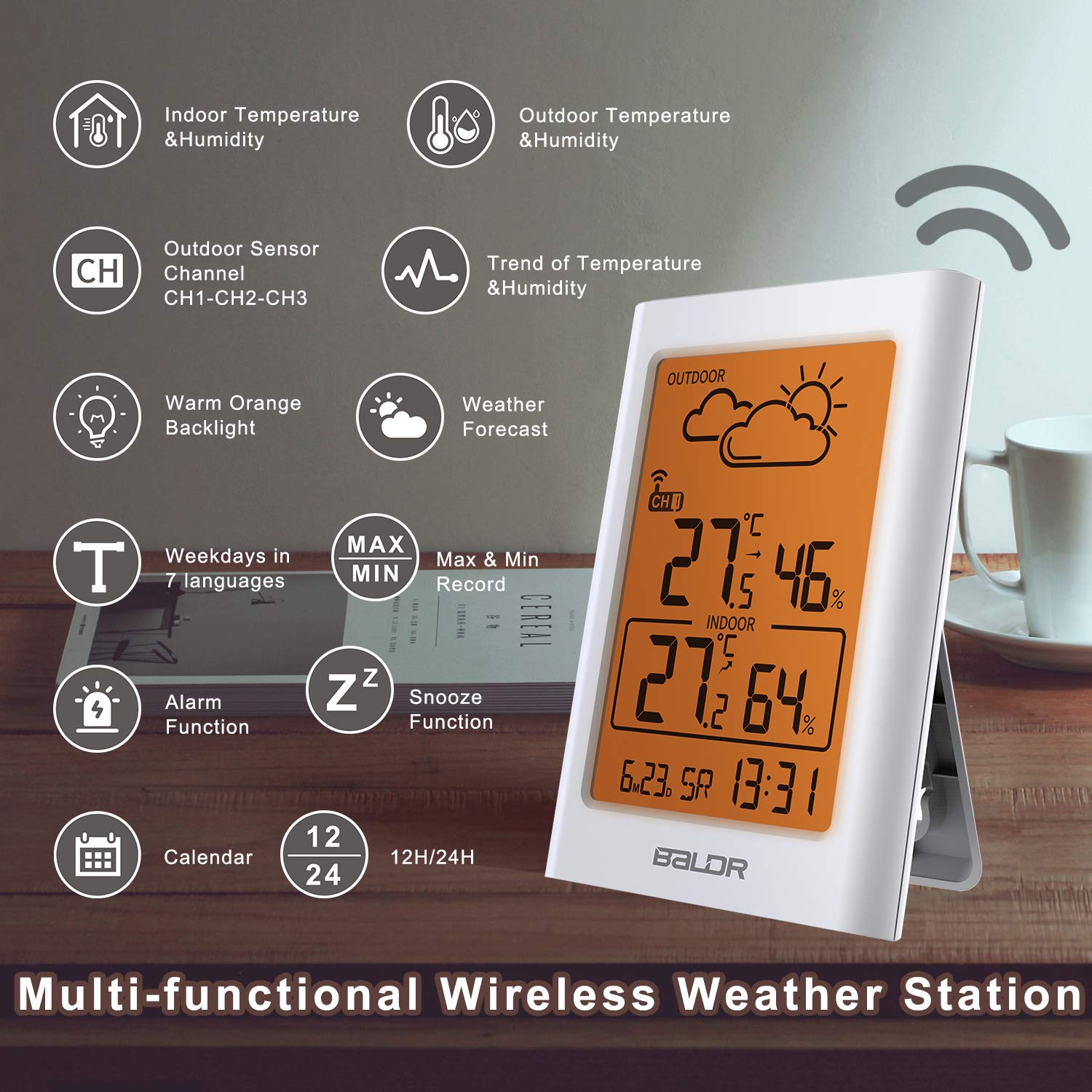
Imatge 3.1: acabatview of the weather station's multi-functional display.
3.2 Outdoor Sensor Features
- Transmissió sense fil fins a 100 metres (328 peus)
- Classificació impermeable IP54
- Supports hanging or standing placement

Imatge 3.2: posterior view of the main unit with ventilation for accurate readings.
4. Configuració
4.1 Instal·lació de la bateria
The weather station and outdoor sensor require batteries (not included).
- Open the battery compartment on the back of the main unit. Insert 2 x AAA batteries, observing polarity (+/-).
- Open the battery compartment on the back of the outdoor sensor. Insert 2 x AA batteries, observing polarity (+/-).
- Close both battery compartments securely.

Image 4.1: Battery installation for the main unit and outdoor sensor.
4.2 Col·locació del sensor
Per obtenir un rendiment òptim, tingueu en compte el següent:
- Place the main unit indoors, away from direct sunlight and heat sources.
- Position the outdoor sensor within 100 meters (328 feet) of the main unit, ensuring minimal obstructions.
- Mount the outdoor sensor in a shaded area, protected from direct rain and sunlight, to ensure accurate temperature and humidity readings. The IP54 rating provides protection against splashes, but direct exposure to heavy rain or submersion should be avoided.
- The sensor can be hung on a wall or placed on a flat surface.

Image 4.2: Recommended placement options for the main unit and outdoor sensor.

Image 4.3: Correct outdoor sensor placement under shelter for weather protection.
4.3 Sincronització inicial
After battery installation, the main unit will automatically search for the outdoor sensor signal. This process may take a few minutes. Ensure both units are within range of each other.
- If the outdoor temperature/humidity does not appear, press the "CH" button on the main unit to cycle through channels or press the "TX" button inside the outdoor sensor's battery compartment to manually send a signal.
- The weather station can support up to 3 outdoor sensors. Additional sensors are sold separately.

Image 4.4: Multi-sensor support and wireless range illustration.
5. Instruccions de funcionament
5.1 Mostra informació
La pantalla LCD mostra la informació següent:
- Secció exterior: Outdoor temperature, outdoor humidity, current channel (CH1, CH2, or CH3), wireless signal strength, weather forecast icon.
- Secció interior: Indoor temperature, indoor humidity.
- Secció inferior: Time, date, weekday.

Image 5.1: Weather forecast icons on the display.
5.2 Configuració de l'hora i la data
Refer to the buttons on the back of the main unit:
- Premeu i manteniu premut el botó "SET" per entrar al mode de configuració de l'hora.
- Use the "UP" and "DOWN" buttons to adjust values.
- Press "SET" again to confirm and move to the next setting (e.g., 12/24H format, hour, minute, year, month, day).
- Press "SET" repeatedly until all settings are confirmed or wait for 10 seconds for automatic exit.
5.3 Funció d'alarma i repetició
- Configuració d'alarma: Press the "ALARM" button to view the alarm time. Press and hold "ALARM" to enter alarm setting mode. Use "UP" and "DOWN" to adjust, and "ALARM" to confirm.
- Activació/desactivació de l'alarma: Press "ALARM" once to toggle the alarm on/off. An alarm icon will appear/disappear on the display.
- Dormitar: When the alarm sounds, press the "SNOOZE/LIGHT" button to activate snooze. The alarm will sound again after a few minutes.
5.4 Funcionament de la llum de fons
Press the "SNOOZE/LIGHT" button to activate the warm orange backlight for 20 seconds, improving visibility in low-light conditions.

Image 5.2: Display with the warm orange backlight.
5.5 Registres màxims/mínims
The weather station records the maximum and minimum indoor/outdoor temperature and humidity values over a 24-hour period.
- Press the "MEM" button once to view maximum records.
- Press "MEM" again to view minimum records.
- Press "MEM" a third time to return to current readings.
- To clear records, press and hold the "MEM" button while viewfent els registres.
5.6 Multi-Sensor Display
If you have multiple outdoor sensors, press the "CH" button on the main unit to cycle through the channels (CH1, CH2, CH3) and view the readings from each sensor.

Image 5.3: Monitoring multiple locations with additional sensors.

Image 5.4: Cycling through sensor channels on the main unit.
5.7 Previsió meteorològica
The weather station uses Weather Forecast 2.0 technology to predict weather trends for the next 12-24 hours. The icons displayed are:
- Assolellat
- Parcialment ennuvolat
- Ennuvolat
- Pluviós
- Nevant
The forecast is based on atmospheric pressure changes and is an estimation, not a guarantee of future weather conditions.

Image 5.5: Weather forecast icon indicating cloudy conditions.
5.8 Temperature and Humidity Trend
The display shows arrows indicating the trend of temperature and humidity (rising, steady, or falling) over the last 10 seconds, providing a quick overview of environmental changes.

Image 5.6: Visual representation of temperature and humidity trends.
6. Manteniment
- Substitució de la bateria: Replace batteries in both the main unit and outdoor sensor when the low battery indicator appears on the display. Always replace with new batteries of the specified type (AAA for main unit, AA for sensor).
- Neteja: Netegeu les unitats amb un drap suauamp tela. No utilitzeu netejadors abrasius ni dissolvents.
- Cura del sensor: Ensure the outdoor sensor's ventilation openings are clear of debris. Periodically check its placement to ensure it remains protected from extreme weather conditions.
7. Solució De Problemes
| Problema | Solució |
|---|---|
| No hi ha lectura de temperatura/humitat exterior. |
|
| Lectures inexactes. |
|
| La pantalla està tènue o en blanc. |
|
8. Especificacions
| Característica | Detall |
|---|---|
| Model | BA-102TY |
| Marca | Baldr |
| Font d'alimentació (unitat principal) | Battery powered (2 x AAA, not included) |
| Font d'alimentació (sensor exterior) | Alimentat per piles (2 x AA, no incloses) |
| Tecnologia de connectivitat | 433 MHz or 868 MHz Wireless |
| abast sense fils | Fins a 100 metres (328 peus) a l'aire lliure |
| Precisió de la temperatura | ±1 °C |
| Tipus de visualització | LCD |
| Material | Plàstic |
| Outdoor Sensor Waterproof Rating | IP54 |
| Freqüència d'actualització de dades | Cada 10 segons |

Image 8.1: Approximate dimensions of the main unit and outdoor sensor.
9. Garantia i Suport
For warranty information or technical support, please refer to the contact details provided with your purchase or visit the official BALDR weblloc web. Conserveu el rebut de compra com a comprovant de compra.