
1. Introducció
This manual provides detailed instructions for the Zopsc Portable MP4 Player. This device is designed for portable media playback, supporting music, video, radio, recording, and e-book functions. It features a 1.8-inch color display and supports up to a 32GB memory card for expanded storage.
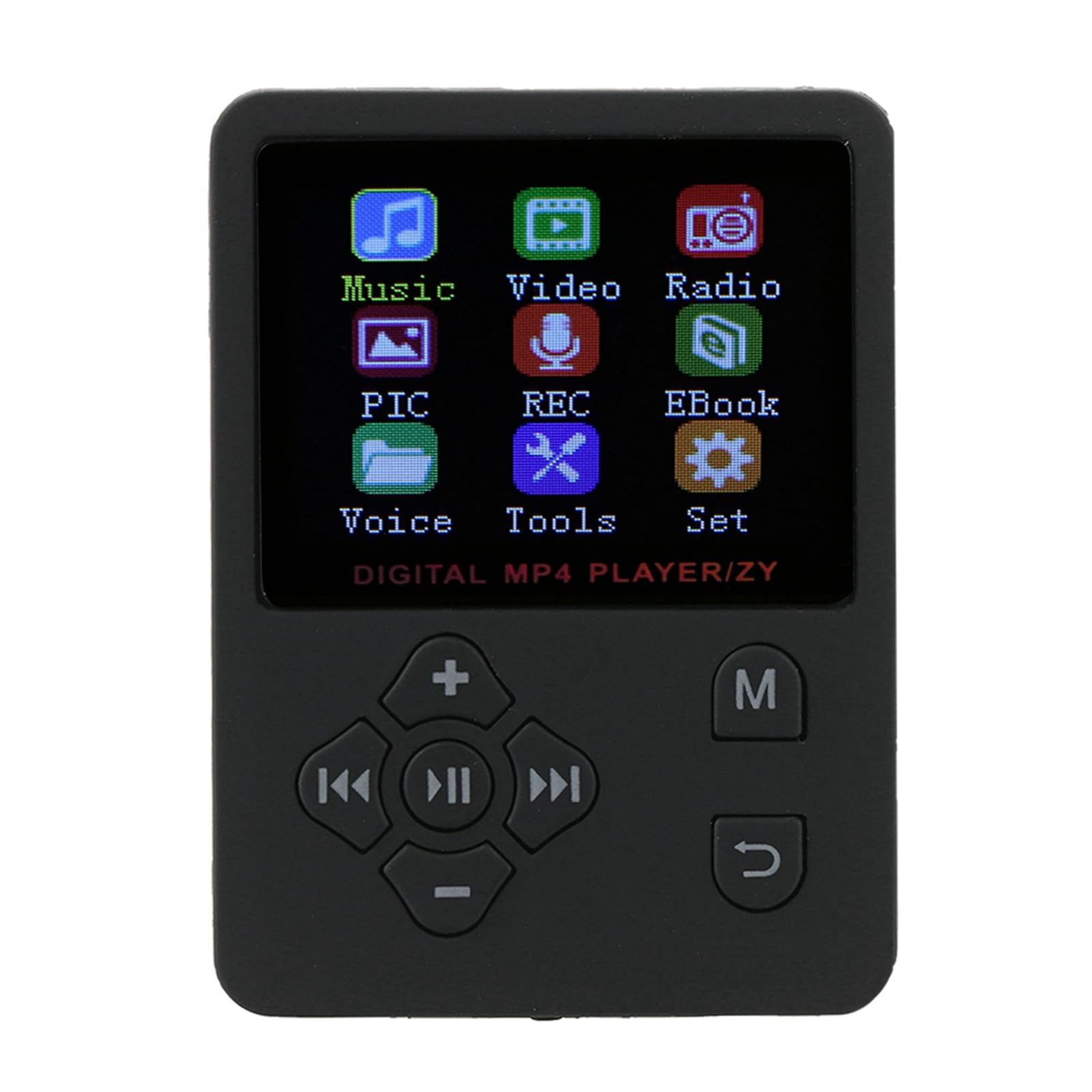
Imatge 1.1: Frontal view of the Zopsc Portable MP4 Player showing its menu interface.
2. Què hi ha a la caixa
Verifiqueu que tots els elements siguin presents al paquet:
- Zopsc Portable MP4 Player
- Auricular
- Cable de càrrega

Image 2.1: The MP4 player, earphones, and charging cable included in the package.
3. Producte acabatview
The Zopsc Portable MP4 Player is designed for ease of use and versatility. Key features include:
- Visualització: 1.8-inch LCD color screen.
- Emmagatzematge: No internal memory; supports up to 32GB Micro SD card (not included).
- Bateria: Built-in 180mAh polymer lithium battery, providing 6-8 hours of continuous playback.
- Connectivitat: USB for charging and data transfer.
- Formats d'àudio: Supports MP3 and other audio formats.
- Formats de vídeo: Supports AMV video format.
- Funcions: Music playback, video playback, FM radio, voice recording, e-book reader, stopwatch.
- Idioma: Default English, with support for 13 switchable languages.

Image 3.1: The MP4 player's main menu, illustrating its various functions.
4. Configuració
4.1 Càrrega del dispositiu
Before first use, fully charge the MP4 player. Connect the provided USB charging cable to the player's USB port and to a power source (e.g., computer USB port or a USB wall adapter). The battery indicator on the screen will show charging status.

Image 4.1: Connecting the charging cable to the MP4 player.
4.2 Inserció d'una targeta Micro SD
The player requires a Micro SD card for storing media files. Locate the card slot on the side of the device. Gently insert the Micro SD card into the slot until it clicks into place. Ensure the card is inserted in the correct orientation.

Image 4.2: Illustration of inserting a Micro SD card for 'Plug & Play' functionality.
4.3 Connectar auriculars
Plug the 3.5mm jack of your headphones into the headphone port located on the bottom of the player.

Image 4.3: The MP4 player with connected headphones.
5. Instruccions de funcionament
5.1 Encès/Apagat
To power on, press and hold the power button (usually located on the side or top) until the screen lights up. To power off, press and hold the power button again until the device shuts down.
5.2 Navegació pel menú
Use the directional buttons (up, down, left, right) to navigate through menu options. The 'MENU' button typically returns to the previous screen or main menu. The central button is usually for selection or play/pause.

Image 5.1: The MP4 player showcasing its multiple play modes and features.
5.3 Reproducció de música
- Al menú principal, seleccioneu "Música".
- Browse your music files'emmagatzema a la targeta Micro SD.
- Seleccioneu una cançó per començar la reproducció.
- Use the 'VOL' buttons to adjust volume.
- Feu servir els botons de fletxa esquerra/dreta per saltar pistes.
- The central button acts as play/pause.
5.4 Reproducció de vídeo
The player supports AMV video format. Ensure your video files are converted to this format for proper playback.
- Al menú principal, seleccioneu "Vídeo".
- Navega pel teu vídeo files.
- Seleccioneu un vídeo per reproduir-lo.
5.5 Ràdio FM
Connect your headphones as they act as the antenna for the FM radio.
- From the main menu, select 'Radio'.
- Use the menu options to scan for stations or manually tune.
5.6 Enregistrament de veu
The player includes a built-in microphone for voice recording.
- From the main menu, select 'REC' (Recording).
- Segueix les instruccions que apareixen a la pantalla per iniciar, pausar i desar gravacions.

Image 5.2: The MP4 player displaying its recording function.
5.7 Lector de llibres electrònics
El reproductor admet la lectura de text files.
- From the main menu, select 'EBook'.
- Browse and select your text files.
5.8 Funció de cronòmetre
Access the stopwatch feature from the 'Tools' menu.
- From the main menu, select 'Tools'.
- Select 'Stopwatch' and follow the on-screen instructions to start, stop, and reset.
5.9 Configuració d'idioma
El dispositiu admet 13 idiomes. Per canviar l'idioma:
- From the main menu, select 'Set' (Settings).
- Navigate to 'Language' and choose your preferred language.
6. Manteniment
6.1 Neteja
Wipe the device with a soft, dry cloth. Avoid using liquid cleaners or solvents, as they may damage the screen or casing.
6.2 Cura de la bateria
To prolong battery life, avoid fully discharging the battery frequently. Charge the device regularly, especially if it will not be used for an extended period.

Image 6.1: The MP4 player displaying its battery charging status.
6.3 Emmagatzematge
Guardeu el reproductor en un lloc fresc i sec, allunyat de la llum solar directa i de temperatures extremes.
7. Solució De Problemes
| Problema | Causa possible | Solució |
|---|---|---|
| El dispositiu no s'encén | Bateria baixa; dispositiu bloquejat | Charge the device for at least 30 minutes. If frozen, press and hold the power button for 10-15 seconds to force a restart. |
| Cannot play music/video | No Micro SD card; unsupported file format; corromput files | Ensure a Micro SD card is inserted. Verify files are in supported formats (e.g., MP3 for audio, AMV for video). Try re-transferring files. |
| No hi ha so dels auriculars | Headphones not properly connected; volume too low; faulty headphones | Ensure headphones are fully plugged in. Increase volume. Test with another pair of headphones. |
| La ràdio no funciona | Headphones not connected (acting as antenna) | Connect headphones to enable FM radio functionality. |
8. Especificacions
- Marca: Zopsc
- Número de model: Zopsca1iypo4gz8-01
- Color: Negre
- Mida de la pantalla: 1.8 polzades
- Tecnologia de visualització: LCD
- Emmagatzematge de memòria: Supports up to 32GB Micro SD Card (not included)
- Connectivitat: USB
- Formats d'àudio compatibles: MP3, etc.
- Formats de vídeo compatibles: AMV
- Bateria: 180mAh Polymer Lithium
- Durada de la bateria: Approximately 6-8 hours of continuous playback
- Pes de l'article: 0.07 quilos
- Dimensions de l'article (D x W x H): 0.3" x 2" x 2.8"
9. Vídeos oficials de productes
9.1 Portable MP3 Music Player Overview
Vídeo 9.1: Un breu resumview of the portable MP3 music player, highlighting its suitability for active lifestyles and premium audio experience.
9.2 Portable MP3 Music Player Features
Video 9.2: Demonstrates key features of the portable MP3 music player, including its 1.8-inch LCD screen and lossless audio capabilities.
10. Garantia i Suport
This product is covered by a standard return policy, allowing for refunds or replacements within 30 days of purchase. For technical support or warranty claims, please contact the manufacturer, Zopsc, through your retailer or their official support channels. Please retain your proof of purchase for warranty validation.