
1. Introducció
This manual provides essential information for the safe and efficient operation of your EPEVER MPPT 30A Solar Charge Controller (Model 3210AN). This advanced Maximum Power Point Tracking (MPPT) controller is designed to optimize power harvesting from your solar panels and efficiently charge 12V or 24V battery systems, including lead-acid (Sealed, AGM, Gel, Flooded) and lithium batteries. It features high conversion efficiency, comprehensive electronic protection, and support for monitoring via APP or PC software.

Figure 1: EPEVER MPPT 30A Solar Charge Controller 3210AN. This image shows the front view of the EPEVER MPPT 30A Solar Charge Controller, highlighting its LCD display and control buttons.
2. Característiques clau
- Tecnologia MPPT avançada: Efficiency no less than 99.5% with accurate recognition and tracking of multi-peaks maximum power point.
- Alta eficiència de conversió: Maximum DC/DC conversion efficiency of 98%.
- Automatic System Voltage Identificació: Supports 12V and 24V auto-identifying system voltage.
- Compatibilitat versàtil de bateries: Supports 4 types of battery charging: Lead-acid (Sealed, AGM, Gel, Flooded), User-defined, and Lithium.
- Protecció integral: Includes a power protection chip providing 5VDC/200mA power, over-current, and short-circuit protections.
- Real-time Monitoring & Control: Supports monitoring and setting parameters via APP or PC software.
- Modes de treball de càrrega múltiple: Offers various load work modes for diverse applications.
- Compensació de la temperatura de la bateria: Function to ensure the controller’s life and protect against over-charging/discharging.
- Negative Grounded Design: Ensures compatibility with common negative grounded solar systems.

Figure 2: Multiple Protections. This image illustrates the 13 built-in electronic protections of the EPEVER MPPT Solar Charge Controller, ensuring safe and efficient battery charging.
3. Configuració
3.1 Instruccions de cablejat
Follow the wiring diagram carefully. Connect the system in the order of battery, load, and then the PV array. Disconnect in the reverse order (PV array, load, battery).
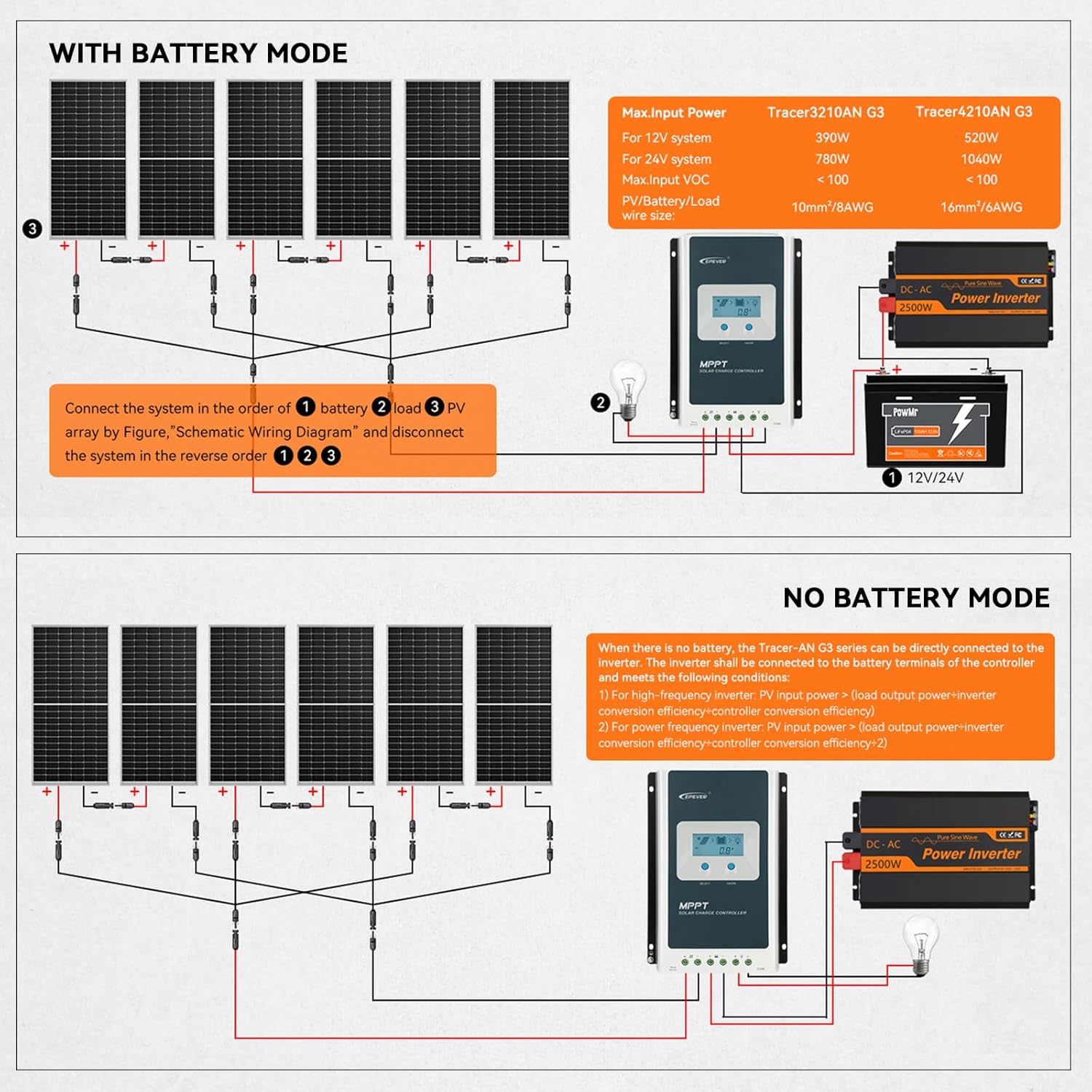
Figure 3: Wiring Diagram. This diagram shows the correct connection sequence for the EPEVER MPPT Solar Charge Controller, including connections for solar panels, battery, and DC load, for both 12V and 24V systems.
3.2 Battery Type Configuration
The controller supports various battery types. Ensure you select the correct battery type for optimal charging and battery longevity. This can be configured via the controller's LCD display or through the mobile app/PC software.

Figure 4: Applicable Battery Types. This image displays a table of supported battery types and their corresponding display codes for the EPEVER MPPT Solar Charge Controller, including Sealed, Gel, Flooded, LiFePO4, and User-Defined options.
3.3 App and PC Software Setup
The controller supports monitoring and parameter setting via a mobile application or PC software. This requires an optional communication module (Bluetooth adapter or WiFi adapter) or an RS485 cable for PC connection.
Video 1: EPEVER G3 Version TracerAN MPPT Solar Charge Controller. This video provides an overview of the EPEVER G3 Version TracerAN MPPT Solar Charge Controller, including its features and setup process.
Video 2: Solar Charge Controller Wiring guide. This video demonstrates the wiring process for a solar charge controller, showing how to connect the battery, solar panels, and load.
4. Instruccions de funcionament
4.1 Algoritme de càrrega
The controller utilizes a smart 3-stage charging algorithm (Bulk Charge, Absorption Charge, Float Charge) to optimize battery performance and extend battery life.

Figure 5: Efficient Charging. This image highlights the 99.5% high tracking efficiency and 98% peak conversion efficiency of the EPEVER MPPT Solar Charge Controller, along with its smart 3-stage charging process (Bulk, Absorption, Float) for 12V/24V Lead-acid and Lithium batteries.
4.2 Load Work Modes
The controller offers multiple load work modes to suit various application needs, including Timer Mode, Manual Mode, Test Mode, Always-On Mode, and Auto-On/Off Mode (Dawn-to-Dusk Mode).

Figure 6: Multiple Load Work Modes. This image illustrates the various load work modes available on the EPEVER MPPT Solar Charge Controller, such as Timer Mode, Manual Mode, Test Mode, Always-On Mode, and Auto-On/Off Mode (Dawn-to-Dusk Mode).
4.3 Monitoring and Control via App
Use the dedicated mobile application (e.g., Solar Guardian) to monitor real-time data, view historical records, and customize charging parameters. The app can be downloaded from the App Store or by scanning the QR code provided in the product documentation.

Figure 7: Monitor and Control via Solar Guardian App. This image shows a smartphone displaying the Solar Guardian app interface, which allows for real-time monitoring and custom charging parameter settings for the EPEVER MPPT Solar Charge Controller. QR codes for iOS and Android app downloads are also visible.
5. Manteniment
Regular maintenance ensures the longevity and optimal performance of your solar charge controller. Inspect all connections for tightness and corrosion periodically. Keep the controller clean and free from dust. Ensure proper ventilation around the unit to prevent overheating. Check battery terminals for any signs of wear or damage.
6. Solució De Problemes
If the controller is not functioning as expected, check the following:
- Sense alimentació/pantalla: Verify battery connections and ensure the battery voltage es troba dins del rang de funcionament.
- Sense càrrega: Check PV array connections, ensure solar panels are receiving adequate sunlight, and confirm PV voltage està dins del rang d'entrada del controlador.
- Battery Not Fully Charged: Review battery type settings in the controller. Ensure the PV array power is sufficient for the battery bank size.
- La càrrega no funciona: Check load connections, verify load output mode settings, and ensure the battery has sufficient charge.
- Codis d'error: Refer to the detailed user manual for specific error code interpretations and solutions.
7. Especificacions
| Característica | Especificació |
|---|---|
| Model | 3210AN |
| Volum del sistematage | 12V / 24V Auto |
| Corrent de càrrega nominal | 30A |
| Màx. Volum d’entrada PVtage | 100V (92V at 25℃ environment temperature) |
| Max. PV Rated Charge Power (12V) | 390W |
| Max. PV Rated Charge Power (24V) | 780W |
| Tipus de bateria | Lead-acid (Sealed, AGM, Gel, Flooded), User, Lithium |
| Tipus de visualització | LCD |
| Temperatura de funcionament | 45 graus centígrads |
| Dimensions del producte | 6.46 x 2.17 x 8.99 polzades |
| Pes de l'article | 3.15 lliures |
| Material | Plàstic |
| Color | Blau |
8. Garantia
The EPEVER MPPT 30A Solar Charge Controller comes with a manufacturer warranty for 2 years from the date of purchase. Please retain your proof of purchase for warranty claims.
9. Suport
For technical assistance, troubleshooting, or any inquiries regarding your EPEVER MPPT 30A Solar Charge Controller, please refer to the official EPEVER website or contact their customer support. Many users find the mobile app and PC software invaluable for monitoring and adjusting settings, and the manufacturer's technical support is often praised for its responsiveness and helpfulness.
Video 3: EPEVER MPPT Charge Controller. This video provides a general overview of the EPEVER MPPT Charge Controller, showcasinel seu disseny i les seves funcionalitats bàsiques.