
AMD Ryzen 7 5800X
Manual d'usuari del processador d'escriptori AMD Ryzen 7 5800X
Model: AMD Ryzen 7 5800X | Marca: AMD
1. Introducció
Aquest manual proporciona informació essencial per a la instal·lació, el funcionament i el manteniment del processador d'escriptori desbloquejat AMD Ryzen 7 5800X de 8 nuclis i 16 fils. Els processadors AMD Ryzen sèrie 5000 estan dissenyats per oferir un alt rendiment per a una àmplia gamma de tasques informàtiques, des de jocs fins a aplicacions professionals. Llegiu aquest manual detingudament abans de continuar amb la instal·lació.
2. Característiques del producte
- El processador de 8 nuclis més ràpid d'AMD per a ordinadors de sobretaula convencionals, amb 16 fils de processament. Compatibilitat amb el sistema operatiu: Windows 10 64-Bit Edition
- Pot oferir un rendiment d'elit de més de 100 FPS als jocs més populars del món
- Nevera no inclosa, es recomana una nevera d'alt rendiment
- 4.7 GHz Max Boost, desbloquejat per a overclocking, 36 MB de memòria cau, suport per a DDR-3200
- Per a la plataforma Socket AM4 avançada, pot admetre PCIe 4.0 a les plaques base X570 i B550
3. Configuració i instal·lació
Una instal·lació correcta és crucial per a un rendiment òptim i la longevitat del processador. Mantingueu sempre el processador per les vores per evitar tocar els contactes o pins daurats.
3.1. Llista de verificació prèvia a la instal·lació
- Placa base compatible: Assegureu-vos que la vostra placa base tingui un sòcol AM4 i que admeti processadors AMD Ryzen de la sèrie 5000. Pot ser que calgui una actualització de la BIOS per a plaques base més antigues. Consulteu el manual del fabricant de la placa base. weblloc web per obtenir instruccions de compatibilitat i actualització de la BIOS.
- Refredador de CPU: L'AMD Ryzen 7 5800X no inclou un refrigerador de sèrie. Es recomana un refrigerador de CPU d'alt rendiment (d'aire o líquid) per gestionar la sortida tèrmica.
- Pasta tèrmica: Si el refrigerador no inclou pasta tèrmica preaplicada, assegureu-vos de tenir un compost tèrmic d'alta qualitat.
- Eines: Tornavís Phillips, corretja antiestàtica per al canell (recomanada).
3.2. Passos d'instal·lació
- Prepara la placa base: Amb la placa base instal·lada a la caixa del vostre PC (o en un banc de proves), localitzeu el sòcol de la CPU AM4. Aixequeu la petita palanca metàl·lica del costat del sòcol per obrir-lo.
- Desempaquetar el processador: Traieu amb cura el processador AMD Ryzen 7 5800X del seu embalatge. Eviteu tocar els pins de la part inferior.
- Alinea el processador: Localitza el petit triangle daurat o la fletxa en una cantonada del processador. Alinea'l amb el triangle/fletxa corresponent al sòcol de la CPU de la placa base. Baixa suaument el processador directament cap avall al sòcol. No el forcis. Si no s'assenten fàcilment, torna a comprovar l'alineació.
- Processador segur: Un cop el processador estigui completament col·locat, premeu la palanca metàl·lica cap avall i sota la pestanya de retenció per bloquejar el processador al seu lloc.
- Aplicar pasta tèrmica: Si el refrigerador de la CPU no té pasta tèrmica preaplicada, apliqueu una petita quantitat de la mida d'un pèsol al centre del difusor de calor integrat (IHS) de la CPU.
- Instal·leu el refrigerador de CPU: Seguiu les instruccions que s'inclouen amb el vostre refrigerador de CPU específic per muntar-lo de manera segura a la placa base i a la CPU. Assegureu-vos que hi hagi un contacte correcte entre la base del refrigerador i l'IHS de la CPU.
- Connecteu el ventilador del refrigerador: Connecteu el(s) cable(s) del ventilador del refrigerador de la CPU al(s) capçalera(es) CPU_FAN designada(es) de la placa base.

Figura 1: Caixa de venda al detall del processador AMD Ryzen 7 5800X (part frontal) View)

Figura 2: Caixa de venda al detall del processador AMD Ryzen 7 5800X (part posterior) View amb nota d'instal·lació)

Figura 3: Primer pla del xip del processador AMD Ryzen 7 5800X

Figura 4: Detallada view del processador AMD Ryzen 7 5800X que mostra el número de model
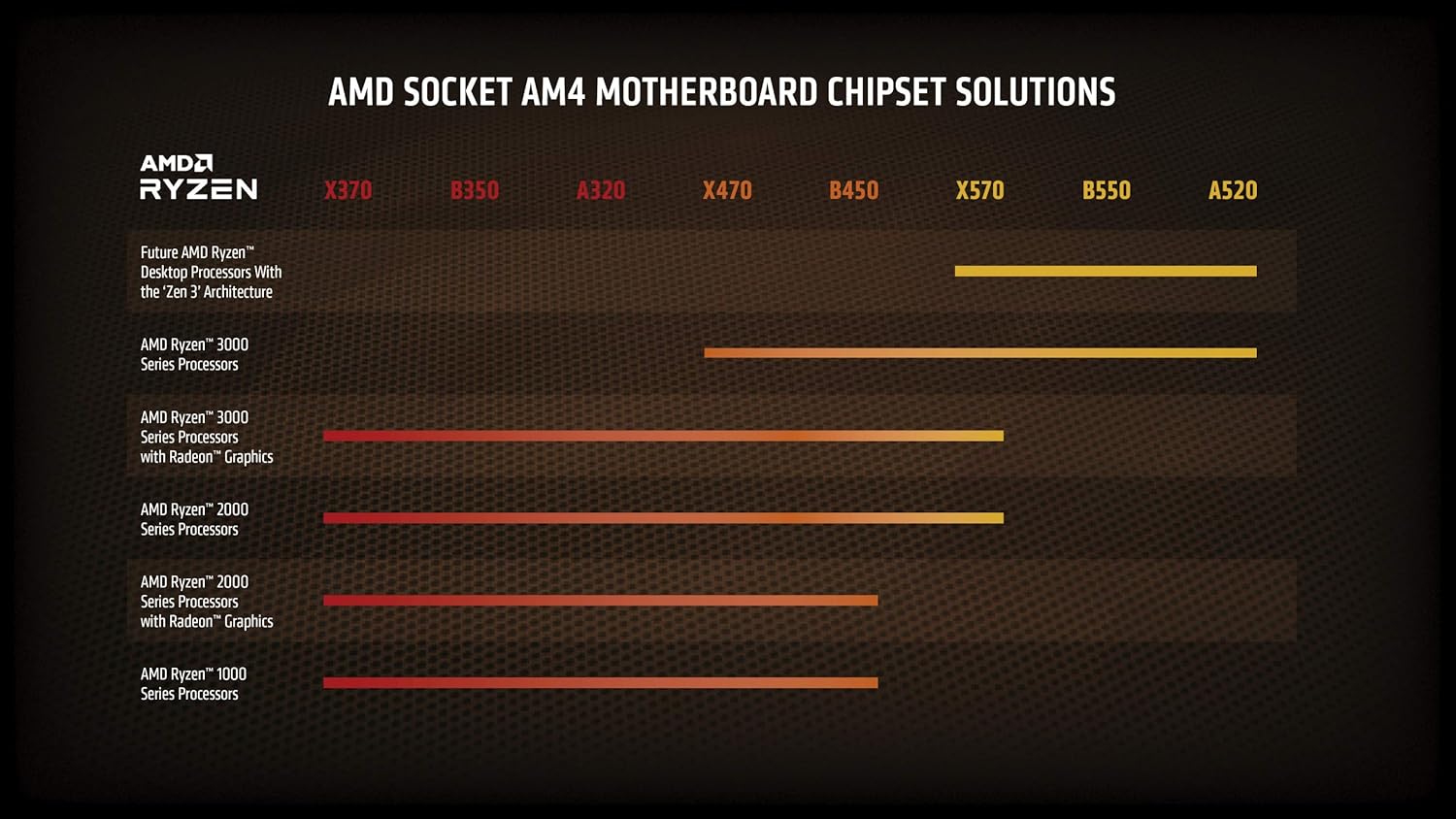
Figura 5: Taula de compatibilitat de solucions de xips de plaques base AMD Socket AM4
4. Directrius de funcionament
Un cop instal·lat, el processador AMD Ryzen 7 5800X funcionarà automàticament amb el sistema. Per a un rendiment i una estabilitat òptims, tingueu en compte el següent:
- Configuració de la BIOS/UEFI: Assegureu-vos que la BIOS/UEFI de la placa base estigui actualitzada a la darrera versió per admetre completament el processador i habilitar funcions com ara Precision Boost Overdrive (PBO) o XMP/DOCP per a la memòria.
- Instal·lació del controlador: Instal·leu els controladors de chipset més recents d'AMD weblloc per al xipset de la placa base. Això garanteix una comunicació i un rendiment adequats.
- Refrigeració: Mantingueu un flux d'aire adequat dins de la carcassa del vostre PC. Superviseu les temperatures de la CPU mitjançant un programari de monitorització del sistema per assegurar-vos que es mantinguin dins dels límits de funcionament segurs, especialment sota càrregues pesades.
- Overclocking: El Ryzen 7 5800X és un processador desbloquejat, cosa que permet l'overclocking manual. Tanmateix, l'overclocking només l'haurien d'intentar usuaris experimentats i requereix un control acurat de les temperatures i l'estabilitat. Un overclocking incorrecte pot provocar inestabilitat o danys al sistema.
5. Manteniment
Un manteniment regular ajuda a garantir la longevitat i el rendiment constant del sistema i del processador.
- Eliminació de pols: Netegeu periòdicament la pols de les aletes del refrigerador de la CPU i dels ventiladors de la caixa amb aire comprimit. L'acumulació de pols pot impedir el flux d'aire i provocar temperatures més altes.
- Reaplicació de pasta tèrmica: Si notes temperatures constantment altes després d'un ús prolongat (diversos anys), considera tornar a aplicar pasta tèrmica. Això implica treure amb cura el refrigerador de la CPU, netejar la pasta antiga i aplicar-ne de nova.
- Actualitzacions de programari: Mantingueu actualitzats el sistema operatiu, la BIOS/UEFI de la placa base i els controladors del chipset AMD per beneficiar-vos de les millores de rendiment i les correccions d'errors.
6. Solució De Problemes
Si teniu problemes amb el processador AMD Ryzen 7 5800X, tingueu en compte els passos habituals següents per a la resolució de problemes:
6.1. El sistema no arrenca / No hi ha pantalla
- Comproveu les connexions: Assegureu-vos que tots els cables d'alimentació (ATX de 24 pins, CPU de 8 pins) estiguin connectats correctament a la placa base i a la font d'alimentació. Verifiqueu que el ventilador del refrigerador de la CPU estigui connectat a la capçalera CPU_FAN.
- Seient de la CPU: Torneu a col·locar la CPU al seu sòcol, assegurant-vos que estigui correctament alineada i que la palanca de retenció estigui bloquejada.
- RAM: Assegureu-vos que els mòduls de RAM estiguin correctament col·locats a les seves ranures. Intenteu arrencar només amb una unitat de RAM.
- Actualització de la BIOS: Si heu actualitzat des d'una CPU més antiga, és possible que la placa base necessiti una actualització de la BIOS per ser compatible amb la sèrie Ryzen 5000. Consulteu el manual de la placa base per obtenir instruccions sobre com actualitzar la BIOS, sovint sense una CPU compatible instal·lada (per exemple, BIOS Flashback).
6.2. Problemes de sobreescalfament
- Instal·lació del refrigerador: Verifiqueu que el refrigerador de la CPU estigui instal·lat correctament i que faci bon contacte amb la CPU. Assegureu-vos que la pressió de muntatge sigui uniforme.
- Pasta tèrmica: Comproveu si la pasta tèrmica s'ha aplicat correctament i adequadament. Torneu a aplicar-la si cal.
- Flux d'aire: Assegureu-vos que la carcassa del vostre PC tingui prou flux d'aire amb ventiladors d'entrada i sortida configurats correctament. Netegeu qualsevol acumulació de pols.
- Velocitat del ventilador: Comproveu la velocitat dels ventiladors del refrigerador de la CPU a la BIOS/UEFI o al programari de monitorització. Assegureu-vos que responen als canvis de temperatura.
6.3. Problemes de rendiment / Inestabilitat
- Conductors: Instal·leu els controladors de chipset AMD més recents des del lloc web oficial d'AMD. weblloc.
- Configuració de la BIOS: Restableix la BIOS a la configuració predeterminada. Si fas overclocking, torna a les velocitats originals per comprovar l'estabilitat.
- Font d'alimentació: Assegureu-vos que la vostra font d'alimentació (PSU) tingui prou aiguatagsubministrament d'energia estable i eficient per a tot el sistema, inclosa la CPU i la GPU.
- Sistema operatiu: Assegureu-vos que el vostre sistema operatiu estigui actualitzat.
7. Especificacions
| Característica | Especificació |
|---|---|
| Processador | 4.7 GHz amd_ryzen_7 |
| Marca | AMD |
| Sèrie | AMD Ryzen 7 5800X |
| Número de model de l'article | AMD Ryzen 7 5800X |
| Pes de l'article | 2.8 unces |
| Dimensions del producte | 1.57 x 1.57 x 0.1 polzades |
| Dimensions de l'article LxWxH | 1.57 x 1.57 x 0.1 polzades |
| Color | Negre |
| Marca del processador | AMD |
| Nombre de processadors | 8 |
| Tipus de memòria d'ordinador | DIMM |
| Bateries | Necessites 1 bateries de ions de liti. |
| Fabricant | AMD |
| Llengua | Anglès |
| ASIN | B0815XFSGK |
| País d'origen | Xina |
| Data de primera disponibilitat | 5 de novembre de 2020 |
| Re Clientviews | 4.8 4.8 de 5 estrelles 21,829 valoracions 4.8 de 5 estrelles |
| Classificació dels més venuts | Núm. 5 en Processadors de CPU d'ordinador |
| Fabricant de CPU | AMD |
| Model de CPU | AMD Ryzen 7 |
| Velocitat de la CPU | 4.7 GHz |
| Socket de CPU | Presa AM4 |
8. Garantia i Suport
El processador AMD Ryzen 7 5800X està cobert per la garantia del fabricant. Per conèixer els termes i condicions específics de la garantia, consulteu la informació oficial d'AMD. weblloc web o la documentació inclosa amb la compra. Per obtenir assistència tècnica, descàrregues de controladors i recursos addicionals, visiteu la pàgina d'assistència oficial d'AMD.
Suport AMD Weblloc: www.amd.com/support
Documents relacionatsAMD Ryzen 7 5800X


Ask a question about this manual
Ask about setup, troubleshooting, compatibility, parts, safety, or missing instructions. Manuals+ will review the question and use this page’s manual context to help answer it.