
1. Introducció i finalview
The Philips BDP1502 is a compact Blu-Ray Disc/DVD player designed to deliver high-quality video and audio playback. This player supports Full HD 1080p Blu-ray Disc playback and upscales standard DVD video to near-HD 1080p via HDMI, enhancing your viewing experience. It features DTS2.0 Digital Out and Dolby Audio for immersive sound, along with Bonus View with Picture-in-Picture functionality. A front-panel USB port allows for convenient playback of media from compatible USB devices.

Figura 1.1: Davant view of the Philips BDP1502 Blu-Ray Disc/DVD Player, showcasing its compact design and front-panel controls.
2. Configuració
Follow these steps to set up your Philips BDP1502 Blu-Ray Disc/DVD Player:
- Col·locació: Place the player on a stable, flat surface near your television. Ensure adequate ventilation around the unit.
- Connectar-se al televisor: Connect one end of an HDMI cable (not included) to the HDMI OUT port on the back of the Blu-Ray player and the other end to an available HDMI IN port on your television. Note the HDMI input number on your TV.
- Connexió d'alimentació: Plug the power cord into the AC IN socket on the back of the player, then plug the other end into a wall outlet.
- Comandament a distància: Insert two AAA batteries (not included) into the remote control. Ensure correct polarity.
- Encesa inicial: Turn on your television and select the correct HDMI input. Press the PODER button on the player or remote control to turn on the unit. Follow any on-screen prompts for initial setup, such as language selection.
3. Instruccions de funcionament
3.1. Reproducció de disc
- Open Disc Tray: Premeu el botó OBRIR/TANCAR button on the front panel or the remote control to open the disc tray.
- Insereix disc: Carefully place a Blu-Ray Disc or DVD onto the disc tray with the label side facing up.
- Tanca la safata del disc: Premeu el botó OBRIR/TANCAR Premeu el botó de nou per tancar la safata. El reproductor començarà a llegir el disc automàticament.
- Controls de reproducció: Utilitza el JUGAR, PAUSA, STOP, SALTAR, i Avançar/rebobinar ràpidament botons del comandament a distància per gestionar la reproducció.
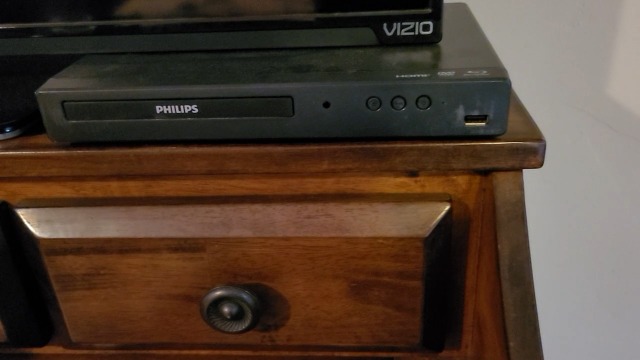
Figura 3.1: The Philips BDP1502 player with its disc tray extended, ready for disc insertion.
3.2. Reproducció multimèdia USB
The player features a front-panel USB port for playing compatible media files d'una unitat flash USB.
- Inseriu un dispositiu USB: Plug your USB flash drive into the USB port on the front of the player.
- Selecciona l'entrada USB: The player should automatically detect the USB device and display a menu. If not, use the remote control to navigate to the USB input.
- Navega i reprodueix: Use the navigation buttons on the remote to browse your files and select the desired media (e.g., photos, music, videos) for playback.
3.3. Funcions de control remot
The compact remote control provides full functionality for the player. Key buttons include:
- POTÈNCIA: Encén o apaga el reproductor.
- TOP MENU/POP MENU: Accedeix als menús del disc.
- INICI: Torna al menú principal.
- OK/Navigation Arrows: Confirms selections and navigates menus.
- INFORMACIÓ: Displays disc information.
- SUBTITLE/AUDIO: Selects subtitle and audio tracks.
- Colored Buttons (RED, GREEN, YELLOW, BLUE): Used for specific functions within disc menus or interactive content.

Figura 3.2: The compact remote control for the Philips BDP1502 Blu-Ray Disc/DVD Player, showing various control buttons.
4. Manteniment
Proper maintenance ensures the longevity and optimal performance of your player.
- Neteja del reproductor: Wipe the exterior of the player with a soft, dry cloth. Do not use liquid or aerosol cleaners. Ensure ventilation slots are free from dust.
- Cura del disc: Handle discs by their edges. Keep discs clean and free from scratches. Store discs in their cases when not in use.
- Actualitzacions de programari: Periodically check the official Philips support website for available firmware updates. Updates are typically installed via a USB stick. Follow the instructions provided on the Philips support page carefully.
5. Solució De Problemes
Si teniu problemes amb el reproductor, consulteu els següents problemes i solucions habituals:
| Problema | Possible causa/solució |
|---|---|
| Sense poder | Assegureu-vos que el cable d'alimentació estigui ben connectat tant al reproductor com a una presa de corrent que funcioni. |
| Sense imatge al televisor | Verify the HDMI cable is correctly connected. Ensure your TV is set to the correct HDMI input. Try a different HDMI cable or TV input. |
| Sense so | Check the audio settings on your TV and the player. Ensure the HDMI cable is functioning correctly. |
| "No Disc" Message | Ensure the disc is inserted correctly with the label side up. Clean the disc if it appears dirty or scratched. Try a different disc. |
| Disc Tray Does Not Open/Close | Press the OPEN/CLOSE button firmly. If stuck, gently try to assist the tray. Do not force it. If the issue persists, contact support. |
| Player Gets Hot During Use | Ensure adequate ventilation around the player. Do not block any vents. This is normal for electronic devices during operation, but excessive heat may indicate an issue. |
| Movie Stops or Pauses Randomly | Check the disc for scratches or smudges. Ensure the player's firmware is up to date. Try restarting the player and the movie. |
| El control remot no respon | Check and replace batteries. Ensure there are no obstructions between the remote and the player's IR sensor. |
6. Especificacions
- Marca: Philips
- Nom del model: BDP1502
- Dimensions (L x P x A): Aproximadament 12 x 8 x 2 polzades
- Pes de l'article: Aproximadament 2.53 lliures (1.15 quilograms)
- Tipus de suport: Disc Blu-ray, DVD
- Resolució de vídeo: Up to 1920x1080 (Full HD 1080p)
- Ampliació d'escala de vídeo: DVD video upscaling to 1080p via HDMI
- Connectivitat: HDMI Out, USB Port (front)
- Sortida d'àudio: DTS2.0 Digital Out, Dolby Audio
- Característiques especials: Blu Ray Support, Bonus View with Picture-in-Picture
7. Garantia i Suport
This Philips BDP1502 player is a Certified Renewed product, inspected to OEM specifications and factory initialized. While specific warranty details for renewed products may vary, please refer to your purchase documentation for information regarding any applicable warranty coverage.
For further assistance, technical support, or to check for the latest firmware updates, please visit the official Philips support website. Ensure you have your model number (BDP1502) ready when contacting support.