
EPEVER 20A+MT50+RTS+RS485
Manual d'usuari del controlador de càrrega solar EPEVER MPPT
Model: 20A+MT50+RTS+RS485
Marca: EPEVER
1. Introducció i finalview
This manual provides detailed instructions for the installation, operation, and maintenance of your EPEVER MPPT Solar Charge Controller. This advanced Maximum Power Point Tracking (MPPT) controller is designed to optimize the power output from your solar panels to efficiently charge your battery bank, ensuring reliable performance for various solar applications.
The EPEVER MPPT Solar Charge Controller features high tracking efficiency (no less than 99.5%) and a maximum conversion efficiency of 98%. It automatically identifies 12V/24VDC system voltage and supports multiple battery types and load control modes. The included MT50 remote meter, temperature sensor, and PC monitoring cable enhance system monitoring and control capabilities.

Figure 1.1: EPEVER MPPT Solar Charge Controller with included MT50 remote meter, temperature sensor, and communication cables.
2. Característiques del producte
The EPEVER MPPT Solar Charge Controller is equipped with several key features to ensure optimal performance and user convenience:
- Tecnologia MPPT avançada: Ensures maximum power point tracking efficiency of no less than 99.5% and a maximum conversion efficiency of 98%.
- Volum automàtictage Identificació: Automatically detects 12V/24VDC system voltage.
- Protecció de sobrecàrrega: Reliable automatic limit function of maximum PV input power prevents overload under any circumstance.
- Wide MPP Operating Voltage Rang: Accommodates various solar panel configurations.
- Disseny robust: Die-cast aluminum construction ensures excellent heat dissipation.
- Multiple Load Control Modes: Includes manual control, light ON/OFF, light ON+Timer, and time control.
- Compatibilitat de la bateria: Supports four charging options: Sealed, Gel, Flooded, and User-defined.
- Interfície de comunicació: Features an RS485 interface for monitoring via cellphone APP (eBox required), PC Software, and the MT50 remote meter.
- Aplicacions versàtils: Suitable for solar RVs, household systems, industrial field monitoring, and more.
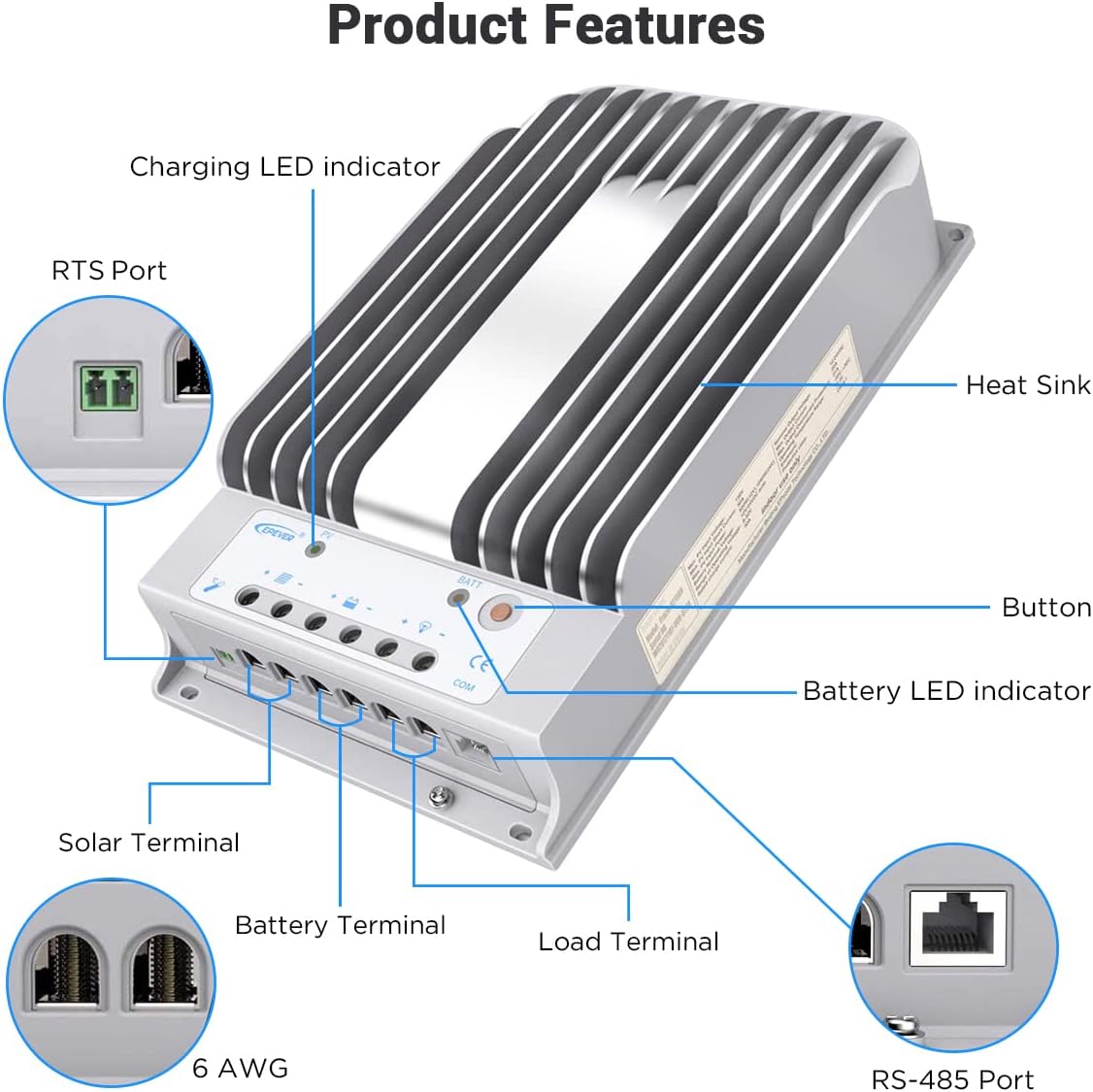
Figure 2.1: Key components and ports of the EPEVER MPPT Solar Charge Controller, including the heat sink, LED indicators, and terminals.
3. Configuració i instal·lació
Una instal·lació correcta és crucial per al funcionament segur i eficient del vostre controlador de càrrega solar. Seguiu aquestes pautes generals:
- Lloc de muntatge: Choose a cool, dry, and well-ventilated indoor location. Avoid direct sunlight, high temperatures, and moisture. Ensure sufficient clearance around the controller for heat dissipation.
- Superfície de muntatge: Mount the controller vertically on a non-flammable surface using appropriate screws. The die-cast aluminum design aids in heat dissipation, but good airflow is still essential.
- Seqüència de cablejat: Always connect the battery first, then the solar panel, and finally the load. Disconnect in the reverse order. Ensure correct polarity for all connections.
- Mida del cable: Use appropriately sized cables for all connections (solar, battery, load) to minimize voltage drop and ensure safety. Refer to local electrical codes and the controller's specifications for recommended wire gauges.
- Posada a terra: Ensure the controller is properly grounded according to local regulations.
For detailed wiring instructions, refer to the "Wiring Diagram" section below.
4. Esquema de cablejat
The following diagram illustrates the typical wiring connections for the EPEVER MPPT Solar Charge Controller within a solar power system. Ensure all connections are secure and correctly polarized.

Figure 4.1: Wiring connections for the solar charge controller, showing connections to solar panels, battery, inverter, and various loads. The MT50 remote meter and PC/APP monitoring connections are also depicted.
- Connexió de la bateria: Connect the battery to the controller's battery terminals first. Observe correct polarity (+ to + and - to -).
- Connexió del panell solar: Connect the solar panel array to the controller's PV terminals. Ensure correct polarity.
- Connexió de càrrega: Connect your DC loads (e.g., lights, small appliances) to the controller's load terminals.
- Connexions opcionals:
- MT50 Remote Meter: Connect the MT50 to the controller via the RS485 port for remote monitoring and parameter setting.
- PC/APP Monitoring: Use the RS485 to USB cable (and eBox for APP) to connect the controller to a PC or smartphone for advanced monitoring and data logging.
- Temperature Sensor (RTS): Connect the RTS to the designated port for accurate battery temperature compensation.
5. Instruccions de funcionament
Once installed, the EPEVER MPPT Solar Charge Controller operates largely automatically. However, understanding its indicators and settings is beneficial for optimal system management.
5.1. Engegada inicial
After connecting the battery, the controller will power on and display system information. Connect the solar panels, and the controller will begin charging the battery if sufficient solar power is available.
5.2. Using the MT50 Remote Meter
The MT50 remote meter provides real-time data and allows for parameter adjustments. Connect it to the controller's RS485 port. The display shows charging status, battery voltage, PV voltage, and load status. Use the buttons to navigate menus and modify settings such as battery type, load control mode, and charging parameters.

Figure 5.1: The EPEVER controller connected to the MT50 remote meter, illustrating the setup for monitoring and adjusting system parameters.
5.3. Load Control Modes
The controller offers various load control modes, configurable via the MT50 or PC software:
- Control manual: Turn the load ON or OFF manually.
- Llum ON/OFF: Load turns ON at dusk and OFF at dawn.
- Light ON + Timer: Load turns ON at dusk and stays ON for a set duration.
- Control de temps: Load turns ON and OFF at specific times.
5.4. Selecció del tipus de bateria
Select the correct battery type (Sealed, Gel, Flooded, or User-defined) to ensure proper charging algorithms and prolong battery life. Incorrect settings can damage your batteries.
6. Manteniment
Regular maintenance helps ensure the longevity and optimal performance of your EPEVER MPPT Solar Charge Controller and the entire solar system.
- Inspecció visual: Periodically check the controller for any signs of physical damage, corrosion, or loose connections.
- Integritat de la connexió: Ensure all wiring connections (solar, battery, load) are tight and secure. Loose connections can cause overheating and poor performance.
- Neteja: Keep the controller clean and free from dust, dirt, and debris. Ensure the heat sink fins are not obstructed to allow for proper heat dissipation.
- Ventilació: Verify that the installation area remains well-ventilated and that airflow around the controller is not restricted.
- Salut de la bateria: Monitor your battery's state of charge and overall health. Ensure the battery type setting on the controller matches your battery chemistry.
- Rendiment del sistema: Regularly check the system's performance using the MT50 remote meter or PC software to ensure expected power generation and charging.
7. Solució De Problemes
This section provides basic troubleshooting steps for common issues. For more complex problems, refer to the comprehensive user manual PDF or contact customer support.
| Problema | Causa possible | Solució |
|---|---|---|
| El controlador no s'encén. | Bateria no connectada o de baix volumtage; polaritat invertida. | Comproveu les connexions de la bateria i el voltage. Ensure correct polarity. Charge battery if too low. |
| No charging from solar panels. | Solar panels not connected; insufficient sunlight; PV voltage massa baix/alt. | Verify solar panel connections and polarity. Check sunlight conditions. Ensure PV voltage is within controller's operating range. |
| La càrrega no funciona. | Load disconnected; load control mode incorrect; battery low voltagi desconnectar. | Check load connections. Verify load control mode settings. Ensure battery voltage is above LVD setting. |
| Sobreescalfament. | Poor ventilation; excessive load; high ambient temperature. | Improve ventilation around the controller. Reduce load if possible. Ensure ambient temperature is within specifications. |
If the problem persists, please refer to the detailed user manual or contact EPEVER customer support.
8. Especificacions tècniques
Below are the key technical specifications for the EPEVER MPPT Solar Charge Controller (Model: 20A+MT50+RTS+RS485).

Figure 8.1: Detailed electrical and environmental parameters for various EPEVER Tracer series controllers, including the 20A model.
| Paràmetre | Valor |
|---|---|
| Sistema nominal Voltage | 12 / 24VDC automàtic |
| Corrent de càrrega nominal | 20A |
| Corrent nominal de descàrrega | 20A |
| Voltage Rang | 8V ~ 32V |
| Màx. Circuit obert PV Voltage | 150 V (a la temperatura ambiental mínima de funcionament) |
| MPP Voltage Rang | Bateria voltage +2V ~ 108V |
| Max. PV Input Power (12V) | 260W |
| Max. PV Input Power (24V) | 520W |
| Autoconsum | ≤60mA (12V); ≤30mA (24V) |
| Circuit de descàrrega Voltage Gota | ≤0.15V |
| Comunicació | RS485 (RJ45 interface) |
| Temperatura de funcionament | -35 °C ~ +55 °C |
| Temperatura d'emmagatzematge | -35 °C ~ +80 °C |
| Gamma d’humitat | ≤95% (N.C.) |
| Tancament | IP30 |
| Dimensions (L x A x A) | 8.53 x 5.61 x 2.2 polzades (aprox.) |
| Pes de l'article | 4.69 lliures (2.13 kg) |
| Material | Alumini |
9. Garantia i Suport
EPEVER stands behind the quality of its products. For specific warranty terms and conditions, please refer to the official product documentation or contact EPEVER customer support.
For comprehensive information, detailed diagrams, and advanced troubleshooting, please download the official User Manual PDF:
Descarrega el Manual d'usuari oficial (PDF)
For further assistance or technical inquiries, please visit the EPEVER Store on Amazon o contactar directament amb el seu servei d'atenció al client.
Ask a question about this manual
Ask about setup, troubleshooting, compatibility, parts, safety, or missing instructions. Manuals+ will review the question and use this page’s manual context to help answer it.