
1. Introducció
This manual provides detailed instructions for the proper setup, operation, and maintenance of your PROEL Eikon WM700DMA Dual-Channel PLL UHF Wireless Handheld Microphone System. Please read this manual thoroughly before using the system to ensure optimal performance and to prevent damage.
The Eikon WM700DMA is a professional dual-channel wireless microphone system designed for various applications, including karaoke, singing, and public address systems. It operates within the 518-550 MHz frequency range, offering reliable wireless connectivity.
2. Informació important de seguretat
- No exposeu la unitat a la pluja ni a la humitat per evitar incendis o descàrregues elèctriques.
- No obriu la c.asing. Demaneu totes les tasques de manteniment a personal qualificat.
- Assegureu-vos que hi hagi una ventilació adequada al voltant de la unitat receptora.
- Use only the power adapter supplied with the system.
- Mantingueu el sistema allunyat de fonts de calor i de la llum solar directa.
- Desfeu-vos de les piles de manera responsable d'acord amb la normativa local.
3. Contingut del paquet
Verifiqueu que tots els elements que s'enumeren a continuació s'inclouen al vostre paquet:
- WM700DMA Dual-Channel Wireless Receiver
- 2 x Handheld Wireless Microphones
- Adaptador d'alimentació
- Audio Cable (e.g., 1/4" to 1/4" or XLR to 1/4") - (Note: Specific cable type not detailed in product info, common for such systems)
- Maleta de transport
- Manual d'usuari (aquest document)
4. Producte acabatview
4.1. WM700DMA Receiver Front Panel

Imatge 4.1: Davant view of the WM700DMA receiver. It features two volume control knobs (VOL A, VOL B), SET buttons, up/down navigation buttons, IR sync windows, a central LCD display, and a POWER button.
- VOL A / VOL B: Adjusts the output volume for Channel A and Channel B respectively.
- Botó SET: Used to enter menu settings or confirm selections.
- Botons amunt / avall: Navigates through menu options or adjusts parameters.
- Finestra IR: Infrared sensor for syncing frequencies with the handheld microphones.
- Pantalla LCD: Shows channel frequency, signal strength, and other operational information.
- Botó d'encendre: Turns the receiver ON or OFF.
4.2. WM700DMA Receiver Rear Panel

Imatge 4.2: posterior view of the WM700DMA receiver. It includes a power input, two balanced XLR outputs (Balanced B, Balanced A), and an auxiliary 1/4" output (AUX).
- POWER INPUT (USB): Connects the supplied power adapter.
- BALANCED B / BALANCED A (XLR): Balanced audio outputs for Channel B and Channel A. Connect these to a mixer or PA system.
- AUX (1/4" Jack): Unbalanced auxiliary audio output, combining both channels.
4.3. Handheld Wireless Microphone

Imatge 4.3: Eikon handheld wireless microphone. It features a display, power/mute button, and an IR sensor for synchronization.
- Reixa del micròfon: Protects the cardioid dynamic capsule.
- Pantalla LCD: Shows battery status and current channel/frequency.
- Botó d'encesa/silenciació: Turns the microphone ON/OFF and mutes/unmutes the audio.
- Sensor IR: Receives frequency synchronization signals from the receiver.
- Compartiment de la bateria: Located at the bottom, holds the required batteries (typically AA, not specified in product data, but common).
5. Instruccions de configuració
- Posicioneu el receptor: Place the WM700DMA receiver in a central location, away from large metal objects or other wireless devices that might cause interference.
Ensure the antennas are extended and positioned for optimal reception.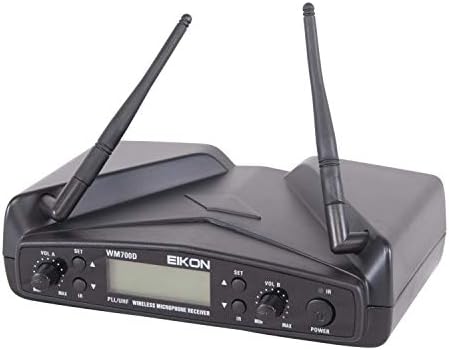
Imatge 5.1: WM700DMA receiver with antennas extended for improved signal reception.
- Connectar l'alimentació: Connect the supplied power adapter to the POWER INPUT (USB) on the rear of the receiver and plug it into a suitable power outlet.
- Connecta la sortida d'àudio:
- For individual channel output, connect XLR cables from BALANCED A and BALANCED B to your mixer or PA system's input channels.
- For a mixed output of both channels, connect a 1/4" cable from the AUX output to your mixer or PA system's input.
- Instal·leu les piles del micròfon: Open the battery compartment of each handheld microphone and insert the required batteries (e.g., 2x AA batteries per microphone, check markings on the device). Ensure correct polarity.
- Encès: Turn on the receiver by pressing the POWER button. Turn on each handheld microphone by pressing and holding its Power/Mute button.
- Frequency Synchronization (IR Sync):
- On the receiver, select the desired channel (A or B) and frequency using the SET and Up/Down buttons.
- Hold the microphone's IR sensor close to the receiver's IR window.
- Press the SET button on the receiver. The display on both the receiver and microphone should indicate successful synchronization. Repeat for the second microphone on the other channel.
- Initial Sound Check: Speak into each microphone and adjust the VOL A and VOL B knobs on the receiver, as well as the input gain on your mixer/PA system, to achieve a clear audio level without distortion.
6. Instruccions de funcionament
6.1. Funcionament del receptor
- Control de volum: Use the VOL A and VOL B knobs to adjust the individual output levels of each microphone channel.
- Selecció de canal/freqüència: Press the SET button to enter the frequency selection mode. Use the Up/Down buttons to change the frequency. Press SET again to confirm.
- Sincronització IR: If a microphone loses connection or needs to be paired with a different channel, follow the synchronization steps outlined in Section 5.
6.2. Microphone Operation
- Encès/apagat: Press and hold the Power/Mute button to turn the microphone ON or OFF.
- Funció de silenci: Briefly press the Power/Mute button to mute or unmute the microphone. The display will indicate the mute status.
- Indicador de bateria: The microphone's LCD display shows the current battery level. Replace batteries when the indicator is low to avoid interruptions.
- Ús òptim: Hold the microphone approximately 2-6 inches (5-15 cm) from your mouth for best sound quality. Avoid covering the grille with your hand.
7. Manteniment
- Neteja: Feu servir un drap suau i sec per netejar el receptor i els micròfons. No utilitzeu netejadors líquids ni dissolvents.
- Emmagatzematge: When not in use for extended periods, remove batteries from the microphones and store the system in its carrying case in a cool, dry place.
- Substitució de la bateria: Replace microphone batteries promptly when the low battery indicator appears. Use high-quality alkaline batteries for best performance.
- Cura de l'antena: Handle receiver antennas carefully to avoid bending or breaking.
8. Solució De Problemes
| Problema | Causa possible | Solució |
|---|---|---|
| No hi ha so del micròfon. |
|
|
| Interferències o electricitat estàtica. |
|
|
| Microphone not syncing. |
|
|
9. Especificacions
| Característica | Detall |
|---|---|
| Marca | PROEL |
| Número de model | EIKONWM700DM |
| Interval de freqüència | 518 – 550 MHz |
| Tecnologia de connectivitat | UHF, USB |
| Tipus de connector | USB (for power), XLR, 1/4" Jack |
| Nombre de canals | 2 |
| Tipus de micròfon | Handheld, Cardioid Dynamic Capsule |
| Patró polar | Unidireccional |
| Ràtio senyal / soroll | 80 dB (System), 105 dB (Microphone Audio Sensitivity) |
| Resposta de freqüència | 15 KHz (Upper limit, typical for audio) |
| Usos recomanats | Karaoke, Singing |
| Dispositius compatibles | PA System, Personal Computer (via audio output) |
| Pes de l'article | 2000 Grams (System) |
| Dimensions de l'article | 14.5 x 10.2 x 7.9 cm (receptor) |
| Components inclosos | Maleta de transport |
10. Garantia i Suport
PROEL products are designed and manufactured to the highest quality standards. For information regarding warranty coverage, technical support, or service, please refer to the warranty card included with your product or visit the official PROEL weblloc.
Si us plau, conserveu el comprovant de compra per a qualsevol reclamació de garantia.