
ProfiCare PC-BSR 3042
ProfiCare PC-BSR 3042 Robot Vacuum Cleaner Instruction Manual
Model: PC-BSR 3042
1. Introducció
Thank you for choosing the ProfiCare PC-BSR 3042 Robot Vacuum Cleaner. This manual provides essential information for the safe and efficient operation, maintenance, and troubleshooting of your new appliance. Please read these instructions thoroughly before first use and keep them for future reference.
The ProfiCare PC-BSR 3042 is designed to independently clean various hard floor surfaces and short-pile carpets, effectively removing dirt, dust, crumbs, and pet hair. Its extra-flat design allows for cleaning under furniture, and its quiet operation ensures minimal disturbance.
2. Instruccions de seguretat
Observeu sempre les següents precaucions de seguretat per evitar lesions o danys a l'aparell:
- Llegiu atentament totes les instruccions abans d'utilitzar l'aparell.
- Aquest aparell està dissenyat només per a ús domèstic.
- Do not allow children to play with the appliance. Supervise children and individuals with reduced physical, sensory, or mental capabilities when the appliance is in use.
- Do not immerse the appliance, power adapter, or remote control in water or other liquids.
- Use only the original power adapter supplied with the appliance.
- Do not use the appliance to pick up flammable or combustible materials, hot ashes, or sharp objects.
- Ensure the dustbin and filter are correctly installed before operation.
- Mantingueu els cabells, la roba solta, els dits i totes les parts del cos lluny de les obertures i les parts mòbils.
- The appliance features automatic stair detection. However, always exercise caution near stairs or elevated surfaces.
- If the appliance is damaged, do not operate it. Contact customer support for assistance.
3. Contingut del paquet
Si us plau, comproveu que tots els elements siguin presents i en bon estat:
- ProfiCare PC-BSR 3042 Robot Vacuum Cleaner
- Adaptador d'alimentació
- Control remot
- Side Brushes (2 pre-installed, 2 extra)
- Filtre HEPA (preinstal·lat)
- Cleaning Brush for Filter
- Manual d'instruccions
4. Producte acabatview
Familiarize yourself with the components of your robot vacuum cleaner.
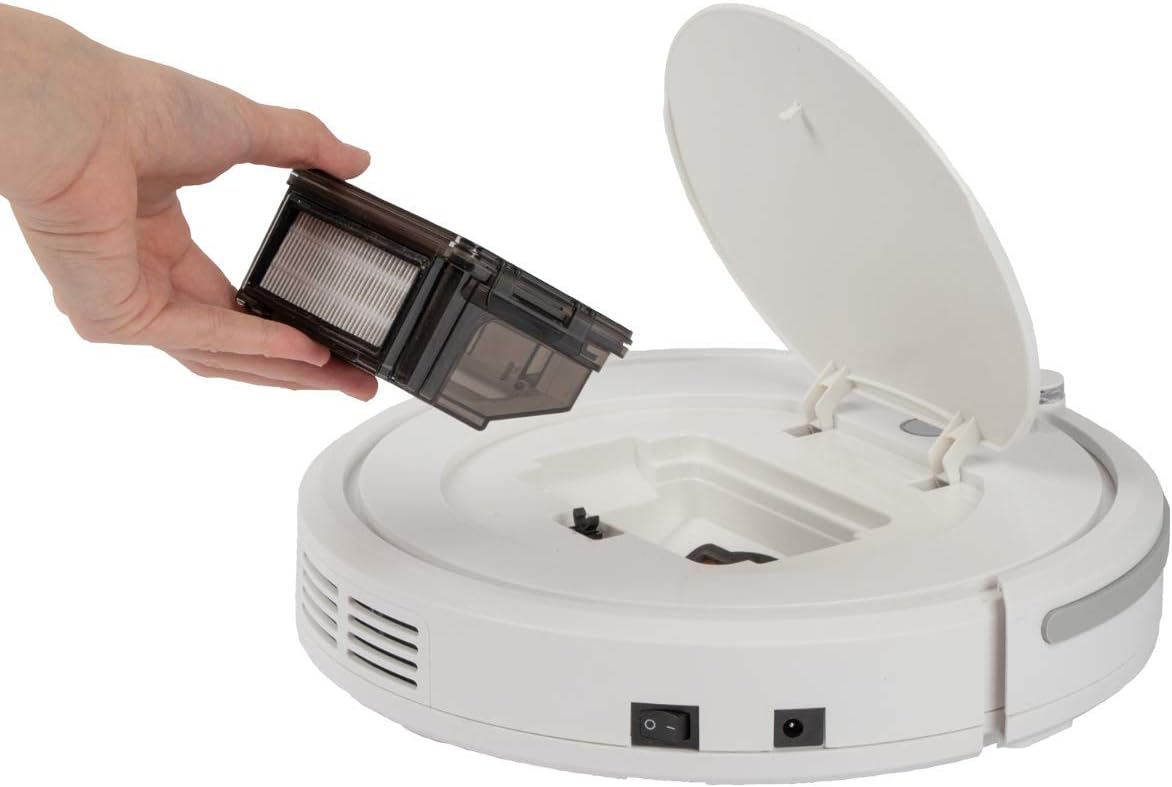
Figura 4.1: A dalt view of the robot vacuum cleaner, showing the main power button, HEPA filter indicator, and remote sensor area.

Figura 4.2: The multi-function remote control for operating the robot vacuum cleaner.
Components de la unitat principal:
- Botó d'encesa: Located on the top surface for manual start/stop.
- Dustbin Compartment: Houses the removable dustbin and HEPA filter.
- Raspalls laterals: Two rotating brushes for sweeping debris into the vacuum's path.
- Port de càrrega: Per connectar l'adaptador de corrent.
- Sensors infrarojos: For obstacle detection and stair avoidance.
- Rodes motrius: Rubberized and spring-mounted for smooth movement across various surfaces.
Funcions de control remot:
- Inici / Pausa: Inicia o atura la neteja.
- Fletxes direccionals: Manually guides the robot.
- FOCUS (Spot Cleaning): Directs the robot to clean a specific area intensively.
- RANDOM (Random Cleaning): Robot cleans in a random pattern.
- AUTO (Systematic Cleaning): Robot cleans in a systematic pattern.
- RESPON: Locates the robot.
5. Configuració
5.1. Carregant la bateria
- Connect the power adapter to the charging port on the side of the robot vacuum cleaner.
- Connecteu l'adaptador de corrent a una presa de corrent.
- Allow the robot to charge for approximately 5 hours before its first use. The charging indicator light will show the charging status.
5.2. Instal·lació dels raspalls laterals
The robot comes with two side brushes pre-installed. If replacement is needed:
- Gireu el robot aspirador cap per avall.
- Align the new side brush with the brush post and press down until it clicks into place. Ensure the brushes are securely attached.
5.3. Preparació de la zona de neteja
- Remove any large obstacles, loose cables, or delicate items from the floor.
- Ensure doors to areas you want cleaned are open, and doors to areas you want to avoid are closed.
6. Operating the Robot Vacuum Cleaner
6.1. Inici d'un cicle de neteja
You can start the robot in two ways:
- Inici manual: Press the power button on the top of the robot.
- Remote Control Start: Press the "Start/Pause" button on the remote control.
The robot will begin cleaning in its default mode (Systematic or Random, depending on the last setting).
6.2. Selecció dels modes de neteja
Use the remote control to select a specific cleaning program:
- AUTO (Systematic Cleaning): The robot cleans in a structured, back-and-forth pattern to cover the entire area efficiently.
- RANDOM (Random Cleaning): The robot navigates randomly, changing direction upon encountering obstacles.
- FOCUS (Spot Cleaning): The robot cleans a concentrated area in a spiral pattern, ideal for heavily soiled spots.
6.3. Pausing and Resuming
Press the "Start/Pause" button on the robot or remote control to pause the cleaning cycle. Press it again to resume.
6.4. Stopping the Robot
To stop the robot completely, press and hold the power button on the robot until it turns off, or press the "Start/Pause" button on the remote and then the power button on the robot.
6.5. Funció de temporitzador
The remote control includes a timer function to schedule cleaning times. Refer to the remote control section in this manual for detailed instructions on setting the timer.
6.6. Stair Detection
The robot is equipped with infrared sensors that automatically detect stairs and prevent it from falling. Ensure these sensors are kept clean for optimal performance.
7. Manteniment
Un manteniment regular garanteix un rendiment òptim i allarga la vida útil del teu robot aspirador.
7.1. Buidar i netejar el contenidor d'escombraries

Figura 7.1: Removing the dustbin for emptying and cleaning.
- Turn off the robot vacuum cleaner.
- Obriu la coberta superior del robot.
- Grasp the handle of the dustbin and lift it out.
- Open the dustbin and empty its contents into a waste bin.
- Si cal, esbandiu el contenidor de pols amb aigua i assegureu-vos que estigui completament sec abans de tornar-lo a instal·lar.
7.2. Neteja del filtre HEPA
The HEPA filter is located inside the dustbin. Clean it regularly to maintain suction power.
- Traieu el contenidor de pols tal com s'ha descrit anteriorment.
- Traieu amb cura el filtre HEPA del contenidor d'escombraries.
- Use the provided cleaning brush to remove dust and debris from the filter. Do not wash the HEPA filter with water unless specified by the manufacturer.
- Reinsert the clean HEPA filter into the dustbin and then place the dustbin back into the robot.
7.3. Neteja dels raspalls laterals
Periodically check and clean the side brushes for tangled hair or debris.
- Turn off the robot and flip it over.
- Gently pull the side brushes upwards to remove them.
- Remove any hair or debris wrapped around the brushes or brush posts.
- Reattach the brushes by pressing them down onto their posts until they click.
7.4. Cleaning Sensors and Wheels
Wipe the infrared sensors (located around the bumper and underneath the robot) and the drive wheels with a clean, dry cloth to ensure proper navigation and movement.
8. Solució De Problemes
If you encounter issues with your robot vacuum cleaner, refer to the following table for common problems and solutions.
| Problema | Causa possible | Solució |
|---|---|---|
| El robot no s'encén. | La bateria està baixa o esgotada. | Charge the robot for 5 hours. |
| El robot s'atura inesperadament. | Battery is low; Obstacle detected; Wheels/brushes jammed. | Charge the robot; Remove obstacles; Clean wheels and brushes. |
| Mal rendiment de neteja. | Dustbin full; Filter clogged; Side brushes worn or dirty. | Empty dustbin; Clean/replace filter; Clean/replace side brushes. |
| El robot no es carrega. | Power adapter not connected; Faulty adapter/port. | Ensure secure connection; Try a different outlet; Contact support. |
| Robot falls down stairs. | Stair sensors are dirty or blocked. | Clean the stair sensors thoroughly. |
9. Especificacions
Technical details for the ProfiCare PC-BSR 3042 Robot Vacuum Cleaner:

Figura 9.1: Dimensions of the robot vacuum cleaner.
| Característica | Detall |
|---|---|
| Número de model | 330420 |
| Tipus de bateria | Ni-MH |
| Voltage | 14.4 V |
| Capacitat de la bateria | 1500 mAh |
| Temps de funcionament de la bateria | Fins a 90 minuts |
| Temps de càrrega de la bateria | Aprox. 5 hores |
| Nivell de soroll | Aprox. 61 dB |
| Dimensions (Diàmetre x Alçada) | 290 mm x 75 mm |
| Pes | 1.9 kg |
| Tipus de filtre | Filtre HEPA |
| Programes de neteja | 3 (Random, Systematic, Spot) |
| Característiques especials | Automatic stair detection, Mechanical furniture barrier, Remote control, Timer function |
| Recomanació de superfície | Hard floors, short-pile carpets |
10. Garantia i Suport
10.1. Garantia del fabricant
This product is covered by a manufacturer's warranty. Please refer to the warranty card included in your package or contact ProfiCare customer service for specific terms and conditions. Spare parts availability is typically 2 years from the date of purchase.
10.2. Atenció al client
For technical assistance, troubleshooting beyond this manual, or warranty claims, please contact your retailer or the ProfiCare customer support team. Contact information can usually be found on the product packaging or the official ProfiCare weblloc.
Documents relacionatsPC-BSR 3042


Ask a question about this manual
Ask about setup, troubleshooting, compatibility, parts, safety, or missing instructions. Manuals+ will review the question and use this page’s manual context to help answer it.