1. Producte acabatview
The GOWIN 10.1 Inch Android 10.0 Tablet is a high-performance device designed for versatile use, featuring a quad-core processor, 4GB RAM, and 64GB internal storage, expandable up to 128GB. It supports dual SIM cards for cellular connectivity and includes a detachable keyboard and wireless mouse for enhanced productivity.

Image: GOWIN 10.1 Inch Android Tablet with its accessories, including a detachable keyboard, wireless mouse, and stylus.
2. Què hi ha a la caixa
Verifiqueu que tots els elements siguin presents al paquet:
- GOWIN 10.1 Inch Android Tablet
- Teclat Bluetooth
- Ratolí sense fil
- Funda per a tauletes
- Carregador de CA
- Manual d'usuari
- Cable USB
- Cable OTG

Image: All components included in the GOWIN tablet package, laid out for inspection.
3. Disseny i ports del dispositiu
Familiarize yourself with the tablet's physical features and connection points.
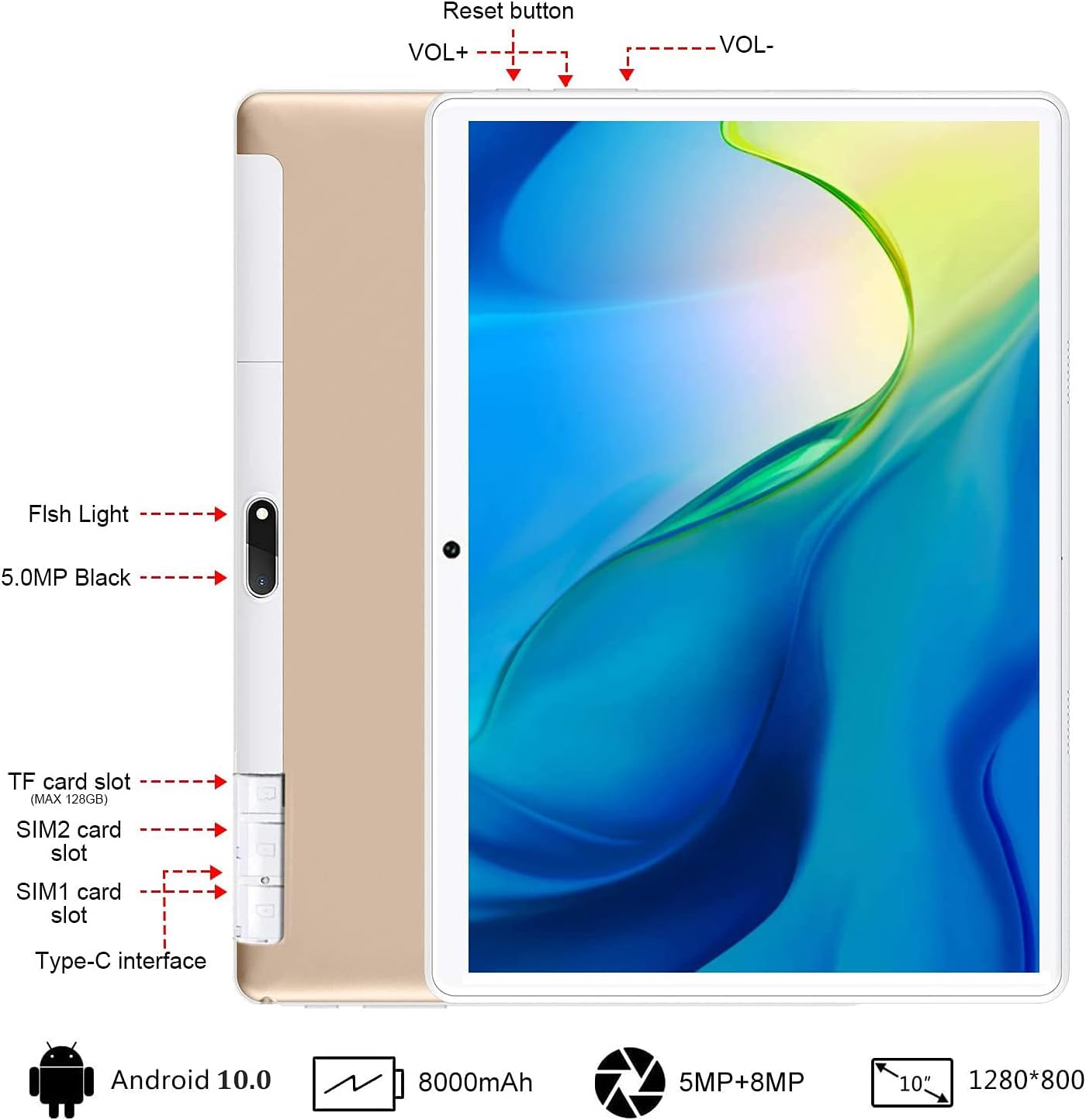
Imatge: Part posterior view of the GOWIN tablet, highlighting the TF card slot, SIM card slots, Type-C interface, reset button, volume controls, and camera.
- Ranura per a targetes TF: Per a emmagatzematge ampliable (fins a 128 GB).
- SIM1/SIM2 Card Slots: For dual 4G cellular connectivity.
- Interfície tipus C: Per a càrrega i transferència de dades.
- VOL+ / VOL-: Volume up and down buttons.
- Botó de restabliment: To restart the device if unresponsive.
- Càmeres: 5MP front-facing and 8MP rear-facing cameras.
4. Configuració
4.1 Càrrega inicial
Before first use, fully charge the tablet using the provided AC charger and USB cable. The 8000mAh battery provides extended usage time.

Image: The GOWIN tablet screen showing a full battery indicator, emphasizing its 8000mAh capacity.
4.2 Inserció de targetes SIM i SD
Carefully insert your SIM cards and/or a microSD card into the designated slots as shown in the device layout section. Ensure the tablet is powered off before inserting or removing cards.
4.3 Connecting Keyboard and Mouse
The included keyboard and mouse connect via Bluetooth. Refer to their individual instructions for pairing. Once paired, they provide a laptop-like experience.

Image: A user's hands typing on the detachable Bluetooth keyboard connected to the GOWIN tablet, with the wireless mouse nearby.
4.4 Attaching Tablet Case
The tablet case provides protection and can be folded into a stand for multiple viewangles d'ajust.

Image: The GOWIN tablet positioned in its protective case, illustrating how the case can be folded to create various viewangles d'ajust.
5. Instruccions de funcionament
5.1 Encès/Apagat
- Per encendre: Manteniu premut el botó d'engegada fins que la pantalla s'encengui.
- Per apagar: Mantingueu premut el botó d'engegada i, a continuació, seleccioneu "Apagar" de les opcions.
5.2 Navegació bàsica (Android 10.0)
The tablet runs on Android 10.0, offering an intuitive user interface. Swipe gestures and on-screen buttons are used for navigation. Access Google Play Store to download applications like YouTube and Netflix.
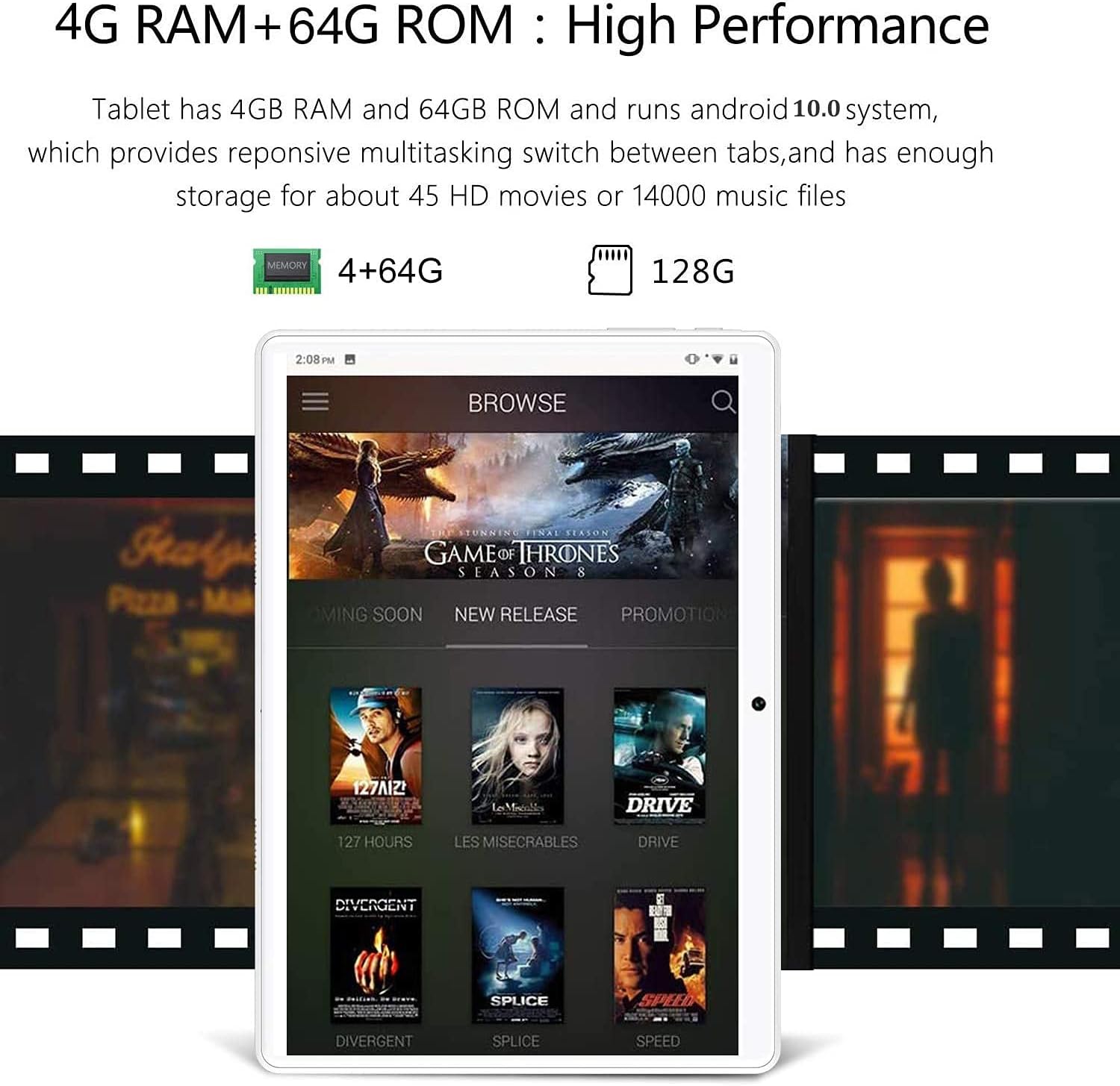
Image: The GOWIN tablet's display showing the Android 10.0 interface with various media applications, demonstrating its high performance and storage capacity.
5.3 Connectivitat
- Wi-Fi: Ves a Configuració > Xarxa i internet > Wi-Fi per connectar-te a les xarxes disponibles.
- Bluetooth: Ves a Configuració > Dispositius connectats > Bluetooth per emparellar-lo amb accessoris Bluetooth.
- Dades mòbils: If SIM cards are inserted, enable mobile data in Settings > Network & internet > Mobile network.
5.4 Ús de la càmera
The tablet is equipped with a 5MP front camera and an 8MP rear camera for photos and videos. Open the Camera app from the home screen or app drawer.

Image: The GOWIN tablet screen showcasing a vibrant image, illustrating the quality of its 8MP rear camera.
6. Manteniment
- Neteja: Feu servir un drap suau i sense borrissol per netejar la pantalla i la carcassa. Eviteu productes de neteja o dissolvents abrasius.
- Cura de la bateria: To prolong battery life, avoid extreme temperatures and do not let the battery fully drain frequently.
- Actualitzacions de programari: Periodically check for system updates in Settings > System > System update to ensure optimal performance and security.
7. Solució De Problemes
- Device is Slow/Apps Crashing: Close unused applications, clear cache, or restart the tablet. Ensure sufficient storage space is available.
- La pantalla no respon: Perform a soft reset by pressing and holding the power button until the device restarts. If unresponsive, use the reset button (refer to Section 3).
- No es pot connectar a la Wi-Fi/Bluetooth: Ensure Wi-Fi/Bluetooth is enabled. Restart the tablet and the router/Bluetooth device.
- La bateria s'esgota ràpidament: Reduce screen brightness, disable unused features (Wi-Fi, Bluetooth, GPS), and close background apps.
For further assistance, please contact customer service through Amazon. We aim to provide a satisfactory answer within 24 hours.
8. Especificacions
| Característica | Especificació |
|---|---|
| Marca | GOWIN |
| Nom del model | Touch (K6) |
| Sistema operatiu | Android 10 |
| Mida de la pantalla | 10.1 polzades |
| Resolució de pantalla | 1280 x 800 píxels (IPS) |
| Processador | 1.5 GHz Quad-Core (MediaTek) |
| RAM | 4 GB |
| Emmagatzematge intern | 64 GB |
| Emmagatzematge ampliable | Fins a 128 GB (microSD) |
| Càmera posterior | 8 MP |
| Càmera frontal | 5 MP |
| Capacitat de la bateria | 8000 mAh |
| Connectivitat | Dual 4G Cellular, Wi-Fi, Bluetooth |
| Pes de l'article | 1.2 lliures |
| Color | Or |
9. Garantia i Suport
GOWIN provides a one-month free replacement policy and 365 days of free repair service for non-human damage. For any questions or support needs, please contact our customer service team via Amazon. We are committed to providing a satisfactory resolution within 24 hours.
For more information about DUODUOGO products, visit the official brand store: DUODUOGO Store on Amazon.