
1. Introducció
The EPEVER Tracer1210AN is a 10A Maximum Power Point Tracking (MPPT) solar charge controller designed for 12V/24V DC systems. It automatically identifies system voltage and features common negative grounding. This controller is compatible with various battery types, including lead-acid (sealed, gel, flooded) and lithium batteries (LiFePO4, Li(NiCoMn)O2, and user-defined). It incorporates advanced MPPT technology for high tracking efficiency and comprehensive protection functions to ensure system stability and battery longevity.
2. Característiques clau
- Corrent nominal: 10A charging and discharging.
- Volum del sistematage: 12V/24V DC automatic identification.
- Entrada FV màxima: 100V open circuit voltage; 130W/12V, 260W/24V power.
- Posada a terra: Common negative grounding.
- Tecnologia MPPT: Advanced tracking speed with efficiency ≥99.5%.
- Compatibilitat de la bateria: Supports sealed, gel, flooded lead-acid, LiFePO4, Li(NiCoMn)O2, and user-defined lithium batteries.
- Modes de control de càrrega: Manual, light on/off, light on + timer, and test mode.
- Visualització: Backlit LCD for real-time energy statistics and status.
- Comunicació: Standard Modbus protocol with RS485 for monitoring via mobile app (with EBox), PC software, or MT50 remote meter.
- Funcions de protecció: Battery temperature compensation, PV over current/power/reverse polarity, night reverse charge, battery over discharge, load short circuit, and overheating power reduction.
- Construcció: Die-cast aluminum design for efficient heat dissipation.
3. Producte acabatview i Interfície
The Tracer1210AN controller features a robust design with clearly labeled terminals and an intuitive LCD display for monitoring system status.
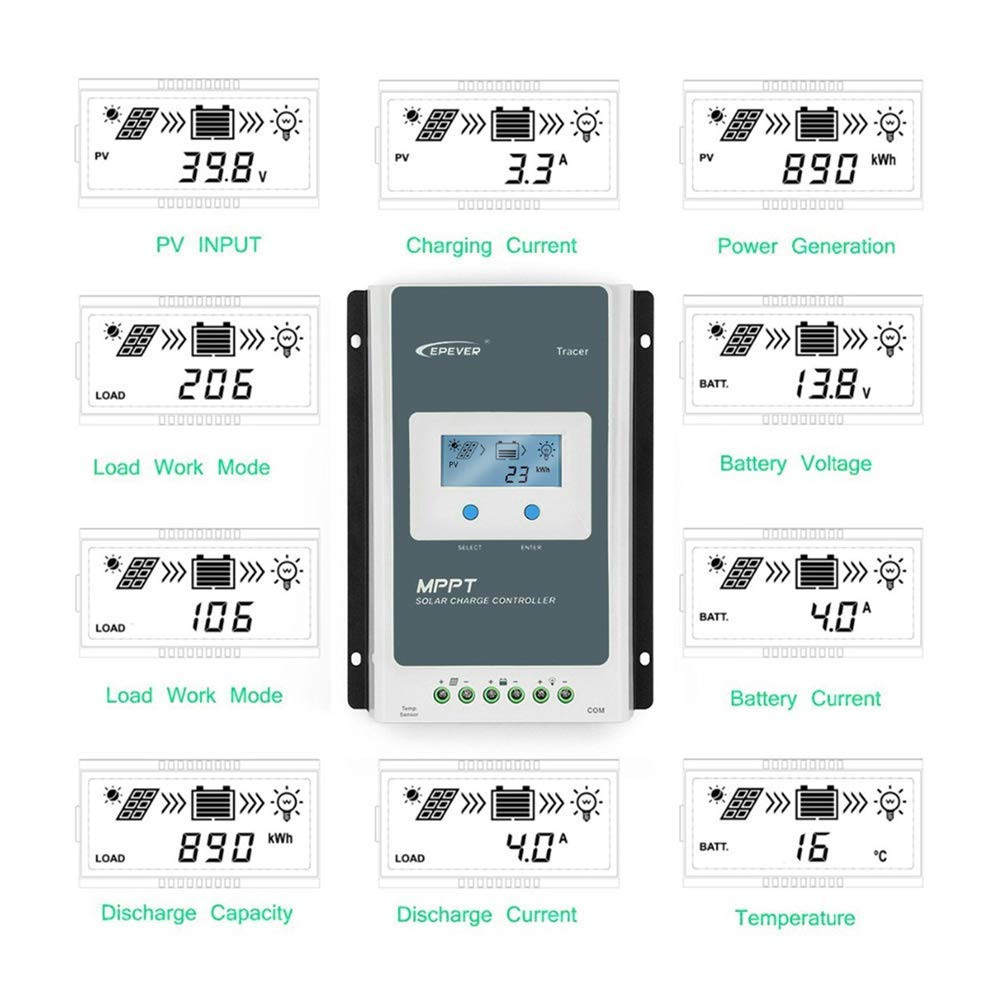
Figure 3.1: Controller Interface. This diagram illustrates the various components and connection points of the EPEVER Tracer1210AN solar charge controller, including the LCD display, selection buttons, remote temperature sensor port, solar panel terminals, battery terminals, load terminals, and the RJ45 communication port.
- Forats de muntatge: Per a una instal·lació segura.
- Pantalla LCD: Shows real-time system data.
- Select/Enter Buttons: For navigation and parameter settings.
- Remote Temp. Sensor: Port for connecting an external temperature sensor (RTS).
- Terminal del panell solar: Connects to the solar PV array.
- Terminal de la bateria: Es connecta al banc de bateries.
- Terminal de càrrega: Connects to DC loads.
- Port de comunicació RJ45: For connecting accessories like MT50, eBox-wifi, or PC communication cables.

Figura 3.2: Frontal View of the Tracer1210AN. This image shows the front panel of the EPEVER Tracer1210AN MPPT solar charge controller, highlighting its compact design and integrated LCD display.
4. Configuració i instal·lació
Proper installation is crucial for the safe and efficient operation of your solar charge controller. Please follow these steps carefully.
4.1 Precaucions de seguretat
- Ensure all connections are tight to avoid excessive heat buildup.
- Install the controller indoors, away from direct sunlight, high temperatures, and water.
- Mount the controller vertically on a wall or flat surface to allow for proper air circulation.
- Use appropriate circuit breakers or fuses for the solar panel, battery, and load circuits.
- Always connect the battery first, then the solar panel, and finally the load. Disconnect in reverse order.
4.2 Wiring Sequence
- Connecteu la bateria: Connect the battery to the controller's battery terminals. Ensure correct polarity (+ to + and - to -). The controller will detect the system voltage.
- Connecteu el panell solar: Connect the solar panel to the controller's PV terminals. Ensure correct polarity.
- Connect the DC Load: Connect the DC load to the controller's load terminals. Ensure correct polarity.
- Connect Remote Temperature Sensor (Optional): If using, connect the RTS to the designated port. This improves battery charging accuracy.
- Connect Communication Accessories (Optional): If using an MT50 remote meter, eBox-wifi, or PC communication cable, connect it to the RJ45 port.
Important: Incorrect wiring sequence can damage the controller. Always connect the battery first and disconnect the solar panel first.
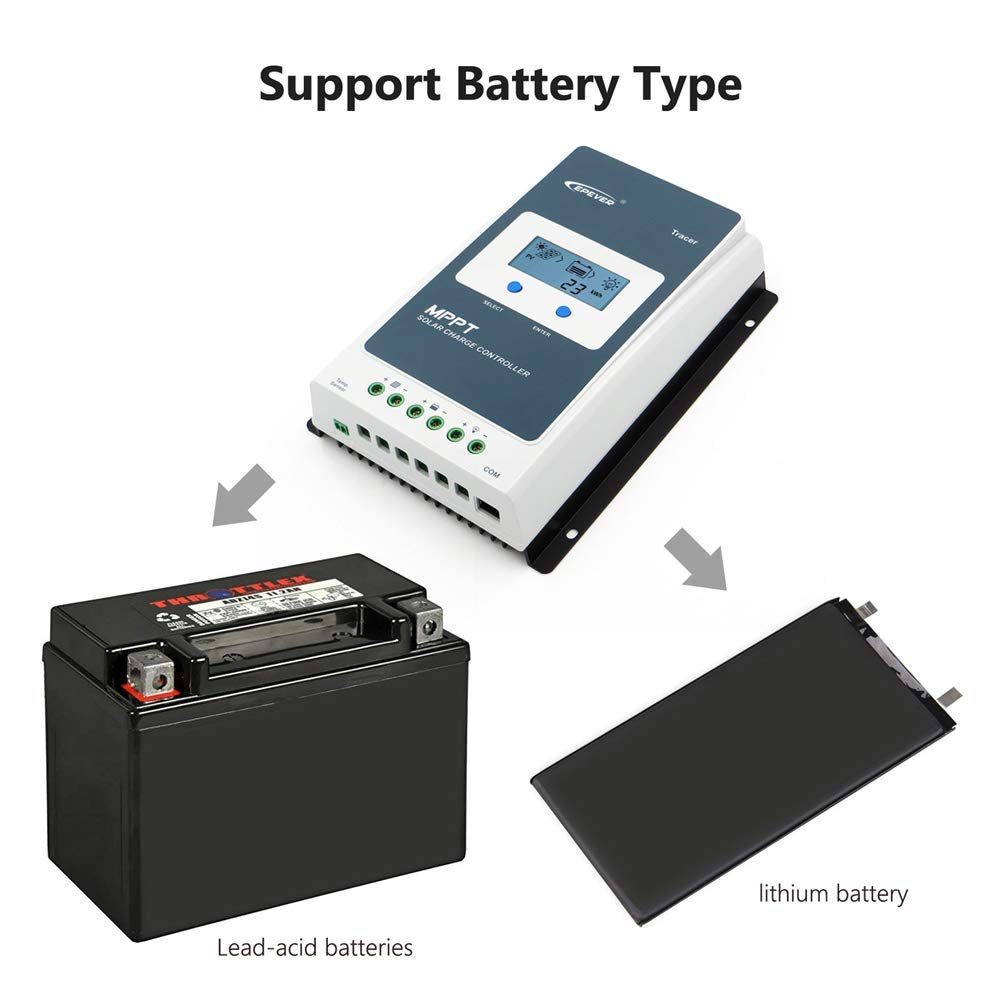
Figure 4.1: Wiring Terminals. This image shows the connection terminals for the solar panel, battery, and load on the EPEVER Tracer1210AN controller.
5. Instruccions de funcionament
The Tracer1210AN controller features an LCD display and buttons for easy operation and monitoring.
5.1 LCD Display and Button Functions
The backlit LCD displays various system parameters. Use the "SELECT" and "ENTER" buttons to navigate menus and adjust settings.
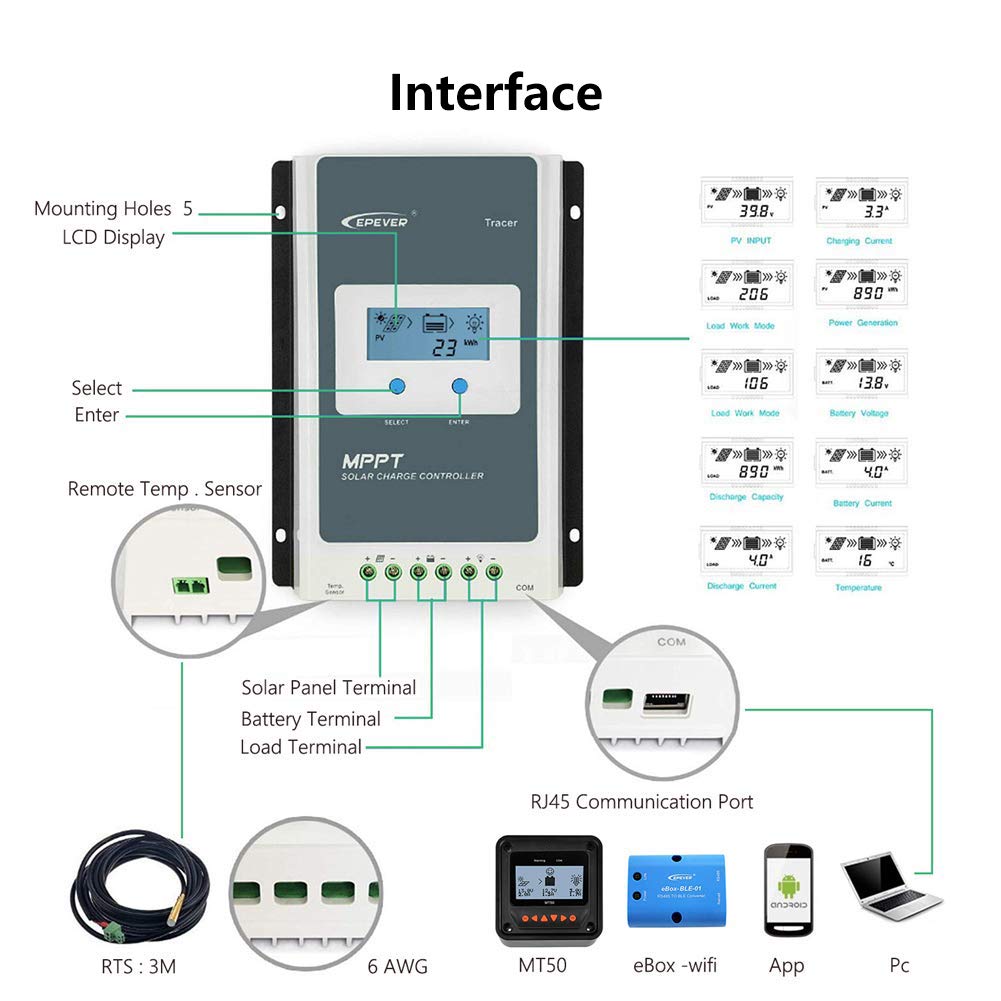
Figure 5.1: LCD Display. This image shows the LCD display of the Tracer1210AN, indicating various real-time parameters such as PV input, charging current, battery voltage, and load status.
5.2 Descripció de l'estat
The LCD uses icons to indicate the current status of the solar array, battery, and load.
Figure 5.2: Status Icons. This table explains the meaning of various icons displayed on the controller's LCD, indicating conditions like day/night, charging status, battery type, and load operation.
5.3 Configuració del tipus de bateria
The controller supports various battery types. It is essential to select the correct battery type for optimal charging and discharge management.
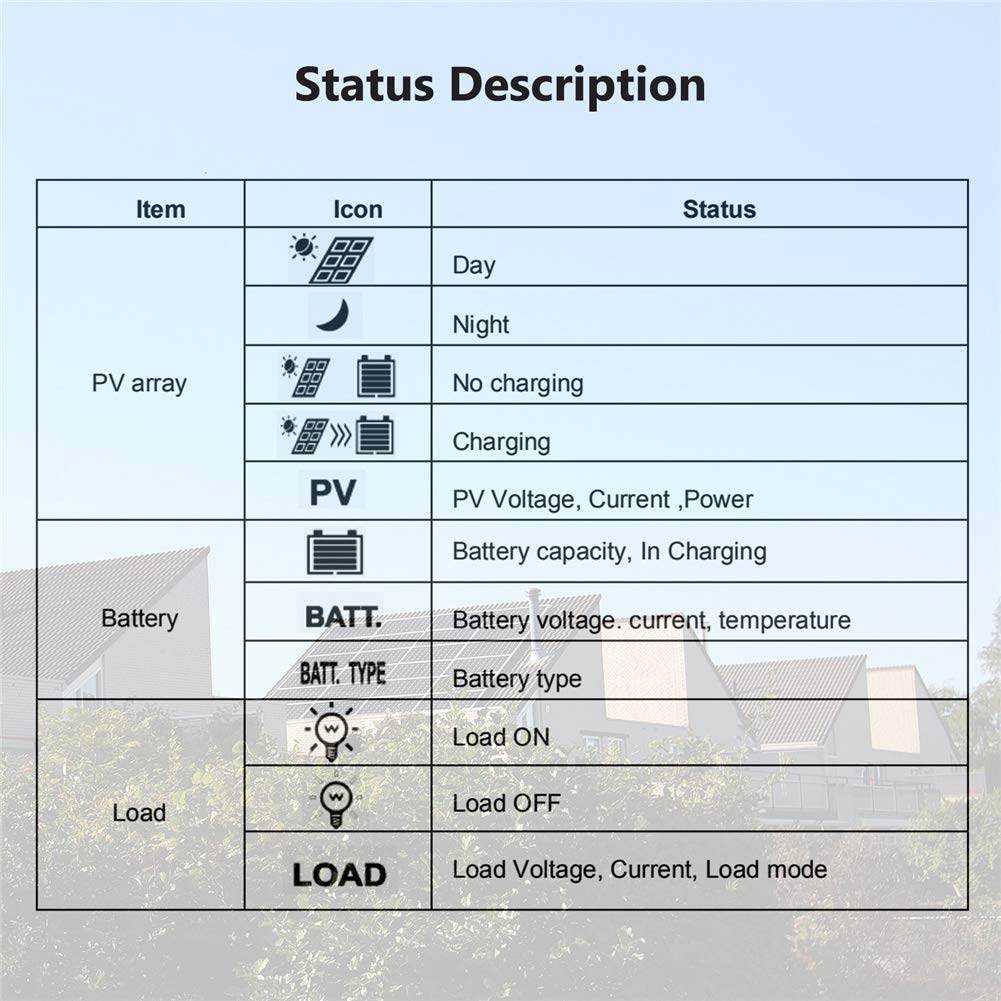
Figure 5.3: Supported Battery Types. This image shows the controller's compatibility with both lead-acid and lithium battery types.
- Lead-Acid: Sealed, Gel, Flooded.
- Liti: LiFePO4, Li(NiCoMn)O2.
- Usuari definit: Allows custom parameters for specific battery chemistries.
Refer to the detailed user manual (usually provided with the product or available online) for specific instructions on how to navigate the LCD menu and set battery parameters.
5.4 Modes de control de càrrega
The controller offers four load control modes:
- Mode manual: Load can be turned on/off manually.
- Llum encès/apagat: La càrrega s'encén al capvespre i s'apaga a l'alba.
- Light On + Timer: Load turns on at dusk and stays on for a set duration.
- Mode de prova: For testing load functionality.
6. Manteniment
Regular maintenance ensures the longevity and optimal performance of your EPEVER Tracer1210AN solar charge controller.
- Comproveu les connexions: Periodically inspect all wiring connections (solar panel, battery, load) to ensure they are tight and free from corrosion.
- Netegeu el controlador: Keep the controller clean and free from dust and debris. Use a dry cloth for cleaning. Do not use liquids.
- Inspeccionar per danys: Check for any physical damage to the casing, wires, or terminals.
- Ventilació: Ensure the installation area has adequate ventilation to prevent overheating. The die-cast aluminum design aids in heat dissipation, but airflow is still important.
- Salut de la bateria: Monitor de vol de la bateriatage and health regularly, especially for lead-acid batteries, to ensure they are functioning correctly.
7. Solució De Problemes
Aquesta secció ofereix orientació per a problemes comuns que podeu trobar.
| Problema | Causa possible | Solució |
|---|---|---|
| Sense pantalla a la pantalla LCD | Bateria no connectada o de baix volumtage; polaritat inversa. | Comproveu les connexions de la bateria i el voltage. Ensure correct polarity. Charge battery if voltage és massa baixa. |
| La bateria no es carrega | Solar panel not connected; low solar input; PV reverse polarity; battery type mismatch. | Check solar panel connections and ensure sufficient sunlight. Verify PV polarity. Confirm correct battery type setting. |
| La càrrega no funciona | Load disconnected; load short circuit; battery low voltage; incorrect load control mode. | Check load connections. Inspect for short circuits. Ensure battery is adequately charged. Verify load control mode settings. |
| Sobreescalfament | Poor ventilation; excessive ambient temperature; overloaded system. | Ensure adequate airflow around the controller. Reduce system load if necessary. Relocate to a cooler environment. |
For more complex issues, refer to the full product manual or contact EPEVER customer support.
8. Especificacions
| Paràmetre | Valor |
|---|---|
| Corrent de càrrega nominal | 10A |
| Corrent nominal de descàrrega | 10A |
| Volum del sistematage | 12V/24V DC Auto |
| Màx. Circuit obert PV Voltage | 100 V |
| Màx. Potència d'entrada fotovoltaica | 130 W (12 V), 260 W (24 V) |
| Tipus de bateria compatibles | Lead-Acid (Sealed, Gel, Flooded), Lithium (LiFePO4, Li(NiCoMn)O2), User-defined |
| Posada a terra | Negatiu comú |
| Tipus de visualització | LCD |
| Material | Alumini |
| Color | Gris |
| Dimensions (L x A x A) | 252 mm x 180 mm x 63 mm (aproximat, basat en la imatge) |
| Pes | 1.65kg (approximate, based on image) |
Nota: Specifications are subject to change without prior notice. Refer to the product label for the most accurate information.
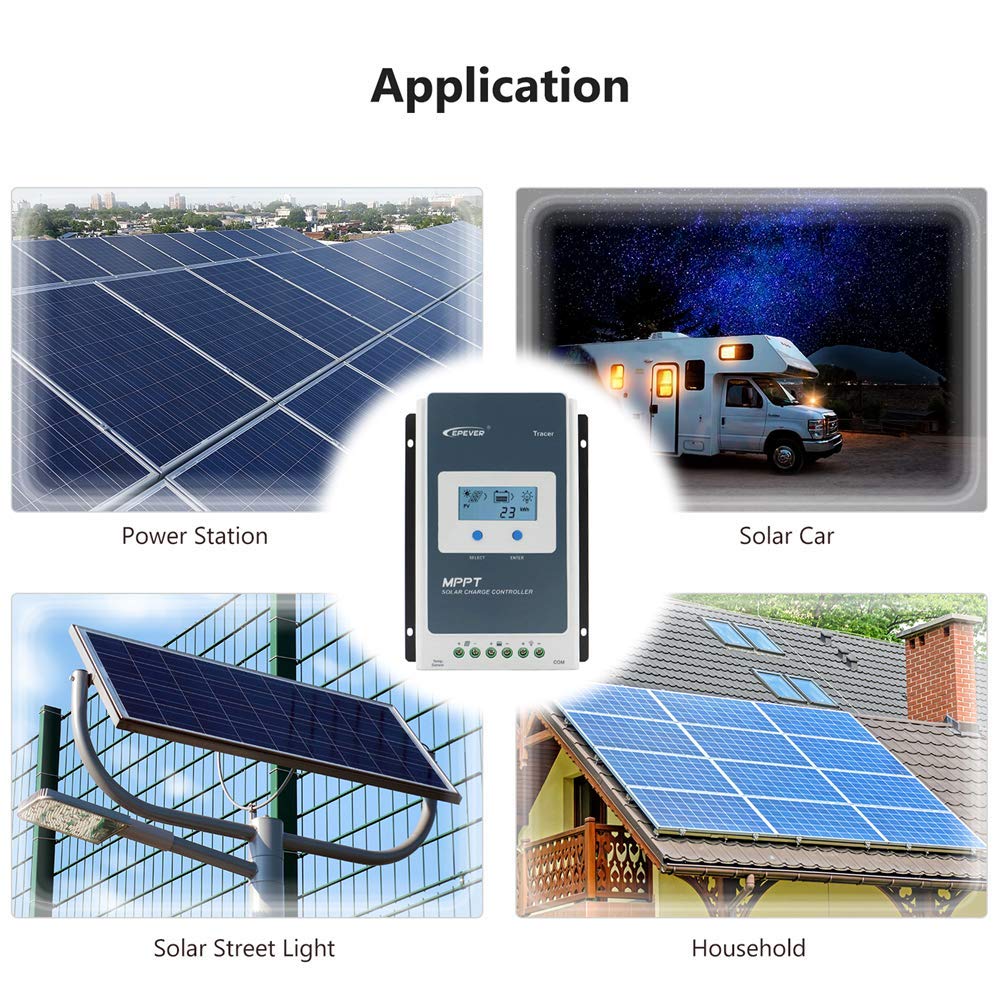
Figure 8.1: Controller Dimensions. This image provides the approximate length, width, height, and weight of the Tracer1210AN controller.
9. Aplicació Examples
The EPEVER Tracer1210AN MPPT solar charge controller is suitable for a variety of off-grid solar applications.
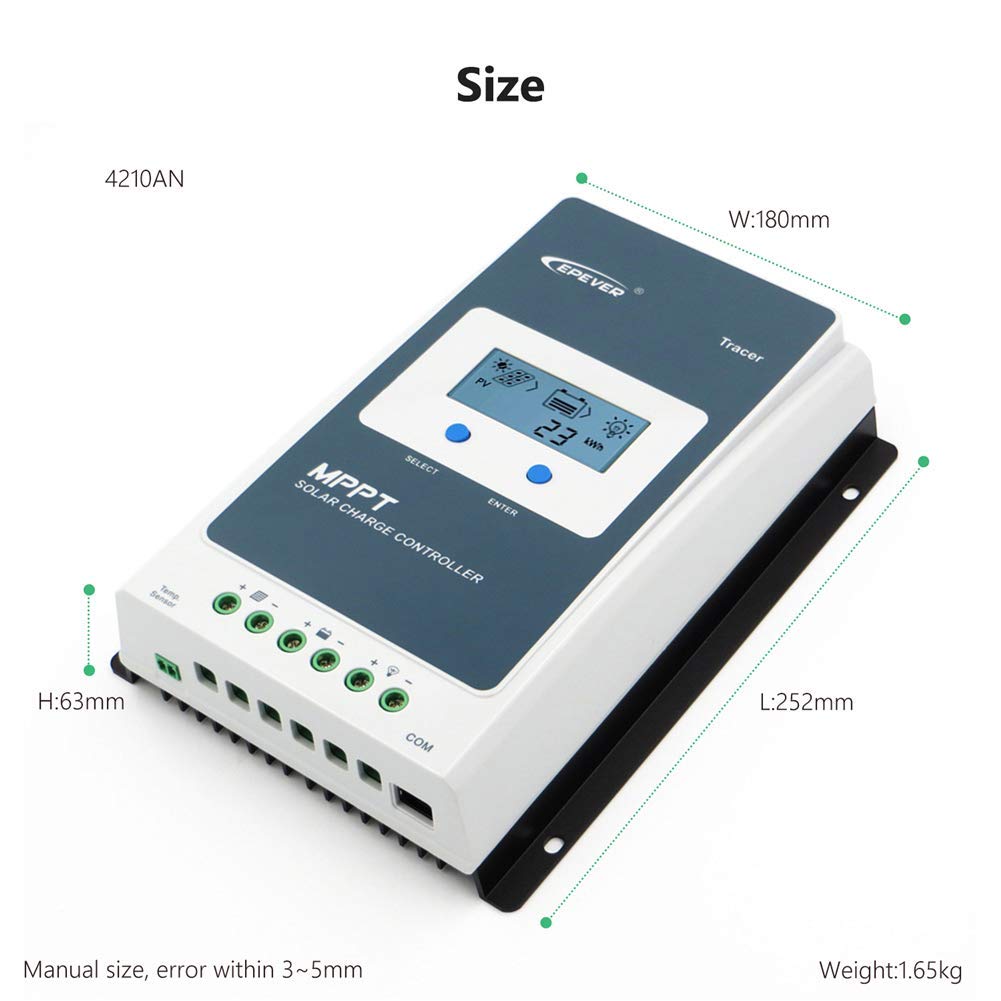
Figure 9.1: Typical Applications. This image illustrates common uses for the solar charge controller, including power stations, solar cars (RVs), solar street lights, and household solar systems.
- Power Stations: Small-scale off-grid power systems.
- Solar Cars/RVs: Charging batteries in recreational vehicles.
- Solar Street Lights: Managing power for autonomous lighting systems.
- Household Systems: Residential off-grid or backup power solutions.
10. Garantia i Suport
EPEVER products are designed for reliability and performance.
10.1 Informació de la garantia
Please refer to the warranty card included with your product for specific warranty terms and conditions. Generally, EPEVER offers a limited warranty against defects in materials and workmanship. Keep your purchase receipt as proof of purchase.
10.2 Atenció al client
For technical assistance, troubleshooting, or warranty claims, please contact EPEVER customer support or the authorized dealer from whom you purchased the product. You may also find helpful resources and FAQs on the official EPEVER weblloc.
Nota: When contacting support, please have your product model (Tracer1210AN) and serial number ready.