
EPEVER TRIRON4210N
EPEVER TRIRON 4210N MPPT Solar Charge Controller User Manual
Model: TRIRON 4210N
1. Introducció
The EPEVER TRIRON 4210N is an advanced Maximum Power Point Tracking (MPPT) solar charge controller designed for efficient and reliable management of solar power systems. This modular-designed regulator is an updated version of the Tracer A/AN series, offering enhanced features and improved performance. It is suitable for various applications, including communication base stations, household solar systems, street lighting, and RV solar setups.
The controller utilizes a sophisticated MPPT control algorithm to minimize power loss and quickly track the maximum power point of the photovoltaic (PV) array, ensuring maximum energy harvest from solar modules under diverse conditions. Its adaptive three-stage charging mode, based on a digital control circuit, helps prolong battery life and significantly improves overall system performance.

Figure 1: EPEVER TRIRON 4210N MPPT Solar Charge Controller with included accessories.
2. Característiques del producte
- Tecnologia MPPT avançada: Features an efficiency of no less than 99.5%, ensuring optimal power conversion from solar panels.
- Disseny modular: Allows for easy combination and replacement of different display and interface modules, enhancing versatility and serviceability.
- Negative Ground Design: Suitable for a wide range of applications, providing flexibility in system grounding.
- Compatibilitat de la bateria: Supports 7 battery types, including Sealed (AGM), Gel, Flooded, Lead-acid User, LiFePO4 Lithium, Li(NiCoMn)O2 Lithium, and Lithium User (9~34V).
- Sortida USB dual: Provides two 5V DC USB output interfaces (Max 2.2A) for direct charging of electronic devices.
- Comunicació RS485: Master and slave RS485 communication modules enable reading of load or inverter operating data and control of inverter switches via a relay interface.
- Interfície intuïtiva: Equipped with three indicator lights for PV, Battery, and Load status, and five buttons for easy adjustment and browsing of system parameters.

Figure 2: Comparison highlighting key upgrades of the TRIRON N series over the Tracer A/AN series.
3. Components and Modular Design
The TRIRON 4210N controller features a modular design, allowing for flexible configuration and easy maintenance. The main unit integrates the core MPPT charging circuitry and power terminals. Various modules can be attached to expand functionality:
- Display Module (MT50): Provides a clear LCD screen for real-time monitoring of system parameters and allows for parameter adjustment.
- Communication Modules (RS485): Enables data communication with external devices like PCs or other monitoring systems.
- Remote Temperature Sensor (RTS): Improves charging accuracy by providing precise battery temperature data.
- USB Output Module: Integrated dual USB ports for charging small electronic devices.

Figure 3: The TRIRON N series controller demonstrating its removable and interchangeable modules.

Figura 4: Mésview of the TRIRON 4210N main unit and its compatible optional accessories.
4. Guia d'instal·lació
Proper installation is crucial for the safe and efficient operation of your solar charge controller. Please follow these guidelines carefully:
4.1 Precaucions de seguretat
- Ensure all power sources are disconnected before wiring.
- Do not close the circuit breaker or fuse until all wiring is complete and verified.
- Verify that the leads of the "+" and "-" poles are connected correctly to prevent damage.
- Install a fuse on the battery side with a current rating of 1.25 to 2 times the rated current of the controller. The fuse should be located no greater than 150 mm from the battery.
- If an inverter is part of your system, connect it directly to the battery, not to the load side of the controller.
4.2 Wiring Sequence
Connecteu els components en el següent ordre:
- Connecteu la bateria: Connect the battery to the controller's battery terminals. Ensure correct polarity.
- Connecteu els panells solars: Connect the solar panels to the controller's PV terminals. Ensure correct polarity.
- Connecteu la càrrega (opcional): If using the controller's load output, connect your DC load to the load terminals.

Figure 5: System connection diagram for the EPEVER TRIRON 4210N controller.
5. Operation and Display
The TRIRON 4210N controller provides comprehensive system status information through its LCD display and indicator lights. Parameters can be easily adjusted using the five control buttons.
5.1 Pantalla LCD
The LCD displays various real-time data, including:
- Matriu fotovoltaica voltage i corrent
- Bateria voltage i corrent de càrrega
- Càrrega voltage i corrent
- Generated energy (kWh)
- Estat de càrrega de la bateria (SOC)
- Temperatura del sistema
- Error codes and warnings
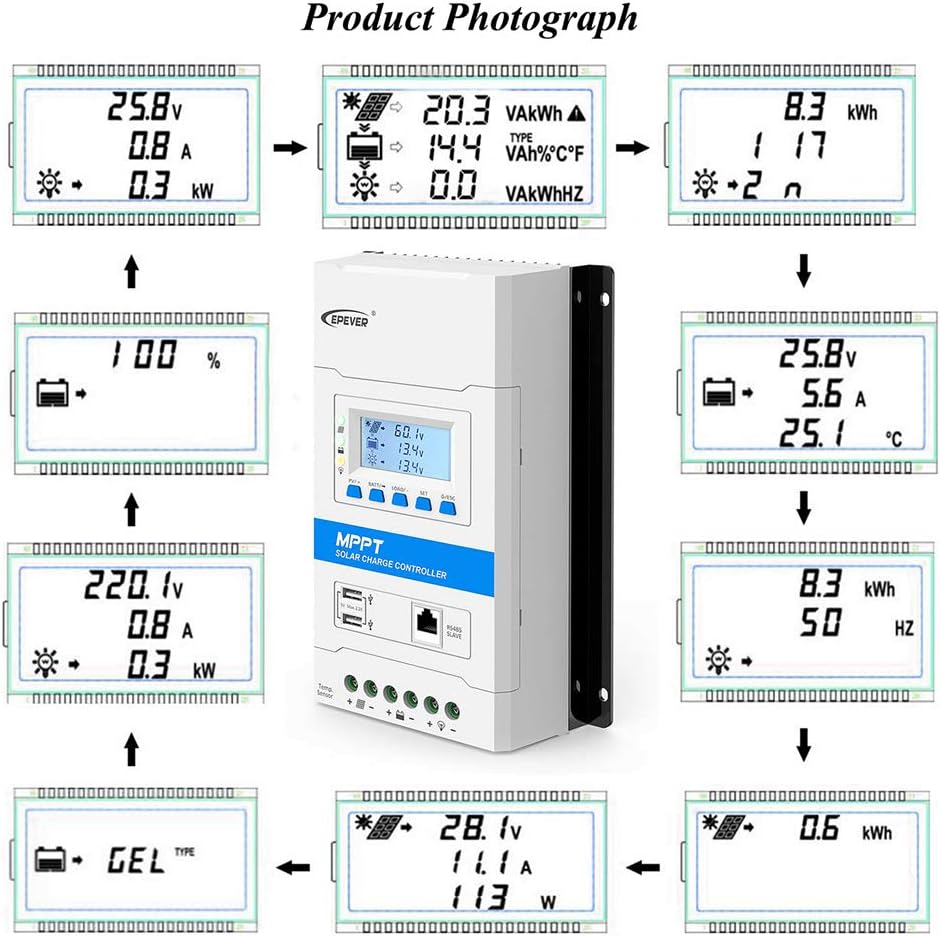
Figura 6: Examples of information displayed on the controller's LCD screen.
5.2 botons de control
The five buttons allow you to navigate through menus, view parameters, and adjust settings. Refer to the detailed user manual for specific button functions and menu navigation.
5.3 Llums indicadors
Three indicator lights provide quick visual feedback on the status of the PV array, battery, and load.
6. Battery Type Configuration
The TRIRON 4210N supports various battery types, and it is essential to select the correct type for optimal charging and battery longevity. The controller supports:
- Sealed (AGM)
- Gel
- Inundat
- Lead-acid User-defined
- LiFePO4 Liti
- Li(NiCoMn)O2 Lithium
- Lithium User-defined (9~34V)
To configure the battery type, navigate through the controller's menu using the control buttons and select the option that matches your battery. For user-defined types, you can set specific voltage parameters for charging stages.
7. Manteniment
Regular maintenance ensures the long-term performance and reliability of your EPEVER TRIRON 4210N solar charge controller:
- Inspecció visual: Periodically check all wiring connections for tightness and signs of corrosion. Ensure no cables are frayed or damaged.
- Neteja: Mantingueu el controlador net i lliure de pols i brutícia. Feu servir un drap sec per netejar la superfície. No utilitzeu netejadors líquids.
- Ventilació: Ensure adequate airflow around the controller to prevent overheating. Keep ventilation openings clear.
- Actualitzacions de firmware: Comproveu el del fabricant website for any available firmware updates. Updates can improve performance and add new features.
- Salut de la bateria: Superviseu l'estat i el volum de la bateriatage regularly. Ensure it is within the recommended operating range for your battery type.
8. Solució De Problemes
This section provides solutions to common issues you might encounter with your TRIRON 4210N controller. For more complex problems, refer to the full user manual or contact support.
| Problema | Causa possible | Solució |
|---|---|---|
| El controlador no s'encén | Bateria no connectada o de baix volumtage; reverse polarity; blown fuse. | Comproveu les connexions de la bateria i el voltage; verify polarity; inspect and replace fuse if necessary. |
| No charging from PV | PV panels not connected; low sunlight; PV voltage too low/high; PV reverse polarity. | Check PV connections; ensure sufficient sunlight; verify PV voltage is within range; correct polarity. |
| La càrrega no funciona | Load disconnected; overload; short circuit; low battery voltage. | Check load connections; reduce load; check for short circuits; charge battery. |
| Lectures inexactes | Loose connections; faulty sensor (RTS). | Tighten all connections; check RTS connection or replace if faulty. |
9. Especificacions tècniques
Below are the detailed technical specifications for the EPEVER TRIRON 4210N MPPT Solar Charge Controller:
| Paràmetre | Valor |
|---|---|
| Model | TRIRON 4210N |
| Sistema nominal Voltage | 12V/24VDC Auto Work |
| Corrent de càrrega nominal | 40A |
| Corrent nominal de descàrrega | 40A |
| Volum d'entrada de bateriatage Rang | 8~32V |
| Màx. Circuit obert PV Voltage | TRIRON**06N: 60V TRIRON**10N: 100V TRIRON**15N: 150V |
| MPP Voltage Rang | (Vbat+2V)~72V (TRIRON**10N) (Vbat+2V)~92V (TRIRON**15N) |
| Màx. Potència d'entrada fotovoltaica | 12 V: 520 W 24 V: 1040 W |
| Tipus de bateria | Sealed / Gel / Flooded / LiFePO4 / Li-NiCoMn / User |
| Equalize Charge Voltage (Lead-acid) | Sealed: 14.6V, Flooded: 14.8V, User-defined: 9~17V |
| Volum de càrrega d’augmenttage (Lead-acid) | Gel: 14.2V, Sealed: 14.4V, Flooded: 14.6V, User-defined: 9~17V |
| Vol. De càrrega flotanttage (Lead-acid) | Gel/Sealed/Flooded: 13.8V, User-defined: 9~17V |
| Volum baixtage Reconnect Voltage (Lead-acid) | Gel/Sealed/Flooded: 12.6V, User-defined: 9~17V |
| Volum baixtage Desconnectar Voltage (Lead-acid) | Gel/Sealed/Flooded: 11.1V, User-defined: 9~17V |
| Volum de càrrega d’augmenttage (Li-battery) | LiFePO4: 14.4V, Li-NiCoMn: 12.4V, User: 9~17V |
| Vol. De càrrega flotanttage (Li-battery) | LiFePO4: 13.6V, Li-NiCoMn: 11.8V, User: 9~17V |
| Volum baixtage Reconnect Voltage (Li-battery) | LiFePO4: 12.4V, Li-NiCoMn: 10.40V, User: 9~17V |
| Volum baixtage Desconnectar Voltage (Li-battery) | LiFePO4: 11.0V, Li-NiCoMn: 9.20V, User: 9~17V |
| Tipus de port de càrrega | USB |
| Tipus de visualització | LCD |
| Pes de l'article | 6.45 lliures |
| Dimensions del paquet | 15.87 x 10.39 x 5.91 polzades |
Note: Specifications are subject to change without prior notice. Refer to the product label for the most accurate information.

Figure 7: Detailed electrical parameters for the TRIRON N series controllers.
10. Garantia i Suport
EPEVER products are manufactured to high-quality standards and come with a manufacturer's warranty. For specific warranty terms and conditions, please refer to the warranty card included with your product or contact the seller directly.
For technical support, troubleshooting assistance, or warranty claims, please contact your point of purchase or the authorized distributor. If purchased from Amazon, you may contact the seller, SolaMr, per assistència.
For general information about EPEVER products, you can visit the official EPEVER weblloc.
Ask a question about this manual
Ask about setup, troubleshooting, compatibility, parts, safety, or missing instructions. Manuals+ will review the question and use this page’s manual context to help answer it.