
Introducció
The Benro BK15 is a versatile accessory designed for smartphones, functioning as both a mini tabletop tripod and an extendable selfie stick. It includes a smartphone adapter and a removable Bluetooth remote for convenient hands-free operation. This manual provides instructions for proper setup, usage, and maintenance of your BK15.
Producte acabatview

Figure 1: Benro BK15 components including the main unit, smartphone clamp, Bluetooth remote, and carrying pouch.
- Unitat principal: Functions as both the tripod base and extendable selfie stick.
- Smartphone Clamp: Adjustable holder for securing your smartphone.
- Comandament Bluetooth: Detachable remote for wireless photo and video capture.
- Carrying Pouch: For convenient storage and transport.
Instruccions de configuració
1. Attaching the Smartphone Clamp
- Locate the smartphone clamp and the screw mount on top of the main unit.
- Alineeu el clamp's screw hole with the screw mount.
- Gira el clamp clockwise until it is securely fastened to the main unit. Ensure it is tight to prevent your phone from wobbling.
2. Pairing the Bluetooth Remote

Figure 2: Detachable Bluetooth remote control.
- Remove the Bluetooth remote from its slot on the main unit.
- Press and hold the button on the remote for approximately 5 seconds until the LED indicator starts blinking. This indicates it is in pairing mode.
- Al teu telèfon intel·ligent, vés a la configuració de Bluetooth i busca els dispositius disponibles.
- Select "Benro BK15" (or similar name) from the list to pair. The LED on the remote will stop blinking once successfully paired.
- To turn off the remote and conserve battery, press and hold the button for 5 seconds.
Instruccions de funcionament
1. Using as a Mini Tripod

Figure 3: Benro BK15 configured as a mini tripod.
- Fold out the three legs at the base of the main unit to form a stable tripod.
- Place your smartphone into the adjustable clamp. Ensure it is held firmly.
- Adjust the ball head to achieve your desired angle for photos or videos. Tighten the knob on the ball head to secure the position.
- Use the Bluetooth remote to capture photos or start/stop video recording from a distance.
2. Ús com a pal de selfie

Figure 4: Benro BK15 extended as a selfie stick.
- Assegureu-vos que les potes del trípode estiguin plegades cap enrere dins del mànec.
- Extend the telescoping center column to your desired length (up to 32 inches / 81 cm).
- Secure your smartphone in the clamp.
- Hold the unit by the handle and use the Bluetooth remote to capture selfies or group shots.
Manteniment
- Mantingueu la unitat neta netejant-la amb un drap suau i sec.
- Eviteu exposar la unitat a temperatures o humitat extremes.
- Store the unit in its carrying pouch when not in use to protect it from dust and scratches.
- Ensure the Bluetooth remote is securely placed in its slot or stored separately to prevent loss.

Figure 5: Benro BK15 carrying pouch.
Resolució de problemes
El comandament a distància Bluetooth no es connecta:
- Ensure the remote is charged or has a fresh battery.
- Verify the remote is in pairing mode (blinking LED).
- Check your smartphone's Bluetooth settings to ensure it's enabled and searching for devices.
- Try unpairing and re-pairing the remote if issues persist.
Phone Not Stable in Clamp:
- Assegureu-vos que el clamp is fully tightened onto the tripod/selfie stick.
- Verify your phone is within the supported clamp range (48-100mm).
- Make sure the phone is centered in the clamp for optimal balance.
Especificacions
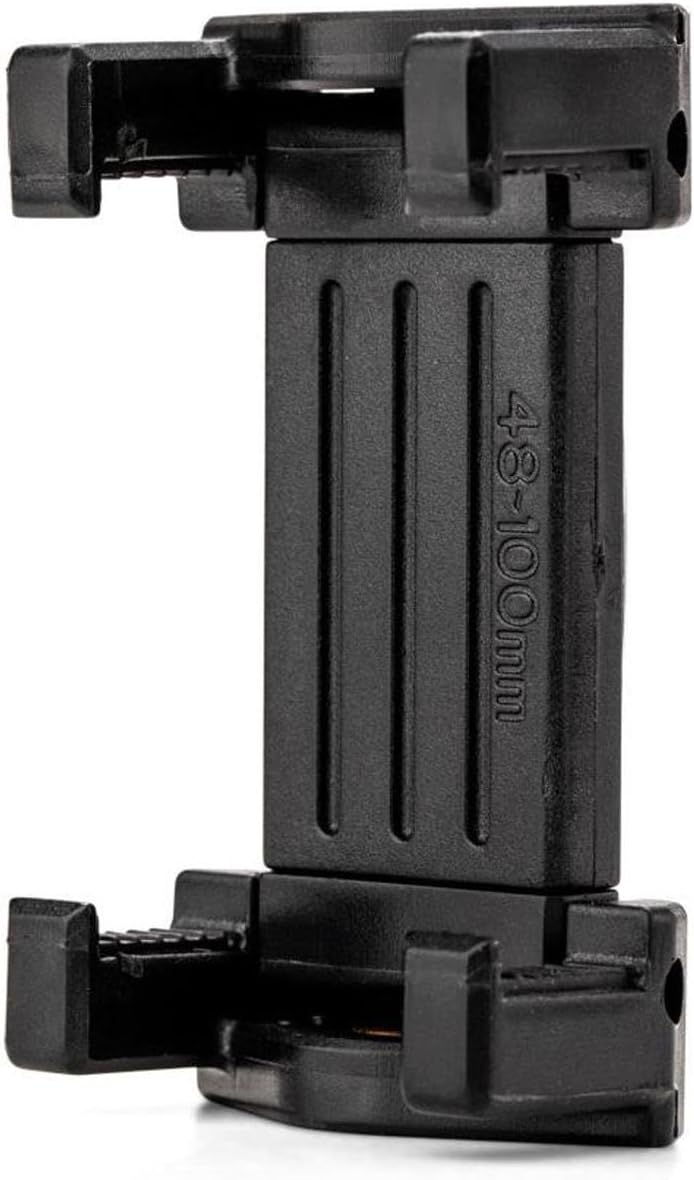
Figure 6: Smartphone clamp with width range indication.
| Característica | Detall |
|---|---|
| Dimensions del producte | 3.94 x 4.33 x 6.3 polzades |
| Pes de l'article | 0.19 kg (0.42 lliures) |
| Número de model | BK15 |
| Material | Alumini |
| Color | Negre |
| Dispositius compatibles | Smartphones (Clamp range: 48-100mm / 1.9"-3.9") |
| Maximum Height (Selfie Stick) | 32 polzades (81 cm) |
| Límit de pes | 0.5 kg (1.1 lliures) |
| Tipus de capçal de trípode | Cap de pilota |
| Bateries | 1 Lithium Ion battery required (for remote) |
Informació de la garantia
A standard limited warranty of 3 years is provided from the date of purchase for the original owner. If you register the product online, the warranty is extended by 2 additional years, totaling 5 years in applicable regions. Please refer to the official Benro website for detailed warranty terms and registration procedures.
Suport
Per a més ajuda, registre de productes o per a view additional products, please visit the official Benro weblloc o contacteu amb el servei d'atenció al client.
Official Benro Store: Benro Amazon Store