
1. Introducció
Thank you for choosing the Tolsen TL35074 Laser Distance Meter. This device is designed for precise and efficient distance measurement, offering various functions including single measurement, continuous measurement, area, volume, Pythagorean calculation, and angle measurement. Please read this manual carefully before using the device to ensure safe and optimal operation.
2. Informació de seguretat
This device emits a Class 2 laser. Adherence to safety guidelines is crucial to prevent injury.
- No mireu directament el raig làser. Direct eye exposure can cause permanent eye damage.
- Eviteu apuntar el raig làser a persones o animals.
- Do not disassemble or modify the device. Unauthorized modifications can lead to hazardous laser radiation exposure.
- Mantingueu el dispositiu fora de l'abast dels nens.
- Utilitzeu el dispositiu només per a la finalitat prevista, tal com es descriu en aquest manual.
- Do not operate the device in explosive environments or near flammable materials.
3. Producte acabatview
The Tolsen TL35074 is a compact and durable laser distance meter. It features an easy-to-read display and intuitive controls. The device is rated IP40 for resistance against dust and splashes, making it suitable for various indoor and light outdoor applications.
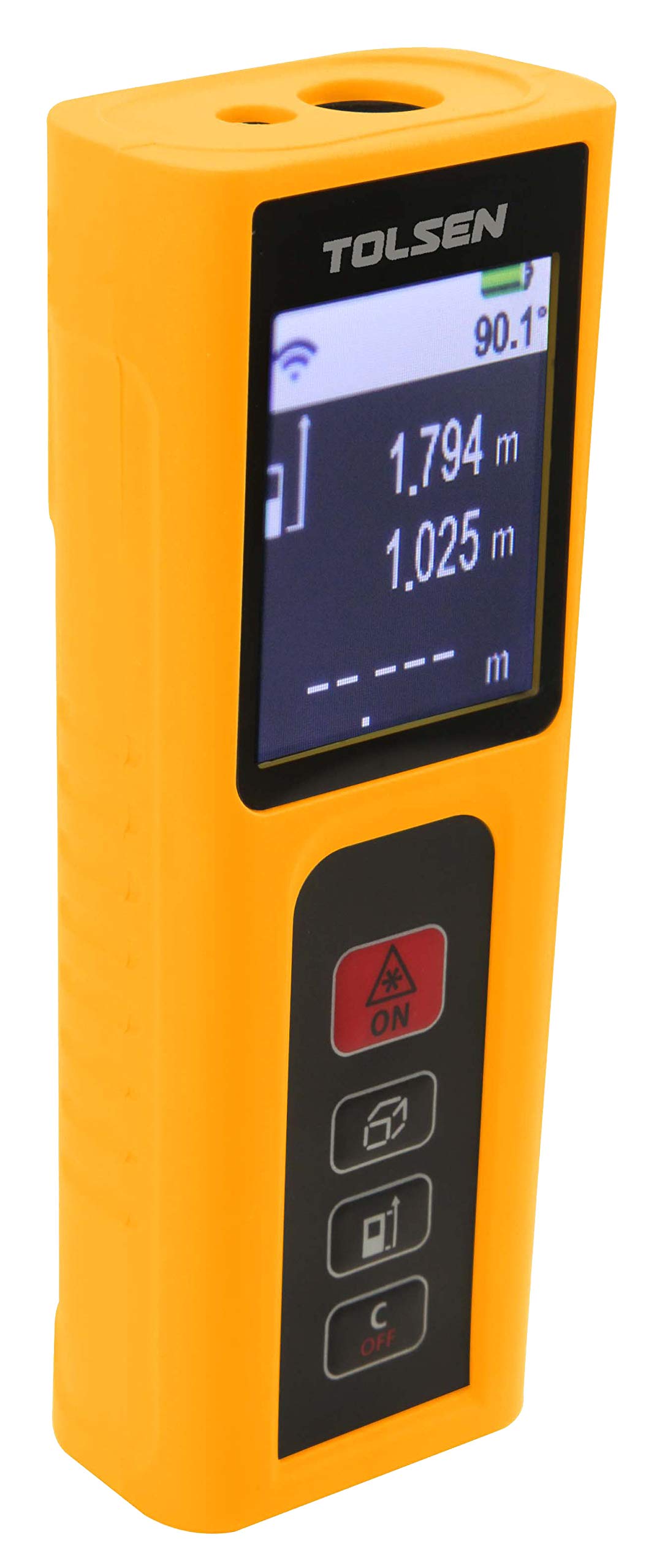
Figura 1: Frontal view of the Tolsen TL35074 Laser Distance Meter, showing the display, control buttons, and laser aperture.
3.1 Components
- Emissor/receptor làser: Located at the top of the device, responsible for sending and receiving laser signals.
- Pantalla LCD: Shows measurement results, mode indicators, battery status, and other relevant information.
- Botons de control: For power on/off, measurement activation, mode selection, and unit conversion.
- Compartiment de la bateria: Located at the rear, for AAA batteries.
4. Configuració
4.1 Instal·lació de la bateria
- Localitzeu la tapa del compartiment de la bateria a la part posterior del dispositiu.
- Feu lliscar la coberta oberta.
- Insert two (2) AAA alkaline batteries, ensuring correct polarity (+/-). The device includes batteries.
- Tanqueu bé la tapa del compartiment de la bateria.
5. Instruccions de funcionament
5.1 Encès/Apagat
- Per encendre: Premeu el botó [MEAS] botó. El làser s'activarà.
- Per apagar: Manteniu premut el botó [DESACTIVAT] button for a few seconds. The device will also automatically power off after a period of inactivity to save battery.
5.2 Modes de mesura
Premeu el botó [FUNC] button to cycle through the different measurement modes.
5.2.1 Mesura única
- Point the device at the target.
- Premeu el botó [MEAS] botó una vegada per activar el làser.
- Premeu el botó [MEAS] button again to take a single measurement. The result will appear on the display.
5.2.2 Mesura contínua (seguiment)
- Select continuous measurement mode using the [FUNC] botó.
- Premeu el botó [MEAS] button. The device will continuously measure and display the distance as you move it.
- Premeu [MEAS] de nou per aturar la mesura contínua.
5.2.3 Mesura de l'àrea
- Select area measurement mode.
- Measure the first side (e.g., length) by pressing [MEAS].
- Measure the second side (e.g., width) by pressing [MEAS] de nou.
- El dispositiu calcularà i mostrarà l'àrea automàticament.
5.2.4 Mesura del volum
- Select volume measurement mode.
- Mesureu la longitud, l'amplada i l'alçada seqüencialment prement [MEAS] després de cada mesura.
- The device will calculate and display the volume.
5.2.5 Pythagorean Calculation (Indirect Measurement)
Aquest mode permet la mesura indirecta d'altures o distàncies utilitzant el teorema de Pitàgores.
- Select Pythagorean mode (e.g., for two-point or three-point measurement).
- Follow the on-screen prompts to measure the required sides (e.g., hypotenuse and one leg for height).
- El dispositiu calcularà i mostrarà el costat desconegut.
5.2.6 Mesura d'angles
This mode allows for the measurement of angles, often in conjunction with indirect height measurements.
- Select angle measurement mode.
- Follow the on-screen instructions to position the device and take the necessary measurements.
- The angle will be displayed.
6. Manteniment
- Neteja: Utilitzeu un suau, damp drap per netejar el dispositiu. No utilitzeu productes de neteja abrasius ni dissolvents. Presteu especial atenció a mantenir neta la lent del làser.
- Emmagatzematge: Guardeu el dispositiu en un lloc sec i fresc, allunyat de la llum solar directa i de temperatures extremes. Si l'emmagatzemeu durant períodes prolongats, traieu les piles per evitar fuites.
- Substitució de la bateria: Canvieu les piles quan aparegui l'indicador de bateria baixa a la pantalla.
7. Solució De Problemes
| Problema | Causa possible | Solució |
|---|---|---|
| El dispositiu no s'encén | Low or dead batteries; incorrect battery polarity | Substituïu les piles; comproveu l'orientació de la bateria |
| Mesures inexactes | Dirty laser lens; unstable measurement surface; extreme environmental conditions | Clean lens; ensure stable measurement; avoid extreme conditions |
| Làser no visible | Bright ambient light; laser not activated | Measure in dimmer conditions; press [MEAS] to activate laser |
| Missatge d'error a la pantalla | Measurement out of range; internal error | Ensure target is within 0.2m-60m range; restart device. If error persists, contact support. |
8. Especificacions
- Marca: Tolsen
- Model: TL35074
- Interval de mesura: 0.2 m - 60 m
- Precisió de mesura: ± 2.0 mm
- Classificació IP: IP40 (resistent a la pols i a les esquitxades)
- Funcions: Single measurement, Continuous measurement, Area, Volume, Pythagorean calculation, Angle measurement
- Tipus de bateria: 2 x AAA Alkaline batteries (Included)
- Dimensions aproximades del producte: 18 x 12 x 6 cm (Shipping dimensions, actual product may be smaller)
- Pes aproximat del producte: 250g (Shipping weight, actual product may be lighter)
- Origen: Xina
9. Garantia i Suport
Per obtenir informació sobre la garantia o assistència tècnica, consulteu la documentació que s'inclou amb la compra o poseu-vos en contacte amb el vostre distribuïdor. Conserveu el comprovant de compra per a qualsevol reclamació de garantia.