
1. Introducció
Thank you for choosing the Impex THUNDER T4 Stereo System. This 2.1 channel speaker system is designed to provide high-quality audio for your entertainment needs. It features multiple connectivity options including USB, MMC, FM radio, and Bluetooth, along with karaoke functionality. This manual provides essential information for the safe and efficient operation of your device.
2. Instruccions de seguretat
- Read all instructions carefully before operating the system.
- Conserveu el manual com a referència futura.
- No exposeu la unitat a la pluja ni a la humitat per evitar incendis o descàrregues elèctriques.
- Assegureu-vos que la ventilació sigui adequada; no obstruïu cap obertura de ventilació.
- Col·loqueu la unitat sobre una superfície plana i estable.
- No obriu la c.asing. Demaneu totes les tasques de manteniment a personal qualificat.
- Desendolleu la unitat durant les tempestes llamps o quan no l'utilitzeu durant llargs períodes.
- Eviteu col·locar la unitat a prop de fonts de calor com ara radiadors, registres de calor, estufes o altres aparells (inclosos amplificadors) que produeixen calor.
3. Contingut del paquet
Si us plau, comproveu que els següents elements estiguin inclosos al vostre paquet:
- Impex THUNDER T4 Main Speaker Unit
- Altaveus satèl·lit (2 unitats)
- Remote Control (if applicable, not explicitly mentioned but common for stereo systems)
- Cables de connexió d'àudio
- Manual d'usuari (aquest document)
- Microphone Set (for Karaoke)
4. Producte acabatview
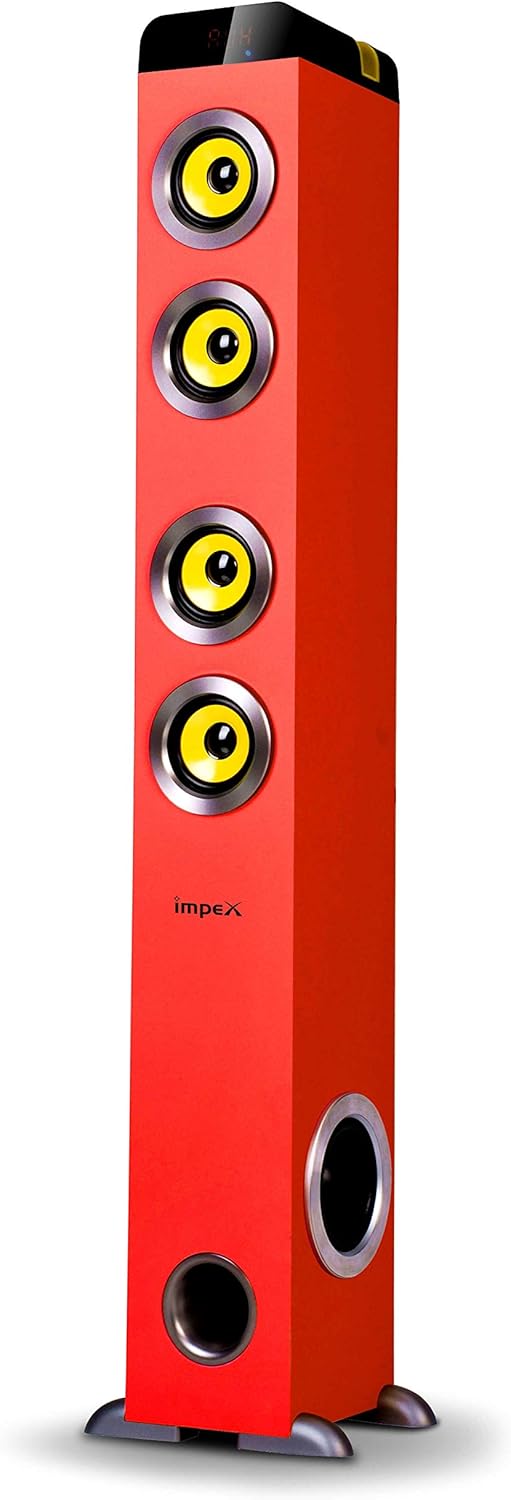
Figura 1: Impex THUNDER T4 Main Speaker Unit. This image displays the Impex THUNDER T4 stereo system, a tall, red tower speaker. It features four prominent yellow speaker cones arranged vertically on the front panel. Towards the bottom, there is a circular bass port. The 'Impex' logo is visible on the front. The speaker stands on a dark base with small feet.
The Impex THUNDER T4 is a 2.1 channel speaker system. The main unit (subwoofer and primary speakers) is a tower design, complemented by two satellite speakers (wooden satellite, speaker unit: 4"+3"*2+1"*2). The system integrates various input options and controls for a versatile audio experience.
5. Configuració
- Col·locació: Position the main speaker unit and satellite speakers in your desired location. For optimal sound, ensure the main unit is on a stable surface.
- Connecteu els altaveus satèl·lit: Connect the satellite speakers to the main unit using the provided audio cables. Ensure connections are secure.
- Connexió d'alimentació: Plug the power cord into the main speaker unit and then into a suitable wall outlet.
- Encesa inicial: Press the Power button on the main unit or remote control to turn on the system.
- Connexió de font d'àudio: Connect your desired audio source (e.g., TV, smartphone, computer) using the appropriate input method (Bluetooth, USB, AUX).
6. Instruccions de funcionament
6.1. Funcionament bàsic
- Encès/apagat: Use the Power button on the unit or remote.
- Control de volum: Adjust the master volume using the dedicated knob on the unit or volume buttons on the remote.
- Selecció del mode: Press the "Mode" button to cycle through available input sources: Bluetooth, FM, USB, MMC, AUX.
6.2. Mode Bluetooth
- Switch the system to Bluetooth mode. The display will indicate "BT".
- Activa el Bluetooth al teu dispositiu mòbil o ordinador.
- Cerca "THUNDER T4" in your device's Bluetooth settings and pair.
- Once connected, you can play audio from your device through the stereo system.
6.3. Mode de ràdio FM
- Switch the system to FM mode.
- Press the "Scan" button (if available) to automatically search and save available radio stations.
- Feu servir els botons "Anterior" i "Següent" per navegar per les estacions desades.
6.4. USB/MMC Mode
- Insert a USB flash drive or MMC card into the respective slot.
- The system will automatically switch to USB/MMC mode and begin playing audio files.
- Use the play/pause, previous, and next buttons to control playback.
6.5. Funció de karaoke
- Connect the microphone to the designated microphone input jack.
- Adjust the microphone volume and echo effects (if available) using the controls on the unit or remote.
- Play your desired karaoke track from any input source.
7. Manteniment
- Neteja: Feu servir un drap suau i sec per netejar l'exterior de la unitat. No utilitzeu netejadors líquids ni aerosols.
- Ventilació: Ensure that the ventilation openings are not blocked by dust or debris.
- Emmagatzematge: Si guardeu la unitat durant un període prolongat, desendolleu-la de la presa de corrent i guardeu-la en un lloc fresc i sec.
8. Solució De Problemes
| Problema | Causa possible | Solució |
|---|---|---|
| Sense poder | Cable d'alimentació no connectat; Presa de corrent defectuosa | Comproveu la connexió del cable d'alimentació; proveu una presa de corrent diferent |
| Sense so | Volume too low; Incorrect input mode; Audio cables loose | Increase volume; Select correct input mode; Check audio cable connections |
| Error de vinculació de Bluetooth | Device too far; Bluetooth not enabled on source; Incorrect pairing procedure | Move device closer; Enable Bluetooth; Refer to Bluetooth pairing instructions |
| USB/MMC not playing | Sense suport file format; USB/MMC card faulty; Card not inserted correctly | Assegureu-vos files are compatible; Try a different USB/MMC card; Reinsert card |
9. Especificacions
| Marca | Impex |
| Número de model | THUNDER T4 |
| Tipus | Stereo System (2.1 Channel) |
| Potència de sortida | 60 watts |
| Resposta de freqüència | 40-20,000 Hz (Assumed from 40-20Hz in description, typically 20kHz) |
| Speaker Unit Configuration | Main: 4" Woofer; Satellites: 3" x 2 + 1" x 2 |
| Tecnologia de connectivitat | USB, Bluetooth |
| Característiques especials | FM Tuner, MMC Card Slot, Karaoke Function (with Mic set) |
| Mode de sortida d'àudio | estèreo |
| Fabricant | Impex |
| Número de model de l'article | THUNDER T4 Red |
| ASIN | B081TNH5SM |
| Dimensions del paquet | 6.97 x 5.33 x 3.01 cm; 1.1 g (Note: This dimension may refer to a component or packaging detail, not the full system.) |
Nota: les especificacions estan subjectes a canvis sense previ avís.
10. Garantia i Suport
For warranty information and customer support, please refer to the warranty card included with your product or visit the official Impex weblloc web. Conserveu el rebut de compra com a comprovant de compra.