
1. Introducció
Gràcies per la compraasing the KINGONE K9 Portable Bluetooth Speaker. This manual provides essential information for setting up, operating, and maintaining your device. Please read these instructions carefully before use to ensure optimal performance and longevity of your speaker.
2. Producte acabatview
2.1 Característiques
- Potència de sortida: 5W x 2
- Versió de Bluetooth: 4.0
- Audio Input Modes: Bluetooth, Line-in (AUX), TF Card
- Built-in FM Radio function
- Càrrega: DC 5V 2A
- Battery Capacity: 2200mAh internal rechargeable Lithium Polymer battery
- Compact dimensions for portability
2.2 Components de l'altaveu
Familiaritzeu-vos amb els controls i els ports de l'altaveu:

Image 2.2.1: Top Control Panel. This image displays the top surface of the KINGONE K9 speaker, highlighting the control buttons including power, mode selection, play/pause, and volume up/down.

Image 2.2.2: Side Input Ports. This image shows the side panel of the KINGONE K9 speaker, featuring the TF card slot, Line-in (AUX) port, and Micro USB charging port.
3. Configuració
3.1 Càrrega de l'altaveu
- Connect the provided Micro USB cable to the charging port on the side of the speaker (refer to Image 2.2.2).
- Connect the other end of the USB cable to a DC 5V 2A power adapter (not included) or a compatible USB port.
- El llum indicador de càrrega s'il·luminarà durant la càrrega i s'apagarà quan estigui completament carregat.
3.2 Engegada/apagada
- To power on: Press and hold the Power button (usually marked with a circle icon) on the top panel until the indicator light turns on.
- To power off: Press and hold the Power button again until the indicator light turns off.
4. Instruccions de funcionament
4.1 Vinculació Bluetooth
- Ensure the speaker is powered on and in Bluetooth mode. If not, press the 'M' (Mode) button to switch to Bluetooth mode. The Bluetooth indicator light will flash, indicating it is ready for pairing.
- Enable Bluetooth on your mobile device (smartphone, tablet, computer).
- Cerca available Bluetooth devices. Select "KINGONE K9" from the list.
- Once paired, the Bluetooth indicator light will stop flashing and remain solid. You can now play audio through the speaker.
4.2 Line-in (AUX) Mode
- Connect one end of a 3.5mm audio cable (not included) to the Line-in port on the speaker (refer to Image 2.2.2).
- Connect the other end of the audio cable to the audio output jack of your external device.
- Press the 'M' (Mode) button on the speaker to switch to Line-in mode. The speaker will automatically play audio from the connected device.
4.3 Mode de targeta TF
- Insert a TF (Micro SD) card with MP3 audio files into the TF card slot on the side of the speaker (refer to Image 2.2.2).
- Press the 'M' (Mode) button to switch to TF Card mode. The speaker will automatically begin playing music from the card.
4.4 Mode de ràdio FM
- Premeu el botó 'M' (Mode) per canviar al mode de ràdio FM.
- To automatically scan and save available FM stations, press and hold the Play/Pause button. The speaker will scan and store stations.
- Use the 'Previous Track' and 'Next Track' buttons to navigate between saved FM stations.
4.5 Control de volum i pista
- Pujar el volum: Premeu el botó '+'.
- Baixar el volum: Premeu el botó '-'.
- Pista següent: Press the 'Next Track' button.
- Pista anterior: Press the 'Previous Track' button.
- Reproduir/pausa: Premeu el botó Reproduir/Pausa.
5. Manteniment
- Mantingueu l'altaveu allunyat de l'aigua, la humitat i les temperatures extremes.
- Netegeu l'altaveu amb un drap suau i sec. No utilitzeu productes de neteja abrasius ni dissolvents.
- Eviteu deixar caure l'altaveu o sotmetre'l a impactes forts.
- When not in use for extended periods, charge the battery at least once every three months to maintain battery health.
6. Solució De Problemes
| Problema | Possible solució |
|---|---|
| L'altaveu no s'encén. | Assegureu-vos que la bateria estigui carregada. Connecteu l'altaveu a una font d'alimentació i torneu-ho a provar. |
| No es pot emparellar per Bluetooth. | Make sure the speaker is in Bluetooth pairing mode (flashing indicator). Ensure your device's Bluetooth is on and within range. Forget previous pairings on your device and try again. |
| No sound in Line-in mode. | Verify the audio cable is securely connected to both the speaker and the external device. Ensure the speaker is in Line-in mode. Check the volume levels on both the speaker and the external device. |
| Mala recepció de ràdio FM. | Move the speaker to a different location, away from potential interference. Re-scan for stations. |
| Distorsió del so. | Redueix el volum tant de l'altaveu com del dispositiu connectat. Assegura't que la font d'àudio sigui de bona qualitat. |
7. Especificacions
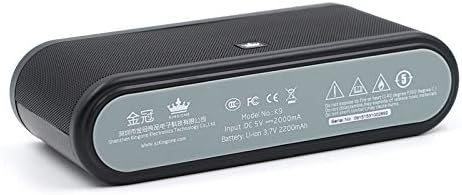
Image 7.1: Speaker Bottom Panel. This image shows the bottom panel of the KINGONE K9 speaker, displaying regulatory marks, model number, input voltage, and battery specifications.
| Especificació | Valor |
|---|---|
| Model | K9 |
| Potència de sortida | 5W x 2 |
| Versió Bluetooth | 4.0 |
| Audio Input Modes | Bluetooth, Line-in, TF Card |
| Entrada de càrrega | DC 5V 2A |
| Capacitat de la bateria | Polímer de liti de 2200 mAh |
| Dimensions (L x A x A) | 181 mm x 46 mm x 88 mm |
| Ràdio FM | Sí |
| Tecnologia de connectivitat | Sense fil |
8. Garantia i Suport
For warranty information or technical support, please refer to the warranty card included with your product or visit the official KINGONE weblloc web. Conserveu el rebut de compra com a comprovant de compra per a qualsevol reclamació de garantia.