
Introducció
This manual provides detailed instructions for the setup, operation, and maintenance of your Awei A500BL Wireless Bluetooth Headphone. Please read this guide thoroughly before using the product to ensure proper functionality and to maximize your listening experience.

Imatge: Frontal view of the Awei A500BL Wireless Bluetooth Headphone, showcasing its over-ear design and color scheme.
Contingut del paquet
Verifiqueu que tots els elements que s'enumeren a continuació s'inclouen al vostre paquet:
- 1x Awei A500BL Wireless Bluetooth Headphone
- 1x cable de càrrega USB
- 1x cable d'àudio de 3.5 mm
Producte acabatview
Familiarize yourself with the various components and controls of your Awei A500BL headphones.
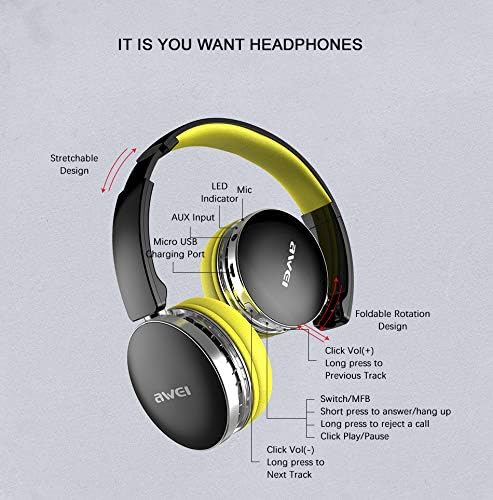
Image: Detailed diagram illustrating the location of buttons, ports, and indicators on the Awei A500BL headphone, including LED indicator, microphone, AUX input, Micro USB charging port, volume controls, multi-function button (MFB), and foldable rotation design.
Les característiques clau inclouen:
- Stretchable Design: Per a un ajust còmode.
- Foldable Rotation Design: Per a un fàcil emmagatzematge i portabilitat.
- Indicador LED: Mostra l'estat de l'alimentació i de la connexió.
- Micròfon: Per trucades mans lliures.
- Entrada AUX: Per a connexió amb cable.
- Port de càrrega micro USB: Per a la càrrega de la bateria.
- Botó Pujar volum/Pista següent: Click for volume up, long press for next track.
- Botó multifunció (MFB): Short press to answer/hang up calls, long press to reject a call, click for play/pause.
- Botó per baixar el volum/pista anterior: Click for volume down, long press for previous track.
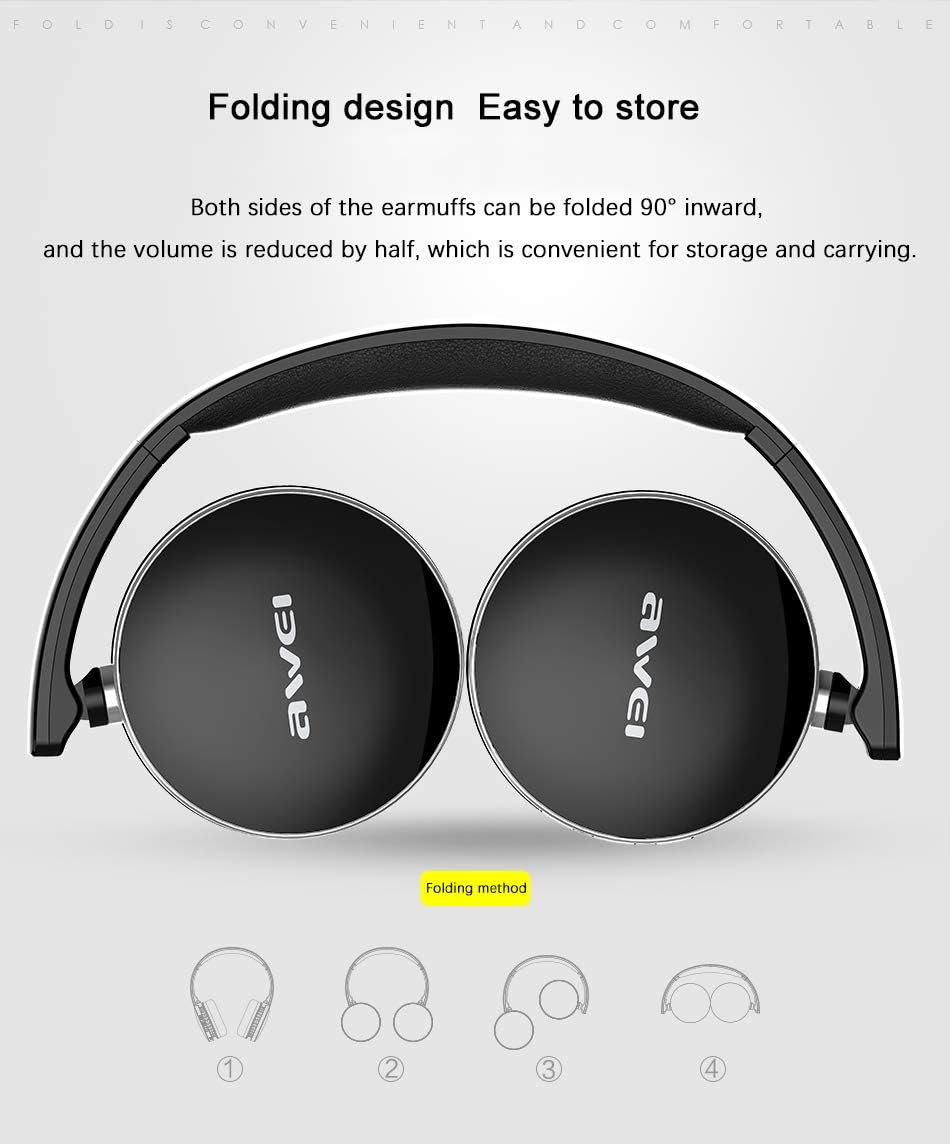
Image: Illustration demonstrating the 90-degree inward folding capability of the Awei A500BL headphone earcups, highlighting its compact storage design.
Configuració
1. Charging the Headphone
Before first use, fully charge the headphone. Use the provided USB charging cable.
- Connect the Micro USB end of the charging cable to the charging port on the headphone.
- Connecteu l'extrem USB-A del cable de càrrega a un adaptador de corrent USB (no inclòs) o al port USB d'un ordinador.
- The LED indicator will illuminate during charging. It will change color or turn off once charging is complete.
- La càrrega sol trigar entre 2 i 4 hores.
2. Emparellament Bluetooth
To connect your headphone to a Bluetooth-enabled device:
- Ensure the headphone is fully charged and turned off.
- Press and hold the Multi-Function Button (MFB) for approximately 5-7 seconds until the LED indicator flashes red and blue alternately, indicating pairing mode.
- Al dispositiu (telèfon intel·ligent, tauleta, ordinador), activeu el Bluetooth i cerqueu els dispositius disponibles.
- Seleccioneu "Awei A500BL" de la llista de dispositius trobats.
- Un cop emparellat, l'indicador LED parpellejarà lentament en blau o romandrà en blau fix.
- Si se us demana una contrasenya, introduïu "0000".
3. Connexió per cable (mode AUX)
You can also use the headphone with a wired connection:
- Connect one end of the 3.5mm audio cable to the AUX input port on the headphone.
- Connecteu l'altre extrem del cable d'àudio de 3.5 mm a la presa de sortida d'àudio del vostre dispositiu.
- The headphone will automatically switch to wired mode. Bluetooth functionality will be disabled.
Instruccions de funcionament
Encès/Apagat
- Encès: Press and hold the MFB for approximately 3 seconds until the LED indicator flashes blue.
- Apagar: Press and hold the MFB for approximately 3 seconds until the LED indicator flashes red and then turns off.
Reproducció de música
- Reproduir/pausa: Premeu breument el MFB.
- Pujar el volum: Short press the "Vol+" button.
- Baixar el volum: Short press the "Vol-" button.
- Pista següent: Long press the "Vol+" button.
- Pista anterior: Long press the "Vol-" button.
Gestió de trucades
- Respon a la trucada: Short press the MFB when an incoming call rings.
- Finalitzar la trucada: Premeu breument el botó MFB durant una trucada.
- Rebutja la trucada: Long press the MFB when an incoming call rings.
- Torna a marcar l'últim número: Premeu dues vegades el MFB.
Manteniment i cura
- Keep the headphone dry. Avoid exposure to moisture or extreme temperatures.
- Clean the headphone with a soft, dry cloth. Do not use harsh chemicals or abrasive cleaners.
- Store the headphone in a cool, dry place when not in use. The foldable design allows for compact storage.
- Avoid dropping or subjecting the headphone to strong impacts.
- Do not attempt to disassemble or modify the headphone, as this will void the warranty.
Resolució de problemes
| Problema | Solució |
|---|---|
| Headphone does not power on. | Ensure the headphone is fully charged. Connect it to a power source using the USB cable. |
| No es pot emparellar amb un dispositiu Bluetooth. |
|
| Sense so o amb un volum baix. |
|
| Mala qualitat de so. |
|
Especificacions
| Característica | Detall |
|---|---|
| Marca | Awei |
| Model | A500BL |
| Tipus de desgast | Sobre l'orella |
| Pes net | 139 g |
| Micròfon | Sí |
| Versió Bluetooth | V4.0 + EDR |
| Distància de transmissió | 10 m |
| Sensibilitat de recepció | 111 dB |
| Impedància | 32Ω |
| Resposta de freqüència | 20-20 kHz |
| Capacitat de la bateria | 300 mAh, 3.7 V |
| Temps de càrrega | 2-4 hores |
| Temps de treball | 7-10 hores |
| Temps d'espera | 300-450 hores |
| Control de soroll | Cancel·lació activa de soroll (CVC6.0) |
| Tecnologia de connectivitat | Sense fil (Bluetooth), amb cable (AUX de 3.5 mm) |
| Material | Plàstic |
Informació de la garantia
Awei products are manufactured to the highest quality standards. This product is covered by a limited warranty against manufacturing defects from the date of purchase. Please retain your proof of purchase for warranty claims. The warranty does not cover damage caused by misuse, accident, unauthorized modification, or normal wear and tear. For specific warranty terms and conditions, please refer to the warranty card included with your product or contact customer support.
Atenció al client
If you encounter any issues or have questions not covered in this manual, please contact Awei customer support. Visit the official Awei weblloc web per obtenir dades de contacte, preguntes freqüents i recursos addicionals.
Weblloc: www.awei.com (Exampl'enllaç, l'enllaç real pot variar)