
Introducció
The Aula S6 Multi-Mode Wireless Gaming Headset is designed to provide a versatile audio experience for gaming and multimedia. This headset features three connection options: 2.4GHz wireless, Bluetooth 5.3, and a traditional 3.5mm wired connection. Its ultra-lightweight design, weighing only 180 grams, ensures comfort during extended use. The integrated microphone with smart noise reduction technology delivers clear communication, and the headset offers up to 22 hours of battery life.
Contingut del paquet
Marqueu la casella per als elements següents:
- 1 x Aula S6 Multi-Mode Wireless Gaming Headset
- 1 x 2.4GHz Wireless Connection Dongle
- 1 x Type-C to 3.5mm Audio Connection Cable (1.5 meters)
- 1 x cable de càrrega USB tipus C
- 1 x Manual d'usuari
Producte acabatview
Familiaritzeu-vos amb els components i els controls dels auriculars.
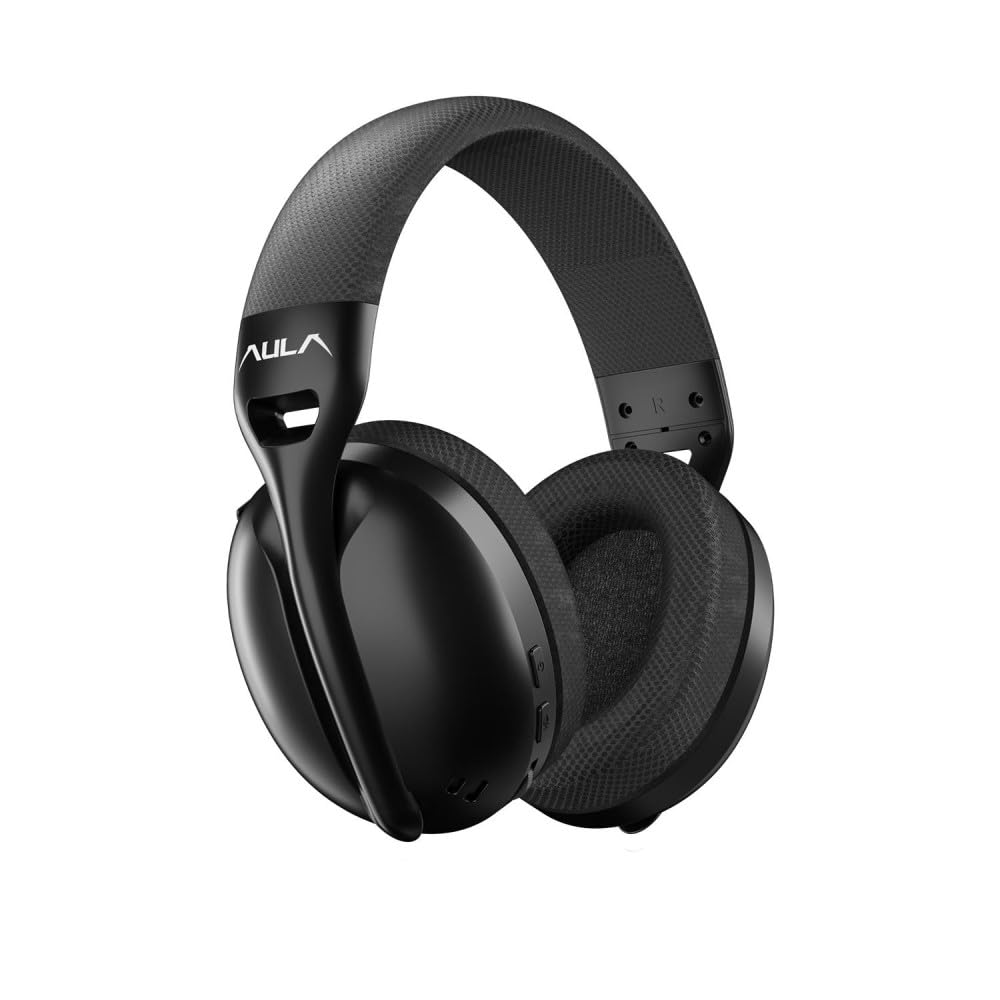
Imatge: Davant view of the Aula S6 Multi-Mode Wireless Gaming Headset. This image displays the overall design of the headset, highlighting its earcups and headband.
Controls i Ports

Imatge: A baix view of the Aula S6 headset. This image illustrates the location of the Type-C charging port, 3.5mm audio jack, volume wheel, and other control buttons on the earcups.
- Botó d'encesa: Used to power the headset on/off and for pairing.
- Botó de canvi de mode: Toggles between Game Mode and Music Mode for optimized audio profiles.
- Roda de volum: Ajusta el volum d'àudio.
- Botons multifunció: For call management (accept/reject) and switching between Bluetooth and 2.4GHz connections.
- Micròfon retràctil: Mute by retracting into the earcup, unmute by extending.
- Port de tipus C: Per carregar els auriculars.
- Conector d'àudio de 3.5 mm: For wired connection using the provided Type-C to 3.5mm cable.
Configuració
Càrrega dels auriculars
Before first use, fully charge the headset. Connect the provided USB Type-C charging cable to the headset's Type-C port and the other end to a USB power source (e.g., computer, wall adapter). The LED indicator will show charging status and turn off when fully charged.
Connectant els auriculars
The Aula S6 offers three connection methods:
1. 2.4GHz Wireless Connection (via Dongle)
- Insert the 2.4GHz wireless dongle into a USB port on your computer or compatible device.
- Power on the headset by pressing and holding the Power button.
- The headset should automatically connect to the dongle. The LED indicator will confirm a successful connection.
2. Connexió Bluetooth 5.3
- Encendre els auriculars.
- Premeu i manteniu premut el botó d'engegada fins que l'indicador LED parpellegi ràpidament, cosa que indica el mode d'emparellament.
- Al dispositiu (telèfon intel·ligent, tauleta, ordinador portàtil), activeu el Bluetooth i cerqueu els dispositius disponibles.
- Select "Aula S6" from the list of devices to pair. The LED indicator will show a solid light upon successful connection.
3. Wired 3.5mm Connection
- Connect the Type-C end of the provided audio cable to the headset's Type-C port.
- Connect the 3.5mm end of the cable to the audio jack of your device.
- Els auriculars funcionaran en mode amb cable, ignorant les funcions sense fil.
Instruccions de funcionament
Encès/Apagat
- Per encendre: Premeu i manteniu premut el botó d'engegada durant aproximadament 3 segons fins que l'indicador LED s'encengui.
- Per apagar: Premeu i manteniu premut el botó d'engegada durant aproximadament 5 segons fins que l'indicador LED s'apagui.
Mode Switching (Game/Music)
Press the Mode Switch button to toggle between Game Mode and Music Mode. Each mode optimizes audio settings for its intended use.
Ús del micròfon

Imatge: En angle view of the Aula S6 headset with its retractable microphone extended. This shows the microphone in its active position for communication.
- Per activar el so: Extend the microphone from the earcup.
- Per silenciar: Retract the microphone fully into the earcup.
The smart noise reduction technology helps minimize ambient noise for clearer voice transmission.
Gestió de trucades
When connected via Bluetooth or 2.4GHz wireless, use the multi-function buttons on the headset to manage calls:
- Accepta la trucada: Premeu el botó multifunció una vegada.
- Rebutja la trucada: Manteniu premut el botó multifunció durant 2 segons.
- Finalitzar la trucada: Premeu el botó multifunció una vegada durant una trucada.
Control de volum
Rotate the Volume Wheel up or down to precisely adjust the audio output level.
Connexió multidispositiu
The headset supports simultaneous wireless connection to two different devices. Use the multi-function buttons to switch between the connected devices as needed.
Manteniment
To ensure the longevity and optimal performance of your Aula S6 headset, follow these maintenance guidelines:
- Neteja: Feu servir un drap suau i sec per netejar els auriculars. Eviteu utilitzar productes químics agressius o materials abrasius.
- Emmagatzematge: Guardeu els auriculars en un lloc fresc i sec, allunyat de la llum solar directa i de temperatures extremes.
- Eviteu la humitat: The headset is not waterproof. Keep it away from water and high humidity.
- Cura del cable: Manipuleu els cables amb cura. Eviteu doblegar-los bruscament o estirar-los excessivament per evitar danys.
Resolució de problemes
If you encounter issues with your Aula S6 headset, refer to the following common solutions:
- Sense so/Volum baix:
- Comproveu el nivell de volum tant als auriculars com al dispositiu connectat.
- Ensure the headset is properly connected (wired, Bluetooth, or 2.4GHz dongle).
- Verifiqueu que el dispositiu de sortida d'àudio correcte estigui seleccionat a la configuració de so del dispositiu.
- El micròfon no funciona:
- Assegureu-vos que el micròfon estigui estès i no silenciat.
- Check microphone input settings on your connected device.
- Prova el micròfon amb una altra aplicació o dispositiu.
- Problemes de connexió:
- Per a Bluetooth: Ensure the headset is in pairing mode and within range. Forget the device on your phone and re-pair.
- Per a 2.4 GHz: Ensure the dongle is securely plugged in and the headset is powered on. Try a different USB port.
- For Wired: Assegureu-vos que el cable de 3.5 mm estigui completament inserit tant als auriculars com al dispositiu.
- Headset Not Powering On:
- Carregueu els auriculars durant almenys 30 minuts.
- Prova un cable de càrrega i una font d'alimentació diferents.
Especificacions
| Marca | AULA |
| Model | S6 |
| Connectivitat | Bluetooth 5.3, 2.4GHz Wireless, 3.5mm Wired |
| Mida del controlador | 40 mm |
| Impedància | 120 ohms |
| Sensibilitat dels auriculars | 120 dB |
| Sensibilitat del micròfon | -38 ± 2db |
| Resposta de freqüència | 20 Hz - 20 kHz |
| Pes | 180 grams |
| Durada de la bateria | Fins a 22 hores |
| Material | Breathable Fabric and ABS Plastic |
| Dispositius compatibles | Mobile Phone, Laptop, Desktop Computer, Game Console, Tablet, Television |
Garantia i Suport
The Aula S6 Multi-Mode Wireless Gaming Headset comes with a 2-Year Aula Turkey Warranty.
For warranty claims, technical support, or further assistance, please contact your local Aula authorized dealer or visit the official Aula weblloc per obtenir informació de contacte d'assistència.