
DPVR RYMEK
KNEWKEY RYMEK Typewriter Style Mechanical Wired & Wireless Keyboard User Manual
Model: RYMEK | Brand: DPVR
Introducció

Figure 1: The KNEWKEY RYMEK Typewriter Style Mechanical Keyboard.
This manual provides comprehensive instructions for the KNEWKEY RYMEK Typewriter Style Mechanical Keyboard. Designed for both wired and wireless connectivity, this keyboard offers a unique typing experience with its retro design, mechanical switches, and integrated tablet stand. It supports various operating systems including Windows, Mac, iOS, and Android, allowing seamless connection with multiple devices.
Característiques clau
- Disseny retro clàssic: Combina vintagi estètica amb funcionalitat moderna.
- Connectivitat dual: Admet connexions sense fil Bluetooth i amb cable USB per a un ús versàtil.
- Compatibilitat amb diversos sistemes operatius: Compatible with Windows, Mac, iOS, and Android devices.
- Vinculació de diversos dispositius: Connect and switch between up to 3 devices simultaneously.
- LED Dynamic Backlight: Enhances visibility and typing accuracy in low-light conditions.
- Integrated Tablet Stand: Conveniently holds your iPad or smartphone.
- Blue Switch Mechanical Keys: Provides a tactile and audible click feedback for an authentic typing feel.
Guia de configuració
Contingut del paquet:
- KNEWKEY RYMEK Keyboard
- Cable USB
- Manual d'usuari (aquest document)
Càrrega inicial:
Before first use, fully charge the keyboard using the provided USB cable. Connect the micro USB end to the keyboard's charging port and the USB-A end to a power source (e.g., computer USB port, USB wall adapter). The charging indicator light will show charging status.
Connexió per cable:
To use the keyboard in wired mode, simply connect the provided USB cable from the keyboard to your computer's USB port. The keyboard will be recognized automatically.
Connexió sense fil Bluetooth:
- Assegureu-vos que el teclat estigui carregat i encès.
- Manteniu premut el botó Fn clau i un dels Bluetooth device keys (BT1, BT2, BT3) for 3 seconds until the corresponding indicator light flashes rapidly. This indicates pairing mode.
- Al dispositiu (ordinador, tauleta, telèfon intel·ligent), aneu a la configuració de Bluetooth i cerqueu els dispositius disponibles.
- Select "RYMEK Keyboard" from the list.
- Follow any on-screen prompts to complete the pairing process. The indicator light on the keyboard will turn solid when successfully paired.
- Repetiu el procés per a un màxim de dos dispositius addicionals utilitzant BT2 i BT3.
To switch between paired devices, simply press the Fn key and the corresponding BT1, BT2, or BT3 clau una vegada.

Figure 2: The integrated tablet stand securely holds your device for comfortable typing.
Instruccions de funcionament
Experiència de mecanografia:
The RYMEK keyboard features blue mechanical switches, providing a distinct tactile bump and an audible click sound with each keystroke. This design is intended to replicate the classic typewriter feel, enhancing the typing experience.
Control de la llum de fons:
The keyboard is equipped with LED dynamic backlighting. Use the dedicated backlight control keys (often combined with function keys) to adjust brightness levels or switch between different lighting modes. Refer to the keycap legends for specific backlight functions.
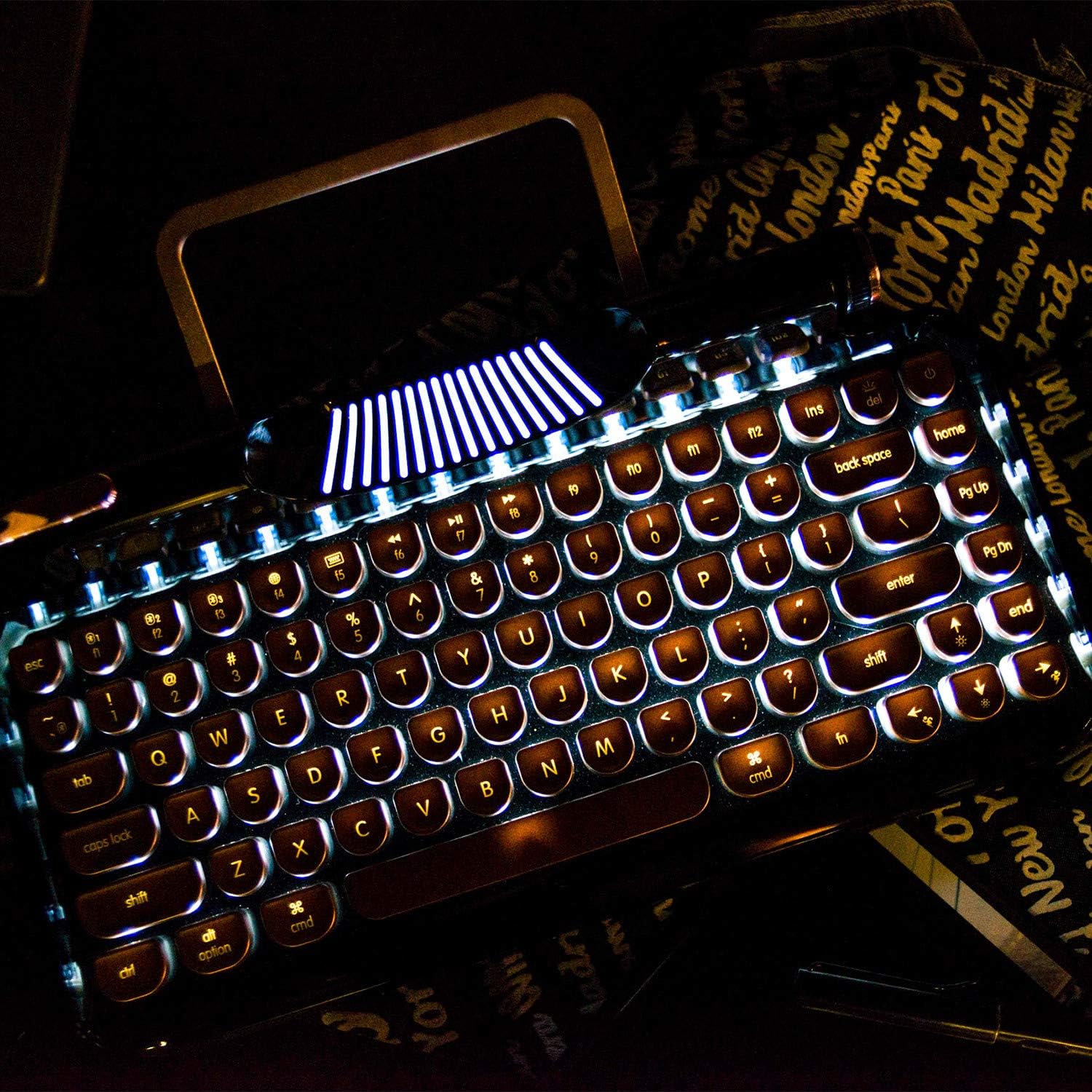
Figure 3: The dynamic LED backlight illuminates the keys for use in various lighting conditions.
Tecles multimèdia i de funció:
The top row of keys includes various function keys (F1-F12) and multimedia controls. These often require pressing the Fn key in combination with the desired function key. Examples include volume control, media playback, and screen brightness adjustments.
Lever Functionality:
The decorative lever on the left side of the keyboard functions as a carriage return in some applications or can be programmed for custom actions depending on your operating system and software.
Vídeo 1: Presentació oficial del producte en vídeoasing the RYMEK Typewriter Style Mechanical Keyboard's features and usage, including typing experience and backlight.
Manteniment
To ensure the longevity and optimal performance of your KNEWKEY RYMEK keyboard, follow these maintenance guidelines:
- Neteja: Feu servir un drap suau i sec per netejar la superfície del teclat. Per a una neteja més profunda, feu servir aire comprimit per eliminar la pols i les restes que hi ha entre les tecles. Eviteu utilitzar productes químics agressius o materials abrasius.
- Emmagatzematge: Quan no l'utilitzeu, guardeu el teclat en un lloc net i sec, allunyat de la llum solar directa i de temperatures extremes.
- Vessaments de líquids: In case of liquid spills, immediately disconnect the keyboard from power and turn it off. Invert the keyboard to drain excess liquid and allow it to dry completely before reconnecting. Professional service may be required for significant spills.
Resolució de problemes
| Problema | Causa possible | Solució |
|---|---|---|
| El teclat no respon (amb cable) | Loose USB connection, faulty cable, driver issue. | Assegureu-vos que el cable USB estigui connectat correctament. Proveu un port o cable USB diferent. Reinicieu l'ordinador. |
| Keyboard not connecting (Bluetooth) | Keyboard not in pairing mode, device Bluetooth off, interference, low battery. | Ensure keyboard is in pairing mode (flashing indicator). Check if Bluetooth is enabled on your device. Recharge the keyboard. Move closer to the device. Forget the device in Bluetooth settings and re-pair. |
| La llum de fons no funciona | Retroil·luminació apagada o configurada a la brillantor més baixa. | Press the backlight control keys to increase brightness or change modes. |
| Claus que no es registren | Restes sota la tapa de les tecles, interruptor defectuós. | Use compressed air to clear debris. If problem persists for a specific key, contact support. |
Especificacions
- Dimensions del producte: 14 x 42 x 2 polzades
- Pes de l'article: 3.34 lliures
- Tecnologia de connectivitat: Micro USB, Bluetooth
- Descripció del teclat: Mecànica
- Nombre de claus: 83
- Característica especial: Retroil·luminat (RGB)
- Dispositius compatibles: Tablet, Smartphone, PC (Windows, Mac, iOS, Android)
- Estil: Retro
Garantia i Suport
Per obtenir informació sobre la garantia i assistència tècnica, consulteu el lloc web oficial del fabricant. weblloc web o contacteu directament amb el seu servei d'atenció al client. Conserveu el rebut de compra com a comprovant de compra per a qualsevol reclamació de garantia.
Ask a question about this manual
Ask about setup, troubleshooting, compatibility, parts, safety, or missing instructions. Manuals+ will review the question and use this page’s manual context to help answer it.