
Introducció
This manual provides detailed instructions for the safe and proper installation and operation of your Barkan BM464 Dual Arm Full Motion Articulating TV Wall Mount. Please read all instructions carefully before beginning installation and retain this manual for future reference.
Informació de seguretat
Proper installation is crucial for the safety and stability of your television. Failure to follow these instructions may result in property damage or personal injury.
- Capacitat de pes: No supereu la capacitat màxima de pes de 132 lliures (60 kg).
- Mida de la pantalla: Aquest suport està dissenyat per a televisors d'entre 13 i 90 polzades.
- Tipus de paret: Ensure the mounting surface is capable of supporting the combined weight of the mount and your TV. Refer to the 'Wall Compatibility' section for details.
- Seguretat infantil: All Barkan TV mounts include a Fall Proof system to prevent accidental disengagement of the screen, enhancing child safety.
- Instal·lació professional: Si no esteu segur del procés d'instal·lació, consulteu un professional qualificat.
Què hi ha a la caixa
Verifiqueu que tots els components siguin presents abans de començar la instal·lació:
- Muntatge de TV
- Hardware Kit (screws, anchors, washers, spacers)
- Manual d'instruccions

Imatge: Detallada view of the Barkan BM464 hardware kit, including wall screws, wall anchors, M8, M6, M4 TV mounting screws, metal washers, and plastic spacers.
Especificacions
| Característica | Especificació |
|---|---|
| Número de model | BM464 |
| Compatibilitat amb la mida de la pantalla | 13 - 90 polzades |
| Capacitat de càrrega màxima | 132 lliures (60 kg) |
| Compatibilitat VESA | 200x100, 200x200, 300x300, 300x400, 400x200, 400x300, 400x400, 600x400 mm and non-VESA up to 600x400 mm |
| Angle d'inclinació | -5° to 15° (tool-free) |
| Angle de gir | 180° (near screen connection plate) |
| Angle de rotació | 180° (near wall, double arm) |
| Angle de plegat | 360° |
| Ajust d'anivellament | ±5° |
| Extensió des de la paret | Min. 3.2 inches (8 cm) to Max. 17.8 inches (45 cm) |
| Material | Metall |
| Dimensions del producte | 14.57 x 10.43 x 3.74 polzades |
| Pes de l'article | 12.1 lliures |

Image: Technical diagram illustrating the dimensions, tilt range (0-15 degrees), swivel range (140 degrees), leveling (±5 degrees), and extension from the wall (3.2" to 17.8") of the Barkan BM464 TV mount.
Configuració i instal·lació
Eines necessàries (no incloses)
- Drill (1/4" - 6mm, 3/8" - 10mm bits for concrete/wood)
- Nivell
- Ulleres de seguretat
- Cercador de muntants (per a la instal·lació de muntants de fusta)

Image: Illustration of required tools for installation, including a drill with various bits, a level, safety glasses, and a stud finder.
Compatibilitat de paret
Aquesta muntura és compatible amb:
- Drywall with wood studs (16" / 40.6cm spacing)
- Concrete blocks / concrete wall
No compatible amb: Drywall/gypsum/plaster without wood studs.
Image: Diagram showing compatible wall types: drywall with wood studs and concrete walls. It also indicates incompatibility with drywall without studs.
Assembly Steps (1-2-3)
- Attach Adapters to TV: Connect the TV plate (adapters) to the rear side of your television using the appropriate screws from the hardware kit. This mount features a patented mechanism that accommodates both flat and curved TVs, as well as those with unique back structures, without needing spacers.
- Install Bracket on Wall: Secure the wall bracket to your chosen wall location. Ensure it is level and mounted directly into wood studs or concrete using the provided hardware. The broad double-arm configuration connects directly to the studs for enhanced stability.
- Snap TV onto Bracket: Carefully lift your TV and snap it onto the installed wall bracket. Ensure the Fall Proof system engages correctly to prevent accidental disengagement.
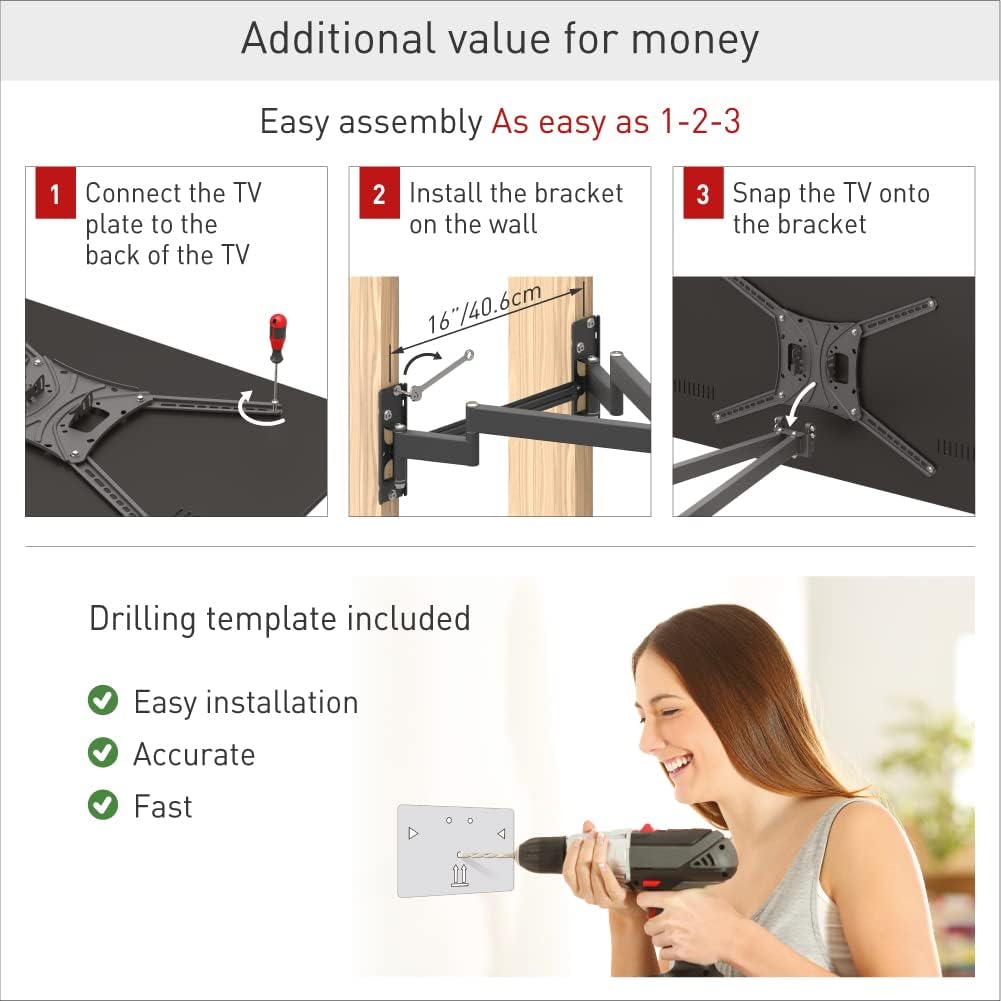
Image: Three-step visual guide for assembly: 1. Connect TV plate to TV, 2. Install wall bracket, 3. Snap TV onto bracket.
VESA and Backscreen Connection Positioning
The mount supports various VESA patterns. If your TV's backscreen connections are not included in the standard positions, please contact Barkan support.

Image: Diagrams illustrating various VESA and non-VESA backscreen connection positioning options for the TV mount.
Funcionament i ajustos
The Barkan BM464 mount offers full motion capabilities for optimal viewangles d'ajust.
- Inclinació: Adjust the screen vertically from -5° to 15° without tools.
- Girar: Rotate the screen horizontally up to 180° at the screen connection plate.
- Rotació: The double arm allows for 180° rotation near the wall.
- Extensió: Extend the TV from the wall up to 17.8 inches (45 cm) for flexible positioning.
- Nivell: Fine-tune the screen's horizontal level by ±5°.
To adjust, gently push or pull the TV to the desired angle. The 'Touch & Move' feature allows for easy repositioning.

Image: Diagram showing the full motion capabilities of the mount, including tilt (0-15 degrees), swivel (140 degrees), leveling (±5 degrees), and extension (17.8 inches).
Instal·lació de cantonada
The articulating design makes this mount suitable for corner installations, providing a wide range of viewing angles. Functionality may vary, with a maximum screen size of 55" typically recommended for optimal corner positioning.

Image: Illustration demonstrating the suitability of the Barkan BM464 mount for corner installation, showing various viewangles d'ajust.
Manteniment
To ensure the longevity and proper function of your Barkan TV wall mount, follow these simple maintenance guidelines:
- Inspecció periòdica: Reviseu periòdicament tots els cargols i connexions per assegurar-vos que estiguin ben ajustats i segurs.
- Neteja: Wipe the mount with a soft, dry cloth. Avoid abrasive cleaners or solvents.
- Lubricació: Moving parts are designed for smooth operation. If any stiffness occurs, a small amount of silicone-based lubricant can be applied to pivot points.
Resolució de problemes
If you encounter issues with your Barkan BM464 TV mount, consider the following:
- TV Tilting Downward: If your TV continuously tilts down, ensure that the tilt bolts are sufficiently tightened. For heavier TVs, especially those approaching the maximum weight limit or with lower mounting holes, ensure all adjustments are securely fastened. If the issue persists, verify that the TV's weight does not exceed the mount's capacity and that the installation is correct.
- Difficulty Moving Mount: Check for any obstructions or loose cables. Ensure all pivot points are free from debris. If stiffness persists, apply a small amount of silicone lubricant.
- La muntanya sembla inestable: Re-check all wall mounting screws and TV attachment screws for tightness. Confirm that the mount is installed into appropriate wall studs or concrete as per instructions.
Garantia
The Barkan BM464 TV Wall Mount comes with a Garantia limitada de per vida. This warranty covers defects in materials and workmanship under normal use. For specific terms and conditions, please refer to the warranty documentation included with your product or visit the Barkan weblloc.

Image: Visual highlighting the lifetime warranty, patented design, and safety features like fall protection and cable management.
Suport
For additional assistance, frequently asked questions, video demonstrations, or to contact customer service, please visit the official Barkan website. Our customer service experts are available to help with any inquiries you may have.
Recursos en línia: www.barkanmounts.com


