
Introducció
The Numark DJ2GO2 Touch is an ultra-portable, feature-packed 2-deck USB DJ controller designed for mobile DJs, beginners, and performers in need of a reliable secondary setup. This compact controller includes a built-in audio interface, touch-capacitive jog wheels for real-time scratching, and an integrated DJ mixer with crossfader and headphone output, offering all the essentials for seamless mixing. Its slim design fits comfortably in front of any laptop or under a DJ laptop stand, making it a flexible solution for prepping sets, practicing transitions, or performing at parties and events. The DJ2GO2 Touch works out of the box with Serato DJ Lite, allowing access to your existing subscriptions from various streaming services.
Què hi ha a la caixa
- DJ2GO2 Touch DJ Controller
- Cable USB
- 1/8-inch to RCA Cable
Producte acabatview
The DJ2GO2 Touch offers a comprehensive set of features in a compact form factor:
- Disseny ultraportàtil: Elegant i baix professionalfile, and lightweight (14.9 ounces, 3.39 x 12.32 x 1.3 inches) for easy transport and setup on any DJ table.
- 2-Channel Control: Two DJ decks with a crossfader for seamless mixing.
- Touch-Capacitive Jog Wheels: Responsive jog wheels for precise scratching and blending.
- Integrated Audio Interface: On-board audio interface with 1/8-inch headphone output and 1/8-inch main output for flexible connectivity to speakers, mixers, or PA systems.
- Coixinets de rendiment: Four pad modes for total control of cue points, auto/manual looping, and sampla reproducció.
- Serato DJ Lite Included: Comes with Serato DJ Lite software, providing access to music libraries and streaming services.
- Assignació MIDI: Compatible with other popular DJ software through MIDI mapping.

Image: The Numark DJ2GO2 Touch controller, showcasing its compact design and key features like 2 channels, crossfader, touch-capacitive jog wheels, USB connectivity, MIDI mapping, and included Serato DJ Lite software.
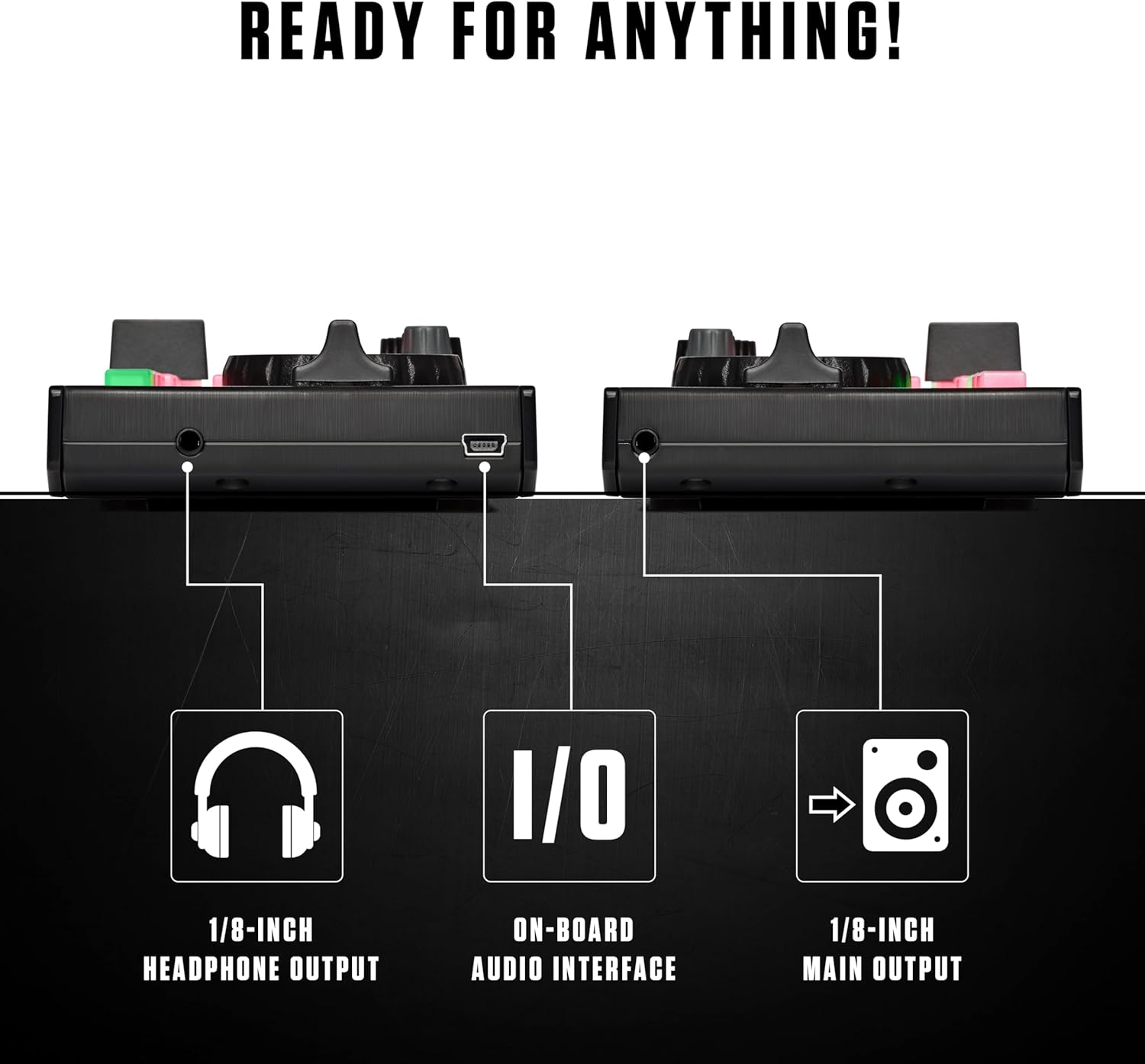
Imatge: Lateral view of the DJ2GO2 Touch highlighting its connectivity options: 1/8-inch headphone output, on-board audio interface, and 1/8-inch main output for speakers or mixers.

Image: Close-up of the controller's central mixer section, detailing controls for cue points, manual looping, auto looping, and sampla reproducció.
Configuració
Follow these steps to set up your Numark DJ2GO2 Touch controller:
- Instal·lació de programari: Download and install Serato DJ Lite on your Mac or Windows computer. Follow the instructions provided with the software.
- Connectar USB: Use the included USB cable to connect the DJ2GO2 Touch to an available USB port on your computer.
- Connecta l'àudio: Connect your headphones to the 1/8-inch headphone output and your speakers or sound system to the 1/8-inch main output using the provided cable.
- Driver Installation (Windows Only): If using Windows, you may be prompted to install a driver. Follow the on-screen instructions and restart your computer if required.
- Launch Serato DJ Lite: Open Serato DJ Lite. The software should automatically detect your DJ2GO2 Touch controller.
Video: This video provides a concise overview of the Numark DJ2GO2 Touch, demonstrating its compact size, 2-deck control, USB connectivity, and integration with Serato DJ Lite. It highlights the controller's portability and essential features for mixing.
Vídeo: Aquest producte ha acabatview video demonstrates the physical connections and initial setup steps for the Numark DJ2GO2 Touch, including connecting the USB cable and audio outputs. It shows the controller's compact form factor and basic functionality.
Instruccions de funcionament
The DJ2GO2 Touch provides intuitive controls for mixing and performing:
- Browsing and Loading Tracks: Use the central browse knob to navigate your music library in Serato DJ Lite. Press the Load 1 or Load 2 buttons to load a track to the corresponding deck.
- Mixing with Crossfader: Use the crossfader to blend between Deck 1 and Deck 2. Adjust the individual deck volume faders and level knobs for optimal sound.
- Rodes de jog: The touch-capacitive jog wheels allow for scratching when touching the top surface and pitch bending when touching the side.
- Botó de sincronització: Press the Sync button to automatically match the BPM of tracks for smooth transitions.
- Botó Cue: Use the Cue button to preview tracks in your headphones before playing them live.
- Coixinets de rendiment: Cycle through pad modes (Hot Cue, Loop, Sampler, FX) using the Pad Mode button to trigger various performance features.
- EQ and Filter: Adjust the bass and treble for each deck using the dedicated knobs. The filter knob allows for creative frequency manipulation.
Video: A full demonstration of the Numark DJ2GO2 Touch mixer, showcasing how to use the jog wheels, crossfader, and performance pads for mixing, scratching, and triggering effects within Serato DJ Lite.
Integració de programari
The DJ2GO2 Touch is designed for seamless integration with Serato DJ Lite and other platforms:
- Serato DJ Lite: The included software provides a powerful and user-friendly interface for managing your music library, mixing, and applying effects.
- Transmissió de música: Serato DJ Lite supports streaming from leading providers such as Apple Music, TIDAL, Spotify, Beatport Link, SoundCloud GO, and Beatsource Link (subscription required for most services).
- Compatibilitat MIDI: The controller can be MIDI mapped for use with other popular DJ software, including Virtual DJ, offering versatility beyond Serato DJ Lite.
Especificacions
| Característica | Detall |
|---|---|
| Pes de l'article | 14.9 unces |
| Dimensions del producte | 3.39 x 12.32 x 1.3 polzades |
| Tipus de material | Plàstic |
| Interfície del maquinari | Àudio de 3.5 mm |
| Tipus de connector | Mesclador |
| Voltage | 1 Volts |
| Wattage | 1 watts |
Resolució de problemes
- Problemes de connexió: Ensure the USB cable is securely connected to both the controller and your computer. For Windows users, verify that the necessary drivers are installed. A computer restart may resolve connection problems.
- Problemes de sortida d'àudio: Check the audio settings within Serato DJ Lite to ensure the correct output device is selected. Confirm that your headphones and speakers are properly connected to the 1/8-inch outputs.
- Jog Wheel Sensitivity: If jog wheels are overly sensitive or glitching, check for any sensitivity settings within Serato DJ Lite. Ensure your hands are not inadvertently resting on the jog wheels when not actively using them.
- El programari no respon: Close and restart Serato DJ Lite. If the issue persists, try disconnecting and reconnecting the DJ2GO2 Touch controller.
Manteniment
To ensure the longevity and optimal performance of your DJ2GO2 Touch controller:
- Neteja: Feu servir un drap suau i sec per netejar la superfície del controlador. Eviteu utilitzar productes químics agressius o materials abrasius.
- Emmagatzematge: Store the controller in a cool, dry place away from direct sunlight and extreme temperatures. If transporting, use a protective case to prevent damage.
- Cura del cable: Handle USB and audio cables carefully. Avoid sharp bends or excessive pulling to prevent internal damage.
Garantia i Suport
For detailed warranty information, technical support, and additional resources, please visit the official Numark support weblloc: