
Introducció
This manual provides comprehensive instructions for the E-Yooso Z-88 Mechanical Gaming Keyboard. It covers essential information regarding setup, operation, maintenance, troubleshooting, and product specifications to ensure optimal performance and longevity of your device. Please read this manual carefully before using the keyboard.
Configuració
Contingut del paquet
- E-Yooso Z-88 Mechanical Gaming Keyboard
- Cable USB-Type C
- Extractor de tecles
- Spare Switches (Blue Switch variant)
Connexió del teclat
- Localitza el port USB tipus C a la part posterior del teclat.
- Connecteu un extrem del cable USB tipus C proporcionat al teclat.
- Connect the other end of the USB cable to an available USB port on your computer or gaming console.
- The keyboard is plug-and-play and does not require additional software installation for basic functionality.
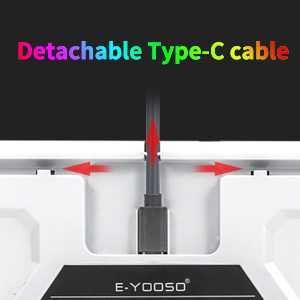
Image: Detachable Type-C cable for easy connection and portability.
Ajust ergonòmic
The keyboard features foldable back kickstands, allowing you to adjust the typing angle for improved comfort and reduced finger fatigue during extended use.

Image: Adjustable kickstands for ergonomic typing angles.
Funcionament
Control de la llum de fons
The E-Yooso Z-88 keyboard features extensive RGB backlighting with multiple modes and customization options.
- Canvia el mode de retroiluminació: Premeu Fn + Ins to cycle through 18 dynamic backlight modes.
- Gaming Backlight Modes: Premeu Fn + (1-8) to activate 8 built-in gaming-specific backlight modes.
- Modes de retroiluminació personalitzables: Premeu Fn + (9, 0) for 2 customizable backlight modes.
- Side Lighting Modes: Premeu Fn + Pausa to cycle through 4 RGB side lighting modes.
- Ajusta la brillantor: Premeu Fn + Fletxa amunt to increase brightness, Fn + Fletxa avall per disminuir la brillantor.

Image: The keyboard displaying various RGB backlight effects.
Tecles multimèdia i de funció
The keyboard includes 12 multimedia shortcuts accessible via the Function (Fn) key combinations.
| Tecla de funció | Acció |
|---|---|
| Fn + F1 | Obriu el reproductor multimèdia |
| Fn + F2 | Baixa el volum |
| Fn + F3 | Puja el volum |
| Fn + F4 | Silenciar |
| Fn + F5 | Pista anterior |
| Fn + F6 | Pista següent |
| Fn + F7 | Reproduir/Pausa |
| Fn + F8 | Atura el joc |
| Fn + F9 | Correu electrònic |
| Fn + F10 | Pàgina d'inici |
| Fn + F11 | Calculadora |
| Fn + F12 | Cerca |
| Fn + ESC | Reset Keyboard Settings |
| Fn + PGDN | Canvia el mode de retroiluminació |
| Fn + GUANYA | Bloquejar/Desbloquejar la clau de Windows |

Imatge: Més deview of Fn key combinations for various functions.
Anti-fantasma
The E-Yooso Z-88 features full N-key rollover (NKRO) anti-ghosting, meaning all 81 keys can be pressed simultaneously without conflict. This ensures every keystroke is registered accurately during intense gaming sessions or fast typing.

Image: Visual representation of the keyboard's full anti-ghosting feature.
Compatibilitat
The keyboard is compatible with Windows 10/8/7/Vista/XP, limited Mac OS, PS5, and PS4. It works with desktops, Chromebooks, PCs, and laptops.
Manteniment
Neteja del teclat
- Desconnecteu el teclat de l'ordinador abans de netejar-lo.
- Utilitzeu un drap suau i sense pelusa dampEsbandiu amb aigua o una solució netejadora suau per netejar les tecles i la superfície.
- Per a una neteja més profunda, feu servir l'extractor de tecles inclòs per treure les tecles i netegeu-les per sota amb aire comprimit o un raspall petit.
- Assegureu-vos que el teclat estigui completament sec abans de tornar-lo a connectar.
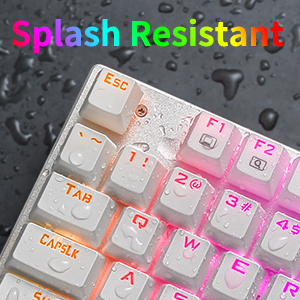
Image: The keyboard is designed with splash resistance for added durability.
Substitució de la tapa de tecles i l'interruptor
The keyboard features double injection keycaps and hot-swappable Outemu Blue switches, allowing for easy replacement if needed.
- Use the included keycap puller to gently remove keycaps.
- Use a switch puller (not included, but spare switches are provided) to remove and replace individual switches. Ensure proper alignment when inserting new switches to avoid bending pins.
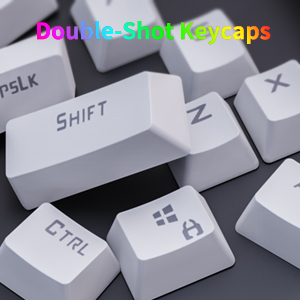
Image: Double-shot keycaps for enhanced durability and legend visibility.
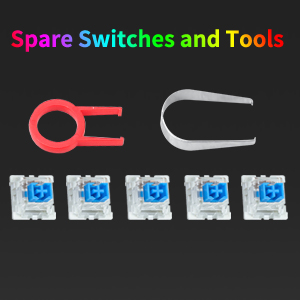
Image: Included keycap puller and spare switches for maintenance.
Resolució de problemes
El teclat no respon
- Assegureu-vos que el cable USB tipus C estigui connectat correctament tant al teclat com a l'ordinador.
- Prova de connectar el teclat a un port USB diferent de l'ordinador.
- Prova el teclat en un altre ordinador per descartar problemes específics del sistema.
- Si feu servir un concentrador USB, proveu de connectar-lo directament a l'ordinador.
La retroiluminació no funciona o és incorrecta
- Ensure the backlight is not turned off or set to minimum brightness using Fn + Fletxa avall.
- Canvieu pels modes de retroiluminació mitjançant Fn + Ins or Fn + PGDN.
- Perform a keyboard reset by pressing Fn + ESC.
- If a specific key's backlight is not working, it might indicate a faulty LED.
Keys Not Registering or Double Typing
- Netegeu al voltant i sota la tecla afectada per eliminar qualsevol residu.
- If the issue persists, consider replacing the switch for the problematic key using the provided spare switches and a switch puller.
Especificacions
| Característica | Detall |
|---|---|
| Marca | E-Yooso |
| Nom del model | Z-88 |
| Número de model | 8582 |
| Tecnologia de connectivitat | USB (Type-C detachable cable) |
| Descripció del teclat | Mecànica |
| Tipus de canvi | Interruptor blau Outemu |
| Nombre de claus | 81 |
| Il·luminació de fons | RGB (18 modes, 8 gaming modes, 2 customizable, 4 side lighting modes) |
| Anti-fantasma | Full N-Key Rollover (NKRO) |
| Material de claus | PBT and ABS Double Injection |
| Compatibilitat | Windows 10/8/7/Vista/XP, Limited Mac OS, PS5/PS4 |
| Material | Acrylonitrile Butadiene Styrene (ABS) and Metal |
| Pes de l'article | 0.75 quilos |
| Contingut de la caixa | Keyboard, USB Type-C Cable, Keycap Puller, Spare Switches |
Informació de la garantia
E-Yooso provides an after-sales guarantee for this product. For any issues, please contact customer service. Within 3 months of purchase, you may be eligible for a free return or exchange.
Atenció al client
If you encounter any problems or have questions regarding your E-Yooso Z-88 Mechanical Gaming Keyboard, please refer to the troubleshooting section first. If the issue persists, contact E-Yooso customer support through the retailer's platform or the official E-Yooso weblloc d'assistència.