
1. Introducció
Thank you for choosing the Eonon GA9465 Android 10.0 Car Stereo. This manual provides detailed instructions for the installation, operation, and maintenance of your new car stereo system. Please read this manual thoroughly before installation and use to ensure proper functionality and to maximize your user experience. Keep this manual for future reference.
2. Producte acabatview
The Eonon GA9465 is a state-of-the-art single DIN car stereo designed to upgrade your vehicle's infotainment system. It features a 7-inch touchscreen display, runs on Android 10.0, and is powered by a Rockchip PX30 Quad Core processor, offering a smooth and responsive user interface.

Figura 2.1: Frontal view of the Eonon GA9465 Car Stereo, showing the 7-inch touchscreen and physical control buttons.
This unit integrates seamlessly with various car functions and offers advanced connectivity options including Bluetooth 5.0, GPS navigation, and support for Apple CarPlay and Android Auto (via an optional dongle).
3. Applicable Models and Compatibility
The Eonon GA9465 car stereo is specifically designed for compatibility with BMW 3 Series models from 2005-2011 (E90/E91/E92/E93).

Figure 3.1: Applicable BMW 3 Series models (E90/E91/E92/E93) and notes on iDrive and fiber optic systems.
Notes importants de compatibilitat:
- If your car is equipped with an iDrive system and an LCD screen (as shown in Figure 3.1, left), this Eonon car stereo is not suitable for installation.
- If your factory car radio plug has fiber optic input with 8 speaker wires, it is applicable to your car, and an A0581 decoder box is not needed.
- If your car radio plug has fiber optics, a SOS prompt may appear on the dashboard screen after installing the aftermarket car stereo. This will not affect product usage.
- If your car has a Logic 7 system or a factory car radio plug has fiber optic input without 8 speaker wires, an A0581 decoder box (NOT INCLUDED) is required for installation.

Figure 3.2: Compatible vehicle samples for E90 Sedan, E91 Touring, E92 Coupé, and E93 Convertible models.
4. Característiques i especificacions principals
The Eonon GA9465 offers a wide range of features designed to enhance your driving experience:

Figure 4.1: Core specifications including Android 10.0 operating system, Rockchip PX30 1.5GHz Cortex A35 Quad Core processor, 2GB RAM + 32GB ROM, and 7-inch touchscreen with 1024x600 resolution and 178° viewangles d'ajust.

Figure 4.2: Function summary highlighting Bluetooth 5.0, split screen multitasking, 1-second boot time, navigation, EasyConnection, backup camera support, full RCA output, 4G & Wi-Fi, USB/SD support, DVR, EQ, app installation, AM/FM radio, OBDII, and built-in RDS radio receiver.
Especificacions tècniques:
| Especificació | Valor |
|---|---|
| Sistema operatiu | Android 10.0 |
| Processador | Rockchip PX30 Quad Core |
| RAM | 2 GB |
| ROM | 32 GB |
| Mida de la pantalla | 7 polzades |
| Resolució de pantalla | 1024 x 600 |
| Versió Bluetooth | 5.0 |
| Tecnologia de connectivitat | Bluetooth, USB |
| Tipus de mapa | A tot el món |
| Mode de sortida d'àudio | estèreo |
| Tipus de muntatge | Muntatge al quadre de comandament |
| Pes de l'article | 6.95 lliures |
| Dimensions del paquet | 13.15 x 10.71 x 8.9 polzades |
5. Configuració i instal·lació
Installation of the Eonon GA9465 is designed to be straightforward for compatible BMW 3 Series models. For many users, it is a plug-and-play process. However, specific considerations apply based on your vehicle's existing system.
Optical Fiber Decoder Box (A0581) Installation:
If your BMW 3 Series has a Logic 7 system or a factory radio plug with fiber optic input but without 8 speaker wires, the A0581 optical fiber decoder box (sold separately) is required. Ensure the car fiber optic connector is working properly before installation.
Figure 5.1: Installation steps for the A0581 Optical Fiber Decoder Box, showing wiring connections and the decoder unit.
Retaining Original Car Features:
The dual CAN Bus system of the Eonon GA9465 is designed to retain many original car features after installation, building information interaction between the head unit and the car.

Figure 5.2: Illustration of retained original car features, including LCD screen information, door/trunk open reminders, curtain control, most steering wheel control functions, seat heating, automatic switch to reverse mode, and headlight-activated button illumination. Also shows sound prompts for parking sensors and driving data display.
- The head unit will remind you when the door or trunk are not closed.
- Most of the steering wheel control functions are retained.
- The head unit will switch to reverse mode automatically while reversing.
- The head unit's buttons will light up after turning on car headlights.
- Sound prompts for parking trajectory & parking sensor (only available for vehicles with parking sensors).
- Driving data display (mileage, average speed, average fuel consumption).
- For your safety, video playback will be disabled while driving. You can enable it if you like.
6. Instruccions de funcionament
The Eonon GA9465 operates similarly to an Android tablet, with intuitive touchscreen controls and physical buttons for common functions.
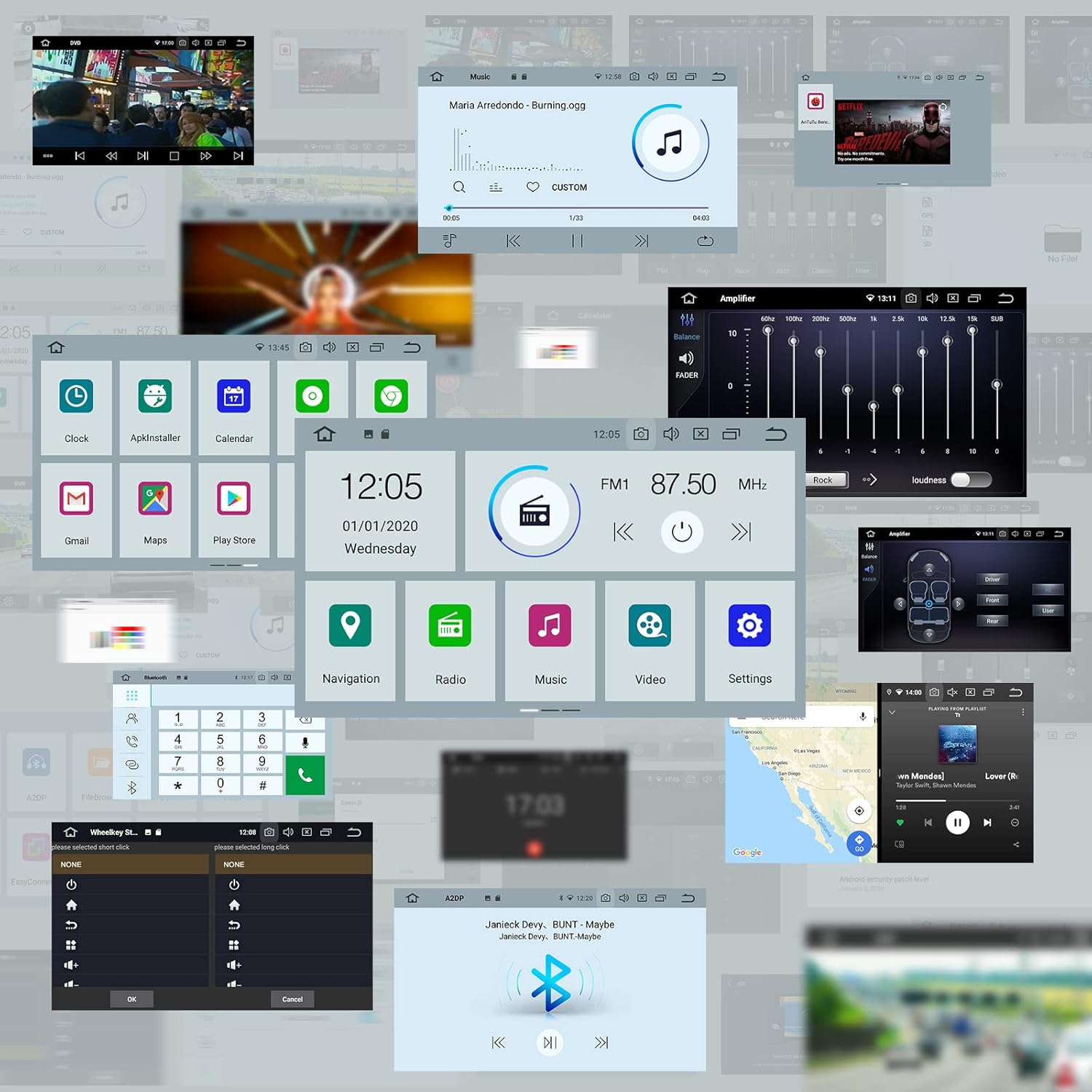
Figure 6.1: Various interface screenshots including home screen, music player, equalizer settings, clock, calendar, navigation, radio, video player, and settings.
Funcions clau:
- Bluetooth 5.0: Connect your smartphone for hands-free calling and audio streaming (A2DP).
- Navegació GPS: Utilize pre-installed or downloaded navigation apps for worldwide mapping.
- Reproducció multimèdia: Reprodueix àudio i vídeo files from USB, SD card, or streaming services.
- Ràdio: Access AM/FM radio with RDS support.
- Instal·lació de l'aplicació: Download and install various Android applications from the Play Store.
- Split Screen Multitasking: Run two applications simultaneously on the screen.
Apple CarPlay / Android Auto:
To use Apple CarPlay or Android Auto functionality, you will need to purchase the Eonon A0585 USB dongle separately.

Figure 6.2: Connection diagram for the A0585 USB dongle, illustrating how it enables Apple CarPlay and Android Auto on the Eonon car radio.
Connect your iPhone or Android phone to the A0585 dongle via USB to access compatible apps, navigation, and communication features directly on the car stereo display.
7. Manteniment
To ensure the longevity and optimal performance of your Eonon GA9465 car stereo, follow these maintenance guidelines:
- Neteja de la pantalla: Feu servir un drap suau i sense borrissol per netejar suaument la pantalla tàctil. Per a taques difícils, fregueu lleugeramentampNetegeu el drap amb aigua o amb un netejador de pantalles dissenyat per a electrònica. Eviteu productes químics agressius o materials abrasius.
- Neteja general: Mantingueu la unitat neta de pols i deixalles. Feu servir un raspall suau o aire comprimit per netejar els voltants dels botons i els ports.
- Actualitzacions de programari: Periodically check for software updates from Eonon to ensure you have the latest features and bug fixes. Follow the instructions provided with the update carefully.
- Eviteu temperatures extremes: No exposeu la unitat a calor o fred extrems durant períodes prolongats, ja que això pot afectar els components electrònics.
8. Solució De Problemes
This section addresses common issues you might encounter with your Eonon GA9465 car stereo. If you experience a problem not listed here, please contact Eonon customer support.
- Flickering Backup Camera Image:
Solució: This issue can often be resolved by installing an RL44 relay (available at automotive stores) to stabilize the power supply to the camera. This requires additional wiring. - Time Clock Does Not Save After Car is Turned Off:
Solució: Ensure that GPS location services are enabled on the unit. The system typically updates the time and date automatically via GPS. - Buzzing Noise (especially with Bluetooth and no music):
Solució: A buzzing or static noise can indicate an issue with the ground connection. Ensure all ground wires are securely connected and consider tapping into a better ground wire if the issue persists. - Radio App Not Working / Random Restarts / Laggy Volume Control:
Solució: Try performing a factory reset of the unit. If the issue persists, it may indicate a software or hardware fault. Ensure the unit's firmware is up to date. - La unitat no s'encén:
Solució: Check all power connections and fuses. Ensure the car's ignition is on and the unit is receiving power. - Sense sortida de so:
Solució: Verify speaker connections. If your car has a fiber optic system, ensure the A0581 decoder box is correctly installed and functioning. For Logic 7 systems, ensure an RCA Y splitter is used for the subwoofer connection if experiencing low bass or volume.
9. Garantia i Suport
For warranty information, technical support, or service inquiries, please contact Eonon customer service through their official website or the platform where you purchased the product. Please have your product model number (GA9465CA) and purchase details ready when contacting support.
An installation manual in PDF format is also available for download from the product's Amazon page for detailed wiring diagrams and installation steps.