
1. Introducció
Thank you for choosing the Silvergear Lollipop Kids Camera. This digital camera is designed for children, featuring a durable silicone case, 5.0-megapixel photo resolution, and video recording capabilities. It also includes built-in games for entertainment. This manual provides essential information for the safe and effective use of your camera.
2. Producte acabatview
Familiarize yourself with the components of your Silvergear Lollipop Kids Camera.
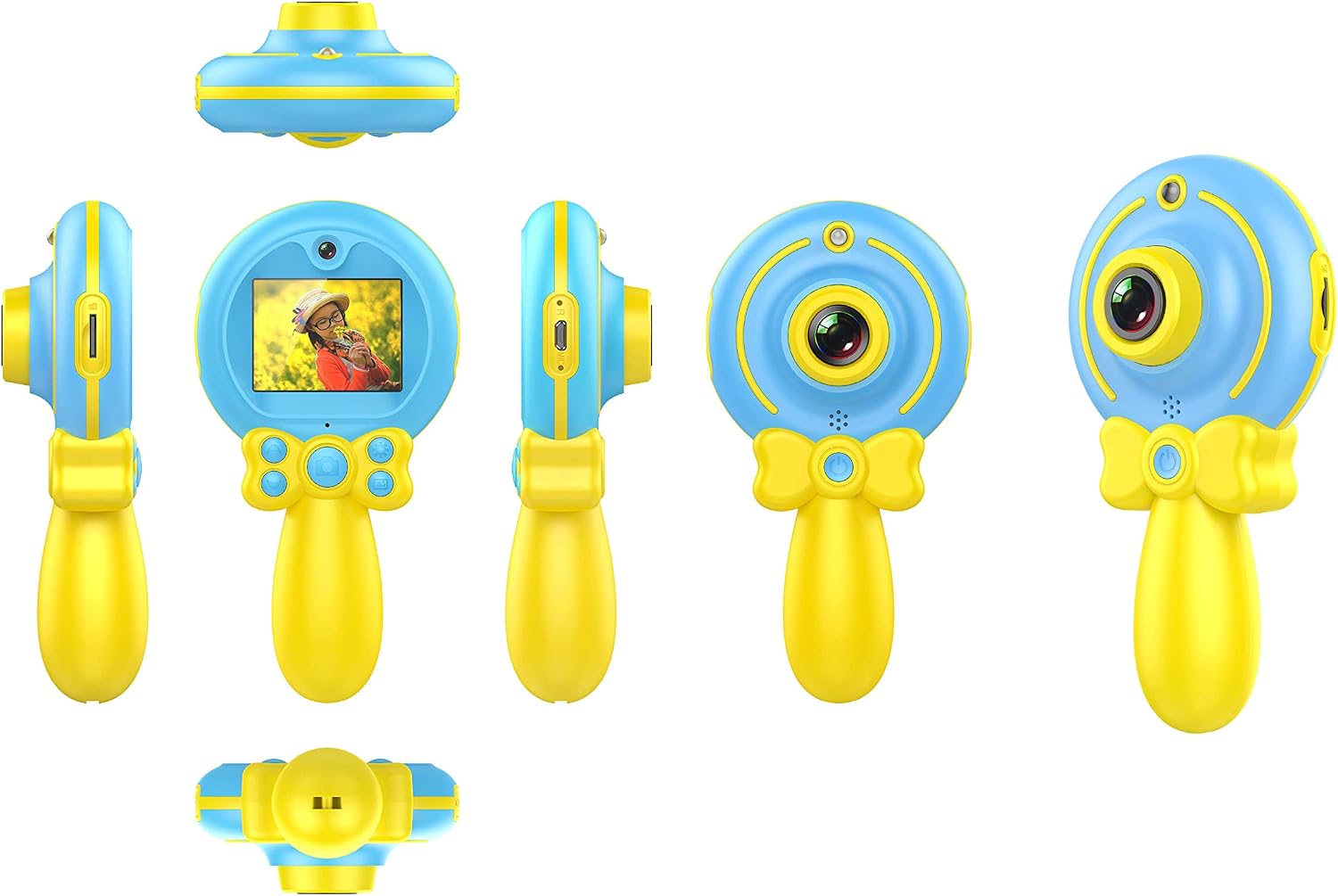
Imatge 2.1: Diversos views of the Silvergear Lollipop Kids Camera, illustrating its compact design, front and rear lenses, 2-inch display, and control buttons. The camera features a yellow handle and blue body with a silicone protective case.
- Lent frontal: Per fer fotos i vídeos.
- Lent posterior: For selfies.
- Pantalla de 2 polzades: Per viewfer fotos, vídeos i navegar pels menús.
- Botons de control: For power, navigation, and selection.
- Port micro USB: Per a càrrega i transferència de dades.
- Ranura per a targetes Micro SD: Per a emmagatzematge ampliable.
- Wrist Strap Attachment Point: For securing the camera.
3. Configuració
3.1 Càrrega de la bateria
The camera is equipped with a built-in rechargeable Lithium-polymer battery. Before first use, fully charge the camera.
- Connect the included Micro USB cable to the camera's Micro USB port.
- Connecteu l'altre extrem del cable a un adaptador de corrent USB (no inclòs) o al port USB d'un ordinador.
- El llum indicador de càrrega s'il·luminarà. Un cop completament carregat, el llum pot canviar de color o apagar-se.
3.2 Inserció d'una targeta Micro SD
A Micro SD card (not included) is required to save photos and videos. The camera supports cards up to 32GB.
- Localitza la ranura per a targetes Micro SD a la càmera.
- Introduïu suaument la targeta Micro SD a la ranura amb els contactes metàl·lics cap avall fins que encaixi al seu lloc.
- Per treure-la, empenyeu lleugerament la targeta fins que surti.
3.3 Engegada/apagada
- Per encendre: Premeu i manteniu premut el botó d'engegada durant uns segons fins que la pantalla s'il·lumini.
- Per apagar: Press and hold the Power button for a few seconds until the screen turns off.
4. Instruccions de funcionament
4.1 Fer fotos
The camera features a 5.0-megapixel resolution for still images.

Imatge 4.1: A child demonstrating the use of the Silvergear Lollipop Kids Camera for taking photographs.
- Ensure the camera is powered on and in photo mode. Use the navigation buttons to select photo mode if necessary.
- Frame your shot using the 2-inch display screen.
- Press the Shutter button to capture the photo. The camera has autofocus for clear images.
4.2 Gravació de vídeos
The camera can record videos at 640 x 480 pixels resolution at 30 frames per second in MP4 format.
- Switch the camera to video recording mode using the mode selection button.
- Press the Record button to start recording. A timer or indicator will appear on the screen.
- Torneu a prémer el botó Grava per aturar la gravació.
4.3 Jugar a jocs
The camera includes three built-in games for entertainment.

Imatge 4.2: A child interacting with the Silvergear Lollipop Kids Camera, viewing content on its screen.
- Navigate to the 'Games' menu option using the navigation buttons.
- Select one of the three available games.
- Use the camera's control buttons to play the game.
4.4 Transferència Files
Per transferir fotos i vídeos a un ordinador:
- Connect the camera to a computer using the Micro USB cable.
- The camera should appear as a removable disk drive on your computer.
- Open the camera's folder to access and copy your files.
5. Manteniment
- Neteja: Feu servir un drap suau i sec per netejar el cos i la pantalla de la càmera. No utilitzeu netejadors líquids ni materials abrasius.
- Emmagatzematge: Guardeu la càmera en un lloc fresc i sec, allunyat de la llum solar directa i de temperatures extremes.
- Cura de la bateria: For optimal battery life, avoid fully discharging the battery frequently. Charge the camera regularly, even if not in use for extended periods.
- Resistència a l'aigua: Aquesta càmera és no impermeableEviteu l'exposició a l'aigua o a una humitat elevada.
6. Solució De Problemes
- La càmera no s'encén: Assegureu-vos que la bateria estigui carregada. Connecteu la càmera a una font d'alimentació i torneu-ho a provar.
- No es poden fer fotos/vídeos: Check if a Micro SD card is inserted correctly and has sufficient free space.
- Poca qualitat d'imatge: Ensure the lens is clean and free from smudges. Check lighting conditions.
- La càmera es congela: Press and hold the Power button to force a shutdown, then restart the camera.
- L'ordinador no reconeix la càmera: Ensure the USB cable is properly connected. Try a different USB port or cable.
7. Especificacions
| Característica | Especificació |
|---|---|
| Número de model | 1087-B |
| Marca | Silvergear |
| Dimensions (L x A x A) | 9 x 5 x 15 cm |
| Pes | 140 grams |
| Resolució d'imatge fixa | 5 megapíxels |
| Resolució de vídeo | 640 x 480 pixels (30 FPS) |
| Format de vídeo | MP4 |
| Format d'imatge | JPEG |
| Mida de la pantalla | 2 polzades |
| Emmagatzematge | Micro SD card support up to 32 GB |
| Bateria | 1 de polímer de liti (incloses) |
| Connectivitat | USB |
| Enfocament automàtic | Sí |
| Resistència a l'aigua | No impermeable |
| Característiques especials | Video recording, filters, 3 built-in games |
8. Contingut de la caixa
- Silvergear Lollipop Kids Camera (Blue)
- Funda protectora de silicona
- Cable de càrrega micro USB
- Corretja de canell
9. Garantia i Suport
Information regarding product warranty and customer support is not available in the provided product data. Please refer to the product packaging or the manufacturer's official website for details on warranty coverage and how to contact customer support.