
1. Introducció
Gràcies per la compraasinel Moukey MAMP1 220W Bluetooth Dual Channel Power Amplificador. Això amplifier is designed to provide powerful and versatile audio amplification for various applications, including karaoke, home theater systems, and general audio playback. It features multiple input options, Bluetooth 5.0 connectivity, and intuitive controls for an enhanced audio experience. Please read this manual thoroughly before use to ensure proper operation and to maximize the product's performance.
2. Instruccions de seguretat
Per evitar descàrregues elèctriques, incendis o danys a la unitat, observeu les següents precaucions de seguretat:
- No exposeu aquesta unitat a la pluja o la humitat.
- No obriu la c.asing. No hi ha peces a l'interior que l'usuari pugui reparar. Demaneu totes les tasques de manteniment a personal qualificat.
- Assegureu-vos que la font d'alimentació voltage compleix els requisits especificats a la unitat.
- Place the unit on a stable, flat surface with adequate ventilation. Do not block ventilation openings.
- Mantingueu la unitat allunyada de fonts de calor, llum solar directa i pols excessiva.
- Disconnect the power plug from the outlet if the unit will not be used for an extended period.
- No feu funcionar la unitat amb les mans mullades.
3. Contingut del paquet
Verifiqueu que tots els elements siguin presents al paquet:
- Moukey MAMP1 Poder AmpUnitat lificadora
- Control remot
- Antena FM
- Manual d'usuari (Aquest document)
4. Producte acabatview
4.1 Front Panel Controls and Functions
The front panel provides access to all primary controls and input ports for easy operation.

Image: Detailed diagram of the Moukey MAMP1 front panel, highlighting each control and port with corresponding numbers.
- Interruptor d'alimentació: Encén o apaga la unitat.
- USB / SD Slot: Per reproduir àudio files from USB drives (max 32GB) or SD cards (max 16GB).
- Botó de mode: Canvia pels modes d'entrada (Bluetooth, USB, SD, AUX, FM).
- Botó BT: Directly switches to Bluetooth mode.
- Prev Button: Salta a la pista/emissora anterior.
- Botó Reprodueix / Pausa: Reprodueix o posa en pausa la reproducció d'àudio.
- Botó següent: Salta a la següent pista/emissora.
- Pantalla LED: Shows current mode, track information, or frequency.
- Folder / Track: Navigates through folders or tracks on USB/SD.
- Control de volum mestre: Ajusta el volum de sortida general.
- Auriculars Jack: 3.5mm output for monitor headphones.
- Microphone 1 Input: Jack de 6.35 mm per a la connexió del micròfon.
- Microphone 2 Input: 6.35mm jack for a second microphone connection.
- Control de volum del micròfon: Ajusta el volum dels micròfons connectats.
- Botó d'eco: Controla l'efecte d'eco dels micròfons.
- Pom de baix: Ajusta la sortida d'àudio de baixa freqüència.
- Pom treble: Ajusta la sortida d'àudio d'alta freqüència.
- Pom d'equilibri: Ajusta el balanç del canal esquerre/dret.
- Presa d'entrada AUX: Entrada de 3.5 mm per a dispositius d'àudio externs.
- Selector d'entrada: Rotary switch to select between CD, AUX, DVD, and MP3/W inputs.
4.2 Connexions del panell posterior
The rear panel houses the main audio input and output connections.

Imatge: Part posterior view del Moukey M.AMP1 amplificador, que mostra tots els ports d'entrada i sortida.

Image: Detailed diagram of the Moukey MAMP1 rear panel, highlighting each connection point.
- Audio Input for DVD (RCA): Connect DVD players or other audio sources.
- Audio Input for CD (RCA): Connect CD players or other audio sources.
- Line Out Jack (RCA): For connecting to another ampmés elevat o dispositiu de gravació.
- Presa d'antena FM: Connecteu l'antena FM inclosa per a la recepció de ràdio.
- Speaker Output Jacks: Connect passive speakers (4-16 Ohm impedance).
- Entrada de cable d'alimentació: Connecteu el cable d'alimentació de CA.
5. Configuració
5.1 Col·locació
Col·loca el amplifier on a flat, stable surface. Ensure there is sufficient space around the unit for proper ventilation to prevent overheating.
5.2 Connexió d'alimentació
Connect the power cable to the Power Cable Input on the rear panel of the amplifier, then plug the other end into a suitable AC power outlet (115V AC).
5.3 Connexió dels altaveus
La MAMP1 amplifier supports two sets of passive speakers with an impedance of 4-16 Ohms. Use appropriate speaker wire to connect your speakers to the Speaker Output Jacks on the rear panel.

Image: Diagram illustrating how to connect speakers to the amplifier's binding posts.
- Rotate and loosen the speaker knob on the binding post.
- Insert the bare wire (remove approximately 10mm of insulation) into the hole. Ensure correct polarity (+ to + and - to -).
- Tighten the knobs to secure the wires firmly.
5.4 Input Device Connection
Connect your audio sources (CD player, DVD player, tuner, etc.) to the corresponding RCA Audio Input jacks on the rear panel. For microphones, use the 6.35mm jacks on the front panel. For 3.5mm AUX devices, use the front panel AUX Input Jack.
6. Instruccions de funcionament
6.1 Encès/Apagat
Premeu el botó Interruptor d'alimentació al panell frontal per engegar el ampactivar o desactivar el lificador. La pantalla LED s'il·luminarà quan la unitat estigui engegada.
6.2 Selecció d'entrada
Utilitza el Botó de mode on the front panel or the remote control to cycle through available input sources (Bluetooth, USB, SD, AUX, FM). Alternatively, use the Selector d'entrada knob on the front panel for RCA inputs (CD, AUX, DVD, MP3/W).
6.3 Control de volum
- Volum mestre: Gira el Pom de volum mestre to adjust the overall output level of the ampmés viu.
- Volum del micròfon: Utilitza el Pom de volum de micròfon to control the volume of connected microphones independently.
Control de 6.4 tons
Adjust the audio characteristics using the Pom de baix i Maneta d'aguts to suit your preference. The Pom d'equilibri allows adjustment of the left and right channel output levels.

Image: Close-up of the Moukey MAMP1 showing the Bass and Treble adjustment knobs.
6.5 Echo Control
Gireu el Pom d'eco to add or reduce the echo effect on the microphone inputs, suitable for karaoke applications.
6.6 Vinculació Bluetooth
Per connectar un dispositiu Bluetooth:
- Premeu el botó Botó BT or cycle through modes until "BLUE" appears on the LED display.
- Activa el Bluetooth al teu telèfon intel·ligent, tauleta o ordinador.
- Cerca "Moukey MAMP1" in your device's Bluetooth settings and select it to pair.
- Once paired, you can stream audio wirelessly. Playback will temporarily pause during phone calls to protect privacy.
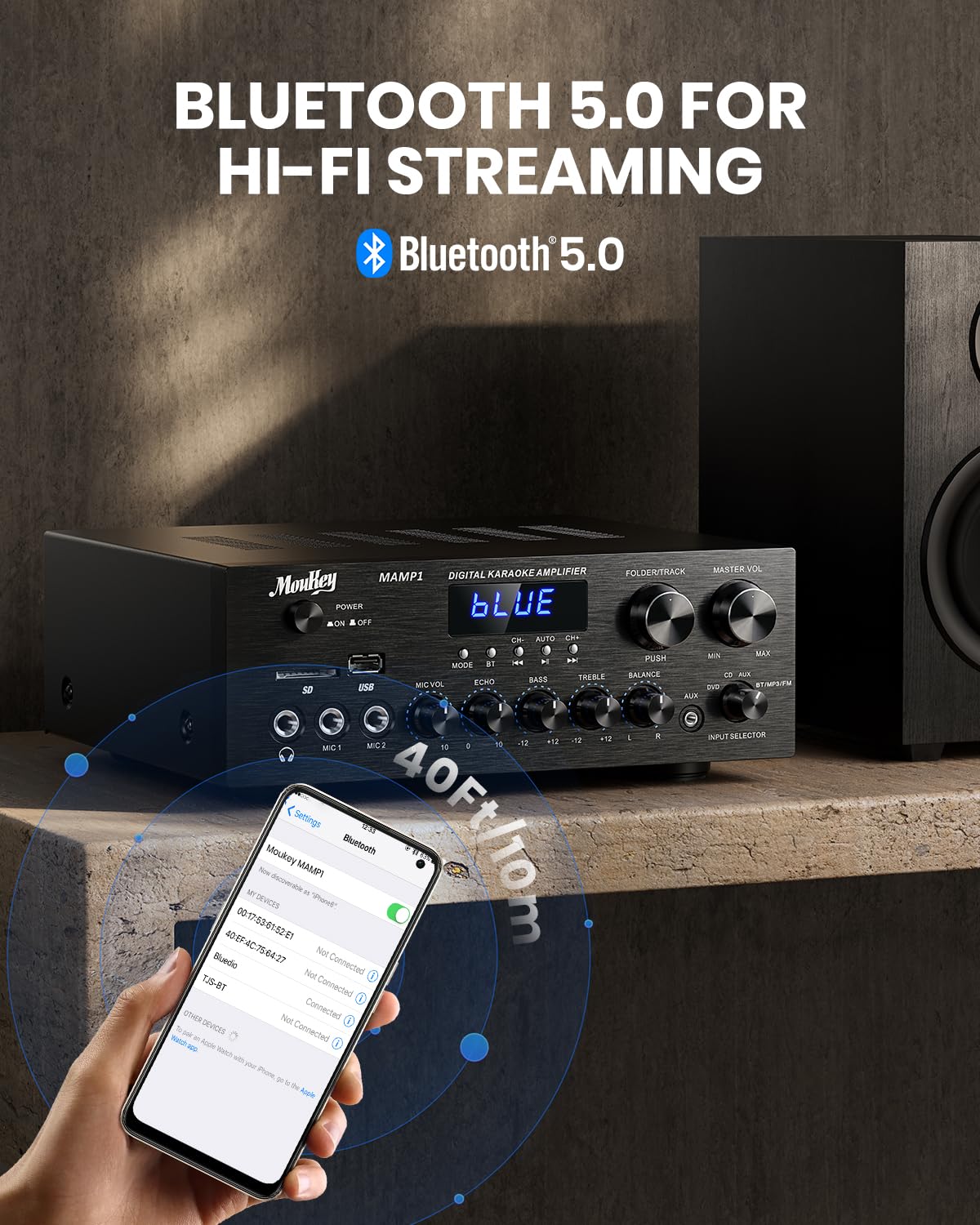
Imatge: The Moukey MAMP1 amplifier displaying "BLUE" on its screen, indicating Bluetooth mode, with a smartphone showing pairing options.
Reproducció USB/SD de 6.7"
Insert a USB drive (max 32GB) or SD card (max 16GB) into the respective slot on the front panel. The amplifier will automatically switch to USB/SD mode and begin playback. Use the Anterior, Reproduir/Pausa, A continuació, i Folder/Track botons per controlar la reproducció.
6.8 Ràdio FM
Ensure the FM antenna is connected to the rear panel. Select FM mode using the Botó de mode. Utilitza el Anterior i A continuació buttons to tune to radio stations. The LED display will show the current frequency.
7. Manteniment
To maintain the performance and appearance of your ampmés viu:
- Neteja: Use a soft, dry cloth to wipe the exterior of the unit. Do not use liquid cleaners or abrasive chemicals.
- Ventilació: Assegureu-vos que les obertures de ventilació estiguin netes de pols i deixalles.
- Emmagatzematge: Si guardeu la unitat durant un període prolongat, desconnecteu-la de l'alimentació i guardeu-la en un lloc fresc i sec.
8. Solució De Problemes
If you encounter issues with your Moukey MAMP1 amplificador, consulteu la taula següent per conèixer els problemes i les solucions més habituals:
| Problema | Causa possible | Solució |
|---|---|---|
| Sense poder | Cable d'alimentació no connectat; Presa de corrent defectuosa; Interruptor apagat. | Ensure power cable is securely connected. Try a different power outlet. Press the power switch to ON. |
| Sense sortida de so | Incorrect input selected; Volume too low; Speakers not connected; Speaker wires loose; Mute function active. | Select the correct input source. Increase Master Volume. Check speaker connections and polarity. Ensure mute is off. |
| Bluetooth no connectat | Amplifier not in Bluetooth mode; Device too far; Device already paired to another unit. | Assegureu-vos amplifier is in Bluetooth mode ("BLUE" on display). Move device closer to amplifier. Disconnect from other devices. |
| El micròfon no funciona | Microphone not connected; Mic volume too low; Echo knob set to minimum. | Connect microphone securely. Increase Microphone Volume. Adjust Echo knob. |
| Problemes de reproducció amb USB/SD | Sense suport file format; USB drive/SD card corrupted; Capacity exceeded. | Assegureu-vos l'àudio files are in supported formats (e.g., MP3). Try a different USB drive/SD card. Check capacity limits (USB max 32G, SD max 16G). |
Si el problema persisteix després de provar aquestes solucions, poseu-vos en contacte amb l'atenció al client.
9. Especificacions
| Característica | Especificació |
|---|---|
| Marca | Moukey |
| Model | MAMP1 |
| Potència de sortida | 220 watts |
| Canals | 2 |
| Voltage | 115 volts (CA) |
| Impedància de l'altaveu | 4-16 ohms |
| Versió Bluetooth | 5.0 |
| Interval Bluetooth | Over 12 meters (40 feet) |
| Compatibilitat amb targetes USB/SD | USB: Max 32GB, SD: Max 16GB |
| Dimensions (L x A x A) | 25 cm x 21.3 cm x 9.5 cm (aprox. 10 polzades x 8 polzades x 4 polzades) |
| UPC | 715802779039 |
| País d'origen | Xina |

Imatge: The Moukey MAMP1 amplifier with its dimensions labeled.
10. Garantia i Suport
This Moukey MAMP1 Poder Amplifier ve amb a 1 any de garantia des de la data de compra. Aquesta garantia cobreix els defectes de fabricació i la mà d'obra en condicions d'ús normal.
La garantia no cobreix:
- Damage caused by accident, abuse, misuse, flood, fire, or other natural causes.
- Danys causats per modificacions o reparacions no autoritzades.
- Damage caused by improper installation or connection.
- Cosmetic damage, such as scratches, dents, and broken plastic on ports.
For warranty claims or technical support, please contact the retailer where you purchased the product or visit the official Moukey website for contact information. Please have your purchase receipt and product model number (MAMP1) ready when contacting support.