
cimetech KF003-Grey
cimetech 2.4GHz Wireless Keyboard User Manual
Model: KF003-Grey
Brand: cimetech
Introducció
This manual provides comprehensive instructions for the setup, operation, maintenance, and troubleshooting of your cimetech 2.4GHz Wireless Keyboard. Designed for seamless compatibility with various operating systems including Windows, iOS, and Android, this full-size keyboard offers a comfortable and efficient typing experience for laptop, desktop PC, and tablet users.
Please read this manual thoroughly before using the keyboard to ensure optimal performance and longevity.

Figure 1: cimetech 2.4GHz Wireless Keyboard (KF003-Grey) with USB receiver.
Guia de configuració
1. Contingut del paquet
- cimetech 2.4GHz Wireless Keyboard
- Receptor Nano USB
- 2 piles AAA (incloses)
2. Instal·lació de la bateria
- Locate the battery compartment on the back of the keyboard.
- Traieu la tapa de la bateria.
- Introduïu dues (2) piles AAA, assegurant-vos de la polaritat correcta (+/-).
- Col·loqueu la tapa de la bateria de manera segura.
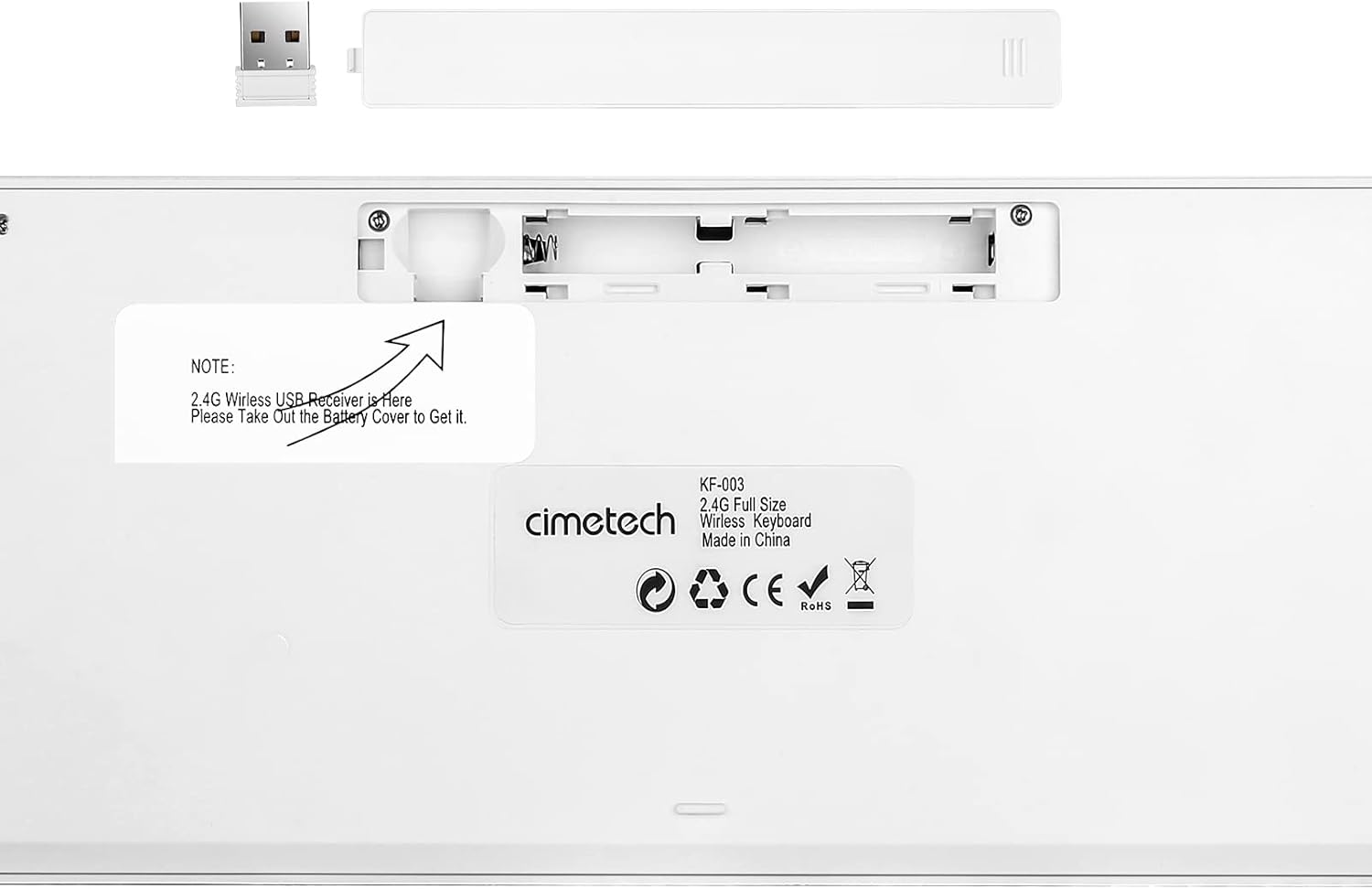
Figure 2: Back of the keyboard indicating battery compartment and USB receiver storage.
3. Connexió del teclat
The cimetech wireless keyboard utilizes 2.4G wireless technology for a stable and clutter-free connection.
- Locate the Nano USB receiver, typically stored within the battery compartment on the back of the keyboard (refer to Figure 2).
- Traieu el receptor USB de la seva ranura d'emmagatzematge.
- Insert the Nano USB receiver into an available USB-A port on your computer, laptop, or tablet.
- The keyboard should automatically connect within a few seconds. No additional drivers are required for most operating systems.

Figure 3: 2.4G Wireless Plug and Play connection diagram.
Instruccions de funcionament
1. Keyboard Layout and Features
The cimetech KF003-Grey keyboard features a full-size layout with 110 keys, including a dedicated numeric pad and 17 shortcut keys for enhanced productivity.

Figure 4: Keyboard layout with dimensions (43.5cm x 12.3cm).
The ergonomic keycaps are designed for comfortable and quiet typing, reducing noise and providing a smooth tactile feel. Rubber pads on the back ensure stability during use.

Figure 5: Detail of the scissor-switch key mechanism for responsive and smooth typing.
2. Llums indicadores
The keyboard features three indicator lights located above the numeric pad:
- Indicador NUM: Lights up when the Number Lock (Num Lock) function is active.
- Indicador CAPS: Lights up when the Caps Lock function is active.
- Indicador POWER: Indicates battery status. It will light up when the keyboard is turned on and may flash when battery power is low.

Figure 6: Location of NUM, CAPS, and POWER indicator lights.
3. Function (Fn) Keys and Multimedia Shortcuts
The keyboard includes a Function (Fn) key that, when pressed in combination with the F1-F12 keys, activates various multimedia and system shortcuts. This allows for quick access to common functions without needing to use a mouse.
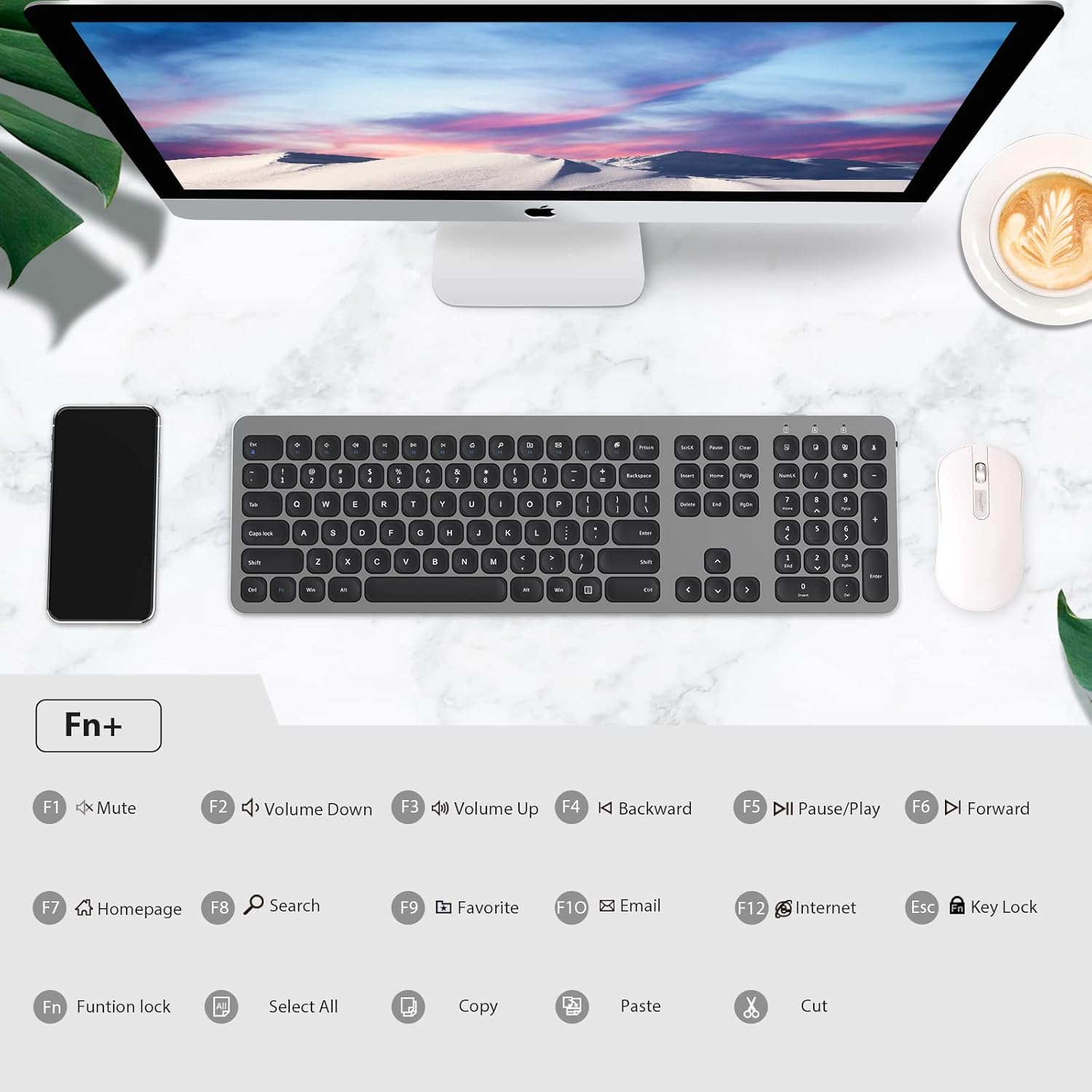
Figure 7: Fn key combinations for multimedia and system shortcuts.
| Combinació de tecles | Funció |
|---|---|
| Fn + F1 | Silencia l'àudio |
| Fn + F2 | Baixa el volum |
| Fn + F3 | Puja el volum |
| Fn + F4 | Backward (Media) |
| Fn + F5 | Pause/Play (Media) |
| Fn + F6 | Forward (Media) |
| Fn + F7 | Pàgina d'inici |
| Fn + F8 | Cerca |
| Fn + F9 | Favorit |
| Fn + F10 | Correu electrònic |
| Fn + F11 | Navegador d'Internet |
| Fn + F12 | Bloqueig de clau |
| Fn + Esc | Function Lock (toggles F1-F12 to act as standard function keys or multimedia keys) |
| Fn+A | Seleccioneu Tot |
| Fn + C | Còpia |
| Fn + V | Enganxa |
| Fn + X | Tallar |
Manteniment
1. Neteja del teclat
Per mantenir la neteja i la funcionalitat del teclat:
- Utilitzeu un drap suau i sense pelusa lleugerament dampamb aigua o una solució de neteja suau.
- Eviteu ruixar líquids directament sobre el teclat.
- No utilitzeu netejadors abrasius, dissolvents ni aerosols.
- Per a la pols i les restes entre les tecles, feu servir aire comprimit.
2. Battery Life and Power Saving
The keyboard is designed for long-term operation with its power-saving features:
- The keyboard has a separate ON/OFF switch located on the back. Turn off the keyboard when not in use for extended periods to conserve battery life.
- A smart auto-sleep feature activates after a period of inactivity to save power. Press any key to wake the keyboard.
- Replace the AAA batteries when the POWER indicator light flashes or the keyboard becomes unresponsive.
Resolució de problemes
If you encounter issues with your cimetech wireless keyboard, please refer to the following common solutions:
| Problema | Possible causa/solució |
|---|---|
| Keyboard is unresponsive or not typing. |
|
| Lag or delayed response when typing. |
|
| Certain keys or multimedia functions are not working. |
|
| El teclat es desconnecta sovint. |
|
Especificacions
| Característica | Detall |
|---|---|
| Model | KF003-Grey |
| Tecnologia de connectivitat | 2.4GHz Wireless (RF), USB-A Receiver |
| Distància d'operació | Fins a 10 metres (33 peus) |
| Nombre de claus | 110 |
| Font d'alimentació | 2 piles AAA (incloses) |
| Dispositius compatibles | Portàtil, PC, tauleta |
| Sistemes operatius | Windows XP / Vista / 7 / 8 / 10, iOS, Android, Mac OS |
| Dimensions del producte | 14.57 x 5.12 x 0.79 polzades (37 x 13 x 2 cm) |
| Pes de l'article | 1.1 lliures (0.5 kg) |
| Característiques especials | Portable, Ergonomic, Lightweight, Hotkeys and Media Keys, Quiet Click |
Garantia i Suport
For information regarding warranty coverage, technical support, or customer service, please refer to the warranty card included with your product packaging or visit the official cimetech weblloc. Conserveu el rebut de compra per a reclamacions de garantia.
Per obtenir més ajuda, també podeu contactar directament amb el venedor a través de la plataforma on vau comprar el producte.
Ask a question about this manual
Ask about setup, troubleshooting, compatibility, parts, safety, or missing instructions. Manuals+ will review the question and use this page’s manual context to help answer it.