
1. Introducció
Thank you for choosing the FeinTech LED Desk Lamp LTL00600. This high-quality desk lamp is designed to provide optimal lighting for your workspace while offering convenient features such as a USB charging port, adjustable brightness, and customizable color temperature. Please read this manual thoroughly before use to ensure proper operation and to maximize the lifespan of your product.
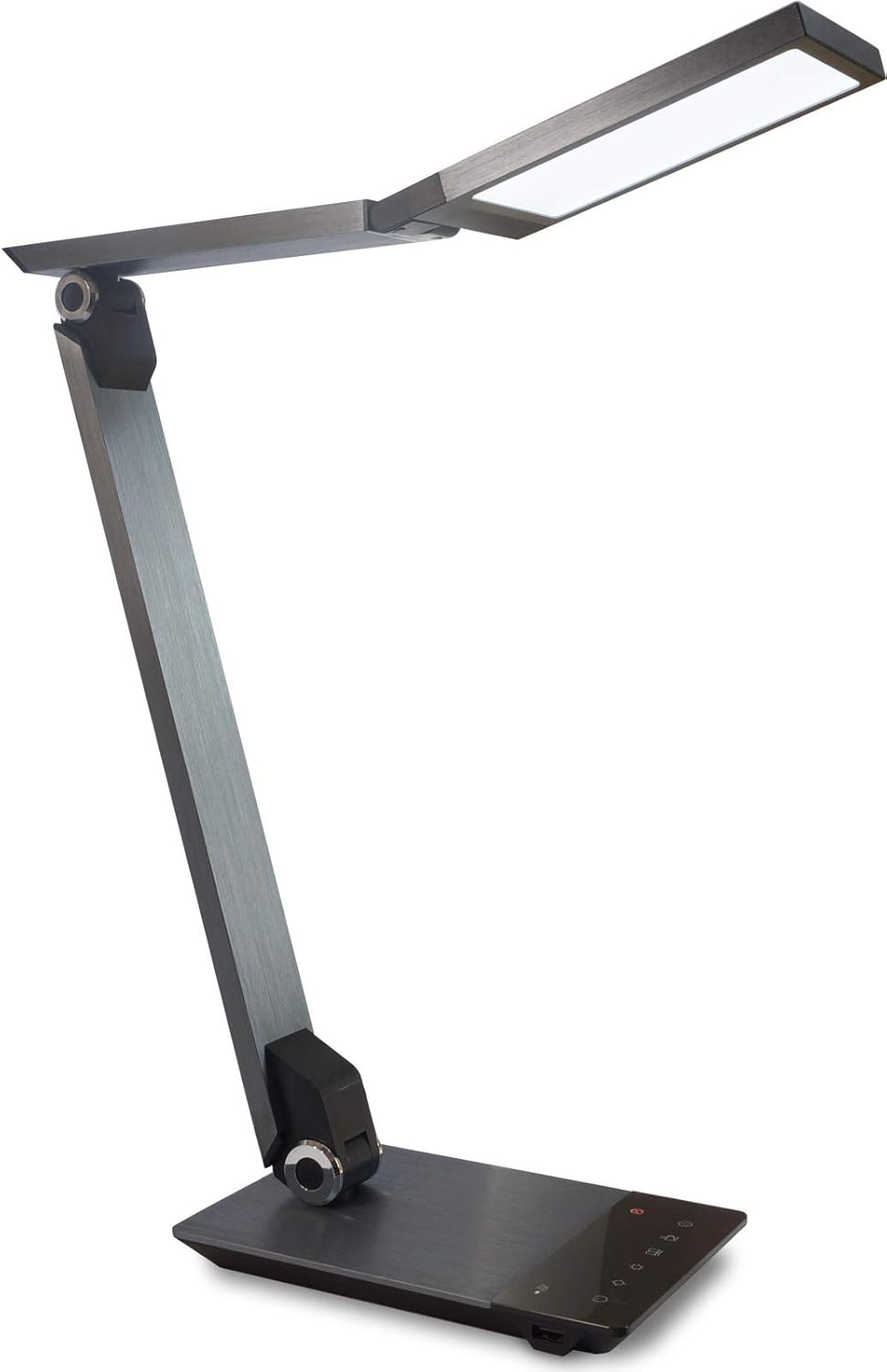
Image 1.1: FeinTech LED Desk Lamp LTL00600. This image displays the lamp en la seva posició vertical, mostraasing its brushed aluminum finish and sleek design.
2. Instruccions de seguretat
Per evitar danys o lesions, observeu les següents precaucions de seguretat:
- Assegureu-vos que l'adaptador de corrent estigui connectat a una presa de corrent adequada.
- No exposa la lamp a l'aigua o a la humitat excessiva.
- Eviteu desmuntar o modificar la lamp. Repairs should only be performed by qualified personnel.
- Mantingueu la lamp lluny de fonts de calor i de la llum solar directa.
- Netegeu la lamp només amb un drap suau i sec. No utilitzeu productes de neteja abrasius ni dissolvents.
- No mireu directament a la font de llum LED durant períodes prolongats.
3. Contingut del paquet
Si us plau, comproveu que tots els elements siguin presents al paquet:
- Escriptori LED FeinTech Lamp (Model: LTL00600)
- Adaptador d'alimentació (12 V/2 A)
4. Producte acabatview
Familiarize yourself with the components of your FeinTech LED Desk Lamp:
- Lamp Cap: Contains the LED light source.
- Braços ajustables: Multiple joints for flexible positioning.
- Base: Provides stability and houses the control panel and USB port.
- Tauler de control: Touch-sensitive buttons for power, brightness, color temperature, and timer.
- Port de càrrega USB: Located on the side of the base for device charging.

Imatge 4.1: De dalt a baix view de la lamp's base and control panel. This image highlights the touch-sensitive buttons for various functions.

Imatge 4.2: Lateral view de la lamp's base, showing the integrated USB charging port. This port allows for convenient charging of compatible devices.
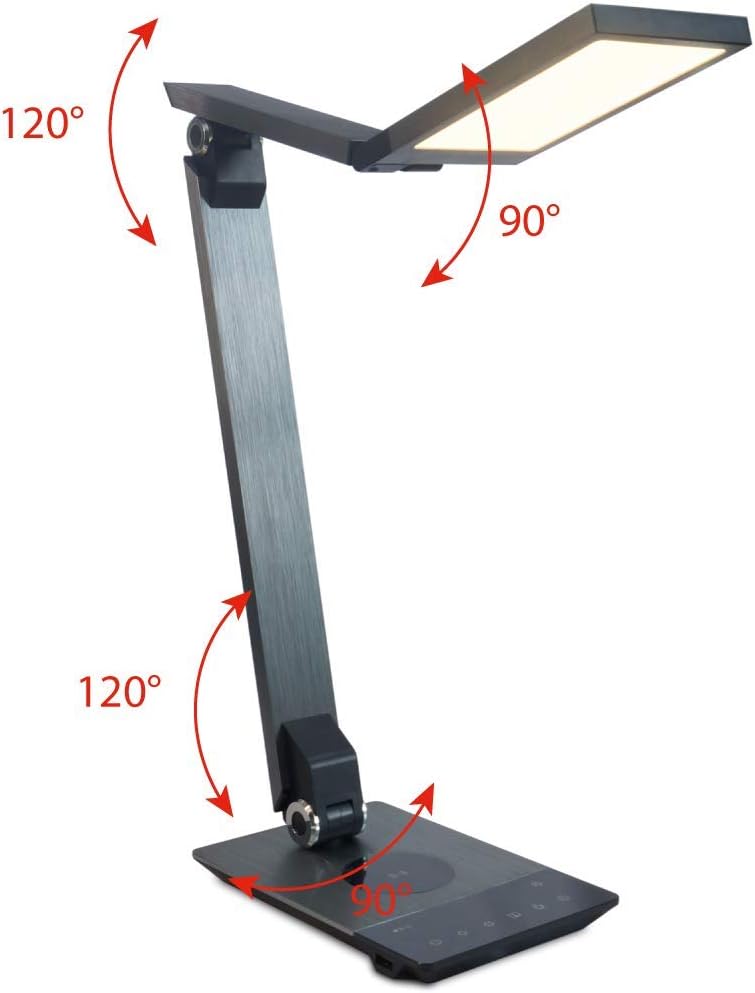
Image 4.3: Diagram illustrating the articulation angles of the lamp's joints. The lamp head can rotate 90 degrees, the upper arm 120 degrees, and the lower arm 120 degrees, allowing for flexible positioning.
5. Configuració
Seguiu aquests passos per a la configuració inicial:
- Desembalar: Traieu amb cura tots els components de l'embalatge.
- Col·locació: Col·loca la lamp base on a stable, flat surface. Ensure there is enough space for the lamp to be adjusted without obstruction.
- Connectar l'alimentació: Insert the power adapter cable into the DC input port on the back of the lamp base. Connecteu l'adaptador de corrent a una presa de corrent estàndard.
6. Instruccions de funcionament
The FeinTech LED Desk Lamp features intuitive touch controls on its base.
6.1 Encès/Apagat
- Toca el Botó d'encesa on the control panel (refer to Image 4.1) to turn the lamp encès o apagat.
6.2 Ajust de la brillantor (regulació de la llum)
- Amb la lamp activat, toca i mantén tocat el Brillantor cap amunt or Brillantor avall buttons (refer to Image 4.1) to steplessly adjust the light intensity.
- El lamp base will vibrate slightly when the minimum or maximum brightness level is reached.
6.3 Ajust de temperatura de color
- Amb la lamp activat, toca i mantén tocat el Color Temperature Up or Color Temperature Down buttons (refer to Image 4.1) to steplessly adjust the light color from warm white (2700K) to cool white (6500K).
- El lamp base will vibrate slightly when the minimum or maximum color temperature is reached.
6.4 Favorite Settings
- El lamp allows you to store and recall 3 favorite light settings (brightness and color temperature).
- To save a setting: Adjust the brightness and color temperature to your desired level. Then, touch and hold one of the Botons preferits (refer to Image 4.1) until the lamp flashes briefly, indicating the setting is saved.
- To recall a setting: Simply touch the corresponding Botó preferit.
- The last used brightness and color temperature settings are automatically saved even after the lamp està apagat.
6.5 Funció de càrrega USB
- Connect your smartphone or other compatible device to the USB charging port on the side of the lamp base (refer to Image 4.2) using a suitable USB cable.
- The intelligent USB port delivers up to 2.4A for fast charging.
- An LED indicator will signal ongoing and completed charging status.
6.6 Funció de temporitzador
- Toca el Botó del temporitzador (refer to Image 4.1) to activate the timer function.
- The first touch activates a 3-minute timer.
- A second touch activates a 1-hour timer.
- El lamp will automatically turn off after the selected time period.
7. Manteniment
Per mantenir la teva lamp's appearance and functionality:
- Desconnecteu sempre la lamp de la font d'alimentació abans de netejar.
- Netegeu la lamp amb un drap suau, sec i sense pelusa.
- Do not use liquid or aerosol cleaners, as they may damage the finish or internal components.
- Avoid scratching the brushed aluminum surface.
8. Solució De Problemes
Si teniu problemes amb el vostre lamp, consulteu els problemes i solucions habituals següents:
| Problema | Causa possible | Solució |
|---|---|---|
| Lamp no s'encén. | Sense font d'alimentació. | Check if the power adapter is securely connected to the lamp and the electrical outlet. Test the outlet with another device. |
| La càrrega USB no funciona. | Dispositiu no compatible o cable defectuós. | Ensure your device is compatible with USB charging. Try a different USB cable. Verify the lamp està encès. |
| Els controls tàctils no responen. | Error temporal de programari o problema d'alimentació. | Disconnect the power adapter for 30 seconds, then reconnect it. Ensure your fingers are clean and dry when operating the touch controls. |
9. Especificacions
| Número de model | LTL00600 |
| Dimensions (L x A x A) | 36 x 13.5 x 44 cm (aprox. 14.2 x 5.3 x 17.3 polzades) |
| Pes | 1.84 kg (aprox. 4.06 lliures) |
| Material | Alumini raspallat |
| Font de llum | LED |
| Max. Light Output | 500 lumens (1000 lux at 40 cm distance) |
| Temperatura de color (CCT) | 2700 K (Warm White) to 6500 K (Cool White) |
| Power Consumption (Lamp només) | Màx. 10 W |
| Power Consumption (Lamp & Charging) | Màx. 22 W |
| Sortida USB | Fins a 2.4 A |
| Entrada Voltage (adaptador) | 12 V / 2 A |
| Tipus de canvi | Toca |

Image 9.1: Diagram showing the dimensions of the FeinTech LED Desk Lamp. El joamp measures approximately 36 cm in length, 13.5 cm in width, and 44 cm in height.
10. Garantia i Suport
FeinTech products are designed for reliability and performance. For warranty information or technical support, please refer to the warranty card included with your purchase or visit the official FeinTech weblloc web. Si us plau, conserveu el comprovant de compra per a reclamacions de garantia.