
Uni-Com 66361
Uni-Com Premium Rechargeable Door Chime User Manual
Model: 66361
Introducció
Gràcies per la compraasing the Uni-Com Premium Rechargeable Door Chime. This portable chime unit offers convenience and reliability without the need for frequent battery replacements. Designed for ease of use, it features an extensive wireless range, multiple operating modes, and customizable chime sounds to ensure you never miss a visitor. This manual provides detailed instructions for setup, operation, and maintenance to help you get the most out of your new door chime.
Informació important de seguretat
- Do not expose the chime unit or bell push to extreme temperatures or direct sunlight for prolonged periods.
- Keep the device away from water and high humidity to prevent damage, although the bell push is weather-resistant.
- No intenteu obrir ni reparar les unitats vosaltres mateixos. Encarregueu tot el manteniment a personal qualificat.
- Use only the supplied USB cable for charging the chime unit.
- Elimineu les piles i els components electrònics de manera responsable d'acord amb la normativa local.
Contingut del paquet
Marqueu la casella per als elements següents:
- 1 x Uni-Com Premium Rechargeable Door Chime Unit
- 1 x Bell Push Unit
- 1 x Wall Fixing Kit (screws and wall plugs)
- 1 x CR2032 Button Cell Battery (pre-installed in bell push)
- 1 x cable de càrrega USB
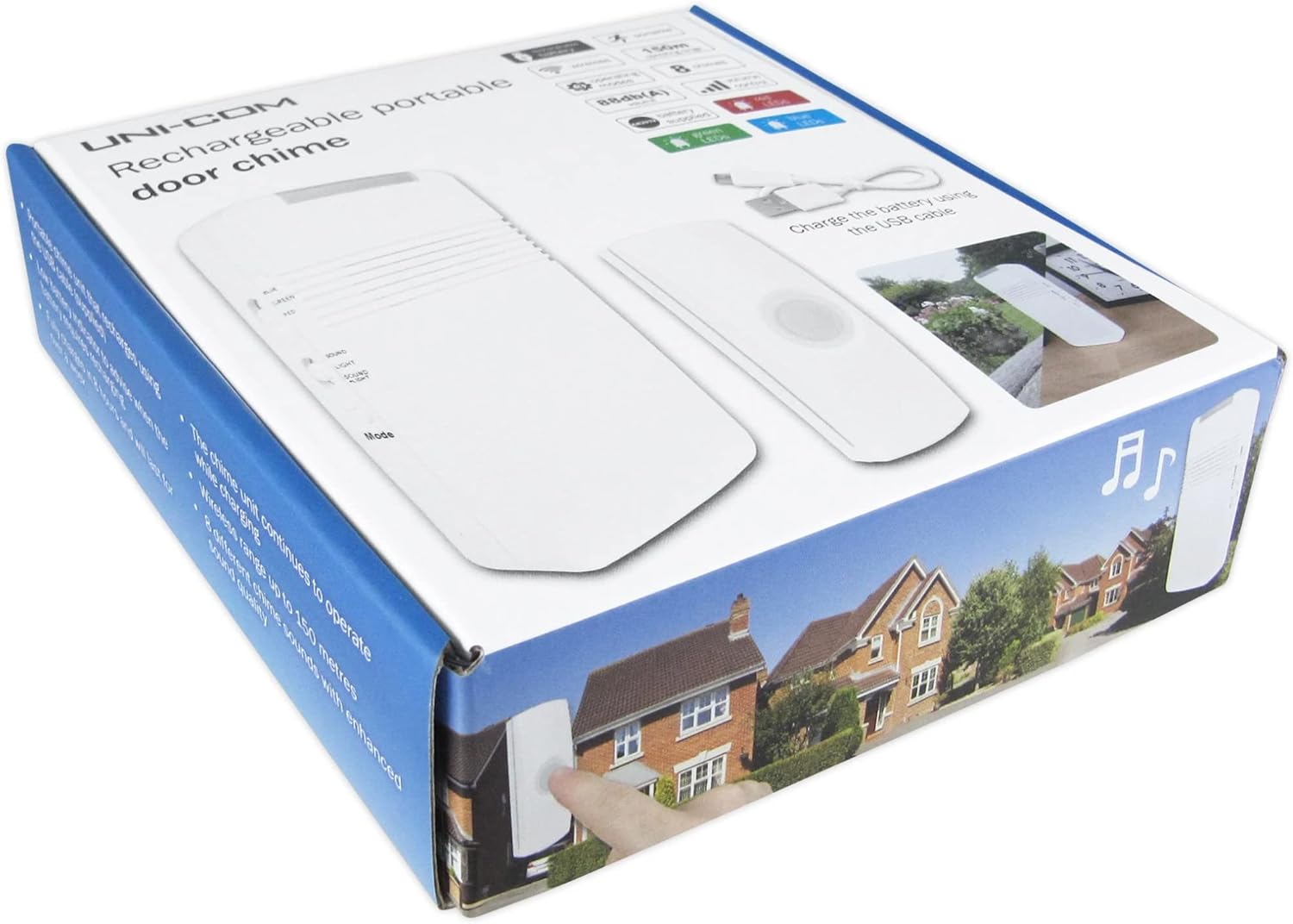
Image: The retail packaging for the Uni-Com Premium Rechargeable Door Chime, showing the chime unit and bell push.

Image: Various angles of the chime unit and bell push, highlighting controls and ports, along with the USB charging cable.
Configuració i instal·lació
1. Bell Push Installation
The bell push is weather-resistant and designed for outdoor use. It is powered by a pre-installed CR2032 button cell battery. To install:
- Choose a suitable location near your front door, ensuring it is easily accessible to visitors.
- Using the provided wall fixing kit, securely attach the bell push to a flat surface. Ensure the mounting surface is stable.

Imatge: frontal, lateral i posterior views of the bell push unit, showing its compact design and mounting points.
2. Chime Unit Charging
The chime unit is powered by a built-in 3.7V 600mAh Li-ion rechargeable battery. Before first use, or when the low battery indicator flashes red, charge the unit:
- Connect the supplied USB cable to the charging port on the chime unit.
- Plug the other end of the USB cable into a standard USB power adapter (not supplied) or a computer USB port.
- The unit will continue to operate while charging. A full charge provides over a week of operation.
3. Emparellament de les unitats
The bell push and chime unit are typically pre-paired. If re-pairing is necessary or if you are adding additional bell pushes:
- Assegureu-vos que ambdues unitats estiguin enceses i dins del rang.
- Refer to the specific pairing instructions provided on the chime unit or in a separate quick start guide if available. Generally, this involves pressing a 'Code' button on the chime unit and then activating the bell push.
Funcionament
Modes de funcionament
The chime unit offers three distinct operating modes:
- Chime Sound Only: The unit will play the selected chime sound when the bell push is activated.
- Flashing Light Only: The LED lens on top of the chime unit will flash in your chosen color (red, blue, or green) without sound. This mode is ideal for quiet environments or for individuals with hearing impairments.
- Both Sound and Light: The unit will play the chime sound and the LED lens will flash simultaneously.

Image: The chime unit shown with its top LED illuminating in red, green, and blue, demonstrating the visual alert feature.
Ajust de volum
Use the 'Volume' buttons (+ and -) on the side of the chime unit to increase or decrease the sound output. The maximum sound output is 88 dBA.
Changing Chime Sounds
The chime unit can be programmed with one of 8 enhanced chimes. These include traditional sounds like Westminster chime and Ding Dong, as well as a barking dog sound for increased security. To change the chime sound, locate the 'Mode' button on the chime unit and cycle through the available options until your desired sound is selected.
Indicador de bateria
The chime unit features a low battery indicator LED. If this LED is flashing red, it indicates that the battery needs recharging soon. Connect the USB cable to recharge the unit.
Manteniment
- Neteja: Netegeu les unitats amb un drap suau i sec. No utilitzeu productes de neteja abrasius ni dissolvents.
- Bell Push Battery Replacement: The CR2032 button cell battery in the bell push should be replaced approximately every 12 months. To replace, carefully open the bell push casing, traieu la pila antiga i inseriu-ne una de nova CR2032 amb la polaritat correcta.
- Chime Unit Recharging: Recharge the chime unit using the supplied USB cable when the low battery indicator flashes red. The unit can operate while charging.
Resolució de problemes
| Problema | Causa possible | Solució |
|---|---|---|
| Chime unit does not sound or light up. | Low battery on chime unit or bell push; units are out of range; units are not paired. | Recharge chime unit. Replace bell push battery. Move chime unit closer to bell push. Re-pair the units as per setup instructions. |
| Chime unit sounds intermittently. | Interference from other wireless devices; weak signal due to distance or obstacles. | Relocate chime unit or bell push to minimize interference. Ensure no large metal objects or thick walls are between units. |
| Bell push not responding. | Bell push battery is dead. | Replace the CR2032 battery in the bell push. |
Especificacions tècniques
| Característica | Especificació |
|---|---|
| Número de model | 66361 |
| Freqüència sense fil | 433.92 MHz |
| abast sense fils | Fins a 150 m (a l'aire lliure) |
| Sortida de so | 88 dBA |
| Chime Unit Battery | Built-in 3.7V 600mAh Li-ion rechargeable battery |
| Bell Push Battery | 1 x CR2032 Button Cell Battery (supplied) |
| Chime Unit Dimensions (HxWxD) | 130 x 63 x 30 mm |
| Bell Push Unit Dimensions (HxWxD) | 82 x 29 x 19 mm |
| Modes de funcionament | Chime Only, Light Only, Both |
| Sons de campanades | 8 enhanced chimes |
| Compliment | Directiva 2014/53/UE (RED) |
Garantia i Suport
Uni-Com products are manufactured to high quality standards. For information regarding warranty coverage or technical support, please refer to the contact details provided on the product packaging or visit the official Uni-Com weblloc web. Si us plau, conserveu el comprovant de compra per a qualsevol reclamació de garantia.
Ask a question about this manual
Ask about setup, troubleshooting, compatibility, parts, safety, or missing instructions. Manuals+ will review the question and use this page’s manual context to help answer it.