
1. Introducció
Thank you for choosing the SUNSHINE P-1503T Analog Power Supply. This manual provides essential information for the safe and efficient operation, setup, maintenance, and troubleshooting of your device. Please read this manual thoroughly before using the product and keep it for future reference.
The SUNSHINE P-1503T is a versatile 15-volt, 3-amp analog power supply designed primarily for mobile phone maintenance. It features touch-sensitive controls and includes two USB ports for convenient mobile testing and charging.
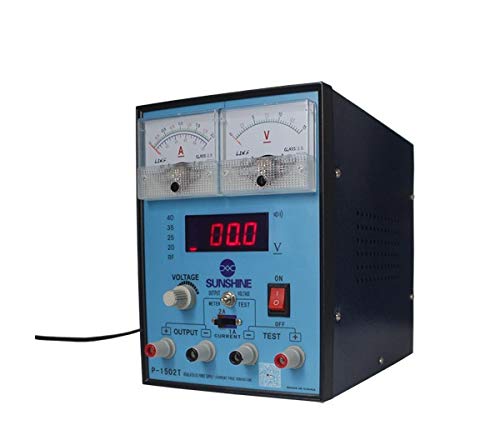
Figura 1: Frontal view of the SUNSHINE P-1503T Analog Power Supply. This image shows the device's display, control knobs, and output terminals, including the two USB ports.
2. Informació de seguretat
AVÍS: Si no es segueixen aquestes instruccions de seguretat, es poden produir descàrregues elèctriques, incendis o lesions greus.
- Always connect the power supply to a grounded electrical outlet.
- No utilitzeu el dispositiu en mullat o damp condicions.
- Assegureu-vos una ventilació adequada per evitar el sobreescalfament. No obstruïu les obertures de ventilació.
- No obriu la c.asing de la font d'alimentació. No hi ha peces a l'interior que l'usuari pugui reparar. Demaneu totes les tasques de manteniment a personal qualificat.
- Eviteu tocar els terminals de sortida quan el dispositiu estigui encès.
- Disconnect the power cord from the outlet before cleaning or if the device will not be used for an extended period.
- Utilitzeu només el volum d'entrada especificattage (15 Volts) as indicated on the device.
3. Configuració
3.1 Desembalatge
- Traieu amb cura la font d'alimentació del seu embalatge.
- Inspect the device for any signs of damage during transit. If damaged, do not use and contact your supplier.
- Ensure all accessories are present (e.g., power cord, test leads if included).
3.2 Connexió a l'alimentació
- Place the power supply on a stable, level surface with adequate ventilation.
- Connect the provided power cord to the power input socket on the rear of the device.
- Connecteu l'altre extrem del cable d'alimentació a una presa de corrent amb connexió a terra adequada.
4. Instruccions de funcionament
4.1 Engegada/apagada
- To power on the device, press the power switch located on the front panel. The display will illuminate.
- Per apagar, premeu l'interruptor d'alimentació de nou.
4.2 Adjusting Output
The P-1503T is an analog power supply, typically meaning voltage and current are set via rotary knobs.
- Utilitza el Voltage Perilla d'ajust to set the desired output voltage. Monitor the voltagvisualització.
- Utilitza el Botó d'ajust actual to set the desired current limit. Monitor the current display.
- The device emits a sound upon touch, indicating interaction with its controls.
4.3 Ús dels ports USB
The power supply features two USB ports on the front panel:
- USB Port 1 (Mobile Testing): Connect a mobile device here for diagnostic purposes. This port is designed to provide stable power for testing mobile phone circuits.
- USB Port 2 (Mobile Charging): Connect a mobile device here for charging. This port delivers power suitable for recharging mobile phone batteries.
Note: Always ensure the output voltage and current settings are appropriate for the device being connected to prevent damage.
5. Manteniment
5.1 Neteja
- Ensure the power supply is turned off and disconnected from the main power outlet before cleaning.
- Utilitzeu un drap suau i sec per netejar l'exterior del dispositiu.
- Do not use liquid cleaners, aerosols, or solvents, as these may damage the casing o components interns.
- Mantingueu les obertures de ventilació netes de pols i deixalles.
5.2 Emmagatzematge
When not in use, store the power supply in a cool, dry place, away from direct sunlight and extreme temperatures.
6. Solució De Problemes
| Problema | Causa possible | Solució |
|---|---|---|
| El dispositiu no s'encén. |
|
|
| Sense sortida voltage / actual. |
|
|
| Els ports USB no funcionen. |
|
|
7. Especificacions
| Característica | Detall |
|---|---|
| Marca | SOL |
| Model | P-1503T |
| Dispositius compatibles | Telèfon mòbil |
| Tipus de connector | ATX |
| Factor de forma | ATX |
| Mètode de refrigeració | Aire |
| Volum d'entrada màximtage | 15 Volts |
| Vol. d'entrada mínimatage | 15 Volts |
| Fabricant | SOL |
| System Bus Connector Type | Connector 2 |
| Font d'alimentació | Extern |
| ASIN | B0847QS2FX |
8. Garantia i Suport
This product is covered by a standard manufacturer's warranty. Please refer to the warranty card included with your purchase for specific terms and conditions. For technical support, service, or warranty claims, please contact your retailer or the manufacturer directly.
For the latest information and support, please visit the official SUNSHINE weblloc (si està disponible).